
INSIGHTS
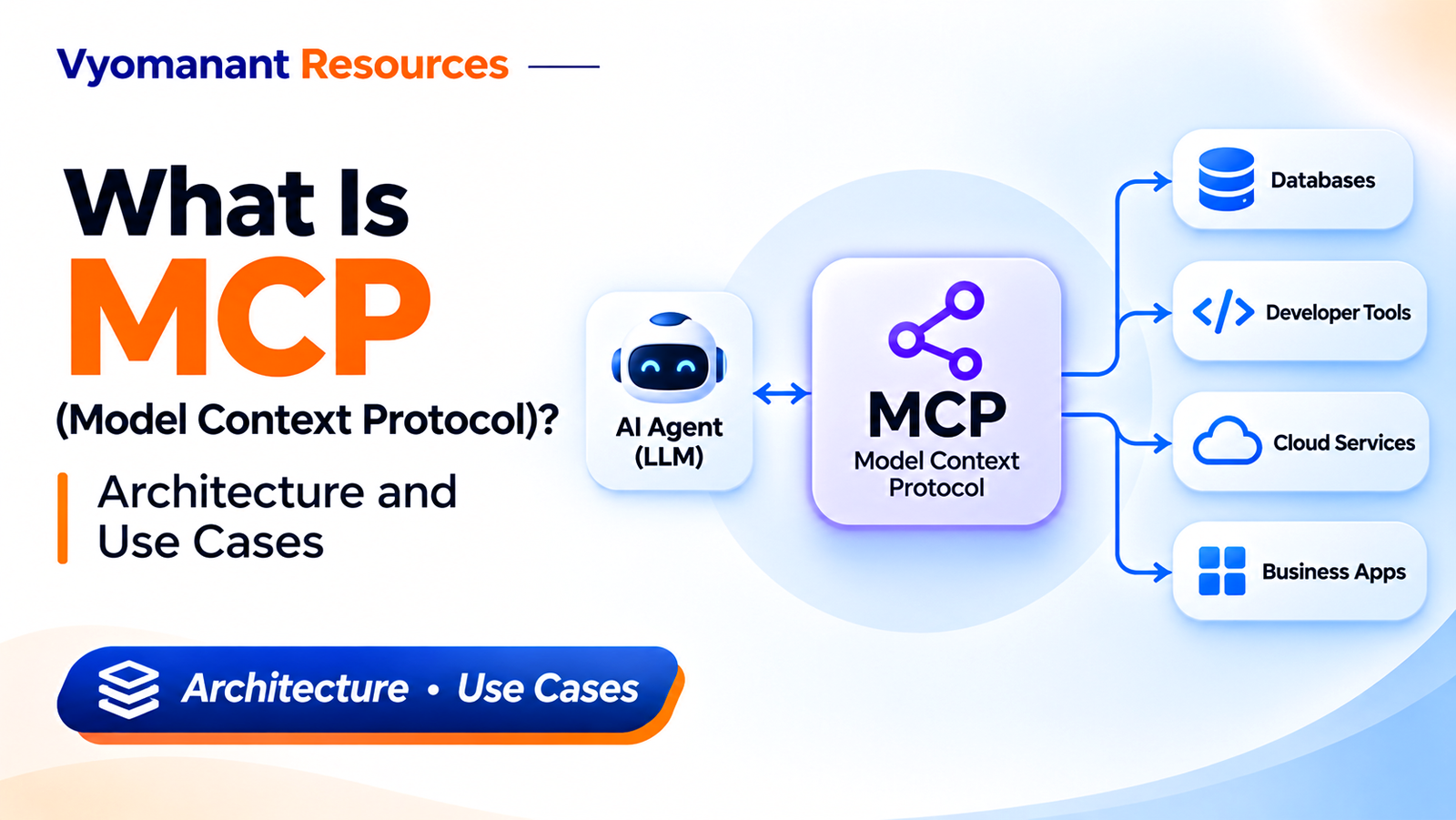
What Is MCP (Model Context Protocol)? Architecture & Use cases
Learn what Model Context Protocol (MCP) is, how its architecture works, and how it connects AI applications with external tools and data. Explore MCP clients, servers, tools, resources, and real-world examples in simple, beginner-friendly language.
Engineering support
Need help applying this?
Discuss your engineering requirements with Vyomanant Technologies.
Talk to UsOn this page
Imagine asking an AI assistant:
"Check my GitHub repository, identify the latest build failure, and explain how to fix it."
An AI model alone may not have access to your GitHub repository or build logs.
But what if your AI application could securely connect to external systems and use their tools?
That's where Model Context Protocol (MCP) comes in.
MCP provides a standardized way for AI applications to connect with external tools, data sources, and services.
Let's understand MCP, its architecture, components, and real-world use cases with simple examples.
1. What Is MCP?
MCP (Model Context Protocol) is an open protocol that standardizes how AI applications connect to external tools, data sources, and services.
It allows an AI application to discover available capabilities and interact with connected systems through a common interface.
Simple Example
Imagine an AI assistant that needs to access information from GitHub, a database, and a monitoring system.
Without MCP:
Developers may need to build and maintain separate custom integrations for each service.
With MCP:
An AI application can communicate with compatible MCP servers that expose those services through a standardized protocol.
For example, an AI assistant could use MCP to:
- Retrieve files from a GitHub repository.
- Query an authorized database.
- Read application monitoring data.
- Create a support ticket using an available tool.
Key Point: MCP helps AI applications connect to external systems without requiring a completely different integration approach for every tool.
MCP itself does not grant access automatically. Connections still require appropriate configuration, authentication, and permissions.
2. Why Do We Need MCP?
AI models are powerful at understanding language, generating content, and reasoning about information.
However, they cannot automatically access every external system or perform real-world actions.
For example, an AI model may explain how to check a server's CPU usage, but it needs a connected tool to retrieve actual CPU metrics.
MCP helps solve this integration challenge.
Benefits of MCP
- Standardization: A common protocol for connecting AI applications with external capabilities.
- Reusability: Compatible MCP servers can support multiple AI applications.
- Extensibility: Developers can add new tools and data sources.
- Interoperability: Compatible clients and servers can work across different applications.
- Controlled Access: Integrations can use authentication, authorization, and user approval mechanisms.
Simple Analogy:
Think of MCP like a USB-C connection for AI applications.
USB-C provides a common connection interface for compatible devices.
Similarly, MCP provides a common communication interface between AI applications and compatible external systems.
The analogy is about standardization, not automatic access or guaranteed compatibility.
3. MCP Architecture
MCP uses a client-server architecture.
The three main architectural roles are:
- MCP Host
- MCP Client
- MCP Server
Basic MCP Architecture
                  USER
                    |
                    v
          +-------------------+
          |     MCP HOST      |
          |  AI Application   |
          |                   |
          |   AI Model / LLM  |
          |                   |
          |  +-------------+  |
          |  | MCP Client  |  |
          |  +-------------+  |
          +---------|---------+
                    |
              MCP Protocol
                    |
                    v
          +-------------------+
          |    MCP SERVER     |
          |                   |
          | Tools             |
          | Resources         |
          | Prompts           |
          +---------|---------+
                    |
                    v
          +-------------------+
          | External Systems  |
          |                   |
          | GitHub            |
          | Databases         |
          | APIs              |
          | Monitoring Tools  |
          +-------------------+
How It Works:
The user sends a request to an AI application.
The host coordinates the AI model and its MCP client connections.
An MCP client communicates with an MCP server to discover available capabilities or request operations.
The MCP server interacts with its connected systems and returns the result.
The AI application can then use that information to respond to the user.
Important: One MCP host can manage multiple MCP clients, with each client connected to a server.
4. Key Components of MCP
1. MCP Host — The AI Application
The MCP Host is the AI application that manages connections to MCP servers.
It coordinates the AI model, user interaction, and MCP clients.
Example:
An AI coding assistant configured to connect with a GitHub MCP server.
Role: Manages the overall AI application and its MCP connections.
2. MCP Client — The Communication Layer
The MCP Client is a component inside the host that communicates with an MCP server.
It handles protocol messages and requests capabilities from the server.
Example:
When the AI assistant needs repository information, its MCP client sends a request to the connected GitHub MCP server.
Role: Maintains communication between the host and an MCP server.
3. MCP Server — The Capability Provider
The MCP Server exposes capabilities that AI applications can use.
These capabilities may include tools, resources, and prompts.
Example:
A GitHub MCP server might expose tools for reading repository files, viewing issues, or creating pull requests.
Role: Makes external capabilities available through the MCP protocol.
5. Tools, Resources, and Prompts in MCP
MCP servers commonly expose three important types of capabilities.
Tools — Perform Actions
Tools are callable functions that an AI application can invoke through an MCP server.
Examples:
- Search a GitHub repository.
- Query a database.
- Create a support ticket.
- Retrieve deployment status.
Example:
An AI assistant invokes a tool to retrieve the latest failed CI/CD workflow.
Resources — Provide Information
Resources expose data or content that an AI application can read.
Examples:
- Configuration files.
- Documentation.
- Database schemas.
- Application logs exposed as resources.
Example:
An AI application reads a resource containing deployment configuration information.
Prompts — Reusable Instructions
Prompts are predefined templates that help structure interactions with an AI model.
Examples:
- Review a pull request.
- Explain a production incident.
- Summarize technical documentation.
- Analyze a troubleshooting report.
Example:
A developer selects a predefined prompt to review code changes according to team guidelines.
Quick Comparison
| Component | Purpose | Example |
|---|---|---|
| Tools | Perform operations | Search repository |
| Resources | Provide data | Read configuration |
| Prompts | Provide reusable templates | Code review prompt |
Remember: Tools perform operations, Resources provide information, and Prompts provide reusable instructions.
6. How Does MCP Work Step by Step?
Let's understand the workflow with a practical DevOps example.
Scenario: A developer asks an AI assistant:
"Why did my latest CI/CD pipeline fail?"
Step 1: User Sends a Request
The user asks the AI assistant to investigate the pipeline failure.
Step 2: AI Identifies a Required Tool
The AI application determines that it needs information from a connected CI/CD system.
Step 3: MCP Client Sends a Request
The MCP client invokes an appropriate tool exposed by the MCP server.
Step 4: MCP Server Accesses the System
The MCP server uses its configured integration and permissions to retrieve pipeline information.
Step 5: MCP Server Returns Results
The server returns relevant data, such as:
- Failed build stage.
- Error messages.
- Dependency failures.
- Test results.
Step 6: AI Explains the Problem
The AI analyzes the returned information and explains the likely cause.
Example Response:
"Your pipeline failed during the build stage because a required dependency version could not be resolved."
The AI may then suggest a fix or use another authorized tool to prepare changes.
Key Point: MCP provides the communication mechanism. The AI application decides how to use the available capabilities.
7. Real-World Use Cases of MCP
Example 1: Software Development
Scenario: A developer wants to review recent code changes.
Using a GitHub MCP server, an AI coding assistant may:
- Retrieve repository information.
- Read changed files.
- Analyze code modifications.
- Identify potential issues.
- Suggest improvements.
Benefit: Faster code review and better access to project context.
Example 2: DevOps and CI/CD
Scenario: A Jenkins pipeline fails.
An AI application connected to a suitable MCP server can:
- Retrieve pipeline execution details.
- Read build logs.
- Identify possible failure causes.
- Explain troubleshooting steps.
Benefit: Reduced manual log investigation.
Example 3: Database Analysis
Scenario: A business analyst asks:
"How many orders were completed yesterday?"
An AI application connected to a database MCP server can:
- Identify the required data.
- Invoke an authorized query tool.
- Retrieve the results.
- Present the answer in simple language.
Benefit: Easier access to business information without manually writing every query.
Example 4: Cloud Infrastructure
Scenario: A DevOps engineer asks:
"Which cloud instances have high CPU usage?"
An AI application connected to a suitable cloud monitoring MCP server can:
- Retrieve infrastructure metrics.
- Identify instances with high CPU usage.
- Summarize possible causes.
- Recommend investigation steps.
Benefit: Faster infrastructure analysis and troubleshooting.
Example 5: IT Support Automation
Scenario: An employee reports an application access issue.
An AI assistant connected to a support platform through MCP can:
- Retrieve relevant support information.
- Check available troubleshooting documentation.
- Suggest possible solutions.
- Create or update a support ticket.
Benefit: Faster support workflows and reduced repetitive work.
8. MCP vs Traditional API Integration
| Traditional API Integration | MCP-Based Integration |
|---|---|
| Often requires service-specific integration logic | Uses a common protocol for MCP capabilities |
| Different services expose different interfaces | Compatible servers expose standardized capability interfaces |
| Developers manage custom integration code | Existing MCP servers may reduce integration effort |
| Applications call APIs directly | MCP clients communicate with MCP servers |
| Useful for direct service integrations | Useful for connecting AI applications to tools and context |
Important: MCP does not replace REST APIs or other existing APIs.
An MCP server may use REST APIs internally to communicate with external systems.
MCP adds a standardized interface designed for AI applications.
9. Is MCP the Same as Agentic AI?
No. MCP and Agentic AI are different concepts, but they can work together.
- Agentic AI: Helps an AI system plan, make decisions, and perform multi-step tasks.
- MCP: Provides a standardized way to connect AI applications with external tools and data.
Simple Example
Imagine an AI agent investigating a production issue.
Agentic AI decides to inspect logs, analyze metrics, and determine the next troubleshooting step.
MCP can provide access to the connected logging and monitoring tools needed for those actions.
In Simple Terms: Agentic AI decides what to do. MCP helps connect it to the tools needed to do it.
MCP can also be used by AI applications that are not autonomous agents.
10. MCP Security Considerations
MCP integrations can access sensitive systems, so security is important.
Some best practices include:
- Least Privilege: Grant only the permissions required.
- Authentication: Verify access to protected MCP servers.
- Human Approval: Require confirmation for sensitive actions.
- Trusted Servers: Use verified and maintained MCP servers.
- Data Protection: Avoid exposing credentials or sensitive information.
- Monitoring: Log and review important tool operations.
Example: An AI assistant may be allowed to read production database information but should not automatically receive permission to delete records.
MCP standardizes communication; it does not automatically make every connected tool secure.
11. Final Thoughts
Model Context Protocol (MCP) makes it easier for AI applications to connect with external tools, data sources, and services through a standardized interface.
Its architecture includes MCP Hosts, MCP Clients, and MCP Servers, while tools, resources, and prompts provide useful capabilities.
From software development and DevOps to cloud monitoring and IT support, MCP can help AI applications work with real-world systems.
Key Takeaway: MCP connects AI applications to the tools and information they need, helping turn AI-generated answers into more useful, context-aware workflows.
CONTINUE EXPLORING
Recommended next
What Is RAG? Explained with Real-World Examples
Learn what Retrieval-Augmented Generation (RAG) is, how it works, and why it is important for AI applications. Understand RAG architecture, embeddings, vector databases, and real-world use cases through simple explanations and practical examples.
Read insight
What Is Harness Engineering for AI Agents?
Learn what Harness Engineering is, why AI agents need it, and how it improves reliability, security, and automation. Explore agent harness architecture, key components, and real-world software development examples in simple, beginner-friendly language.
Read insight
What Is Platform Engineering? How It Differs from DevOps
Learn what Platform Engineering is, how it works, and how it differs from DevOps. Explore Internal Developer Platforms (IDPs), self-service infrastructure, real-world examples, benefits, and the roles of platform engineers.
Read insight