
RESOURCES
What Is Kubernetes? Architecture & Basics — A Beginner’s Guide
Learn what Kubernetes is, how its architecture works, and why it is used. Explore clusters, nodes, pods, deployments, services, scaling, and practical examples.
Vyomanant Academy
Build these skills hands-on
Explore structured, practical technology programs from Vyomanant Academy.
Explore CoursesOn this page
What Is Kubernetes? Architecture & Basics
Introduction
Imagine you have built an online shopping application using Docker containers.
At first, everything is simple. You run a few containers on one server, and customers can access your application.
As the business grows, more people begin using the website.
Now you face new challenges:
- Increased Traffic: More customers are visiting the application.
- Container Failures: Some application containers may stop unexpectedly.
- Multiple Servers: One server may no longer provide enough computing resources.
- Software Updates: New versions must be released without unnecessary interruptions.
- Service Communication: Different application components need to communicate reliably.
Managing all these tasks manually becomes difficult.
This is where Kubernetes comes in.
Kubernetes helps organizations deploy, manage, scale, and maintain containerized applications across groups of computers.
What Will You Learn?
In this beginner-friendly guide, you'll understand:
- What Kubernetes is: Its meaning and purpose.
- Container orchestration: Why containers need management at scale.
- Kubernetes architecture: Control plane and worker nodes.
- Core components: Pods, Deployments, Services, and more.
- How Kubernetes works: From application configuration to running containers.
- Scaling and self-healing: How Kubernetes responds to changing conditions.
- Practical example: Deploying a simple application.
- Getting started: A beginner-friendly Kubernetes learning path.
You don't need previous Kubernetes experience, but a basic understanding of Docker and containers will help.
1. What Is Kubernetes?
Kubernetes, also known as K8s, is an open-source container orchestration platform used to automate the deployment, scaling, and management of containerized applications.
It was originally developed at Google and is now maintained as a project of the Cloud Native Computing Foundation (CNCF).
Kubernetes in Simple Words
Kubernetes helps manage containers across multiple computers so applications can run, scale, and recover more reliably.
For example, imagine a website needs five running copies of its application.
Instead of manually starting and monitoring five containers, you can tell Kubernetes that you want five application instances.
Kubernetes then works to maintain that desired state.
If a container fails, Kubernetes can arrange for a replacement.
If a worker node becomes unavailable, Kubernetes may schedule replacement workloads on other suitable nodes, depending on the application's configuration and available capacity.
Why Is It Called K8s?
The abbreviation K8s comes from the eight letters between K and s in Kubernetes.
What Does Kubernetes Manage?
Kubernetes helps with:
- Deployment: Running containerized applications.
- Scheduling: Choosing suitable nodes for workloads.
- Scaling: Adjusting the number of application instances.
- Service Discovery: Helping applications locate other services.
- Networking: Enabling communication between workloads.
- Self-Healing: Replacing failed containers or Pods when appropriate.
- Configuration: Providing application settings and secrets.
- Rolling Updates: Replacing application versions gradually.
Key Point: Kubernetes is an orchestration platform. It does not replace the need to build container images or design reliable applications.
2. Understanding Kubernetes with a Real-Life Analogy
Imagine a large delivery company operating several warehouses.
Each warehouse contains workers who prepare and dispatch orders.
As customer demand changes, the company needs to decide:
- Which warehouse should handle new orders?
- How many workers are needed?
- What happens if a worker becomes unavailable?
- How can operations continue when one warehouse has a problem?
- How can new procedures be introduced without stopping everything?
The company uses a central coordination system to organize its operations.
Kubernetes performs a somewhat similar role for containerized applications.
Mapping the Analogy
| Delivery Company | Kubernetes |
|---|---|
| Entire warehouse network | Kubernetes cluster |
| Individual warehouse | Worker node |
| Group of workers handling a task | Pod |
| Central coordination system | Control plane |
| Desired staffing levels | Desired replica count |
| Replacing unavailable workers | Workload recovery |
| Directing orders to available warehouses | Service routing |
Example
Suppose an application needs three running instances.
Kubernetes schedules the application Pods onto suitable worker nodes.
If one Pod fails, the system works to restore the required number of instances.
Where the Analogy Ends
Kubernetes does not make business decisions like a human warehouse manager.
It uses software controllers, scheduling rules, resource information, and configuration objects to manage workloads.
Also, replacing a failed Pod does not automatically repair application bugs or recover lost data.
Remember: Kubernetes coordinates application workloads according to a declared desired state.
3. What Is Container Orchestration?
Container orchestration is the automated management of containerized applications across computing environments.
Docker and other container technologies help package and run applications.
But when an organization operates many containers across multiple servers, additional management is needed.
Example: A Growing Application
Imagine an application contains three services:
- Frontend: Displays the website.
- Backend: Processes application requests.
- Database: Stores important information.
The company wants to run:
- Three frontend instances.
- Two backend instances.
- One database instance.
That creates six application instances to manage.
Now imagine the application grows to dozens or hundreds of instances.
Manual management becomes increasingly difficult.
What Does Orchestration Help With?
- Placement: Choosing where workloads run.
- Scaling: Increasing or decreasing application replicas.
- Recovery: Replacing failed workloads.
- Networking: Connecting services.
- Updates: Deploying new application versions.
- Configuration: Providing application settings.
Key Point: Container orchestration becomes useful when running and maintaining containerized applications involves more complexity than individual container commands can comfortably manage.
4. What Is a Kubernetes Cluster?
A Kubernetes cluster is a group of computing resources managed together by Kubernetes.
A cluster contains two major architectural parts:
- Control Plane: Manages the cluster's desired state and coordination.
- Worker Nodes: Run application workloads.
A node may be a physical server or a virtual machine.
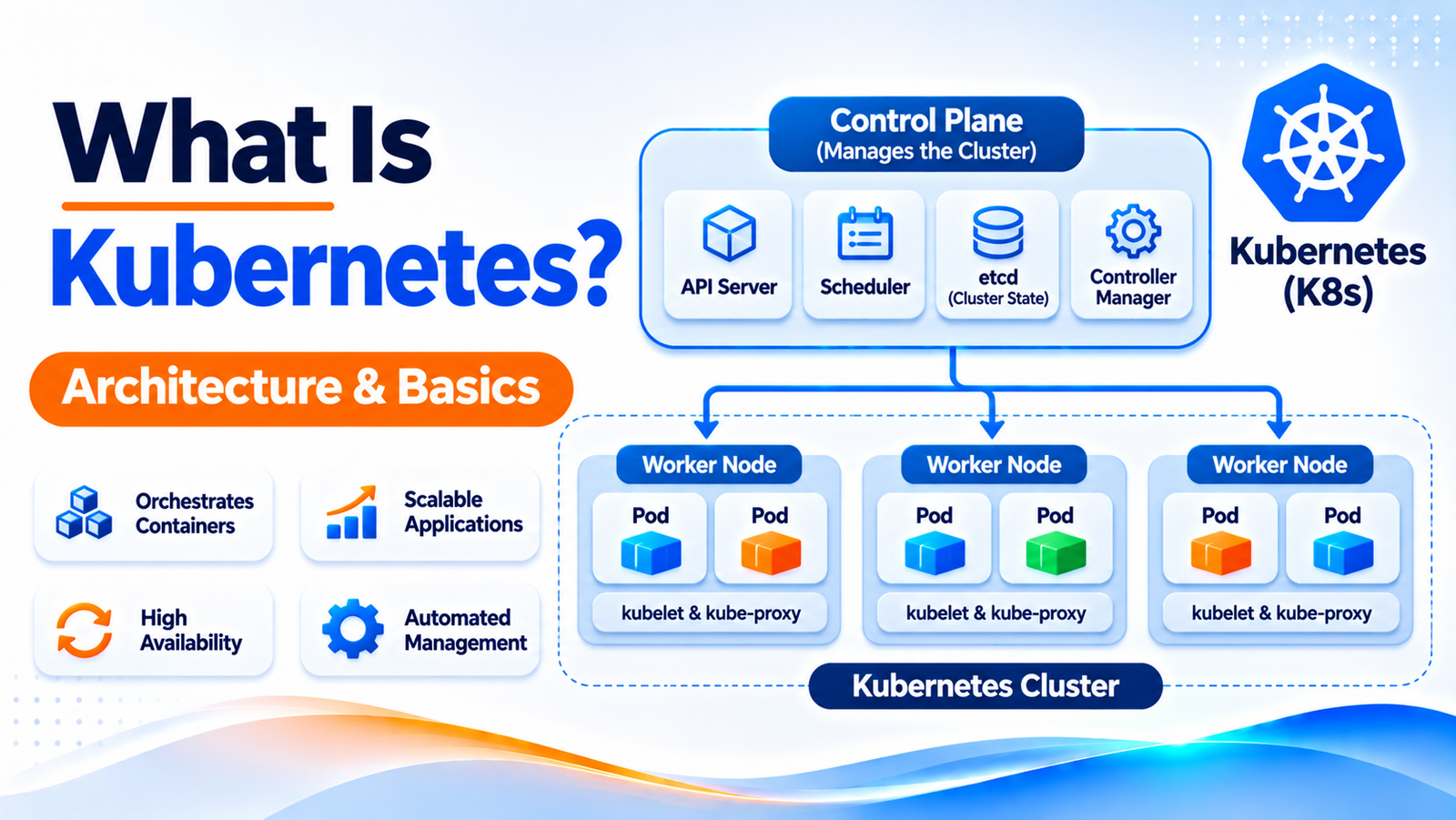
Simple Kubernetes Architecture
              KUBERNETES CLUSTER
                      |
        +-------------+-------------+
        |                           |
        v                           v
   CONTROL PLANE               WORKER NODES
        |                           |
   API Server                  +----+----+
   Scheduler                   |         |
   Controllers                 v         v
   etcd                     Node 1    Node 2
                              |         |
                             Pods      Pods
This diagram is simplified. Production clusters may have multiple control-plane machines for high availability, and worker nodes run additional Kubernetes components.
What Does the Control Plane Do?
The control plane manages the cluster.
It receives configuration requests, tracks cluster state, and coordinates changes needed to maintain the desired workloads.
What Do Worker Nodes Do?
Worker nodes provide the computing resources where application Pods run.
Remember: The control plane coordinates the cluster, while worker nodes execute application workloads.
5. Kubernetes Control Plane Components
The control plane contains several important components.
1. API Server (kube-apiserver)
The API server is the main interface through which users, tools, and Kubernetes components communicate with the cluster.
For example, when you use kubectl to create a Deployment, the request goes to the API server.
The API server validates and processes API requests.
2. etcd
etcd is a distributed key-value store used to hold Kubernetes cluster data.
It stores information representing the cluster's configuration and state.
Because this data is critical, etcd requires appropriate security, backup, and recovery procedures.
3. Scheduler (kube-scheduler)
The scheduler selects suitable nodes for Pods that have not yet been assigned a node.
It considers factors such as:
- Available computing resources.
- Scheduling constraints.
- Node characteristics.
- Placement preferences.
4. Controller Manager (kube-controller-manager)
The controller manager runs controllers that observe cluster state and work to move it toward the desired state.
For example, controllers help maintain the required number of application replicas.
5. Cloud Controller Manager
In supported cloud environments, the cloud controller manager connects Kubernetes with certain cloud-provider infrastructure services.
It can help manage integrations involving nodes, networking, and load balancers.
Not every Kubernetes cluster uses this component.
Quick Reference
| Component | Main Responsibility |
|---|---|
| API Server | Handles Kubernetes API requests |
| etcd | Stores cluster state data |
| Scheduler | Assigns unscheduled Pods to suitable nodes |
| Controller Manager | Runs controllers that reconcile cluster state |
| Cloud Controller Manager | Integrates supported cloud-provider services |
Key Point: The control plane continuously coordinates the cluster rather than directly running every application process itself.
6. Kubernetes Worker Node Components
Worker nodes run the application's workloads.
Each node commonly includes several components.
1. Kubelet
The kubelet is an agent running on each worker node.
It helps ensure that the containers described by assigned Pods are running as expected.
The kubelet communicates with the container runtime and reports information about the node and its workloads.
2. Container Runtime
The container runtime executes containers.
Common Kubernetes-compatible runtimes include:
- containerd.
- CRI-O.
Kubernetes uses the Container Runtime Interface (CRI) to work with compatible runtimes.
Important: Kubernetes does not require Docker Engine as its runtime.
3. Kube-Proxy
kube-proxy is a networking component that can implement Kubernetes Service networking rules.
Some Kubernetes networking solutions provide equivalent functionality through other mechanisms.
4. Pods
Pods are the workload units scheduled onto nodes.
A worker node can run multiple Pods, depending on available resources and configuration.
Simplified Worker Node
            WORKER NODE
                 |
       +---------+---------+
       |         |         |
       v         v         v
     Kubelet   Runtime   Networking
                 |
                 v
          +------+------+
          |             |
          v             v
        Pod A         Pod B
Remember: Worker nodes provide the environment in which Kubernetes-managed applications run.
7. What Is a Pod in Kubernetes?
A Pod is the smallest deployable computing unit Kubernetes creates and manages.
A Pod contains one or more containers that share certain resources, including networking and storage volumes.
Most beginner examples use one application container per Pod.
Simple Example
Imagine you want to run an Nginx web server.
Kubernetes can run Nginx inside a Pod.
         Kubernetes Pod
               |
               v
        Nginx Container
               |
               v
        Web Application
Can a Pod Contain Multiple Containers?
Yes.
A Pod can contain multiple closely related containers.
For example:
- Application Container: Runs the main application.
- Sidecar Container: Performs a supporting task, such as log processing.
Containers within the same Pod share a network namespace and can communicate through localhost.
Are Pods Permanent?
No.
Pods are generally treated as replaceable resources.
When a Pod is replaced, the new Pod may have a different IP address and identity.
This is one reason Kubernetes provides higher-level workload controllers and Services.
Key Point: Kubernetes schedules and manages Pods, while containers run inside those Pods.
8. What Is a Deployment in Kubernetes?
A Deployment is a Kubernetes resource used to manage a desired state for a set of application Pods, typically for stateless workloads.
A Deployment commonly manages Pods through a ReplicaSet.
Example: Running Three Website Instances
Imagine you want three copies of a web application.
You define a Deployment with:
replicas: 3
Kubernetes works to maintain three matching Pods.
What Happens If a Pod Fails?
Suppose one Pod is deleted or fails permanently.
The relevant controllers detect that the desired replica count is not satisfied and work to create a replacement.
Deployment Structure
             Deployment
          Desired: 3 Pods
                  |
                  v
              ReplicaSet
                  |
          +-------+-------+
          |       |       |
          v       v       v
        Pod 1   Pod 2   Pod 3
What Else Can Deployments Do?
Deployments support:
- Declaring application replicas.
- Updating container image versions.
- Rolling updates.
- Tracking rollout status.
- Rolling back to a previous Deployment revision when available.
Important: A Deployment is commonly suitable for stateless applications. Stateful applications may require other workload resources, such as StatefulSets.
9. What Is a Service in Kubernetes?
A Service provides a stable way to access a group of Pods.
Why is this necessary?
Pods can be created, deleted, and replaced. Their IP addresses may change.
If other applications connect directly to individual Pod IP addresses, those connections may become difficult to manage.
A Service provides a stable network identity for accessing selected Pods.
Example
Imagine a frontend application needs to communicate with three backend Pods.
Instead of tracking each Pod's address, the frontend connects to a Kubernetes Service.
          Frontend Application
                   |
                   v
             Backend Service
                   |
          +--------+--------+
          |        |        |
          v        v        v
       Backend   Backend   Backend
        Pod 1     Pod 2     Pod 3
Common Kubernetes Service Types
- ClusterIP: Exposes a Service on a cluster-internal IP address.
- NodePort: Exposes a Service on a port of each node, subject to networking configuration.
- LoadBalancer: Requests an external load balancer through a supported infrastructure integration.
- ExternalName: Maps a Service name to an external DNS name.
What Is Ingress?
Ingress is a Kubernetes API resource for defining HTTP and HTTPS routing rules to Services.
An Ingress controller is required to implement those rules.
Ingress is useful for routing requests based on hostnames or URL paths.
Key Point: Services provide stable access to changing sets of Pods.
10. How Does Kubernetes Work? Step by Step
Let's follow the journey of deploying an application.
Imagine you want Kubernetes to run three Nginx Pods.
Step 1: Define the Desired State
You create a configuration file describing:
- The application image.
- The desired number of replicas.
- The container port.
- Other relevant settings.
Step 2: Submit the Configuration
You use kubectl to submit the configuration to the Kubernetes API server.
Step 3: Store the Cluster State
Kubernetes records the desired configuration through its control-plane mechanisms.
Step 4: Create Workload Resources
The Deployment controller works with ReplicaSets to create the required Pods.
Step 5: Schedule the Pods
The scheduler selects suitable worker nodes for unscheduled Pods.
Step 6: Start the Containers
Kubelets on the selected nodes work with their container runtimes to start the containers.
Step 7: Maintain the Desired State
Controllers continue checking whether the actual state matches the desired state.
If a Pod disappears, Kubernetes may create a replacement.
Step 8: Provide Application Access
A Service can provide stable network access to the application Pods.
Simplified Workflow
      Deployment YAML
             |
             v
         kubectl
             |
             v
       Kubernetes API
             |
             v
      Deployment Controller
             |
             v
          ReplicaSet
             |
             v
            Pods
             |
             v
          Scheduler
             |
             v
        Worker Nodes
             |
             v
       Running Containers
Several Kubernetes components operate concurrently. The diagram represents the main concepts rather than a strict internal execution sequence.
Remember: Kubernetes uses a declarative model. You describe the desired state, and controllers work to achieve it.
11. What Are Namespaces, ConfigMaps, and Secrets?
As clusters grow, teams need ways to organize workloads and manage configuration.
Namespaces
A Namespace provides a way to organize namespaced Kubernetes resources within a cluster.
For example:
development
testing
production
Namespaces can help organize teams and environments.
However, namespaces alone do not provide complete security isolation.
ConfigMaps
A ConfigMap stores non-sensitive configuration data.
Examples include:
- Application settings.
- Feature configuration.
- Environment-specific values.
Applications can consume ConfigMap data through environment variables or mounted files.
Secrets
A Secret stores sensitive information such as:
- Passwords.
- API tokens.
- Certificates.
However, Kubernetes Secrets are not automatically a complete secret-management solution.
Secret values require appropriate access controls and protection, including encryption at rest where configured.
Quick Comparison
| Resource | Purpose |
|---|---|
| Namespace | Organizes namespaced resources |
| ConfigMap | Stores non-sensitive configuration |
| Secret | Stores sensitive configuration data |
Key Point: Kubernetes separates application workloads from many of the settings they need to operate.
12. What Are Persistent Volumes in Kubernetes?
Containers and Pods are often replaceable, but some applications need data that survives workload replacement.
For example, a database must preserve customer records.
Kubernetes provides storage resources to help applications use persistent storage.
PersistentVolume (PV)
A PersistentVolume represents a piece of storage made available to the cluster.
PersistentVolumeClaim (PVC)
A PersistentVolumeClaim is a request for storage by a workload.
StorageClass
A StorageClass describes a class of storage and can support dynamic provisioning through a compatible storage system.
Simple Example
         Database Pod
               |
               v
     PersistentVolumeClaim
               |
               v
       PersistentVolume
               |
               v
      Underlying Storage
The underlying storage may be provided by a cloud platform, network storage system, or another supported storage solution.
Important: Persistent storage does not automatically guarantee backups, replication, or recovery from every type of failure.
Remember: Kubernetes storage resources help separate important data from the lifecycle of individual Pods.
13. What Is Scaling in Kubernetes?
Scaling means adjusting computing capacity to meet workload requirements.
Kubernetes supports several approaches.
Horizontal Scaling
Horizontal scaling increases or decreases the number of application instances.
For example:
Normal Traffic:
Pod 1 -> Pod 2

Higher Traffic:
Pod 1 -> Pod 2 -> Pod 3 -> Pod 4
A Deployment's replica count can be changed manually or through automation.
Horizontal Pod Autoscaler (HPA)
The Horizontal Pod Autoscaler can adjust the replica count of supported workloads based on configured metrics.
For example, it may increase replicas when CPU utilization exceeds a defined target, provided the necessary metrics are available.
Vertical Scaling
Vertical scaling adjusts the CPU or memory resources assigned to workloads.
Kubernetes environments may use mechanisms such as the Vertical Pod Autoscaler to recommend or apply resource changes.
Node Scaling
If the cluster needs additional computing capacity, suitable cluster autoscaling tools can add worker nodes in supported environments.
Important Limitations
Scaling requires:
- Available infrastructure capacity.
- Correct application configuration.
- Suitable resource requests and limits.
- Appropriate metrics.
- Applications designed to handle multiple instances.
Key Point: Kubernetes provides scaling mechanisms, but application architecture and infrastructure capacity determine how effectively scaling works.
14. What Is Self-Healing in Kubernetes?
Self-healing refers to Kubernetes mechanisms that help restore workloads toward their desired state.
Example: A Failed Container
Imagine a container unexpectedly exits.
Depending on the Pod's restart policy and workload configuration, the kubelet may restart the container.
Example: A Deleted Pod
Imagine a Deployment requires three replicas.
If one Pod is deleted, the controllers work to create another Pod to restore the desired count.
Example: An Unavailable Worker Node
If a node becomes unavailable, Kubernetes may eventually create replacement Pods on healthy nodes, subject to scheduling, storage, and workload constraints.
What Kubernetes Cannot Automatically Fix
Kubernetes does not automatically resolve every problem.
For example:
- An application may contain a programming bug.
- A database may contain corrupted data.
- A container image may be incorrectly configured.
- A cluster may lack available resources.
- A shared external service may be unavailable.
Remember: Kubernetes self-healing improves workload recovery, but it is not a substitute for application reliability, monitoring, and disaster recovery planning.
15. What Are Rolling Updates and Rollbacks?
Kubernetes Deployments support controlled application updates.
Rolling Updates
A rolling update gradually replaces old application Pods with Pods using a new configuration.
For example, suppose an application has three replicas.
During an update, Kubernetes can create new Pods and remove old Pods according to the Deployment's rollout settings.
This helps reduce interruptions.
Rollbacks
If a new application version causes problems, a Deployment can often be rolled back to a previous revision.
For example:
kubectl rollout undo deployment/my-web-app
This requests a rollback of the named Deployment, assuming an appropriate previous revision exists.
Are Rolling Updates Always Downtime-Free?
No.
Availability depends on:
- Readiness checks.
- Application startup behavior.
- Replica count.
- Resource availability.
- Deployment strategy.
- Application compatibility.
Key Point: Kubernetes supports gradual updates and rollbacks, but reliable releases still require careful configuration and testing.
16. Practical Example: Deploy Nginx on Kubernetes
Let's deploy a simple Nginx application.
This example is intended for a local learning cluster, such as Minikube or kind.
What Do You Need?
- A working Kubernetes cluster.
kubectlinstalled and configured.- Permission to create resources.
- Access to a container registry.
Step 1: Check Your Cluster
Run:
kubectl get nodes
This displays the nodes available in the cluster.
Step 2: Create a Deployment File
Create a file named nginx-deployment.yaml.
apiVersion: apps/v1
kind: Deployment
metadata:
  name: nginx-demo
spec:
  replicas: 2
  selector:
    matchLabels:
      app: nginx-demo
  template:
    metadata:
      labels:
        app: nginx-demo
    spec:
      containers:
        - name: nginx
          image: nginx:stable
          ports:
            - containerPort: 80
Understanding the Configuration
apiVersion: Identifies the Kubernetes API version.kind: Specifies the resource type.metadata.name: Names the Deployment.replicas: Requests two Pod replicas.selector: Identifies the Pods managed by the Deployment.template: Defines the Pods to create.image: Specifies the container image.containerPort: Documents the container's application port.
Step 3: Apply the Configuration
kubectl apply -f nginx-deployment.yaml
Step 4: Check the Deployment
kubectl get deployments
Step 5: Check the Pods
kubectl get pods
You should see two Nginx Pods once the Deployment is ready.
Step 6: Create a Service
Run:
kubectl expose deployment nginx-demo \
  --name=nginx-service \
  --port=80 \
  --target-port=80
This creates a ClusterIP Service for the Deployment.
Step 7: Access the Application Locally
Run:
kubectl port-forward service/nginx-service 8080:80
Keep this command running, then open:
http://localhost:8080
You should see the default Nginx welcome page.
Step 8: Scale the Deployment
Increase the replica count:
kubectl scale deployment nginx-demo --replicas=3
Check the Pods again:
kubectl get pods
Kubernetes should work toward running three matching Pods.
Step 9: Clean Up
When you finish, stop the port-forward process and remove the learning resources:
kubectl delete service nginx-service
kubectl delete deployment nginx-demo
Important: Use a dedicated learning cluster for this exercise. Avoid experimenting in production environments.
What Did You Learn?
You have practiced:
- Checking cluster nodes.
- Creating a Deployment.
- Running application Pods.
- Creating a Service.
- Accessing an application.
- Scaling replicas.
- Removing resources.
Congratulations! You have completed a basic Kubernetes deployment.
17. Kubernetes vs Docker: What Is the Difference?
Docker and Kubernetes are closely related, but they serve different purposes.
Docker
Docker provides tools for:
- Building container images.
- Running containers.
- Managing local container environments.
- Distributing images through registries.
Kubernetes
Kubernetes provides tools for:
- Scheduling containerized workloads.
- Managing application replicas.
- Providing stable service access.
- Scaling workloads.
- Coordinating rolling updates.
- Maintaining desired application state.
Quick Comparison
| Docker | Kubernetes |
|---|---|
| Builds and runs containers | Orchestrates containerized applications |
| Common for local development | Common for clustered workload management |
| Uses Dockerfiles to build images | Uses Kubernetes resource definitions |
| Manages containers on a Docker host | Manages Pods across cluster nodes |
| Often used with Docker Compose | Uses controllers and Services for orchestration |
Important: Kubernetes can run images built with Docker without requiring Docker Engine on its worker nodes.
Remember: Docker helps package applications. Kubernetes helps operate containerized applications at scale.
18. Where Is Kubernetes Used in the Real World?
Kubernetes supports many modern application environments.
1. E-Commerce Platforms
Online retailers may use Kubernetes to run frontend and backend services.
Example: Additional application replicas can be created during periods of increased traffic.
2. Software-as-a-Service (SaaS)
SaaS providers may run multiple application services on Kubernetes.
Example: A project-management platform uses separate services for authentication, notifications, and reporting.
3. Financial Applications
Financial technology companies may use Kubernetes for suitable containerized workloads.
Example: A payment application uses controlled deployments and monitoring to support operational reliability.
4. Media and Streaming Platforms
Media services may use Kubernetes to manage application APIs and supporting services.
Example: A streaming platform scales its recommendation API based on workload demand.
5. Enterprise Applications
Organizations may use Kubernetes for internal systems and application modernization.
Example: A company runs several internal web applications on a shared Kubernetes platform.
6. Development and Testing
Engineering teams may create temporary Kubernetes environments for integration testing.
Example: A CI/CD workflow deploys an application to a test cluster before release.
Key Point: Kubernetes is especially useful when organizations need repeatable management of containerized workloads across computing resources.
19. What Are the Benefits of Kubernetes?
1. Automated Workload Management
Kubernetes reduces the need to manually start and supervise individual application containers.
2. Application Scaling
Teams can adjust workload replicas manually or through supported autoscaling mechanisms.
3. Workload Recovery
Controllers help replace failed Pods and maintain desired replica counts.
4. Consistent Deployments
Declarative configuration helps teams manage applications through repeatable definitions.
5. Service Discovery
Services help applications communicate without depending on individual Pod addresses.
6. Rolling Updates
Deployments support gradual application updates and revision-based rollbacks.
7. Infrastructure Flexibility
Kubernetes can operate in on-premises, cloud, and hybrid environments.
Important: Kubernetes does not automatically make applications scalable, secure, or highly available. Those outcomes require suitable architecture, configuration, and operational practices.
20. What Are the Challenges of Kubernetes?
Kubernetes provides powerful capabilities, but it also introduces complexity.
1. Learning Curve
Beginners need to understand:
- Containers.
- Networking.
- YAML configuration.
- Cluster architecture.
- Workload controllers.
- Storage.
- Security.
2. Operational Complexity
Clusters require monitoring, upgrades, maintenance, and troubleshooting.
3. Security Configuration
Teams must manage:
- Role-based access control (RBAC).
- Network policies.
- Secrets.
- Container permissions.
- Image security.
- Cluster access.
4. Resource Management
Incorrect CPU and memory settings can cause performance problems or scheduling failures.
5. Networking and Storage
Production applications may require sophisticated networking and persistent storage arrangements.
6. Cost
Running and maintaining Kubernetes infrastructure can introduce compute, networking, storage, and operational costs.
When Might Kubernetes Be Unnecessary?
For a small application running on one server, Docker Compose or a managed application hosting service may be simpler.
Key Point: Kubernetes is valuable when its orchestration capabilities justify the additional complexity.
21. How Can Beginners Start Learning Kubernetes?
Follow this practical learning path.
Step 1: Learn Linux Fundamentals
Understand:
- Files and directories.
- Processes.
- Permissions.
- Networking.
- System services.
Step 2: Understand Containers
Learn:
- Docker images.
- Containers.
- Dockerfiles.
- Container networking.
- Volumes.
Step 3: Learn Basic YAML
Kubernetes commonly uses YAML files to define resources.
Practice reading keys, values, lists, and nested configuration.
Step 4: Create a Local Kubernetes Cluster
Explore beginner-friendly tools such as:
- Minikube.
- kind.
- Docker Desktop's Kubernetes support, where available.
Step 5: Learn kubectl
Practice:
kubectl get nodes
kubectl get pods
kubectl get deployments
kubectl get services
Step 6: Deploy a Simple Application
Create an Nginx Deployment and expose it through a Service.
Step 7: Learn Core Resources
Focus on:
- Pods.
- Deployments.
- ReplicaSets.
- Services.
- Namespaces.
- ConfigMaps.
- Secrets.
Step 8: Explore Scaling and Updates
Practice:
- Changing replica counts.
- Updating container images.
- Checking rollout status.
- Rolling back a Deployment.
Step 9: Learn Troubleshooting
Explore commands such as:
kubectl describe pod POD_NAME
kubectl logs POD_NAME
kubectl get events
Replace POD_NAME with the actual Pod name.
Step 10: Explore Advanced Topics
After building strong fundamentals, continue with:
- Persistent storage.
- Ingress and Gateway API.
- Helm.
- Monitoring.
- RBAC.
- Network policies.
- Horizontal Pod Autoscaler.
- Managed Kubernetes services.
Beginner Tip: Learn how one Pod, one Deployment, and one Service work before attempting a complex multi-service cluster.
22. Frequently Asked Questions (FAQs)
Q1. What is Kubernetes in simple words?
Kubernetes is an open-source platform that automates the deployment, scaling, and management of containerized applications.
Q2. What does K8s mean?
K8s is an abbreviation for Kubernetes. The number eight represents the eight letters between K and s.
Q3. Is Kubernetes the same as Docker?
No. Docker helps build and run containers, while Kubernetes manages containerized workloads across clusters.
Q4. What is a Pod in Kubernetes?
A Pod is the smallest deployable computing unit Kubernetes creates and manages. It contains one or more closely related containers.
Q5. What is a Kubernetes cluster?
A Kubernetes cluster is a group of computing resources managed by a control plane, with nodes that run application workloads.
Q6. What is the difference between a Pod and a Deployment?
A Pod runs containers. A Deployment manages a desired set of Pods, typically through a ReplicaSet, and supports updates and scaling.
Q7. Does Kubernetes automatically scale applications?
Kubernetes supports autoscaling through components such as the Horizontal Pod Autoscaler, but autoscaling must be configured and requires appropriate metrics and resources.
Q8. Is Kubernetes necessary for every application?
No. Smaller applications may be easier to manage using simpler container tools or managed hosting services.
Q9. Can Kubernetes run in the cloud?
Yes. Kubernetes can run on cloud infrastructure, on-premises servers, or hybrid environments.
Q10. Can beginners learn Kubernetes?
Yes. Beginners can start with Linux, Docker, networking, and YAML before practicing with a local Kubernetes cluster.
23. Key Takeaways
- Kubernetes is an open-source container orchestration platform.
- Container orchestration automates the management of containerized workloads.
- A Kubernetes cluster contains a control plane and worker nodes.
- The control plane manages cluster state, scheduling, and coordination.
- Worker nodes run application Pods.
- A Pod is the smallest deployable unit managed by Kubernetes.
- Deployments manage application replicas and rolling updates.
- Services provide stable network access to selected Pods.
- ConfigMaps and Secrets help manage application configuration.
- Persistent storage supports workloads that need data beyond the lifecycle of a Pod.
- Autoscaling and self-healing help Kubernetes maintain workloads under changing conditions.
- Beginners should practice with a local cluster and simple applications before exploring production environments.
24. What Should You Learn Next?
Now that you understand Kubernetes architecture and fundamentals, explore these topics:
-
Kubernetes Pods, Deployments & Services Explained
- Understand the three most important workload and networking concepts in greater detail.
-
Kubernetes Commands for Beginners: Essential kubectl Commands
- Learn how to inspect and manage cluster resources.
-
What Is Helm in Kubernetes? A Beginner's Guide
- Discover how Helm helps package and manage Kubernetes applications.
-
Kubernetes vs Docker: Key Differences Explained
- Explore how container tooling and orchestration fit together.
-
What Is Kubernetes Ingress? Networking Basics Explained
- Learn how external HTTP and HTTPS traffic reaches applications inside a cluster.
Continue Learning with Vyomanant Academy
Kubernetes is an important technology for professionals working in DevOps, cloud engineering, platform engineering, and modern application infrastructure.
Vyomanant Academy helps learners build practical knowledge in areas such as:
- Linux Fundamentals.
- Docker and Containerization.
- Kubernetes Architecture and Administration.
- Cloud Computing.
- CI/CD Automation.
- Infrastructure as Code.
- Monitoring and Observability.
Start with the fundamentals, practice on a local cluster, and gradually develop the skills needed to manage containerized applications.
Learn. Build. Grow.
CONTINUE EXPLORING
Recommended next

What Is Artificial Intelligence? A Simple Beginner's Guide
Learn what Artificial Intelligence (AI) means, how it works, and where we use it in everyday life, with simple examples that anyone can understand.
View resource
What Is Machine Learning? A Simple Beginner's Guide
Discover what Machine Learning is, how computers learn from data, and how predictions work. Explore key ML concepts, learning types, and real-world examples in this beginner-friendly guide.
View resource
What Is Information Technology? A Beginner's Guide
Discover what Information Technology (IT) is, how it works, its main components, everyday applications, and how beginners can start learning IT.
View resource