
RESOURCES
What Is Generative AI? How Does It Work? A Beginner’s Guide
Discover what Generative AI is, how it creates text, images, and code, and how models, prompts, and training work. Explore examples, benefits, risks, and practical uses.
Vyomanant Academy
Build these skills hands-on
Explore structured, practical technology programs from Vyomanant Academy.
Explore CoursesOn this page
What Is Generative AI? How Does It Work?
Introduction
Imagine typing a simple instruction into a computer:
"Write a friendly welcome email for a new customer."
Within seconds, the computer produces a complete email.
Now imagine asking it to create an illustration, summarize a lengthy document, explain a difficult concept, or write a small computer program.
These are examples of Generative Artificial Intelligence (Generative AI).
Unlike traditional software that follows explicitly programmed rules, Generative AI uses models trained on data to produce new content in response to instructions.
But how does a computer generate sentences, pictures, music, or code? Does it actually understand what it creates? And how reliable are its answers?
This guide explains Generative AI from the beginning, using everyday examples and simple explanations.
What Will You Learn?
- Generative AI: What it means and how it differs from other AI systems.
- AI Models: How models learn patterns from training data.
- Large Language Models: How text-generating AI works.
- Tokens and Prediction: How models generate responses step by step.
- Prompts: How instructions influence AI-generated results.
- Multimodal AI: How AI can work with text, images, audio, and other information.
- Practical Applications: Where Generative AI is useful.
- Limitations and Risks: Why AI-generated content needs verification.
- Getting Started: How beginners can use Generative AI responsibly.
1. What Is Generative AI?
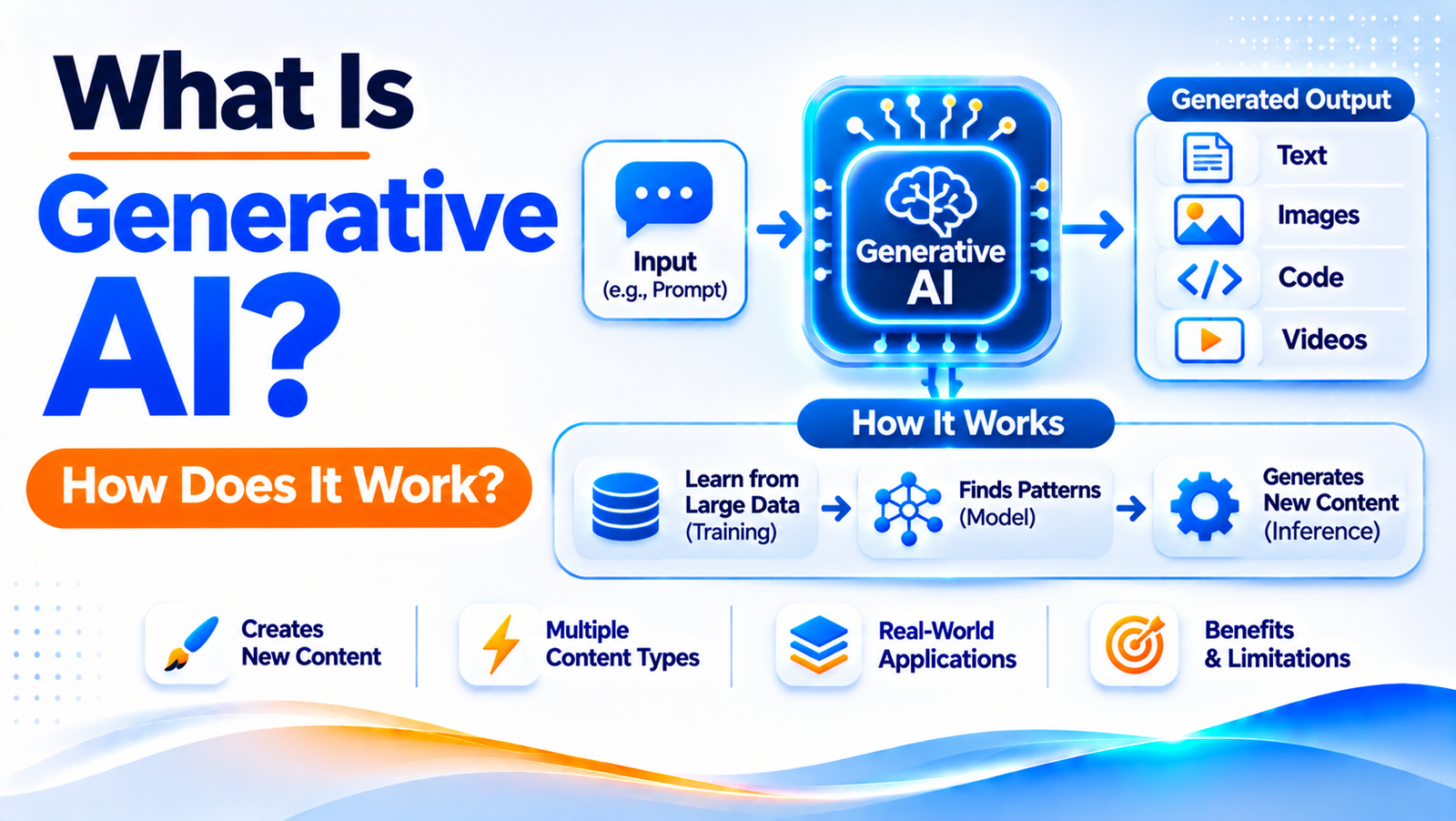
Generative AI is a type of artificial intelligence that can generate content based on patterns learned during training.
Depending on the model, it can produce:
- Text: Emails, articles, explanations, and summaries.
- Images: Illustrations, graphics, and visual concepts.
- Code: Programming examples, scripts, and functions.
- Audio: Speech, music, and sound effects.
- Video: Generated or modified moving images.
- Structured Data: Information formatted as tables or other data structures.
Simple Definition
Generative AI is artificial intelligence that learns patterns from data and uses those patterns to create new content.
For example, a student might ask:
"Explain photosynthesis to a 12-year-old."
A text-generating model can produce an explanation using simpler language and familiar examples.
A designer might request:
"Create an illustration of a futuristic library with natural lighting."
An image-generation model can produce a visual interpretation of that description.
The same broad idea—learning patterns and generating outputs—can be applied to different types of content.
Key Point: Generative AI creates outputs based on learned patterns and the information provided to it. It does not simply retrieve a prewritten answer for every request.
2. Understanding Generative AI with a Real-Life Analogy
Imagine someone learning to write short stories.
They read many examples and gradually become familiar with:
- How sentences are structured.
- How stories begin and end.
- How characters interact.
- How different writing styles sound.
- How ideas connect.
Later, someone asks them to write an original story about a journey through space.
They can combine familiar language patterns and storytelling techniques to create something new.
Generative AI has a limited similarity to this process.
The Analogy
| Human Writing Example | Generative AI |
|---|---|
| Reads example stories | Trains on datasets |
| Learns language patterns | Adjusts model parameters |
| Receives a writing topic | Receives a prompt |
| Writes a new story | Generates output |
| Revises a draft | May refine output through additional prompting or processing |
Where the Analogy Ends
A human writer has lived experiences, intentions, and personal understanding.
A Generative AI model does not need those abilities to produce fluent content.
Its output is generated through mathematical computations involving learned parameters and the current input.
Remember: Convincing language does not guarantee genuine understanding, factual accuracy, or reliable reasoning.
3. How Is Generative AI Different from Traditional AI?
Artificial intelligence includes many approaches.
Not every AI system is designed to generate content.
Some systems primarily classify, detect, recommend, or predict.
Example: An Email System
Consider two possible AI features.
System A: Spam Detection
The system examines an email and predicts whether it is spam.
Its output might be:
Spam: Yes
System B: Email Generation
The system receives an instruction:
"Write a polite reminder about tomorrow's meeting."
Its output is a new email message.
Comparison
| Traditional Predictive AI Task | Generative AI Task |
|---|---|
| Classifies an email as spam or not spam | Drafts an email |
| Predicts future product demand | Generates a product description |
| Detects an object in an image | Creates a new image |
| Estimates delivery time | Drafts a delivery-status explanation |
| Identifies sentiment in feedback | Produces a response to feedback |
These categories can overlap. Modern AI systems may combine predictive and generative capabilities.
Is Generative AI Part of Machine Learning?
Yes.
Modern Generative AI commonly relies on machine learning, particularly deep learning.
A useful relationship is:
Artificial Intelligence
        |
        v
  Machine Learning
        |
        v
    Deep Learning
        |
        v
  Many Modern
  Generative AI Models
This diagram shows a common technical relationship, not a complete classification of every AI technique.
Key Point: Predictive systems often estimate or classify something, while generative systems produce content. Some applications do both.
4. How Does Generative AI Work?
The process has two major stages:
- Training: The model learns patterns from data.
- Generation: The trained model produces output from a new input.
Simplified Workflow
           TRAINING STAGE

          Training Data
                |
                v
         Model Training
                |
                v
         Trained AI Model


          GENERATION STAGE

            User Prompt
                |
                v
          Trained Model
                |
                v
        Generated Content
Let's understand each stage.
Stage 1: Training the Model
During training, a model processes examples from a dataset.
For a language model, training data may include text from various permitted sources.
The training process adjusts numerical values called parameters.
These parameters influence how the model processes inputs and produces outputs.
Over many training steps, the model becomes better at the objectives used during training.
Stage 2: Generating Content
After training, the model can receive a new input.
For example:
"Write three ideas for a science project."
The model processes the instruction and generates a response based on its learned patterns and available context.
Does the Model Search Its Training Data for an Answer?
Not necessarily.
A typical language model generates text using its learned parameters and current context rather than searching a database of complete stored answers.
However, some AI applications combine generation with search tools or document retrieval.
These are separate capabilities that can be integrated into one system.
Remember: Training creates the model's learned behavior; generation uses that trained model to produce responses.
5. What Are Large Language Models (LLMs)?
A Large Language Model (LLM) is a machine learning model trained to process and generate language.
LLMs are the technology behind many conversational AI assistants and text-generation systems.
Examples of language model families include GPT, Claude, Gemini, and Llama.
What Can an LLM Do?
Depending on the model and its capabilities, an LLM can help with:
- Explaining concepts.
- Drafting documents.
- Summarizing text.
- Translating languages.
- Generating code.
- Brainstorming ideas.
- Answering questions.
- Organizing information.
How Does an LLM Generate Text?
Many modern LLMs generate text by predicting tokens sequentially.
A token is a unit of text processed by the model.
A token may represent a word, part of a word, punctuation, or another text fragment.
Simple Example
Suppose a model receives:
The sun rises in the
It might assign high probability to a continuation such as:
east
The model selects a next token according to its generation method.
Then it considers the updated sequence and predicts another token.
This process continues until the response is complete.
Does Predicting Tokens Mean the Model Only Completes Sentences?
No.
Predicting tokens is the underlying generation mechanism for many language models, but training can produce capabilities that support complex tasks such as explanation, coding, and multistep problem-solving.
However, these capabilities are imperfect.
Key Point: Many LLMs generate text one token at a time, using learned patterns and the current context.
6. What Is a Transformer Model?
Many modern language models use an architecture called the Transformer.
Transformers are especially important because they can model relationships among elements of a sequence.
What Is Attention?
A major component of Transformers is the attention mechanism.
Attention helps a model determine which parts of the input are relevant when processing other parts.
Simple Example
Consider this sentence:
The bicycle did not fit inside the car
because it was too large.
To interpret the word "it," a language system needs to consider the surrounding words and their relationships.
Attention mechanisms help Transformer models use contextual information when processing such sentences.
This does not mean the model always resolves ambiguity correctly.
Why Are Transformers Important?
Transformer-based architectures support:
- Processing contextual relationships.
- Training on large datasets.
- Scaling to large model sizes.
- Many language and multimodal applications.
Do All Generative AI Models Use Transformers?
No.
Different generative systems use different architectures.
For example, many image-generation systems use diffusion-based techniques, sometimes alongside Transformer components.
Remember: Transformers are a major foundation of modern Generative AI, but they are not the only model architecture.
7. How Does AI Generate Images?
Text generation and image generation are related forms of Generative AI, but their technical processes can differ.
Many image-generation systems use diffusion models or related approaches.
Understanding Diffusion with an Analogy
Imagine starting with a television screen filled with random static.
Now imagine gradually transforming that static into a clear picture.
Some diffusion-based image generators work in a conceptually similar way.
They learn how to reverse a process that adds noise to images.
During generation, they can progressively transform noisy representations into an image guided by a text prompt or other input.
Example
A user enters:
A small wooden cabin beside a lake
at sunrise, realistic lighting,
peaceful atmosphere.
The model processes the prompt and generates an image consistent with the description.
Simplified Image Generation
        Text Description
                |
                v
         Image AI Model
                |
                v
      Initial Noisy Representation
                |
                v
       Repeated Refinement
                |
                v
          Generated Image
This describes a common diffusion-based approach. Not every image generator follows this exact process.
Why Can Results Differ?
Image generation may involve randomness and configurable generation settings.
Two generations from the same prompt can produce different images.
Key Point: Image-generation models learn visual patterns and use those patterns to synthesize images rather than merely selecting an existing picture.
8. What Is a Prompt in Generative AI?
A prompt is the input or instruction given to a Generative AI system.
It tells the model what task to perform.
Example: A Basic Prompt
Explain cloud computing.
The model may provide a general explanation.
Example: A More Specific Prompt
Explain cloud computing to a complete beginner.

Use simple language, one everyday analogy,
and three practical examples.

Keep the explanation under 300 words.
This prompt provides more useful guidance.
Elements of a Good Prompt
- Task: What should the AI do?
- Context: What background information is relevant?
- Audience: Who will read or use the result?
- Format: Should the output be a table, paragraph, or list?
- Constraints: What length, tone, or limitations should apply?
A Reusable Prompt Template
Task: [What you want the AI to do]

Audience: [Who the result is for]

Context: [Relevant background]

Requirements: [Important details]

Output Format: [Preferred structure]
Example
Task: Create a study plan for learning Python.

Audience: A complete beginner.

Context: I can study 30 minutes per day.

Requirements:
- Focus on fundamentals.
- Include small practice exercises.
- Avoid advanced frameworks.

Output Format:
A four-week table with weekly goals.
What Is Prompt Engineering?
Prompt engineering is the practice of designing and refining inputs to help AI systems produce useful outputs.
It involves clear instructions, relevant context, examples, and evaluation of results.
Important: Better prompts can improve results, but they cannot guarantee accuracy.
9. What Is Multimodal Generative AI?
Multimodal AI can process or generate more than one type of information.
Different modalities include:
- Text.
- Images.
- Audio.
- Video.
- Other structured or sensory information.
Example: Understanding an Image
A user uploads a photograph of a damaged bicycle.
A multimodal model may analyze the image and describe visible damage.
Example: Creating a Presentation
A system might combine:
- Written instructions.
- Generated slide text.
- Generated illustrations.
- A structured presentation layout.
Example: Audio Interaction
A multimodal system may accept spoken input and generate a spoken response.
Important Distinction
Not every multimodal system can both understand and generate every modality.
Capabilities depend on the specific model and the tools connected to it.
Key Point: Multimodal AI expands interaction beyond text-only inputs and outputs.
10. What Is Retrieval-Augmented Generation (RAG)?
A common limitation of language models is that their internal knowledge may be incomplete, outdated, or inaccurate.
Retrieval-Augmented Generation (RAG) is an approach that combines information retrieval with AI-generated responses.
Example: A Company Knowledge Assistant
Imagine an organization has hundreds of internal help documents.
An employee asks:
"What is our procedure for requesting new equipment?"
Instead of relying only on the model's learned knowledge, a RAG system can retrieve relevant information from the organization's documents.
The model then uses that retrieved material to generate an answer.
Simplified RAG Workflow
           User Question
                 |
                 v
          Search Documents
                 |
                 v
        Retrieve Relevant Text
                 |
                 v
         Language Model
                 |
                 v
       Answer Using Retrieved
             Information
Benefits of RAG
- Current Information: Can use recently updated documents.
- Domain Knowledge: Can incorporate organization-specific information.
- Source Grounding: Can support answers with retrieved references.
- Knowledge Management: Helps users access large document collections.
Limitations of RAG
RAG does not automatically eliminate incorrect answers.
Problems can occur when:
- Relevant documents are not retrieved.
- Retrieved information is outdated.
- Source documents contain errors.
- The model misinterprets the retrieved material.
Remember: RAG provides additional context, but retrieval quality and answer verification still matter.
11. What Is Fine-Tuning in Generative AI?
Fine-tuning means further training an existing model on additional examples for a particular purpose.
Example
Imagine a company wants an AI model to produce responses in a specific structured format.
It may fine-tune a suitable model using approved examples of the desired input-output behavior.
Prompting vs RAG vs Fine-Tuning
| Approach | Main Idea | Common Purpose |
|---|---|---|
| Prompting | Give instructions and context at generation time | Guide an individual response |
| RAG | Retrieve external information and supply it to the model | Ground answers in relevant documents |
| Fine-Tuning | Update model parameters through additional training | Adapt model behavior to specific tasks or formats |
Do Beginners Need to Fine-Tune Models?
Usually not.
Beginners can learn a great deal by using existing models, writing effective prompts, and checking results.
Fine-tuning introduces additional data, evaluation, infrastructure, and cost considerations.
Key Point: Prompting, RAG, and fine-tuning solve different problems and may be combined in advanced applications.
12. Real-World Applications of Generative AI
Generative AI is used across many industries and activities.
1. Education
Generative AI can help create:
- Practice questions.
- Concept explanations.
- Study outlines.
- Learning examples.
Example: A learner asks for a simple explanation of fractions with five practice problems.
2. Software Development
AI coding tools can assist with:
- Code suggestions.
- Test generation.
- Documentation.
- Debugging explanations.
- Refactoring ideas.
Example: A developer requests a Python function to validate an email address.
The generated code still requires review and testing.
3. Customer Support
Generative AI can draft responses to common customer questions.
Example: A support assistant prepares a reply explaining how to reset an account password.
4. Marketing and Communication
Teams use Generative AI to draft:
- Product descriptions.
- Social media posts.
- Email campaigns.
- Presentation outlines.
Example: A small business generates three versions of a product announcement.
5. Design and Media
AI tools can help generate:
- Concept art.
- Storyboards.
- Illustrations.
- Image variations.
- Draft video content.
Example: A designer creates several visual concepts before developing a final design.
6. Healthcare Administration
Generative AI may assist with appropriately governed administrative tasks, such as drafting non-diagnostic communications or summarizing authorized documents.
Example: A healthcare organization drafts a general appointment-preparation message.
Sensitive information requires suitable privacy and security safeguards, and clinical outputs require appropriate professional oversight.
7. Business Operations
Organizations may use Generative AI for:
- Document summaries.
- Internal knowledge assistance.
- Meeting-note organization.
- Report drafting.
- Workflow support.
Example: A project manager asks an AI tool to organize meeting notes into action items.
Remember: Generative AI is most useful when applied to a clearly defined task with appropriate review and safeguards.
13. Benefits of Generative AI
1. Faster First Drafts
AI can produce initial versions of text, code, and other content quickly.
2. Easier Learning
Learners can request explanations adapted to their current level.
3. Creative Exploration
Users can generate alternative ideas, designs, and approaches.
4. Support for Repetitive Work
AI can assist with tasks such as drafting routine messages and organizing information.
5. Accessibility
Some systems can help users interact with information through different languages and modalities.
6. Prototyping
Developers and designers can test ideas before investing in full implementation.
7. Knowledge Assistance
AI systems combined with reliable retrieval can help people find and summarize relevant information.
Important: Productivity improvements depend on the task, the model, and the time required to verify or correct its output.
14. Limitations and Risks of Generative AI
Generative AI can produce impressive results, but it is not always reliable.
1. Hallucinations
An AI model may generate information that sounds convincing but is incorrect or unsupported.
For example, it might invent a book title, a source, or a technical explanation.
Good Practice: Verify important claims against trustworthy sources.
2. Bias
Training data and model design can influence outputs.
A model may reproduce unfair patterns or stereotypes.
Good Practice: Review outputs for unfair assumptions and inappropriate generalizations.
3. Privacy Risks
Information entered into an AI system may be processed or retained according to that service's policies and settings.
Good Practice: Avoid sharing confidential information unless the system is approved for that purpose.
4. Copyright and Intellectual Property
AI-generated content may raise questions involving training data, similarity to existing works, ownership, and permitted use.
Good Practice: Review applicable rights, licenses, and organizational policies before publishing or distributing content.
5. Security Risks
Generated code may contain vulnerabilities.
AI systems can also be affected by malicious instructions embedded in untrusted content.
Good Practice: Review generated code and treat retrieved or uploaded content as untrusted unless verified.
6. Outdated Information
A model may not know about recent events or updated policies unless it has access to current information.
Good Practice: Use current, authoritative sources for time-sensitive questions.
7. Overreliance
People may trust fluent answers without checking them.
Good Practice: Use AI as an assistant rather than the final authority for important decisions.
Key Point: Generative AI is a powerful tool, but human judgment and verification remain essential.
15. Does Generative AI Actually Understand What It Creates?
This is an important and actively debated question.
Generative AI models can produce responses that appear knowledgeable, creative, or thoughtful.
However, fluent output alone does not establish that a system understands information in the same way a human does.
What We Can Say Technically
Modern language models:
- Process inputs using learned numerical parameters.
- Represent and transform information mathematically.
- Generate outputs according to their architecture and training.
- Can perform many language and reasoning tasks.
- Can also make confident mistakes.
Whether AI systems possess human-like understanding or subjective experience is a separate question that remains debated.
Practical Lesson
Instead of assuming an AI response is correct because it sounds confident, evaluate:
- Is the answer factually accurate?
- Does it follow the instructions?
- Is the information supported?
- Does it contain unsupported assumptions?
- Is it appropriate for the intended use?
Remember: The usefulness of an AI response should be judged by its quality and reliability, not simply by how human-like it sounds.
16. A Practical Beginner Exercise: Write and Improve an AI Prompt
Let's try a simple activity that does not require programming.
Goal
Use a Generative AI tool to create a beginner-friendly study plan.
Step 1: Start with a Basic Prompt
Enter:
Create a study plan for learning computer networking.
Read the response.
It may be useful, but it may also be too broad.
Step 2: Add Context
Try:
Create a four-week computer networking study plan
for someone with no IT experience.

I can study 30 minutes per day.
Compare the result with the first response.
Step 3: Specify the Format
Try:
Create a four-week computer networking study plan
for a complete beginner.

I can study 30 minutes per day.

Include:
- Weekly learning goals.
- Three topics per week.
- One simple practical activity per week.
- A short self-assessment question.

Present the plan in a Markdown table.
Avoid advanced technical jargon.
Step 4: Evaluate the Result
Check whether the response:
- Uses beginner-friendly language.
- Follows the requested structure.
- Fits the available study time.
- Includes practical activities.
- Avoids unnecessary complexity.
Step 5: Refine the Prompt
If the plan is too advanced, follow up with:
Make Week 1 easier.

Assume I do not know what an IP address,
router, or network protocol is.
What Did You Learn?
You practiced:
- Giving a clear task.
- Providing context.
- Defining the audience.
- Specifying an output format.
- Reviewing the response.
- Improving the result through follow-up instructions.
Beginner Tip: Prompting is an iterative process. A useful first response can often be improved through clarification and verification.
17. How Can You Use Generative AI Responsibly?
Follow these practical principles.
1. Verify Important Information
Check facts, calculations, references, and technical instructions before relying on them.
2. Protect Sensitive Data
Do not enter passwords, confidential business records, or private personal information into unapproved tools.
3. Review Generated Code
Test code and check for security problems before using it in real applications.
4. Respect Intellectual Property
Check licensing and usage rights when publishing or distributing generated material.
5. Be Transparent When Appropriate
Disclose AI assistance when required by workplace, academic, legal, or publishing rules.
6. Use Human Oversight
For high-impact decisions, ensure appropriate qualified human review.
7. Understand Tool Limitations
Know whether the system can access current information, external documents, or tools.
8. Keep Learning
Generative AI tools evolve, but foundational skills in writing, programming, analysis, and critical thinking remain valuable.
18. How Can Beginners Start Learning Generative AI?
You do not need advanced mathematics or programming to begin using Generative AI.
However, deeper technical knowledge becomes useful when you want to build AI applications.
Step 1: Understand AI Fundamentals
Learn the basic differences between artificial intelligence, machine learning, and deep learning.
Step 2: Learn How Generative Models Work
Understand training, inference, tokens, and model limitations.
Step 3: Practice Prompting
Write instructions for summarization, explanation, brainstorming, and structured output.
Step 4: Compare Different Tasks
Try text generation, image generation, and document analysis using appropriate tools.
Step 5: Learn Evaluation
Practice checking whether AI-generated results are accurate, relevant, and safe.
Step 6: Learn Basic Python
If you want to build applications, Python is a useful starting language.
Step 7: Explore AI APIs
Learn how applications send requests to models and process their responses.
Step 8: Understand RAG
Explore how document retrieval can support answers grounded in external information.
Step 9: Build a Small Project
Examples include:
- A study-plan assistant.
- A document summarizer.
- A product-description drafting tool.
- A question-answering assistant using approved documents.
Step 10: Explore Advanced Topics
After mastering the basics, learn about:
- Transformer architecture.
- Embeddings.
- Vector databases.
- Model evaluation.
- Fine-tuning.
- AI application security.
- Multimodal systems.
Beginner Tip: Start by learning how to evaluate AI outputs before attempting to build complex AI applications.
19. Frequently Asked Questions (FAQs)
Q1. What is Generative AI in simple words?
Generative AI is artificial intelligence that creates content such as text, images, audio, video, and code based on patterns learned during training.
Q2. How does Generative AI work?
Generative AI models learn patterns during training and use those learned patterns to generate outputs in response to prompts or other inputs.
Q3. Is ChatGPT an example of Generative AI?
Yes. ChatGPT is an AI assistant that uses generative models to produce responses.
Q4. What is the difference between AI and Generative AI?
Artificial intelligence is the broader field. Generative AI focuses on producing content, while other AI systems may classify, predict, detect, or recommend.
Q5. What is an LLM?
A Large Language Model is a machine learning model trained to process and generate language.
Q6. What is a prompt?
A prompt is an input or instruction provided to an AI model to guide its response.
Q7. Can Generative AI create images?
Yes. Image-generation models can create new visual content from text prompts, images, or other supported inputs.
Q8. Is Generative AI always accurate?
No. Generative AI can produce incorrect, misleading, or unsupported content. Important outputs should be verified.
Q9. Do I need coding skills to use Generative AI?
No. Many Generative AI tools can be used through conversational interfaces. Programming becomes useful when building custom applications.
Q10. What is the difference between RAG and fine-tuning?
RAG retrieves external information to provide context during generation. Fine-tuning updates model parameters through additional training.
20. Key Takeaways
- Generative AI creates content using patterns learned from training data.
- Modern Generative AI commonly relies on deep learning.
- LLMs process and generate language.
- Tokens are units of text used by many language models.
- Transformers are important architectures behind many modern language models.
- Diffusion models are commonly used in image generation.
- Prompts guide the content and structure of AI-generated outputs.
- Multimodal AI works with multiple information types.
- RAG combines retrieval with generated responses.
- Fine-tuning adapts model behavior through additional training.
- Generative AI has limitations, including hallucinations, bias, privacy concerns, and security risks.
- Beginners should practice prompting, evaluation, and responsible use before moving to advanced development.
21. What Should You Learn Next?
Continue exploring Generative AI with these related resources:
-
What Is a Large Language Model (LLM)? Explained Simply
- Understand how language models process and generate text.
-
What Is Prompt Engineering? A Beginner's Guide
- Learn how to write clear, effective instructions for AI systems.
-
What Is Retrieval-Augmented Generation (RAG)?
- Discover how AI applications combine document retrieval with language generation.
-
What Are AI Agents? How Autonomous AI Systems Work
- Explore how AI applications can use tools and coordinate multistep tasks.
-
What Is Deep Learning? Neural Networks Explained
- Learn more about the machine learning techniques behind many generative models.
Continue Learning with Vyomanant Academy
Generative AI is becoming an important skill for learners, developers, designers, and professionals working across technology and business.
Vyomanant Academy helps beginners and working professionals explore areas such as:
- Artificial Intelligence Fundamentals.
- Machine Learning and Deep Learning.
- Generative AI Concepts.
- Prompt Engineering.
- Python Programming.
- AI Application Development.
- Responsible AI Practices.
Start with the fundamentals, experiment with simple prompts, evaluate the results carefully, and gradually build practical AI skills.
Learn. Build. Grow.
CONTINUE EXPLORING
Recommended next

What Is Artificial Intelligence? A Simple Beginner's Guide
Learn what Artificial Intelligence (AI) means, how it works, and where we use it in everyday life, with simple examples that anyone can understand.
View resource
What Is Machine Learning? A Simple Beginner's Guide
Discover what Machine Learning is, how computers learn from data, and how predictions work. Explore key ML concepts, learning types, and real-world examples in this beginner-friendly guide.
View resource
What Is Information Technology? A Beginner's Guide
Discover what Information Technology (IT) is, how it works, its main components, everyday applications, and how beginners can start learning IT.
View resource