
RESOURCES
What Is DevSecOps? Security in DevOps Explained for Beginners
Learn what DevSecOps is, how security fits into the DevOps lifecycle, and how teams use automated testing, secure pipelines, and shared responsibility to build safer software.
Vyomanant Academy
Build these skills hands-on
Explore structured, practical technology programs from Vyomanant Academy.
Explore CoursesOn this page
What Is DevSecOps? Security in DevOps Explained for Beginners
Introduction
Imagine a software development team building an online shopping application.
The developers write code, automated tests check whether features work, and a CI/CD pipeline deploys new updates.
Everything appears ready for release.
But just before deployment, the security team discovers a serious vulnerability.
The application uses an outdated software library that could expose customer information.
Now the team must stop the release, investigate the problem, update the dependency, test the application again, and repeat parts of the deployment process.
What if the vulnerability had been identified much earlier?
This is one of the problems DevSecOps aims to address.
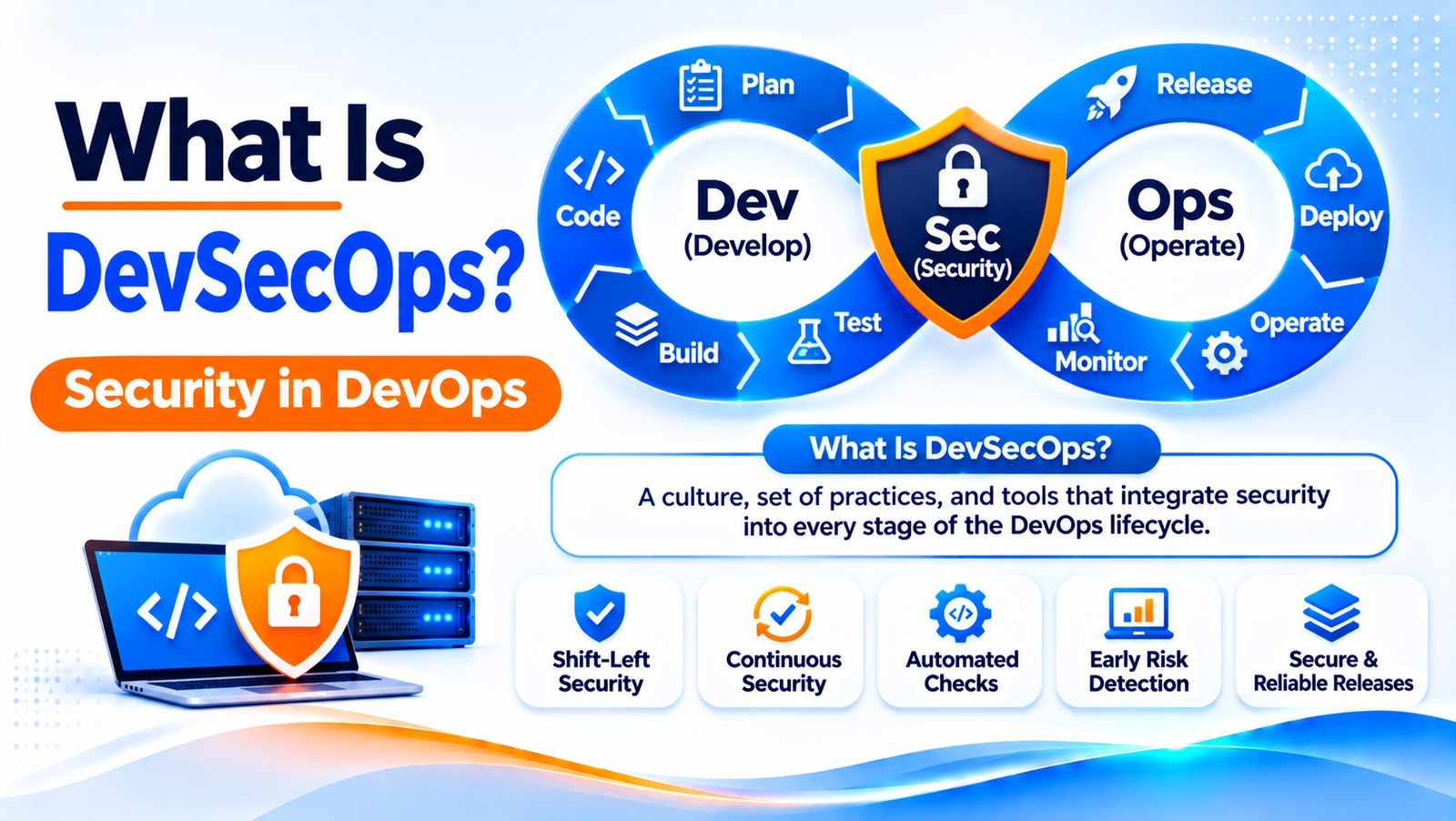
DevSecOps brings security practices into everyday software development and operations instead of treating security as a separate activity performed only before release.
In this guide, you will learn what DevSecOps means, how it works, which tools and practices it uses, and how beginners can start applying its principles.
1. What Is DevSecOps?
DevSecOps stands for Development, Security, and Operations.
It is an approach to software delivery that integrates security into development, testing, deployment, and ongoing operations.
DevSecOps in Simple Words
DevSecOps means making security a shared, continuous part of building, delivering, and running software.
Instead of relying only on a security review at the end of development, teams introduce security activities throughout the software lifecycle.
These activities may include:
- Secure Coding: Writing code with security risks in mind.
- Dependency Scanning: Identifying known vulnerabilities in third-party libraries.
- Automated Security Testing: Checking applications during CI/CD.
- Secret Detection: Looking for accidentally exposed credentials.
- Infrastructure Security: Reviewing cloud and infrastructure configurations.
- Access Control: Restricting permissions to what is necessary.
- Continuous Monitoring: Detecting security problems after deployment.
DevSecOps is not a single tool or product.
It combines people, processes, automation, and security practices.
Key Point: DevSecOps extends DevOps by making security an integral part of software delivery.
2. Why Is DevSecOps Important?
Modern software development often involves frequent releases, cloud infrastructure, open-source libraries, containers, and automated deployment pipelines.
Each introduces potential security considerations.
Example: A Vulnerable Dependency
Suppose a developer adds a third-party library to an application.
The library works correctly, so the functional tests pass.
However, the version being used contains a publicly known security vulnerability.
Without dependency scanning, the problem might remain unnoticed.
With DevSecOps, an automated check can identify the vulnerable dependency during development or the build process.
The team can then investigate the finding and decide whether to update the library, apply a mitigation, or take another appropriate action.
Problems DevSecOps Helps Address
- Late Security Discoveries: Finding vulnerabilities only before production release.
- Manual Bottlenecks: Relying entirely on occasional manual reviews.
- Inconsistent Practices: Different teams following different security procedures.
- Exposed Secrets: Accidentally committing API keys or passwords.
- Misconfigured Infrastructure: Deploying resources with unsafe permissions.
- Unmonitored Applications: Missing security issues that arise after release.
DevSecOps cannot eliminate every vulnerability.
Its goal is to make security more consistent, timely, and manageable.
3. Understanding DevSecOps with a Real-Life Analogy
Imagine a company manufacturing bicycles.
In one factory, the team builds each bicycle completely before performing a safety inspection.
If the final inspection discovers a defective brake system, workers may need to dismantle part of the bicycle and replace several components.
In another factory, safety checks happen throughout production.
Workers inspect the brakes during installation, check wheel alignment during assembly, and perform a final inspection before shipping.
The second factory is less dependent on discovering every problem at the very end.
DevSecOps follows a similar principle.
The Analogy
| Bicycle Manufacturing | Software Development |
|---|---|
| Design safety requirements | Define application security requirements |
| Inspect parts during assembly | Scan dependencies and review code |
| Test brakes before completion | Run automated security tests |
| Perform final safety inspection | Conduct release security checks |
| Monitor product defects | Monitor deployed applications |
Where the Analogy Ends
Software security is more complicated than a fixed manufacturing checklist.
Threats change, new vulnerabilities are discovered, and applications interact with external systems.
Security checks must therefore continue after software is deployed.
Remember: DevSecOps is about continuous security, not simply adding one inspection to the development process.
4. DevOps vs DevSecOps: What Is the Difference?
DevOps encourages collaboration between development and operations teams to improve software delivery.
It commonly emphasizes:
- Collaboration.
- Automation.
- Continuous integration.
- Continuous delivery.
- Monitoring.
- Feedback.
DevSecOps builds on these practices by integrating security into the same workflows.
DevOps vs DevSecOps
| Area | DevOps | DevSecOps |
|---|---|---|
| Main Emphasis | Efficient software delivery and operations | Software delivery with integrated security |
| Collaboration | Development and operations | Development, security, and operations |
| Testing | Functional and operational testing | Functional, operational, and security testing |
| CI/CD | Automates building, testing, and delivery | Adds security controls to delivery workflows |
| Infrastructure | Automates provisioning and management | Also evaluates infrastructure security |
| Monitoring | Performance and reliability | Performance, reliability, and security |
| Responsibility | Shared delivery responsibility | Shared delivery and security responsibility |
Does DevOps Ignore Security?
No.
DevOps and DevSecOps are not mutually exclusive approaches.
A mature DevOps organization may already have strong security practices.
The term DevSecOps explicitly emphasizes the need to integrate security into the workflow.
Key Point: DevSecOps is not a replacement for DevOps. It makes security a visible and continuous part of DevOps practices.
5. What Does "Shift Left" Mean in DevSecOps?
One of the most common DevSecOps concepts is shift left.
It means performing security activities earlier in the software development lifecycle.
Imagine a development process displayed from left to right:
Plan -> Code -> Build -> Test -> Deploy -> Operate
In a traditional late-review approach, most security testing might happen near the deployment stage.
A shift-left approach introduces appropriate security checks during planning, coding, and building.
Example
A developer accidentally includes an API key in a source-code file.
There are two possible outcomes.
Late Detection:
The secret is discovered after the application has been deployed.
The team must investigate possible exposure, revoke or rotate the credential, and remediate the problem.
Early Detection:
A local check or repository scanning tool identifies the secret before it reaches the shared codebase.
The developer can remove it and use an approved secret-management method.
Is Shift Left Enough?
No.
Security also needs to continue after deployment.
This is sometimes called shift right, referring to operational security practices such as:
- Runtime monitoring.
- Vulnerability management.
- Incident detection.
- Security logging.
- Continuous configuration assessment.
Remember: Shift left helps prevent problems earlier, while ongoing operational security helps detect and respond to risks in running systems.
6. Understanding the DevSecOps Lifecycle
DevSecOps activities can be integrated into every major stage of software delivery.
Simplified DevSecOps Lifecycle
               PLAN
                |
                v
               CODE
                |
                v
              BUILD
                |
                v
               TEST
                |
                v
              RELEASE
                |
                v
              DEPLOY
                |
                v
              OPERATE
                |
                v
              MONITOR
                |
                +------> Feedback to PLAN
Security is considered at every stage, rather than appearing as a single step.
Stage 1: Plan — Identify Security Requirements
Before development begins, teams identify important security requirements.
Examples include:
- What information will the application store?
- Who should have access?
- What authentication is required?
- What threats are relevant?
- Are there privacy or compliance obligations?
A useful technique is threat modeling, which helps teams identify possible threats and plan appropriate controls.
Stage 2: Code — Develop Securely
Developers follow secure coding practices.
Activities may include:
- Reviewing code changes.
- Avoiding hardcoded secrets.
- Validating untrusted input.
- Using safe authentication patterns.
- Running static code analysis.
Stage 3: Build — Check Dependencies and Artifacts
During the build process, automated tools may inspect:
- Third-party libraries.
- Software packages.
- Container images.
- Build configuration.
- Generated artifacts.
The goal is to identify known risks before release.
Stage 4: Test — Evaluate Application Security
Teams run suitable security tests.
Examples include:
- Static application security testing.
- Dynamic application security testing.
- API security tests.
- Targeted manual security assessments.
Stage 5: Release — Verify Readiness
Before releasing software, teams may review:
- Unresolved critical vulnerabilities.
- Required approvals.
- Artifact integrity.
- Security test results.
- Release policies.
Stage 6: Deploy — Configure Infrastructure Securely
Deployment controls may include:
- Restricting network access.
- Using least-privilege permissions.
- Managing secrets securely.
- Reviewing Infrastructure as Code.
- Applying approved configuration policies.
Stage 7: Operate — Maintain Security
After deployment, teams continue:
- Applying relevant updates.
- Managing access.
- Rotating credentials when appropriate.
- Reviewing configuration changes.
- Maintaining backups and recovery plans.
Stage 8: Monitor — Detect and Respond
Security monitoring helps identify suspicious activity, newly discovered vulnerabilities, and unexpected changes.
Findings become feedback for future development and operational improvements.
Key Point: DevSecOps security activities are distributed across the lifecycle and continue after deployment.
7. Important Security Testing Methods in DevSecOps
Several testing techniques are commonly associated with DevSecOps.
Understanding what each technique checks is more important than memorizing tool names.
1. SAST — Static Application Security Testing
SAST analyzes source code or related application representations without requiring the application to run.
It can help identify certain insecure coding patterns.
Example: A tool flags code that constructs a database query using untrusted input in an unsafe way.
Limitation: SAST tools can produce false positives and may miss vulnerabilities that depend on runtime behavior.
2. DAST — Dynamic Application Security Testing
DAST tests a running application from the outside.
It examines how the application responds to selected inputs and requests.
Example: A scanner tests whether a web application handles certain malformed requests securely.
Limitation: DAST generally cannot inspect every internal code path and requires a suitable running test environment.
3. SCA — Software Composition Analysis
SCA examines software dependencies and their associated security information.
It can help identify:
- Known vulnerable library versions.
- Outdated packages.
- Dependency relationships.
- Certain software license considerations.
Example: A project depends on a package version associated with a published vulnerability.
Limitation: SCA findings require context. A vulnerable package may not always be exploitable in a particular application, and unknown vulnerabilities may not be detected.
4. Secret Scanning
Secret scanning looks for potentially exposed credentials.
Examples include:
- API keys.
- Access tokens.
- Private keys.
- Password-like values.
Important: If a real secret has been exposed, removing it from the latest code commit may not be sufficient. The credential may need to be revoked or rotated.
5. Infrastructure as Code Scanning
IaC scanning checks infrastructure configuration files for selected security issues.
For example, it may flag:
- Overly permissive network rules.
- Unencrypted storage configurations.
- Excessive cloud permissions.
- Missing security controls.
6. Container Image Scanning
Container scanning checks images and packages for known vulnerabilities and selected configuration risks.
It is useful for teams deploying applications with Docker or Kubernetes.
Quick Comparison
| Method | What It Examines | Typical Use |
|---|---|---|
| SAST | Application code | Find insecure coding patterns |
| DAST | Running application | Test externally observable weaknesses |
| SCA | Third-party dependencies | Identify known vulnerable packages |
| Secret Scanning | Code and related artifacts | Detect exposed credentials |
| IaC Scanning | Infrastructure definitions | Identify unsafe cloud configurations |
| Container Scanning | Container images | Detect vulnerable packages and selected risks |
No single scanning technique can identify every security problem.
8. How Does DevSecOps Work in a CI/CD Pipeline?
CI/CD pipelines automate important parts of software building, testing, and delivery.
DevSecOps integrates appropriate security checks into those pipelines.
Example: A Secure Delivery Workflow
          Developer Commits Code
                    |
                    v
               Git Repository
                    |
                    v
              CI Pipeline
                    |
          +---------+---------+
          |         |         |
          v         v         v
       SAST       SCA      Secret Scan
          |         |         |
          +---------+---------+
                    |
                    v
             Build Application
                    |
                    v
             Container Scan
                    |
                    v
            Application Tests
                    |
                    v
           Security Policy Check
                    |
             +------+------+
             |             |
             v             v
           Pass           Fail
             |             |
             v             v
        Approved       Investigate
        Deployment     and Remediate
             |
             v
       Runtime Monitoring
This is an example workflow, not a mandatory sequence for every project.
What Happens When a Check Fails?
Suppose a dependency scanner identifies a critical vulnerability.
The pipeline may:
- Record the finding.
- Evaluate it against the team's security policy.
- Block the release if the policy requires it.
- Notify the responsible team.
- Allow the issue to be investigated and corrected.
- Run the relevant checks again.
Should Every Finding Block Deployment?
Not necessarily.
Security policies should consider:
- Vulnerability severity.
- Whether the vulnerable component is reachable.
- Known exploitation activity.
- Application exposure.
- Available mitigations.
- Business impact.
A large number of poorly prioritized alerts can slow delivery without improving security proportionately.
Key Point: A good DevSecOps pipeline uses security checks that provide useful feedback and support risk-based decisions.
9. Popular DevSecOps Tools and Their Roles
DevSecOps is tool-independent, but understanding common tool categories is useful.
| Category | Example Tools | Main Purpose |
|---|---|---|
| Source Control | Git, GitHub, GitLab | Manage and review code changes |
| CI/CD | Jenkins, GitHub Actions, GitLab CI/CD | Automate delivery workflows |
| SAST | Semgrep, SonarQube | Analyze code for selected issues |
| DAST | OWASP ZAP | Test running web applications |
| SCA | OWASP Dependency-Check, Dependabot | Identify vulnerable dependencies |
| Secret Scanning | Gitleaks | Detect potential exposed secrets |
| Container Scanning | Trivy, Grype | Check container images and packages |
| IaC Scanning | Checkov, Trivy | Analyze infrastructure configurations |
| Policy as Code | Open Policy Agent | Evaluate defined policies |
| Secrets Management | HashiCorp Vault, cloud secret managers | Manage application secrets |
| Monitoring | Cloud-native monitoring and security services | Observe operational and security events |
Tool capabilities, licensing, and supported integrations can change over time.
Do Beginners Need All These Tools?
No.
Start by understanding the security problem each category solves.
For a small practice project, a version-control system, a CI pipeline, and one or two suitable security scanners are enough to learn the basic workflow.
Remember: Installing many security tools is not the same as establishing effective DevSecOps practices.
10. What Is DevSecOps in Cloud Computing?
Cloud infrastructure introduces configuration and access-management responsibilities.
A cloud application might use:
- Virtual machines.
- Managed databases.
- Object storage.
- Container services.
- Network security rules.
- Identity and access permissions.
DevSecOps helps teams apply consistent security practices to these resources.
Example: Cloud Storage Security
Imagine a team uses a cloud storage bucket for internal documents.
An incorrect configuration could make the documents publicly accessible.
A DevSecOps workflow might include:
- Defining storage configuration through Terraform.
- Scanning the Terraform configuration for unsafe settings.
- Reviewing the change through a pull request.
- Applying approved infrastructure changes.
- Monitoring for unexpected configuration changes.
Important Cloud Security Practices
- Least Privilege: Grant only necessary permissions.
- Encryption: Protect data in transit and at rest as appropriate.
- Network Segmentation: Restrict unnecessary communication paths.
- Secure Configuration: Apply reviewed settings.
- Logging: Collect relevant security and audit information.
- Credential Management: Prefer managed identities and short-lived credentials when possible.
Key Point: Cloud DevSecOps combines infrastructure automation with security review, access control, and continuous monitoring.
11. DevSecOps with Docker and Kubernetes
Containers are widely used to package and deploy applications.
However, containerization does not automatically make an application secure.
Container Security
Teams should consider:
- The trustworthiness of base images.
- Known vulnerabilities in installed packages.
- Unnecessary software inside images.
- Container user permissions.
- Embedded credentials.
- Image provenance and integrity.
Example
A developer builds a Docker image using an old base image.
The application runs correctly, but the image includes outdated system packages.
A container scanner can identify known vulnerabilities before deployment.
Kubernetes Security
For Kubernetes environments, teams may also review:
- Role-based access control.
- Service account permissions.
- Network policies.
- Pod security settings.
- Secret handling.
- Image admission controls.
- Cluster updates.
- Audit logs.
Simplified Workflow
       Application Code
              |
              v
         Docker Build
              |
              v
        Image Scanning
              |
              v
       Approved Registry
              |
              v
     Kubernetes Deployment
              |
              v
       Runtime Monitoring
Remember: Container security covers the application, image, registry, deployment configuration, and running environment.
12. What Is Software Supply Chain Security?
Modern applications depend on many components beyond the code written by their developers.
These may include:
- Open-source libraries.
- Build tools.
- Container images.
- Package repositories.
- CI/CD systems.
- Third-party services.
Together, these form part of the software supply chain.
Why Does It Matter?
Imagine a trusted application depends on a third-party package.
If that package is compromised, the application could be affected even when its own code has not changed.
DevSecOps practices can help reduce these risks.
Common Supply Chain Controls
- Dependency Review: Evaluate third-party packages.
- Version Pinning: Control which versions are used.
- Software Bill of Materials (SBOM): Record software components and dependencies.
- Artifact Signing: Help verify the origin and integrity of build artifacts.
- Build Provenance: Record information about how software was built.
- Restricted Pipeline Permissions: Limit what automation systems can access.
What Is an SBOM?
An SBOM is an inventory of software components used in an application or product.
It can help teams understand dependencies and investigate newly disclosed vulnerabilities.
An SBOM alone does not prove that software is secure.
Key Point: DevSecOps protects not only application code but also the processes and components used to build and deliver it.
13. Who Is Responsible for Security in DevSecOps?
A central principle of DevSecOps is shared responsibility.
Security specialists remain important, but developers and operations teams also participate in security work.
Developers
Common responsibilities include:
- Following secure coding practices.
- Reviewing dependency changes.
- Fixing application vulnerabilities.
- Avoiding exposed credentials.
- Writing security-related tests where appropriate.
Security Teams
Common responsibilities include:
- Defining security policies.
- Advising on threat modeling.
- Supporting vulnerability assessment.
- Helping teams prioritize risks.
- Investigating complex security issues.
- Providing security expertise and training.
Operations and Platform Teams
Common responsibilities include:
- Securing deployment environments.
- Managing infrastructure permissions.
- Maintaining monitoring and logging.
- Applying updates.
- Supporting incident response.
- Protecting CI/CD infrastructure.
Management and Leadership
Leadership supports DevSecOps by providing:
- Clear accountability.
- Time for remediation.
- Training.
- Appropriate tools.
- Risk-management processes.
Important: Shared responsibility does not mean that everyone performs the same tasks. It means security is integrated into each team's work with clear ownership.
14. Practical Beginner Exercise: Add Security Checks to a Project
You can practice basic DevSecOps principles using a small sample application.
The goal is to understand how security checks fit into a development workflow.
What You Need
- A small project stored in Git.
- Access to a code editor.
- A supported CI/CD platform.
- Permission to use security-scanning tools.
Use a dedicated practice repository without real credentials or sensitive information.
Step 1: Create a Small Application
Create a basic Python or JavaScript project.
It does not need advanced functionality.
A simple application that displays a message is enough.
Step 2: Add Version Control
Initialize a Git repository and commit the application files.
Step 3: Enable a CI Workflow
Configure a pipeline that runs when code is pushed or a pull request is opened.
Initially, the pipeline can perform:
Checkout Code
      |
      v
Install Dependencies
      |
      v
Run Tests
Step 4: Add Static Analysis
Choose a suitable static analysis tool.
Configure it to scan your project and report findings.
Review what the tool checks and which rules are enabled.
Step 5: Add Dependency Scanning
Use an appropriate dependency-scanning tool to check third-party packages.
If the tool identifies a known vulnerability, investigate the affected package and available remediation options.
Step 6: Add Secret Scanning
Configure a scanner to identify potential exposed credentials.
Do not create or commit real secrets for testing.
If you need a test case, use a harmless synthetic string documented by the scanner.
Step 7: Review the Results
Ask:
- Did the pipeline complete successfully?
- Were any findings reported?
- Which findings are relevant?
- Were there false positives?
- What should be fixed first?
Step 8: Correct an Issue
Make an appropriate change, such as updating an outdated dependency or removing an insecure coding pattern.
Run the checks again.
Step 9: Define a Simple Security Policy
For a learning project, your policy might require:
- All automated tests to pass.
- No known exposed credentials.
- Review of high-severity security findings.
- Approval before production deployment.
What Did You Learn?
You practiced:
- Integrating security into version control.
- Adding automated checks.
- Reviewing security findings.
- Prioritizing remediation.
- Re-running tests after changes.
Beginner Tip: Start with a small number of useful checks and expand gradually. A manageable workflow encourages consistent security practices.
15. Benefits of DevSecOps
1. Earlier Vulnerability Detection
Security checks during development can identify some issues before deployment.
2. Faster Feedback
Automated scanning provides developers with timely information about selected risks.
3. Better Collaboration
Developers, security specialists, and operations teams work together rather than relying entirely on separate handoffs.
4. More Consistent Security Controls
Automated workflows help apply agreed checks across projects.
5. Improved Visibility
Security findings can be tracked alongside code changes and deployment activity.
6. Reduced Rework
Fixing an issue earlier may avoid additional testing and release delays.
7. Stronger Operational Security
Monitoring and vulnerability management continue after deployment.
8. Support for Governance
Version control, approvals, and automated checks can provide evidence of security-related activities.
Important: DevSecOps can improve security outcomes, but results depend on the quality of the practices, tools, and team decisions.
16. Challenges of Implementing DevSecOps
1. Too Many Alerts
Security tools can generate large numbers of findings.
Without prioritization, teams may experience alert fatigue.
2. False Positives
Some reported issues may not represent exploitable vulnerabilities.
Findings need investigation.
3. Pipeline Delays
Poorly designed security checks can increase build and deployment times.
4. Skills Gaps
Developers may need additional knowledge of secure coding, cloud permissions, and vulnerability management.
5. Tool Integration
Different tools may produce inconsistent reports or require additional configuration.
6. Cultural Resistance
Teams may initially view security as an obstacle rather than part of delivering reliable software.
7. Legacy Applications
Older systems may lack automated tests or use outdated dependencies that are difficult to replace.
8. Continuous Maintenance
Scanning rules, dependencies, credentials, and security policies require ongoing attention.
Key Point: Successful DevSecOps requires sensible processes and collaboration, not just automation.
17. Best Practices for DevSecOps Beginners
1. Start with Security Requirements
Identify important risks before choosing tools.
2. Automate Repeatable Checks
Use automation for suitable tests that can provide consistent feedback.
3. Prioritize High-Risk Findings
Evaluate severity, exploitability, exposure, and business context.
4. Protect Secrets
Use approved secret-management solutions rather than storing credentials in code.
5. Apply Least Privilege
Restrict access for users, applications, and CI/CD systems.
6. Review Dependencies
Monitor third-party libraries and update them appropriately.
7. Secure Infrastructure Definitions
Review Terraform, Kubernetes manifests, and other deployment configurations.
8. Include Manual Security Review
Automated scanning cannot replace every type of security assessment.
9. Monitor Production Systems
Continue detecting vulnerabilities and suspicious activity after release.
10. Measure Improvement
Track useful indicators such as remediation time, recurring issues, and coverage of important security controls.
Avoid using raw vulnerability counts as the only measure of security performance.
18. How Can Beginners Start Learning DevSecOps?
DevSecOps combines knowledge from software development, DevOps, and cybersecurity.
A structured learning path can make it easier.
Step 1: Understand Software Development
Learn how applications are written, tested, and deployed.
Step 2: Learn Git and Version Control
Practice commits, branches, pull requests, and code reviews.
Step 3: Learn CI/CD Fundamentals
Understand how automated pipelines build, test, and deploy software.
Step 4: Learn Basic Cybersecurity
Focus on:
- Authentication and authorization.
- Common web application vulnerabilities.
- Secure coding.
- Encryption basics.
- Least privilege.
Step 5: Explore OWASP Resources
Learn about common application security risks through the OWASP Top 10 and related educational materials.
Step 6: Practice Security Scanning
Try SAST, SCA, and secret scanning on a small practice project.
Step 7: Learn Docker Security
Understand container images, dependencies, permissions, and scanning.
Step 8: Learn Cloud Security
Explore identity management, networking, logging, and secure infrastructure configuration.
Step 9: Learn Infrastructure as Code Security
Practice reviewing Terraform configurations for security issues.
Step 10: Build a Secure CI/CD Project
Create a pipeline that runs automated tests, selected security checks, and controlled deployments.
Beginner Tip: You do not need to master every security tool. Focus on understanding common risks and learning how to detect, prioritize, and address them.
19. Frequently Asked Questions (FAQs)
Q1. What is DevSecOps in simple words?
DevSecOps is an approach that integrates security into software development, testing, deployment, and operations.
Q2. What does DevSecOps stand for?
DevSecOps stands for Development, Security, and Operations.
Q3. What is the difference between DevOps and DevSecOps?
DevOps emphasizes collaboration and automation in software delivery. DevSecOps explicitly integrates security practices into those workflows.
Q4. What does shift left mean in DevSecOps?
Shift left means introducing appropriate security activities earlier in the software development lifecycle.
Q5. What is SAST in DevSecOps?
Static Application Security Testing analyzes code or related application representations to identify selected security weaknesses without running the application.
Q6. What is DAST?
Dynamic Application Security Testing examines a running application for certain security weaknesses.
Q7. What is SCA?
Software Composition Analysis examines third-party dependencies for known vulnerabilities and other relevant software component information.
Q8. Is DevSecOps only about automation?
No. DevSecOps also involves collaboration, security awareness, policies, manual review, and ongoing operational security.
Q9. Is DevSecOps used with Kubernetes?
Yes. DevSecOps practices can help secure container images, Kubernetes configurations, access permissions, and running workloads.
Q10. Do beginners need cybersecurity experience to learn DevSecOps?
Not necessarily. Beginners can start with DevOps fundamentals and basic security concepts before progressing to more advanced practices.
20. Key Takeaways
- DevSecOps integrates security into development and operations.
- Security is shared among development, security, operations, and platform teams.
- Shift left introduces security activities earlier in development.
- Shift right emphasizes ongoing security after deployment.
- SAST analyzes code for selected weaknesses.
- DAST tests running applications.
- SCA examines software dependencies.
- Secret scanning helps detect exposed credentials.
- IaC scanning checks infrastructure configuration.
- Container scanning identifies selected image and package risks.
- CI/CD integration automates repeatable security checks.
- Software supply chain security protects dependencies, builds, and artifacts.
- Risk-based prioritization is more useful than treating every finding as equally important.
- Continuous monitoring remains essential after deployment.
21. What Should You Learn Next?
Continue exploring DevSecOps with these related resources:
-
What Is OWASP Top 10? Common Web Security Risks Explained
- Understand the major categories of web application security risks.
-
What Is SAST vs DAST vs SCA? Security Testing Explained
- Learn how different application security testing methods work.
-
What Is CI/CD? Explained with a Real-Life Analogy
- Review how automated delivery pipelines support DevSecOps.
-
What Is Docker Security? Container Security Basics
- Explore image scanning, secure configurations, and container permissions.
-
What Is Terraform? Infrastructure as Code
- Understand how infrastructure definitions can be reviewed and checked before deployment.
Continue Learning with Vyomanant Academy
DevSecOps is a valuable skill for learners interested in software development, DevOps engineering, cloud security, and application security.
Vyomanant Academy helps learners build practical foundations in:
- Linux and Networking.
- Git and Version Control.
- CI/CD Pipelines.
- Docker and Kubernetes.
- Cloud Computing.
- Infrastructure as Code.
- Cybersecurity Fundamentals.
- DevSecOps Practices.
Start with basic security concepts, practice automated checks in a small project, and gradually develop the skills needed to build safer software delivery workflows.
Learn. Build. Grow.
CONTINUE EXPLORING
Recommended next

What Is Artificial Intelligence? A Simple Beginner's Guide
Learn what Artificial Intelligence (AI) means, how it works, and where we use it in everyday life, with simple examples that anyone can understand.
View resource
What Is Machine Learning? A Simple Beginner's Guide
Discover what Machine Learning is, how computers learn from data, and how predictions work. Explore key ML concepts, learning types, and real-world examples in this beginner-friendly guide.
View resource
What Is Information Technology? A Beginner's Guide
Discover what Information Technology (IT) is, how it works, its main components, everyday applications, and how beginners can start learning IT.
View resource