
RESOURCES
What Is DevOps? Concepts, Lifecycle & Benefits
Learn what DevOps is, how its lifecycle works, and why businesses use it. Explore CI/CD, automation, collaboration, essential tools, and real-world examples.
Vyomanant Academy
Build these skills hands-on
Explore structured, practical technology programs from Vyomanant Academy.
Explore CoursesOn this page
Introduction
Imagine using an online shopping application.
One day, the company introduces a new feature that allows customers to track their orders more easily.
To make this feature available, several activities must happen:
- Development: Software developers write the new code.
- Testing: The team checks whether the feature works correctly.
- Deployment: The updated application is released.
- Monitoring: The team checks whether the application continues working properly.
- Maintenance: Problems are fixed, and future improvements are planned.
Now imagine the company releases updates every week or even several times a day.
How can teams deliver these changes quickly without creating unnecessary problems?
This is where DevOps becomes important.
DevOps helps software development and IT operations teams work together, automate repetitive tasks, and deliver reliable software more efficiently.
What Will You Learn?
In this beginner-friendly guide, you'll understand:
- What DevOps is: Its meaning and purpose.
- Why DevOps is needed: The problems it helps solve.
- Core DevOps concepts: Collaboration, automation, and continuous improvement.
- DevOps lifecycle: How software moves from planning to monitoring.
- CI/CD: How teams automate software integration and delivery.
- DevOps tools: Common technologies used in modern workflows.
- Benefits and challenges: What organizations can gain and what they must manage.
- Getting started: How beginners can begin learning DevOps.
You don't need previous DevOps experience to follow this guide.
1. What Is DevOps?
DevOps is a combination of practices, culture, and tools that helps software development and IT operations teams collaborate to build, test, release, and operate software more effectively.
The term comes from two words:
- Dev (Development): The people and activities involved in creating software.
- Ops (Operations): The people and activities involved in running, maintaining, and supporting software systems.
In simple words:
DevOps helps teams work together to deliver software changes faster, more reliably, and with less repetitive manual work.
DevOps is not a single software tool or programming language.
It is an approach to improving how software is developed and operated.
What Does DevOps Focus On?
DevOps commonly emphasizes:
- Collaboration: Development and operations teams share responsibility.
- Automation: Repetitive tasks are performed using tools and scripts.
- Continuous Integration: Code changes are integrated and checked frequently.
- Continuous Delivery: Software is kept ready for release through a repeatable process.
- Monitoring: Teams observe application and infrastructure behavior.
- Feedback: Information from testing and production helps improve future changes.
Key Point: DevOps connects software development with the work required to run software reliably.
2. Why Do We Need DevOps?
To understand DevOps, let's look at how software delivery can become difficult when teams work separately.
Example: Releasing a New Website Feature
Imagine a development team finishes a new feature.
The developers send the application files to the operations team.
However:
- Different environments: The application works on a developer's computer but fails on the production server.
- Manual deployment: Someone must copy files and run commands by hand.
- Limited communication: Operations discovers important requirements only during deployment.
- Slow troubleshooting: Teams spend time determining who should investigate a failure.
- Delayed feedback: Developers learn about production problems much later.
These problems can slow releases and increase the risk of errors.
How Does DevOps Help?
DevOps encourages teams to improve the entire delivery process.
For example:
- Developers store code in a shared version control system.
- Automated checks run when code changes are submitted.
- Teams use consistent deployment procedures.
- Application updates pass through defined quality checks.
- Monitoring tools help identify problems after release.
- Developers and operations teams use feedback to improve the next release.
Before and After DevOps
| Traditional Siloed Approach | DevOps Approach |
|---|---|
| Development and operations work separately | Teams collaborate throughout delivery |
| Many tasks depend on manual steps | Repeatable tasks are automated |
| Releases may require lengthy handovers | Delivery workflows are coordinated |
| Problems are often discovered late | Automated checks provide earlier feedback |
| Responsibility may be fragmented | Teams share responsibility for service outcomes |
Important: Not every organization without DevOps practices works in silos, and adopting DevOps tools alone does not guarantee better results.
3. What Are the Core Concepts of DevOps?
Several principles help explain how DevOps works.
1. Collaboration
Developers, operations engineers, testers, and security specialists work together.
Instead of treating software delivery as separate departments handing work to one another, teams coordinate throughout the process.
Example: Developers and operations engineers discuss infrastructure requirements before releasing a new application.
2. Automation
Automation reduces repetitive manual work.
Common automated activities include:
- Building applications: Converting source code into deployable software.
- Running tests: Checking whether changes meet expected requirements.
- Deploying software: Releasing approved application versions.
- Configuring infrastructure: Creating and managing computing resources.
- Monitoring systems: Collecting metrics and generating alerts.
Example: A pipeline automatically runs tests whenever a developer submits a code change.
3. Continuous Improvement
DevOps encourages teams to regularly review their processes.
Teams can learn from:
- Failed deployments.
- Application incidents.
- Test results.
- Customer feedback.
- Monitoring data.
Example: After a deployment failure, the team improves its checks to reduce the chance of a similar problem.
4. Shared Responsibility
Teams consider both delivering new features and keeping the application reliable.
This may involve:
- Understanding production behavior.
- Improving application stability.
- Reviewing deployment risks.
- Participating in incident investigations.
5. Measurement and Feedback
Teams use measurements to understand whether changes are improving software delivery.
Useful measurements may include:
- How frequently changes are deployed.
- How long changes take to reach production.
- How often deployments cause failures.
- How quickly service is restored after an incident.
Key Point: DevOps combines people, processes, and technology. Automation is important, but teamwork and feedback are equally essential.
4. What Is the DevOps Lifecycle?
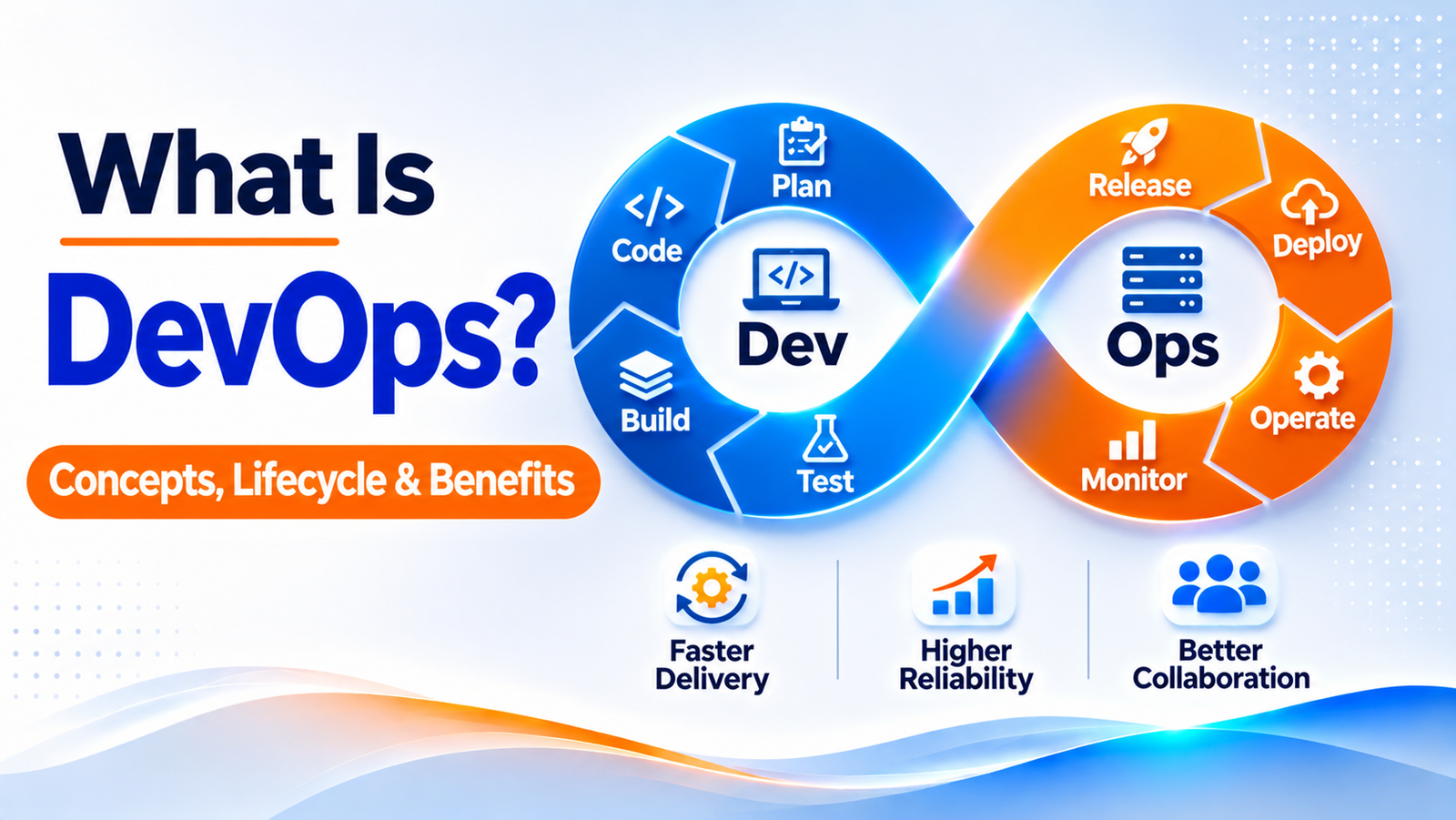
The DevOps lifecycle describes the recurring activities involved in planning, developing, testing, releasing, operating, and improving software.
It is often illustrated as a continuous loop because feedback from running applications informs future development.
Let's understand the lifecycle using an online shopping application.
Stage 1: Plan
The team decides what to build or improve.
Activities include:
- Understanding business requirements.
- Discussing user needs.
- Defining tasks.
- Prioritizing features.
Example: The team plans to add an order-tracking feature.
Stage 2: Code
Developers write and maintain the application code.
Activities include:
- Writing new features.
- Fixing bugs.
- Reviewing code.
- Managing changes through version control.
Example: Developers create the code required to display shipment status.
Stage 3: Build
The source code is prepared into an application artifact that can be tested or deployed.
Depending on the technology, this may involve:
- Compiling code.
- Installing dependencies.
- Packaging application files.
- Creating container images.
Example: A pipeline builds a container image for the updated shopping application.
Stage 4: Test
The application is checked for defects and unexpected behavior.
Common tests include:
- Unit Tests: Check individual functions or components.
- Integration Tests: Check how components work together.
- Security Checks: Identify certain vulnerabilities or unsafe configurations.
- Application Tests: Verify expected features and behavior.
Example: Automated tests confirm that customers can view their order status.
Stage 5: Release
The team prepares an approved software version for deployment.
Activities may include:
- Reviewing test results.
- Approving a release.
- Assigning a version.
- Preparing release information.
Example: Version 2.1 of the shopping application is approved for production.
Stage 6: Deploy
The application is delivered to its target environment.
Activities may include:
- Updating application services.
- Applying configuration changes.
- Running deployment checks.
- Verifying application health.
Example: The updated application becomes available to customers.
Stage 7: Operate
Operations activities keep the application running.
These may include:
- Managing infrastructure.
- Maintaining application availability.
- Handling incidents.
- Applying updates.
- Managing capacity.
Example: The team ensures the shopping application remains available during busy periods.
Stage 8: Monitor
The team observes the application's health and performance.
Monitoring may include:
- Metrics: CPU usage, memory usage, and response times.
- Logs: Records of application and system events.
- Traces: Information showing how requests move through services.
- Alerts: Notifications when defined conditions occur.
Example: Monitoring detects that the order-tracking feature is responding slowly.
The team investigates the issue and uses the findings to plan improvements.
Simple DevOps Lifecycle
           PLAN
             |
             v
            CODE
             |
             v
           BUILD
             |
             v
            TEST
             |
             v
          RELEASE
             |
             v
           DEPLOY
             |
             v
          OPERATE
             |
             v
          MONITOR
             |
             v
       FEEDBACK & PLAN
             |
             +----> Repeat
The lifecycle is a learning model, not a mandatory sequence followed identically by every organization. Many activities overlap or run continuously.
Remember: DevOps is a continuous process. Software delivery does not end when an application is deployed.
5. What Is CI/CD in DevOps?
CI/CD is an important part of modern DevOps workflows.
It helps teams integrate code changes, perform checks, and prepare or automate software releases.
What Is Continuous Integration (CI)?
Continuous Integration (CI) is the practice of frequently integrating code changes into a shared codebase and running automated checks.
Simple CI Example
Imagine three developers working on the same application.
Each developer makes changes to different features.
When a developer submits a change:
- The code is added to the shared repository.
- A CI workflow starts.
- The application is built.
- Automated tests run.
- The team receives the results.
If a test fails, developers can investigate before the change progresses further.
What Is Continuous Delivery?
Continuous Delivery keeps software in a state where it can be released through a reliable, repeatable process.
The final production release may still require manual approval.
What Is Continuous Deployment?
Continuous Deployment goes a step further.
Changes that pass the required automated checks are released to production automatically, without a separate manual approval for each release.
Quick Comparison
| Practice | Main Purpose |
|---|---|
| Continuous Integration | Integrate and check code changes frequently |
| Continuous Delivery | Keep software ready for reliable release |
| Continuous Deployment | Automatically release qualifying changes to production |
Simple CI/CD Workflow
     Developer Changes Code
              |
              v
        Git Repository
              |
              v
         CI Pipeline
              |
        +-----+-----+
        |           |
        v           v
      Build        Test
        |           |
        +-----+-----+
              |
              v
       Release Checks
              |
              v
        Deployment
              |
              v
       Running Application
Key Point: CI/CD reduces repetitive delivery work and provides faster feedback, but automated checks and deployment safeguards must be designed carefully.
6. What Is Infrastructure as Code (IaC)?
Infrastructure as Code (IaC) is the practice of defining and managing infrastructure through machine-readable configuration files or code.
Instead of creating every resource manually, teams describe the desired infrastructure in files.
Example: Creating a Cloud Server
Without IaC, an engineer might:
- Open a cloud management console.
- Select a server configuration.
- Configure networking.
- Set security rules.
- Create the server manually.
With IaC, the engineer can define the required resources in configuration files and use an appropriate tool to create or update them.
Benefits of IaC
- Consistency: Repeatable infrastructure configurations.
- Version Control: Infrastructure changes can be reviewed and tracked.
- Automation: Resources can be created through automated workflows.
- Reusability: Configurations can be reused across environments.
- Documentation: Configuration files describe intended infrastructure.
Common IaC Tools
Examples include:
- Terraform.
- OpenTofu.
- AWS CloudFormation.
- Pulumi.
Configuration management tools such as Ansible are also commonly used in infrastructure automation.
Remember: IaC improves repeatability, but configuration errors can still cause problems. Reviews, testing, and access controls remain important.
7. What Tools Are Commonly Used in DevOps?
DevOps is not defined by a particular tool.
However, tools help teams implement automation, collaboration, and monitoring.
Version Control
Used to manage and track changes to source code.
Examples:
- Git.
- GitHub.
- GitLab.
CI/CD Automation
Used to build, test, and deploy software.
Examples:
- Jenkins.
- GitHub Actions.
- GitLab CI/CD.
Containers
Used to package applications with their required dependencies and configuration.
Example:
- Docker.
Container Orchestration
Used to deploy and manage containerized workloads.
Example:
- Kubernetes.
Infrastructure as Code
Used to define and manage infrastructure through code.
Examples:
- Terraform.
- OpenTofu.
Configuration Management
Used to automate system configuration and operational tasks.
Example:
- Ansible.
Monitoring and Observability
Used to understand application and infrastructure behavior.
Examples:
- Prometheus.
- Grafana.
Quick Reference
| Category | Example Tools | Main Purpose |
|---|---|---|
| Version Control | Git, GitHub | Manage code changes |
| CI/CD | Jenkins, GitHub Actions | Automate builds, tests, and delivery |
| Containers | Docker | Package applications |
| Orchestration | Kubernetes | Manage containerized workloads |
| Infrastructure as Code | Terraform, OpenTofu | Define infrastructure |
| Configuration Management | Ansible | Automate system configuration |
| Monitoring | Prometheus, Grafana | Observe system performance |
Beginner Tip: You do not need to learn every DevOps tool immediately. Start by understanding the problem each tool solves.
8. Real-World Example: DevOps in an Online Shopping Application
Let's connect the concepts through one practical example.
Imagine an e-commerce company wants to add a discount feature.
Step 1: Plan the Feature
The team defines the requirements.
For example:
- Customers should see eligible discounts.
- Discounts should be calculated correctly.
- Existing checkout functionality should continue working.
Step 2: Develop the Code
Developers create the discount functionality and commit their changes to a Git repository.
Step 3: Run Automated Checks
A CI pipeline:
- Builds the application.
- Runs unit tests.
- Checks integration behavior.
- Performs configured quality and security checks.
Step 4: Prepare the Release
After the required checks pass, the team prepares an approved application version.
Step 5: Deploy the Application
A deployment workflow updates the application environment.
The team may use gradual rollout techniques to reduce deployment risk.
Step 6: Monitor the Results
After deployment, the team checks:
- Application response times.
- Checkout success rates.
- Error rates.
- Relevant logs and alerts.
Step 7: Improve the Application
If the team discovers a problem, it can investigate, fix the code, and repeat the delivery process.
What Did DevOps Improve?
The process helped the team:
- Coordinate development and operations.
- Automate repeatable checks.
- Follow a consistent release workflow.
- Detect problems earlier.
- Use production feedback to improve future changes.
Key Point: DevOps is valuable because it improves the entire software delivery process, not just the deployment step.
9. What Are the Benefits of DevOps?
Organizations adopt DevOps practices for several reasons.
1. Faster Software Delivery
Automated workflows can reduce the time needed to build, test, and release software.
Example: A team replaces a lengthy manual release procedure with a repeatable pipeline.
2. Improved Collaboration
Development, operations, and other teams work toward shared outcomes.
Example: Engineers discuss deployment and reliability requirements during development.
3. More Consistent Releases
Automated checks and repeatable deployment processes can reduce manual mistakes.
Example: Every application update passes through the same defined testing process.
4. Faster Feedback
Developers can discover certain problems earlier.
Example: A CI pipeline reports a failed test shortly after a code change is submitted.
5. Better Operational Visibility
Monitoring and observability tools help teams understand application behavior.
Example: Engineers receive alerts when response times exceed defined thresholds.
6. Easier Infrastructure Management
Infrastructure automation can reduce repetitive configuration work.
Example: A team uses reviewed IaC configurations to create similar environments.
7. Continuous Improvement
Teams use feedback from incidents, testing, and operations to improve delivery practices.
Important: DevOps does not guarantee these benefits automatically. Outcomes depend on team practices, automation quality, system design, and organizational support.
10. What Are the Challenges of Implementing DevOps?
DevOps adoption also comes with challenges.
1. Cultural Change
Teams may be accustomed to working independently.
Improving collaboration requires shared goals, communication, and management support.
2. Tool Complexity
Modern DevOps environments may involve several tools.
Managing too many tools without clear requirements can increase complexity.
3. Automation Risks
An incorrectly configured automated process can cause failures quickly.
Teams need appropriate testing, reviews, permissions, and recovery procedures.
4. Security Requirements
Fast software delivery must still include security controls.
Common practices include:
- Reviewing code changes.
- Protecting credentials.
- Scanning dependencies.
- Managing access permissions.
- Checking infrastructure configurations.
5. Skills Development
DevOps work often involves knowledge of:
- Linux.
- Networking.
- Scripting.
- Version control.
- CI/CD.
- Cloud computing.
- Monitoring.
Learning these technologies takes time and practice.
Remember: DevOps is a long-term improvement approach, not a one-time installation of tools.
11. DevOps vs Agile: What Is the Difference?
DevOps and Agile are related, but they focus on different aspects of software work.
Agile
Agile emphasizes iterative development, collaboration, customer feedback, and adapting to change.
For example, a team may develop a product in short iterations and review feedback regularly.
DevOps
DevOps emphasizes collaboration and improvement across software development, delivery, and operations.
For example, a team may automate testing and deployment while monitoring application reliability.
Quick Comparison
| Agile | DevOps |
|---|---|
| Emphasizes iterative development and feedback | Emphasizes software delivery and operational collaboration |
| Helps teams adapt to changing requirements | Helps teams improve delivery and reliability |
| Often uses short development iterations | Often uses continuous automation and feedback |
Important: Agile and DevOps are not competing approaches. Organizations can use both together.
12. How Can Beginners Start Learning DevOps?
DevOps involves several technologies, but beginners can learn them step by step.
Step 1: Learn IT Fundamentals
Start with:
- Computers and servers.
- Operating systems.
- Basic networking.
- Files and permissions.
- How websites and applications work.
Step 2: Learn Linux
Practice:
- Navigating directories.
- Creating and editing files.
- Managing permissions.
- Installing packages.
- Viewing processes and logs.
Step 3: Learn Git
Understand:
- Repositories.
- Commits.
- Branches.
- Pull requests or merge requests.
- Version history.
Step 4: Learn Basic Scripting
Explore:
- Bash.
- Python.
- Variables and conditions.
- Simple automation scripts.
Step 5: Understand CI/CD
Learn how to:
- Trigger workflows.
- Build applications.
- Run automated tests.
- Store build artifacts.
- Deploy approved versions.
Step 6: Learn Containers
Start with Docker fundamentals:
- Images.
- Containers.
- Dockerfiles.
- Container networking.
- Basic image building.
Step 7: Explore Cloud and Infrastructure Automation
Learn:
- Cloud virtual machines.
- Cloud networking.
- Storage.
- Infrastructure as Code.
- Basic security controls.
Step 8: Explore Monitoring and Kubernetes
After building strong fundamentals, explore:
- Application metrics.
- Logs and alerts.
- Prometheus and Grafana.
- Kubernetes basics.
A Beginner DevOps Project
Build a simple automated delivery workflow.
For example:
- Create a basic website.
- Store the code in GitHub.
- Add a simple automated test or validation check.
- Create a GitHub Actions workflow.
- Run the workflow when code changes.
- Deploy the website to a suitable test environment.
- Verify that the website works.
Beginner Tip: Start with Git, Linux, and one simple CI/CD workflow before learning complex orchestration platforms.
13. Frequently Asked Questions (FAQs)
Q1. What is DevOps in simple words?
DevOps is an approach that helps development and operations teams collaborate, automate software delivery, and improve application reliability.
Q2. Is DevOps a tool or a technology?
DevOps is not one tool. It combines culture, practices, processes, and technologies used to improve software development and operations.
Q3. What are the main stages of the DevOps lifecycle?
A commonly taught lifecycle includes:
- Plan.
- Code.
- Build.
- Test.
- Release.
- Deploy.
- Operate.
- Monitor.
These stages form a continuous improvement cycle.
Q4. What is CI/CD in DevOps?
CI/CD refers to practices that help teams integrate, test, prepare, and deliver software changes through repeatable workflows.
Q5. Is Docker required for DevOps?
No. Docker is a popular container technology, but DevOps practices can be implemented without Docker.
Q6. Is Kubernetes necessary to learn DevOps?
Not initially. Kubernetes is useful for managing containerized applications, but beginners should first understand Linux, Git, networking, CI/CD, and containers.
Q7. Does DevOps require programming?
Basic scripting and the ability to understand application code are valuable for many DevOps roles.
The required programming depth depends on the job and organization.
Q8. Can beginners start learning DevOps?
Yes. Beginners can start with IT fundamentals and gradually build practical skills through small automation and deployment projects.
14. Key Takeaways
Here are the most important points from this guide:
- DevOps combines culture, practices, and tools to improve software development and operations.
- Collaboration and shared responsibility are central DevOps principles.
- Automation helps reduce repetitive manual tasks and improve consistency.
- The DevOps lifecycle connects planning, coding, building, testing, releasing, deploying, operating, and monitoring.
- CI/CD helps teams integrate changes and deliver software through repeatable workflows.
- Infrastructure as Code helps manage infrastructure using version-controlled configurations.
- Monitoring and feedback support reliability and continuous improvement.
- DevOps tools include Git, Jenkins, GitHub Actions, Docker, Kubernetes, Terraform, and monitoring systems.
- Beginners should build strong fundamentals before moving into advanced DevOps technologies.
15. What Should You Learn Next?
Now that you understand DevOps, continue with these topics:
-
What Is Git? A Beginner's Guide to Version Control
- Learn how developers track and manage code changes.
-
What Is CI/CD? Continuous Integration and Delivery Explained
- Understand how automated pipelines help deliver software.
-
What Is Docker? Containers Explained for Beginners
- Learn how applications are packaged and run in containers.
-
What Is Infrastructure as Code (IaC)? A Beginner's Guide
- Explore how infrastructure can be managed using configuration files and automation.
-
What Is Kubernetes? A Simple Beginner's Guide
- Discover how containerized applications are deployed and managed at scale.
Continue Learning with Vyomanant Academy
DevOps is an important part of modern software development, cloud infrastructure, and IT operations.
Vyomanant Academy helps learners explore practical, industry-relevant technologies, including:
- Linux and System Administration.
- Git and Version Control.
- Cloud Computing.
- DevOps and CI/CD.
- Docker and Kubernetes.
- Infrastructure Automation.
- Monitoring and Observability.
Build your skills step by step, from fundamental concepts to practical workflows.
Learn. Build. Grow.
CONTINUE EXPLORING
Recommended next

What Is Artificial Intelligence? A Simple Beginner's Guide
Learn what Artificial Intelligence (AI) means, how it works, and where we use it in everyday life, with simple examples that anyone can understand.
View resource
What Is Machine Learning? A Simple Beginner's Guide
Discover what Machine Learning is, how computers learn from data, and how predictions work. Explore key ML concepts, learning types, and real-world examples in this beginner-friendly guide.
View resource
What Is Information Technology? A Beginner's Guide
Discover what Information Technology (IT) is, how it works, its main components, everyday applications, and how beginners can start learning IT.
View resource