
RESOURCES
Software Development Life Cycle (SDLC): A Beginner's Guide
Learn what the Software Development Life Cycle (SDLC) is, its seven main phases, popular SDLC models, real-world examples, and how teams build reliable software.
Vyomanant Academy
Build these skills hands-on
Explore structured, practical technology programs from Vyomanant Academy.
Explore CoursesOn this page
Understanding the Software Development Life Cycle (SDLC)
Introduction
Have you ever wondered how a mobile banking app, online shopping website, or video conferencing platform is built?
A software application does not usually begin with developers immediately writing code.
Before development starts, teams need to understand what users need, decide how the system should work, plan the technical solution, and identify potential challenges.
After the software is built, it must be tested, released, monitored, and improved.
This organized process is known as the Software Development Life Cycle (SDLC).
SDLC provides a structured approach to developing software, helping teams coordinate their work, manage risks, and deliver applications that meet user requirements.
In this beginner-friendly guide, we will explore the meaning of SDLC, its main phases, popular development models, and how it works through a practical example.
1. What Is the Software Development Life Cycle (SDLC)?
The Software Development Life Cycle (SDLC) is a structured process used to plan, design, develop, test, deploy, and maintain software applications.
It helps development teams organize the activities required to transform an idea into a working software product.
SDLC in Simple Words
SDLC is the step-by-step process teams follow to create, deliver, and improve software.
For example, imagine a company wants to develop an online appointment-booking application.
The team needs to answer several questions:
- Requirements: What should users be able to do?
- Design: How should the application look and function?
- Development: How will programmers build it?
- Testing: How will the team check whether it works?
- Deployment: How will users access it?
- Maintenance: How will bugs and future improvements be handled?
SDLC provides a framework for organizing these activities.
Is SDLC Only for Large Companies?
No.
SDLC principles can be useful for:
- Individual developers.
- Small development teams.
- Startups.
- Large organizations.
- Open-source projects.
- Enterprise software development.
The amount of documentation and formality may differ depending on the project's complexity and risk.
Key Point: SDLC is not a programming language or software tool. It is a structured approach to managing software development.
2. Why Is SDLC Important?
Imagine a development team starts building an application without clearly understanding what customers need.
After several weeks, the team discovers that an essential feature was misunderstood.
Developers must now modify the application, redesign parts of the system, and repeat testing.
A structured development process can help identify these problems earlier.
Main Benefits of SDLC
- Clear Requirements: Teams establish what the software should accomplish.
- Better Planning: Work, resources, and responsibilities can be organized.
- Improved Collaboration: Developers, designers, testers, and stakeholders coordinate their activities.
- Quality Assurance: Testing is included in the development process.
- Risk Management: Potential technical and business problems can be identified.
- Cost Control: Early planning and feedback may reduce unnecessary rework.
- Maintainability: Teams consider how the software will be supported after release.
Does SDLC Guarantee Project Success?
No.
Even well-planned projects can encounter changing requirements, technical difficulties, budget constraints, or unexpected defects.
SDLC helps teams manage these challenges, but the quality of execution still matters.
3. Understanding SDLC with a Real-Life Analogy
Imagine constructing a house.
You would not normally begin by placing bricks randomly and deciding the floor plan afterward.
Instead, the project follows an organized process.
House Construction vs Software Development
| Building a House | Building Software |
|---|---|
| Understand the owner's needs | Gather software requirements |
| Estimate budget and resources | Plan the project |
| Create architectural drawings | Design the software |
| Construct the building | Write application code |
| Inspect electrical and plumbing systems | Test software functionality |
| Hand over the completed house | Deploy the application |
| Repair and maintain the property | Maintain and improve the software |
The analogy demonstrates why planning, design, construction, and verification are important.
Where the Analogy Ends
Software is easier to modify than a physical building in many situations.
Development teams may revisit requirements, redesign features, and release small improvements repeatedly.
Modern software development is therefore often iterative rather than strictly sequential.
Remember: SDLC provides structure, but teams can adapt how they perform its activities.
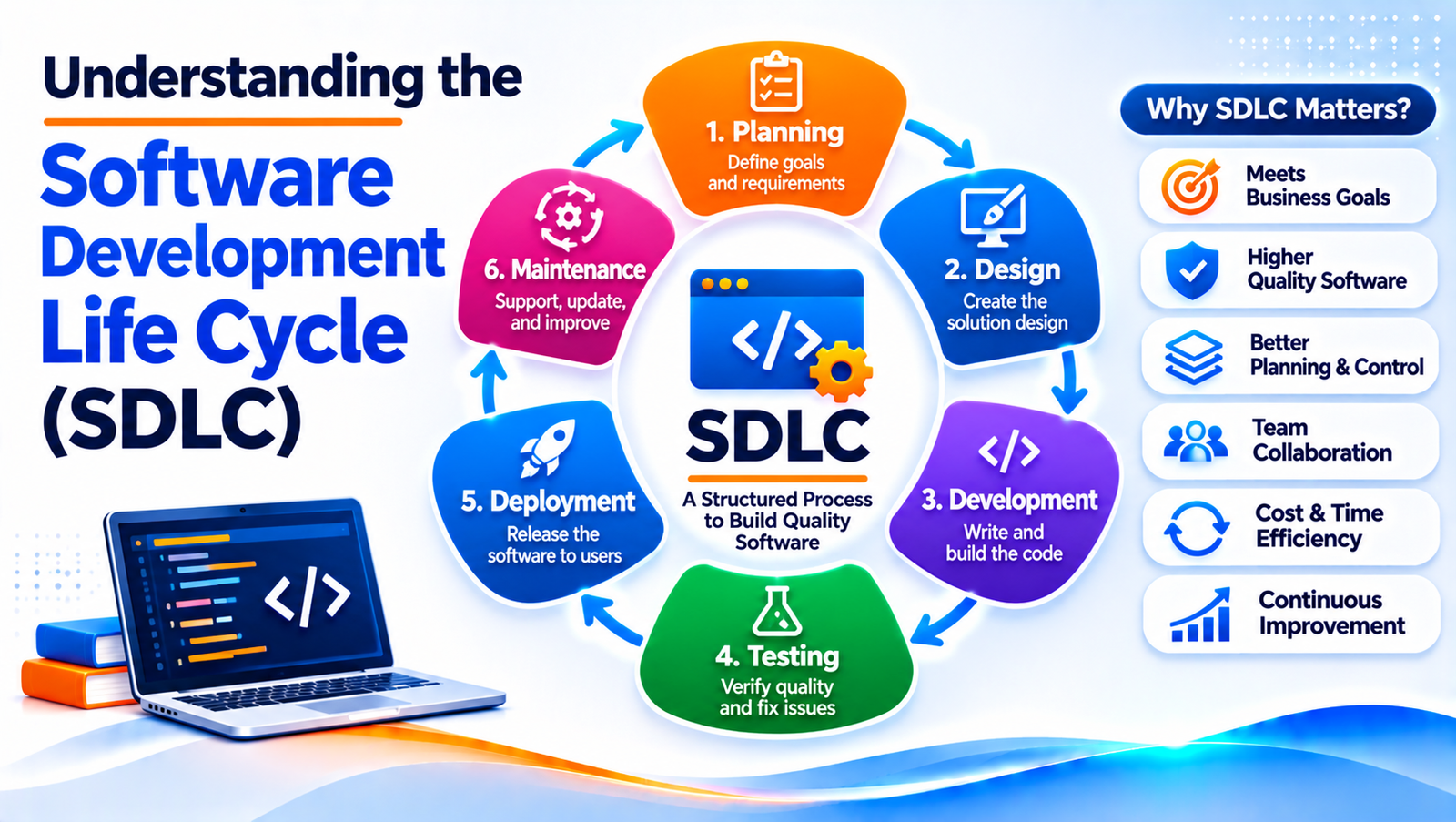
4. What Are the Seven Phases of SDLC?
SDLC is commonly explained through seven phases:
- Planning.
- Requirements Analysis.
- System Design.
- Development.
- Testing.
- Deployment.
- Maintenance.
Different organizations may combine or rename phases. The seven-phase structure is a useful learning model rather than a universal standard.
SDLC Process Flow
        1. Planning
             |
             v
    2. Requirements Analysis
             |
             v
       3. System Design
             |
             v
        4. Development
             |
             v
          5. Testing
             |
             v
        6. Deployment
             |
             v
        7. Maintenance
             |
             +----> Feedback and Improvements
                         |
                         v
                 Earlier SDLC Phases
Let's understand each phase using one consistent example: an online appointment-booking application.
5. Phase 1: Planning
Planning is the starting point of the software development process.
The team evaluates the project idea and decides whether it is practical and worthwhile.
Important Planning Questions
- What problem will the software solve?
- Who will use the application?
- What is the expected budget?
- How much time might development require?
- What technical resources are available?
- What risks could affect the project?
- How will success be measured?
Example: Appointment-Booking Application
A business wants customers to book appointments online instead of calling its office.
During planning, the team identifies:
- Goal: Allow customers to book available appointment slots.
- Users: Customers and service administrators.
- Main Benefit: Reduce manual scheduling work.
- Constraints: Budget, delivery schedule, and available staff.
- Risks: Scheduling conflicts, privacy concerns, and service availability.
Common Planning Deliverables
Depending on the project, planning may produce:
- Project objectives.
- Initial scope.
- Budget estimates.
- Resource plans.
- Risk assessments.
- High-level timelines.
Key Point: Planning establishes the purpose, feasibility, and boundaries of the project.
6. Phase 2: Requirements Analysis
Requirements analysis identifies what the software must do and what conditions it must satisfy.
The team works with stakeholders to understand user expectations.
Functional Requirements
Functional requirements describe the actions and features a system must support.
For the appointment-booking application:
- Customers can create accounts.
- Customers can view available appointment slots.
- Customers can book appointments.
- Customers can cancel bookings.
- Administrators can manage availability.
- The system can send booking confirmations.
Non-Functional Requirements
Non-functional requirements describe quality attributes or constraints.
Examples include:
- Performance: Booking pages should respond within an agreed time under specified conditions.
- Security: Customer information must be protected.
- Availability: The application should meet its defined uptime target.
- Usability: Users should be able to complete bookings easily.
- Scalability: The system should handle expected growth in traffic.
- Accessibility: The interface should support applicable accessibility requirements.
What Is an SRS Document?
An SRS (Software Requirements Specification) is a document that records software requirements.
It may describe:
- System functionality.
- User roles.
- Business rules.
- External integrations.
- Quality requirements.
- Constraints.
- Acceptance criteria.
Not every project uses a formal SRS document. Agile teams may capture requirements through user stories, acceptance criteria, and other artifacts.
Example User Story
As a customer, I want to see available appointment slots so that I can choose a convenient booking time.
Key Point: Requirements analysis defines what the system must achieve before the team decides exactly how to implement it.
7. Phase 3: System Design
During the design phase, the team determines how the application will be structured.
The design translates requirements into a technical solution.
What Does System Design Include?
- Architecture: How major application components interact.
- Database Design: How information will be stored and organized.
- User Interface Design: How users interact with the application.
- API Design: How different systems exchange information.
- Security Design: How access and data protection will work.
- Infrastructure Design: Where and how the application will run.
Example: Appointment-Booking Architecture
The team might design three main components:
          Customer
             |
             v
       Web or Mobile App
             |
             v
       Application Server
             |
             v
           Database
The customer interacts with the application.
The application server processes booking requests.
The database stores customer details, appointment slots, and booking records.
This is a simplified architecture. A production application may require additional services and security controls.
High-Level Design vs Low-Level Design
| High-Level Design (HLD) | Low-Level Design (LLD) |
|---|---|
| Describes major system components | Describes detailed component behavior |
| Focuses on overall architecture | Focuses on implementation details |
| Defines system interactions | Defines classes, functions, schemas, and interfaces |
| Helps teams understand the complete solution | Helps developers implement individual components |
Key Point: Good system design helps teams build software that is understandable, maintainable, and appropriate for its requirements.
8. Phase 4: Development
Development is the phase where programmers implement the application.
They translate the design and requirements into working code.
Common Development Activities
- Writing application code.
- Creating database structures.
- Building user interfaces.
- Implementing APIs.
- Integrating external services.
- Writing unit tests.
- Reviewing code changes.
- Managing source code with Git.
Example: Booking Functionality
A developer may implement logic such as:
Customer Selects Appointment
             |
             v
     Check Slot Availability
             |
       +-----+-----+
       |           |
       v           v
    Available   Unavailable
       |           |
       v           v
  Create Booking  Show Message
       |
       v
  Send Confirmation
A real implementation must also handle simultaneous booking attempts, authorization, failures, and other important conditions.
Why Is Version Control Important?
Version control systems such as Git help teams:
- Track code changes.
- Collaborate on features.
- Review proposed modifications.
- Maintain development branches.
- Investigate previous versions.
Does Testing Begin Only After Development?
No.
Developers often write and run tests while implementing features.
In iterative approaches, development and testing happen repeatedly.
Remember: Development involves more than writing code. It also includes collaboration, review, and continuous verification.
9. Phase 5: Testing
Testing evaluates whether the software behaves as expected and helps identify defects.
A successful test does not prove that software contains no bugs, but testing reduces uncertainty about its quality.
Common Types of Software Testing
| Testing Type | Purpose |
|---|---|
| Unit Testing | Checks individual functions or components |
| Integration Testing | Checks interactions between components |
| System Testing | Evaluates the complete integrated application |
| User Acceptance Testing (UAT) | Checks whether the system meets user or business expectations |
| Performance Testing | Evaluates behavior under defined workloads |
| Security Testing | Investigates selected security weaknesses |
| Regression Testing | Checks whether changes have broken existing behavior |
Example: Testing an Appointment Booking
The team might test these scenarios:
- A customer books an available slot.
- The system prevents duplicate bookings.
- A customer cancels an existing appointment.
- An administrator updates availability.
- Unauthorized users cannot view another customer's private information.
- The system behaves appropriately when the database is temporarily unavailable.
What Is a Test Case?
A test case describes a scenario, the actions to perform, and the expected result.
Example:
| Field | Example |
|---|---|
| Test Case | Book an available appointment |
| Precondition | Customer is signed in |
| Action | Select an available slot and confirm |
| Expected Result | Booking is created and confirmation appears |
| Actual Result | Recorded during execution |
| Status | Pass or Fail |
Manual vs Automated Testing
- Manual Testing: A person performs test steps and evaluates results.
- Automated Testing: Software tools execute defined tests and compare results against expected conditions.
Both can be useful depending on the type of testing.
Key Point: Testing provides evidence about software quality and helps teams identify problems before and after release.
10. Phase 6: Deployment
Deployment makes the application available in its intended environment.
For a web application, this may involve installing and running software on cloud or on-premises infrastructure.
Common Deployment Environments
- Development: Used for active development.
- Testing or QA: Used to verify software behavior.
- Staging: Used for pre-production checks.
- Production: Used by actual customers.
Example Deployment Process
       Approved Application
                |
                v
          Build Artifact
                |
                v
        Staging Environment
                |
                v
         Release Verification
                |
                v
       Production Deployment
                |
                v
        Monitor Application
What Is CI/CD?
Continuous Integration (CI) helps teams frequently integrate code changes and run automated checks.
Continuous Delivery helps keep software in a releasable state through automated workflows.
Continuous Deployment goes further by automatically releasing qualifying changes to production.
CI/CD can make deployment more consistent and repeatable.
Common Deployment Strategies
- Rolling Deployment: Updates application instances gradually.
- Blue-Green Deployment: Switches traffic between two prepared environments.
- Canary Deployment: Releases a change to a limited group before wider rollout.
The appropriate strategy depends on the application's architecture, risk, and operational requirements.
Key Point: Deployment is not simply uploading code. It includes release preparation, configuration, verification, and operational monitoring.
11. Phase 7: Maintenance
Software development does not end when an application is released.
Users may report bugs, business requirements may change, and new security vulnerabilities may be discovered.
Maintenance keeps software useful and reliable over time.
Common Types of Software Maintenance
- Corrective Maintenance: Fixing defects.
- Adaptive Maintenance: Updating software to work with changing environments.
- Perfective Maintenance: Improving features, usability, or performance.
- Preventive Maintenance: Reducing future problems through improvements such as refactoring or updating dependencies.
Example
After launching the appointment-booking application, users request the ability to reschedule appointments.
The team must:
- Understand the new requirement.
- Design the rescheduling feature.
- Implement the changes.
- Test the new functionality.
- Deploy the update.
- Monitor the result.
The SDLC begins another cycle.
Why Is Maintenance Important?
Without maintenance, software may become:
- Less secure.
- Incompatible with updated systems.
- Difficult to use.
- Unreliable.
- Expensive to modify.
Remember: Maintenance is an ongoing part of software development, not an optional activity after launch.
12. Popular SDLC Models Explained
The seven SDLC phases describe important activities.
An SDLC model describes how those activities are organized and repeated.
Different models are suitable for different project situations.
1. Waterfall Model
The Waterfall model organizes work into sequential phases.
Requirements
     |
     v
   Design
     |
     v
 Development
     |
     v
   Testing
     |
     v
 Deployment
Advantages:
- Clear phase boundaries.
- Straightforward documentation and milestones.
- Useful when requirements are stable and well understood.
Limitations:
- Changes can be costly when discovered late.
- Working software may become available relatively late.
- Feedback may arrive after significant work is complete.
Example: A project with tightly defined requirements and formal approval stages may use a Waterfall-style process.
2. Agile Development
Agile is an approach guided by iterative delivery, collaboration, and responsiveness to change.
Teams typically divide work into smaller increments and gather feedback frequently.
Plan -> Build -> Test -> Review
  ^                       |
  |_______________________|
Advantages:
- Frequent feedback.
- Adaptability to changing needs.
- Incremental delivery of working features.
Limitations:
- Requires active stakeholder collaboration.
- Poorly managed priorities can create confusion.
- Long-term planning still requires attention.
Example: A product team releases booking, cancellation, and notification features in successive increments.
Agile is broader than any single framework; Scrum and Kanban are commonly associated approaches.
3. Spiral Model
The Spiral model organizes development into repeated cycles with explicit attention to risk.
Each cycle may involve:
- Defining objectives.
- Identifying and analyzing risks.
- Developing and evaluating a solution.
- Planning the next cycle.
Advantages:
- Strong focus on risk.
- Supports iterative refinement.
- Useful for complex or uncertain projects.
Limitations:
- Can require substantial expertise.
- Risk analysis may increase cost and complexity.
4. V-Model
The V-Model emphasizes relationships between development activities and corresponding testing activities.
For example:
- Requirements are associated with acceptance testing.
- System design is associated with system testing.
- Component design is associated with integration and unit testing.
Advantages:
- Encourages early test planning.
- Supports traceability between requirements and tests.
- Useful when verification requirements are strict.
Limitations:
- Can be less flexible when requirements change frequently.
- Formal documentation and coordination may be substantial.
5. Iterative and Incremental Model
In an iterative approach, teams improve a solution through repeated cycles.
In an incremental approach, they deliver functionality in smaller parts.
These approaches are often combined.
Example:
- Increment 1: Customer registration.
- Increment 2: Appointment booking.
- Increment 3: Cancellation and rescheduling.
- Increment 4: Notifications and reporting.
Each increment can be designed, developed, and tested before the next.
SDLC Model Comparison
| Model | Main Characteristic | Often Suitable When |
|---|---|---|
| Waterfall | Sequential phases | Requirements are stable |
| Agile | Iterative collaboration and feedback | Requirements may evolve |
| Spiral | Risk-driven cycles | Risks and uncertainty are significant |
| V-Model | Development and testing alignment | Formal verification is important |
| Iterative/Incremental | Repeated improvement and staged delivery | Value can be delivered in smaller parts |
Key Point: There is no single SDLC model that is best for every software project.
13. SDLC vs Agile vs DevOps: What Is the Difference?
These terms are related but describe different things.
SDLC
SDLC describes the activities involved in creating and maintaining software.
Agile
Agile provides principles for iterative development, collaboration, and responding to change.
DevOps
DevOps emphasizes collaboration, automation, and feedback across software development and operations.
Quick Comparison
| Concept | Main Focus |
|---|---|
| SDLC | Complete software development lifecycle |
| Agile | Iterative development and adaptability |
| DevOps | Efficient software delivery and operations |
| DevSecOps | Integrating security throughout delivery and operations |
Can They Work Together?
Yes.
A team can:
- Use SDLC activities to organize its work.
- Follow Agile principles to deliver small improvements.
- Use DevOps practices to automate testing and deployment.
- Apply DevSecOps practices to integrate security throughout the workflow.
These concepts complement one another rather than necessarily competing.
14. Who Is Involved in the SDLC?
Software development is a collaborative process.
Different professionals contribute at different stages.
| Role | Typical Responsibility |
|---|---|
| Product Manager or Product Owner | Defines priorities and product goals |
| Business Analyst | Helps gather and clarify requirements |
| UI/UX Designer | Designs user interfaces and experiences |
| Software Architect | Defines major technical structures |
| Software Developer | Implements application functionality |
| QA Engineer | Designs and performs quality checks |
| DevOps Engineer | Supports delivery automation and operations |
| Security Engineer | Helps assess and address security risks |
| Project Manager | Coordinates schedules, resources, and delivery |
| Operations or Support Team | Helps maintain and support the application |
In smaller teams, one person may perform several roles.
Responsibilities also vary across organizations.
Remember: SDLC works best when the people responsible for requirements, implementation, quality, and operations communicate effectively.
15. Common SDLC Documents and Deliverables
Different projects produce different artifacts.
Some commonly used examples include:
- Project Plan: Objectives, scope, schedule, and resources.
- Requirements Specification: Functional and non-functional requirements.
- User Stories: User needs expressed from a user's perspective.
- Architecture Diagrams: Major components and relationships.
- Design Specifications: Implementation details and interfaces.
- Source Code: Application implementation.
- Test Cases and Reports: Testing scenarios and outcomes.
- Deployment Documentation: Release and environment instructions.
- User Documentation: Instructions for application users.
- Maintenance Records: Bugs, updates, and operational changes.
Not every team needs a separate document for every item.
Documentation should support communication, traceability, and maintainability without becoming unnecessary overhead.
16. How Does Security Fit into SDLC?
Security should be considered throughout the software lifecycle.
This approach is often called a Secure Software Development Life Cycle (SSDLC).
Security Activities by Phase
| SDLC Phase | Example Security Activity |
|---|---|
| Planning | Identify security objectives and risks |
| Requirements | Define authentication and privacy requirements |
| Design | Perform threat modeling |
| Development | Follow secure coding practices |
| Testing | Conduct security testing |
| Deployment | Verify secure configuration |
| Maintenance | Monitor vulnerabilities and apply updates |
Example
For an appointment-booking application, security requirements might include:
- Customers can access only their own bookings.
- Passwords are handled using appropriate secure methods.
- Communication uses encrypted connections.
- Administrators have restricted permissions.
- Sensitive data is protected according to applicable requirements.
Security is more effective when these needs are considered during design and development rather than only after deployment.
17. Practical Beginner Exercise: Plan a Simple Application Using SDLC
You can practice SDLC without writing any code.
Let's plan a personal task-management application.
Step 1: Define the Goal
Write a short project statement:
Build a simple application that allows users to create, complete, and delete personal tasks.
Step 2: Identify Requirements
List the essential features:
- Add a task.
- View existing tasks.
- Mark a task as completed.
- Delete a task.
Also identify quality requirements, such as an easy-to-use interface.
Step 3: Create a Basic Design
Sketch three areas:
+----------------------------+
|       My Task List         |
+----------------------------+
| [Enter a new task       ]  |
| [Add Task]                 |
+----------------------------+
| [ ] Read Chapter 1         |
| [x] Complete Exercise      |
| [ ] Review Notes           |
+----------------------------+
Decide how task information will be stored.
Step 4: Break Development into Tasks
Create a checklist:
- Build the task-entry interface.
- Implement adding tasks.
- Display the task list.
- Implement completion status.
- Implement deletion.
- Save tasks between sessions.
Step 5: Define Test Cases
| Scenario | Expected Result |
|---|---|
| Add a valid task | Task appears in the list |
| Submit an empty task | Application handles the input appropriately |
| Mark a task complete | Task status changes |
| Delete a task | Task disappears from the list |
| Reload the application | Saved tasks remain available |
Step 6: Plan Deployment
Decide whether the application will run:
- Locally on a computer.
- On a simple web hosting platform.
- On a cloud service.
Step 7: Plan Maintenance
Identify possible future improvements:
- Task categories.
- Due dates.
- Search.
- Reminders.
- Multiple user accounts.
What Did You Learn?
This exercise demonstrates how an idea becomes a structured development plan.
You practiced defining requirements, designing features, organizing work, preparing tests, and thinking about deployment and maintenance.
Beginner Tip: A small, clearly scoped project is an excellent way to understand SDLC before working on complex applications.
18. Common SDLC Mistakes to Avoid
1. Starting Development Without Clear Requirements
Problem: The team builds features that do not meet user needs.
Better Approach: Clarify goals and acceptance criteria before implementation.
2. Ignoring User Feedback
Problem: The application may be technically functional but difficult to use.
Better Approach: Gather feedback during development.
3. Leaving Testing Until the End
Problem: Defects accumulate and become harder to investigate.
Better Approach: Test throughout development.
4. Overlooking Security
Problem: Vulnerabilities may be introduced into the application or deployment environment.
Better Approach: Integrate security into requirements, design, coding, testing, and operations.
5. Poor Communication
Problem: Different team members make conflicting assumptions.
Better Approach: Use clear documentation, reviews, and regular communication.
6. Ignoring Maintenance
Problem: Software becomes outdated or unreliable after release.
Better Approach: Plan for monitoring, updates, and support.
7. Choosing a Process That Does Not Fit the Project
Problem: The team follows unnecessary procedures or lacks sufficient controls.
Better Approach: Adapt SDLC practices to the project's scale, complexity, and risks.
19. Frequently Asked Questions (FAQs)
Q1. What is SDLC in simple words?
SDLC is the structured process used to plan, design, develop, test, deploy, and maintain software.
Q2. What does SDLC stand for?
SDLC stands for Software Development Life Cycle.
Q3. What are the seven phases of SDLC?
A common seven-phase model includes planning, requirements analysis, system design, development, testing, deployment, and maintenance.
Q4. What is the purpose of SDLC?
SDLC helps teams organize software development, improve communication, manage risks, and deliver software that meets requirements.
Q5. Is Agile an SDLC model?
Agile is a broader set of principles and approaches for iterative software development. Agile methods can be used to organize SDLC activities.
Q6. What is the difference between SDLC and STLC?
SDLC covers the overall software development lifecycle.
STLC (Software Testing Life Cycle) focuses specifically on activities involved in software testing, such as test planning, test design, execution, and closure.
Q7. Is SDLC only for software developers?
No. Business analysts, designers, testers, security specialists, operations teams, and project managers also participate.
Q8. Does SDLC end after deployment?
No. Maintenance, monitoring, updates, and new requirements continue throughout the software's useful life.
Q9. Which SDLC model is best?
The best approach depends on project requirements, uncertainty, risks, team structure, and delivery needs.
Q10. Can beginners learn SDLC without coding?
Yes. Beginners can understand SDLC by planning a small application, defining requirements, sketching designs, and preparing test cases.
20. Key Takeaways
- SDLC stands for Software Development Life Cycle.
- SDLC provides structure for building and maintaining software.
- Planning establishes project goals and feasibility.
- Requirements Analysis defines what the software must do.
- System Design determines how the application will work.
- Development transforms designs into working code.
- Testing evaluates functionality, quality, and selected risks.
- Deployment makes software available to intended users.
- Maintenance keeps software reliable and useful.
- Waterfall, Agile, Spiral, V-Model, and iterative approaches organize development activities differently.
- DevOps and DevSecOps complement SDLC through delivery automation, collaboration, and integrated security.
- The right process depends on the project's needs, complexity, and risks.
21. What Should You Learn Next?
Continue building your software development knowledge with these resources:
-
What Is Agile Software Development? Principles and Examples
- Understand iterative development and continuous feedback.
-
Scrum vs Kanban: What's the Difference?
- Explore two common approaches to organizing development work.
-
What Is Git? Understanding Version Control
- Learn how developers track and collaborate on code changes.
-
What Is CI/CD? Explained with a Real-Life Analogy
- Discover how teams automate building, testing, and releasing software.
-
What Is DevSecOps? Security in DevOps
- Learn how security practices are integrated throughout software delivery.
Continue Learning with Vyomanant Academy
Understanding SDLC is an important foundation for anyone exploring software development, quality assurance, project management, DevOps, or cybersecurity.
Vyomanant Academy helps beginners and working professionals develop practical technology skills in areas such as:
- Programming Fundamentals.
- Software Development Concepts.
- Git and Version Control.
- Software Testing.
- Agile and DevOps.
- CI/CD Automation.
- Cloud Computing.
- Application Security.
Start by planning a simple application, practice each SDLC phase, and gradually build confidence in delivering real software projects.
Learn. Build. Grow.
CONTINUE EXPLORING
Recommended next

What Is Artificial Intelligence? A Simple Beginner's Guide
Learn what Artificial Intelligence (AI) means, how it works, and where we use it in everyday life, with simple examples that anyone can understand.
View resource
What Is Machine Learning? A Simple Beginner's Guide
Discover what Machine Learning is, how computers learn from data, and how predictions work. Explore key ML concepts, learning types, and real-world examples in this beginner-friendly guide.
View resource
What Is Information Technology? A Beginner's Guide
Discover what Information Technology (IT) is, how it works, its main components, everyday applications, and how beginners can start learning IT.
View resource