
RESOURCES
Monolithic vs Microservices Architecture: Differences, Benefits & Examples
Understand monolithic vs microservices architecture with real-world examples, diagrams, benefits, challenges, and guidance on choosing the right software architecture.
Vyomanant Academy
Build these skills hands-on
Explore structured, practical technology programs from Vyomanant Academy.
Explore CoursesOn this page
Monolithic vs Microservices Architecture: Differences, Benefits & Examples
Introduction
Imagine you're building an online shopping application.
Customers should be able to browse products, create accounts, place orders, make payments, and track deliveries.
You have two broad options for organizing the software.
You could build these features as parts of one application, deployed together.
Or you could divide the system into multiple smaller services, each responsible for a particular business capability.
These approaches are commonly called monolithic architecture and microservices architecture.
Both can support successful software products. The difference lies in how the system is organized, deployed, maintained, and scaled.
In this guide, you'll learn how each architecture works, understand the differences through practical examples, and discover when each approach makes sense.
1. What Is Software Architecture?
Software architecture describes the major structural decisions involved in building a software system.
It defines how important components are organized, how they communicate, and how the system meets requirements such as performance, reliability, security, and maintainability.
For example, an online shopping application might include:
- User Management: Customer accounts and authentication.
- Product Catalog: Product information and availability.
- Order Management: Shopping carts and purchases.
- Payment Processing: Payment requests and transaction status.
- Notifications: Order confirmations and updates.
These capabilities exist regardless of whether the application uses a monolithic or microservices architecture.
The architectural decision concerns how those capabilities are grouped and operated.
Key Point: Architecture is not simply about choosing a programming language. It is about organizing a system to meet technical and business needs.
2. What Is Monolithic Architecture?
A monolithic architecture is an approach in which the main application components are built and deployed as a single unit.
The application may contain many modules, classes, and functions, but they are packaged into one deployable application.
Simple Definition
A monolith is an application whose main features are deployed together as one unit.
Consider an online store with user accounts, products, orders, and payments.
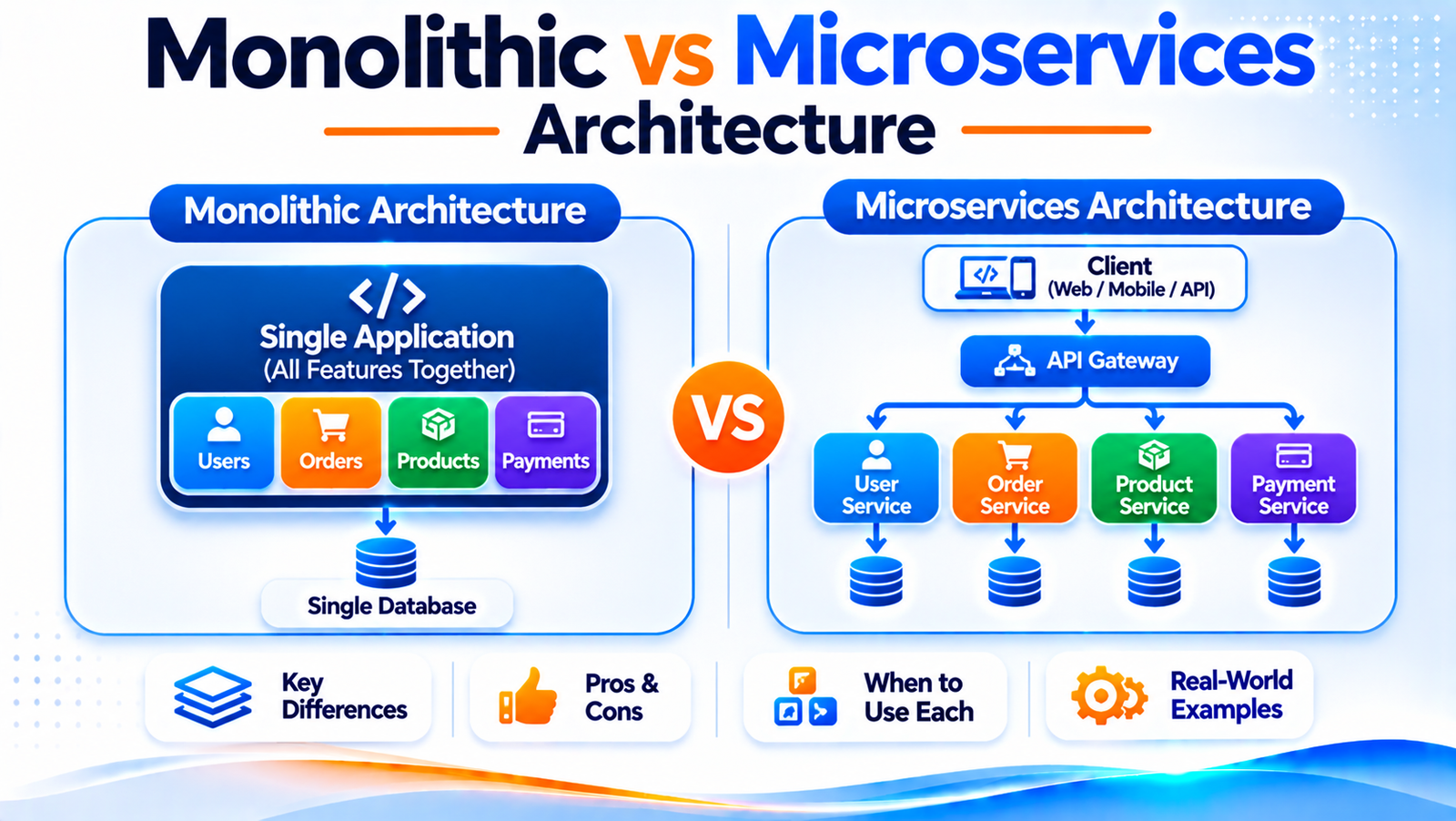
Monolithic Architecture Diagram
                Customers
                    |
                    v
             Web / Mobile App
                    |
                    v
          +---------------------+
          | Monolithic Backend  |
          |---------------------|
          | User Management     |
          | Product Catalog     |
          | Order Management    |
          | Payment Logic       |
          | Notifications       |
          +---------------------+
                    |
                    v
               Database
The backend's features are organized inside one application.
When a new backend version is released, the application is typically built and deployed as one unit.
Does a Monolith Have to Be Poorly Organized?
No.
A monolithic application can have well-defined internal modules, clear interfaces, and strong separation of responsibilities.
This is sometimes called a modular monolith.
The important distinction is that its modules are still deployed together.
3. How Does a Monolithic Application Work?
Let's follow a customer placing an order.
Example: Buying a Product
- A customer selects a product.
- The application receives the order request.
- The order module checks the product information.
- The payment module initiates payment processing.
- The order module records the result.
- The notification module prepares a confirmation.
These activities happen within the same deployed backend, although it may still communicate with external systems such as a payment provider.
A Simplified Request Flow
Customer
   |
   v
Monolithic Application
   |
   +--> Product Module
   |
   +--> Order Module
   |
   +--> Payment Module
   |
   +--> Notification Module
   |
   v
Response
Modules can often communicate through in-process function or method calls.
This reduces the need for network communication between internal business components.
Important Distinction
A monolith does not necessarily run on only one server.
You can deploy multiple copies of the same monolithic application behind a load balancer to handle more traffic.
Remember: Monolithic describes the application's deployment structure, not the number of servers running it.
4. Advantages of Monolithic Architecture
1. Simpler Initial Development
For small projects, a single application can be easier to set up and understand.
Developers can work within one main codebase and deployment structure.
2. Straightforward Local Testing
Many application features can be run together in one local environment.
This can simplify development and debugging.
3. Easier Initial Deployment
A monolith commonly has fewer independently deployed application components.
Teams may not need complex service orchestration or inter-service networking.
4. Efficient Internal Communication
Modules can communicate within the same process without making network requests for every interaction.
5. Simpler Data Transactions
When modules share a relational database, operations involving multiple modules may use a single database transaction.
6. Lower Operational Complexity
A small monolithic system may require fewer monitoring, networking, and deployment components than a distributed microservices system.
Key Point: A well-designed monolith can be an efficient and practical choice, particularly for smaller teams and applications.
5. Challenges of Monolithic Architecture
Monolithic systems can become difficult to manage as their size and complexity increase.
1. Larger Codebases
As more features are added, understanding dependencies and maintaining clear module boundaries can become harder.
2. Coordinated Deployments
A small change to one module may require rebuilding and deploying the complete application.
3. Shared Scaling
Teams often scale the whole application rather than scaling one business capability independently.
For example, increased demand for product searches may require more application instances even when order processing is relatively quiet.
4. Technology Coordination
Different modules typically share major runtime and deployment choices.
Adopting a new framework may require changes across the application.
5. Risk of Tight Coupling
Without good design, modules can become highly dependent on one another.
This makes changes harder to implement safely.
6. Larger Failure Impact
An unhandled failure or resource exhaustion problem in one component may affect the entire application process.
However, good isolation, error handling, and multiple application instances can reduce this risk.
Remember: These are potential challenges, not inevitable outcomes. Modular design and disciplined engineering can keep monoliths maintainable for many years.
6. What Is Microservices Architecture?
Microservices architecture organizes an application as a collection of smaller, independently deployable services.
Each service is responsible for a defined business capability.
Services communicate through network-based interfaces such as APIs or messaging systems.
Simple Definition
Microservices architecture divides an application into separate services that can be developed, deployed, and scaled independently.
For our online shopping application, the system might include:
- User Service.
- Product Service.
- Order Service.
- Payment Service.
- Notification Service.
Microservices Architecture Diagram
                  Customers
                      |
                      v
               API Gateway
                      |
        +-------------+-------------+
        |             |             |
        v             v             v
   User Service  Product Service  Order Service
        |             |             |
        v             v             v
     User DB       Product DB     Order DB
                                      |
                            +---------+---------+
                            |                   |
                            v                   v
                      Payment Service    Notification Service
                            |                   |
                            v                   v
                       Payment Data        Notification Data
This is one possible architecture, not a mandatory design.
An API gateway is common but optional. Services can also communicate directly or through a message broker.
What Makes a Service Independent?
A well-designed microservice typically has:
- A clearly defined responsibility.
- An explicit interface.
- Its own deployment lifecycle.
- Ownership of its business logic and data.
- Limited coupling to other services.
Independence is a design goal rather than an automatic result of splitting an application.
7. How Do Microservices Work?
Let's revisit the online shopping example.
Example: Placing an Order
- A customer submits an order.
- The request reaches the order service.
- The order service checks relevant product or inventory information.
- The order service coordinates payment processing.
- The order is recorded.
- A notification event may be published.
- The notification service sends an order confirmation.
Unlike a monolith, these capabilities may run as separate applications communicating over a network.
Common Communication Methods
Synchronous Communication
One service sends a request and waits for a response.
For example:
Order Service
      |
      | HTTP Request
      v
Payment Service
      |
      | HTTP Response
      v
Order Service
REST APIs and gRPC are common technologies for synchronous service communication.
Asynchronous Communication
A service publishes a message or event without requiring the receiving service to respond immediately.
For example:
Order Service
      |
      v
 "Order Created" Event
      |
      v
   Message Broker
      |
      v
Notification Service
      |
      v
 Send Confirmation
Messaging technologies can include RabbitMQ, Apache Kafka, and managed cloud messaging services.
Why Does Communication Design Matter?
Network communication introduces new concerns:
- Request timeouts.
- Temporary service failures.
- Retries.
- Duplicate messages.
- Message ordering.
- Authentication between services.
- Data consistency.
Key Point: Microservices provide deployment independence but introduce distributed-system complexity.
8. Understanding the Difference with a Real-Life Analogy
Imagine two ways of organizing a restaurant business.
Monolithic Approach: One Integrated Kitchen
A single kitchen team handles food preparation, cooking, packaging, and order coordination.
Everyone works in one shared environment.
Communication can be direct, and operations are closely coordinated.
Microservices Approach: Specialized Kitchens
A larger food operation has separate kitchens for different categories.
Each kitchen manages its own work, and a coordination system routes orders between them.
One kitchen can expand its capacity without necessarily expanding every other kitchen.
Comparison
| Restaurant Analogy | Software Architecture |
|---|---|
| One integrated kitchen | Monolithic application |
| Kitchen workstations | Internal modules |
| Specialized kitchens | Microservices |
| Order coordination system | APIs or messaging |
| Expanding one kitchen | Scaling one service |
| Coordination delays | Network and distributed-system overhead |
Where the Analogy Ends
Microservices are not necessarily physically separated, and monoliths are not necessarily limited to one machine.
Both approaches can use multiple servers and cloud infrastructure.
Remember: The core difference is independent service boundaries and deployment, not physical location.
9. Monolithic vs Microservices: Key Differences
| Feature | Monolithic Architecture | Microservices Architecture |
|---|---|---|
| Application Structure | One deployable application | Multiple independently deployable services |
| Code Organization | Modules within an application | Services with defined boundaries |
| Deployment | Usually deploys as one unit | Services can deploy independently |
| Scaling | Often scales the complete application | Can scale individual services |
| Communication | Commonly in-process calls | Network APIs and messaging |
| Data Management | Often a shared database | Preferably service-owned data |
| Initial Complexity | Usually lower | Usually higher |
| Operational Complexity | Often simpler initially | Requires distributed-system management |
| Testing | Integrated testing can be simpler | Cross-service testing is more complex |
| Technology Choices | Common technology stack | Potentially different stacks per service |
| Failure Handling | Process-level failures can affect the application | Failures can propagate through service dependencies |
| Team Independence | Depends on module boundaries | Can support independently owned services |
| Best Fit | Often small to medium or tightly integrated systems | Often larger systems needing independent delivery and scaling |
Neither approach automatically provides better security, performance, or reliability.
Those outcomes depend on implementation and operational practices.
10. How Does Database Management Differ?
Database design is one of the most important architectural differences.
Database in a Monolith
A monolithic application commonly uses one shared database.
Different modules may read and write related tables.
    Monolithic Application
              |
              v
       Shared Database
       +-------------+
       | Users       |
       | Products    |
       | Orders      |
       | Payments    |
       +-------------+
This can make certain queries and transactions straightforward.
However, poorly controlled database access can increase coupling between modules.
Databases in Microservices
Microservices generally aim for data ownership by service.
User Service ------> User Database

Product Service ---> Product Database

Order Service -----> Order Database

Payment Service ---> Payment Database
Each service controls access to its data through its interface.
Does Every Microservice Need a Separate Database Server?
No.
Separate data ownership does not necessarily require separate physical database servers.
Services may use different schemas, databases, or storage technologies, provided ownership boundaries are maintained.
What Is the Main Challenge?
Suppose an order requires updating both order information and payment status.
In a monolith using one database, some related changes may be handled in a single transaction.
Across independent microservices, coordinating updates is more difficult.
Teams may use patterns such as:
- Eventual Consistency: Different services become consistent over time.
- Saga Pattern: A sequence of local transactions with recovery or compensating actions.
- Transactional Outbox: A pattern for reliably coordinating database updates with event publication.
These patterns require careful design.
Key Point: Microservices encourage independent data ownership, but maintaining consistency across services becomes more complex.
11. Scaling: Monolith vs Microservices
Scalability refers to a system's ability to handle changing workloads.
Scaling a Monolith
Imagine an online store experiences heavy traffic during a major sale.
The team can run additional copies of the complete application.
             Load Balancer
             /     |     \
            v      v      v
         App 1   App 2   App 3
            \      |      /
             Shared Database
This is called horizontal scaling.
A monolith can also be scaled vertically by increasing the resources available to an instance.
Scaling Microservices
Suppose product browsing receives far more traffic than payment processing.
With microservices, the team may add more product-service instances without increasing every other service.
            API Gateway
                 |
        +--------+--------+
        |                 |
        v                 v
  Product Service     Payment Service
   /     |     \             |
  v      v      v            v
 P1     P2     P3           Pay1
Does Microservices Always Scale Better?
No.
Performance depends on workload, database design, network communication, caching, and resource management.
A monolith may outperform a poorly designed microservices system, especially when many services must communicate for a single request.
Remember: Independent scaling is a potential advantage of microservices, not a guarantee of higher performance.
12. Deployment and DevOps Considerations
Deployment is another major difference.
Deploying a Monolith
A typical process might be:
Code Changes
     |
     v
Build Application
     |
     v
Run Tests
     |
     v
Deploy Application
Even when one module changes, the entire deployable application is typically released.
Deploying Microservices
Each service may have its own delivery pipeline.
User Service ----> CI/CD ----> Deployment

Product Service -> CI/CD ----> Deployment

Order Service ---> CI/CD ----> Deployment
This allows teams to release individual services independently, provided interfaces remain compatible.
Technologies Commonly Used
Microservices environments often use:
- Git: Source control.
- CI/CD Tools: Automated building, testing, and deployment.
- Docker: Application container packaging.
- Kubernetes: Container orchestration.
- API Gateways: Routing and selected cross-cutting functions.
- Monitoring Tools: Metrics, logs, and tracing.
Is Kubernetes Required for Microservices?
No.
Microservices can run on virtual machines, managed application platforms, serverless services, or containers without Kubernetes.
Kubernetes is one possible operational platform, not a requirement of the architecture.
Key Point: Microservices can improve release independence but often require more sophisticated automation and operational practices.
13. Reliability and Fault Isolation
Reliability means a system continues to provide its intended functionality under expected operating conditions.
Monolithic Reliability
A serious failure in one module may affect the entire application process.
However, techniques such as redundancy, process isolation where applicable, timeouts for external calls, and careful resource management can improve resilience.
Microservices Reliability
Microservices can isolate certain failures.
For example, if the notification service becomes unavailable, the application might still accept orders and send confirmations later.
However, this requires intentional design.
Common Resilience Techniques
- Timeouts: Stop waiting indefinitely for another service.
- Retries: Repeat selected failed operations when safe.
- Circuit Breakers: Temporarily stop requests to an unhealthy dependency.
- Bulkheads: Limit how failures or resource exhaustion spread.
- Queues: Buffer work for asynchronous processing.
- Health Checks: Detect unhealthy service instances.
- Graceful Degradation: Preserve essential features when nonessential components fail.
Important Warning
Retries must be designed carefully.
For example, repeating a payment request without safeguards could produce duplicate operations.
Techniques such as idempotency keys can help make repeated requests safer.
Remember: Microservices make some forms of isolation possible, but network dependencies can also create cascading failures.
14. Security: Monolithic vs Microservices
Both architectures require strong security practices.
Security in a Monolith
Security concerns may include:
- Authentication and authorization.
- Secure session handling.
- Input validation.
- Dependency vulnerabilities.
- Database access controls.
- Secure deployment configuration.
Security in Microservices
Microservices share these concerns but also introduce additional requirements:
- Service-to-service authentication.
- API authorization.
- Network security.
- Secure communication.
- Distributed secret management.
- Consistent security policies.
- Monitoring across service boundaries.
Example
An order service must not assume that every request from another service is automatically authorized.
The system should verify identity and permissions using an appropriate security design.
Does Microservices Automatically Improve Security?
No.
More services can mean more network interfaces and configuration points that require protection.
Security depends on design, implementation, testing, and operations.
15. What Is a Modular Monolith?
A modular monolith combines a single deployment unit with well-defined internal module boundaries.
It can be a useful middle ground.
Example
         Modular Monolith
+--------------------------------+
|                                |
|  +----------+  +------------+  |
|  | Users    |  | Products   |  |
|  | Module   |  | Module     |  |
|  +----------+  +------------+  |
|                                |
|  +----------+  +------------+  |
|  | Orders   |  | Payments   |  |
|  | Module   |  | Module     |  |
|  +----------+  +------------+  |
|                                |
+--------------------------------+
          Single Deployment
Modules communicate through defined interfaces rather than freely accessing one another's internal implementation.
Benefits
- Simpler deployment than a distributed microservices system.
- Clearer internal organization than a tightly coupled monolith.
- Easier local development for many projects.
- Potential to extract selected modules into services later.
Important Limitation
A modular monolith does not provide independent deployment of individual modules.
Key Point: A modular monolith is often worth considering before adopting microservices.
16. When Should You Choose Monolithic Architecture?
A monolith may be appropriate when:
- The Application Is New: Requirements and business boundaries are still evolving.
- The Team Is Small: A single deployment workflow is easier to manage.
- The Product Is Relatively Simple: Distributed services would add unnecessary complexity.
- Rapid Prototyping Matters: The team needs to validate an idea quickly.
- Operational Resources Are Limited: The organization does not yet have extensive distributed-system expertise.
- Features Are Closely Related: Strong transactional consistency and straightforward communication are important.
Example
A small business launches its first online appointment-booking application.
It has a small engineering team and a manageable number of features.
A well-designed modular monolith may be a practical starting point.
17. When Should You Choose Microservices Architecture?
Microservices may be appropriate when:
- The System Is Large: Business capabilities can be divided into meaningful boundaries.
- Teams Need Independent Delivery: Different teams release features on different schedules.
- Workloads Differ Significantly: Some services require much more capacity than others.
- Operational Maturity Is Strong: The organization can manage distributed monitoring, networking, and deployment.
- Service Ownership Is Clear: Teams can maintain services and their interfaces independently.
- Independent Technology Choices Are Valuable: Certain services have specialized technical requirements.
Example
A large digital commerce platform has separate teams responsible for search, payments, inventory, and order processing.
These capabilities have different workloads and release schedules.
Microservices may help the organization manage them independently.
Important Consideration
Company size alone does not determine the correct architecture.
A large organization can successfully operate a monolith, and a smaller organization may have legitimate reasons to use microservices.
18. How Do You Move from a Monolith to Microservices?
Some organizations begin with a monolith and later extract selected capabilities into independent services.
This is called monolith decomposition.
A Gradual Migration Approach
- Understand the Existing System: Identify major business capabilities and dependencies.
- Improve Module Boundaries: Reduce unnecessary coupling inside the monolith.
- Choose a Suitable Capability: Select a feature with clear ownership and manageable dependencies.
- Define an Interface: Establish how other components will communicate with it.
- Extract the Service: Move selected functionality into an independently deployed application.
- Plan Data Ownership: Decide how the service will manage its data.
- Test Integration: Verify interactions and failure handling.
- Monitor the Result: Evaluate reliability, performance, and operational cost.
- Repeat Carefully: Extract additional capabilities only when the benefits justify the complexity.
What Is the Strangler Fig Pattern?
The Strangler Fig Pattern is an incremental migration approach.
New or extracted services gradually handle selected functionality while the existing monolith continues serving the remaining features.
             Client Requests
                    |
                    v
               Router / API
                /        \
               v          v
        New Service    Existing Monolith
               |          |
               +----------+
Over time, more functionality may move to services.
Why Avoid Rewriting Everything at Once?
A complete rewrite can introduce substantial risks:
- Loss of existing behavior.
- Unexpected integration problems.
- Long delivery delays.
- Increased operational cost.
- Difficult data migration.
Gradual migration allows teams to learn and validate each change.
Remember: Moving to microservices is not automatically an upgrade. It should solve a specific business or engineering problem.
19. Common Microservices Mistakes
1. Creating Too Many Small Services
A microservice should represent a meaningful capability, not simply one function or database table.
Better Approach: Define boundaries around business responsibilities.
2. Sharing One Database Without Clear Ownership
If services freely modify one another's tables, they become tightly coupled.
Better Approach: Establish explicit data ownership and service interfaces.
3. Ignoring Network Failures
Remote service calls can fail or time out.
Better Approach: Design for timeouts, retries, and graceful degradation.
4. Making Every Request Cross Many Services
Excessive synchronous communication can increase latency and failure risk.
Better Approach: Review service boundaries and communication patterns.
5. Skipping Observability
Troubleshooting becomes difficult when requests pass through multiple services.
Better Approach: Use centralized logs, metrics, and distributed tracing.
6. Adopting Microservices Without a Clear Need
A distributed system can introduce more complexity than the application requires.
Better Approach: Begin with actual requirements and operational constraints.
20. Practical Beginner Exercise: Design Both Architectures
You can understand the difference without writing code.
Let's design a simple online learning platform.
The application needs:
- User registration.
- Course catalog.
- Course enrollment.
- Payment processing.
- Email notifications.
Step 1: Design a Monolith
Place all capabilities inside one backend application.
          Learning Platform
                 |
                 v
        Monolithic Backend
        +------------------+
        | Users            |
        | Courses          |
        | Enrollment       |
        | Payments         |
        | Notifications    |
        +------------------+
                 |
                 v
              Database
Ask yourself:
- How would you deploy a change to enrollment?
- How would you test interactions between modules?
- What happens if course browsing traffic increases?
Step 2: Design Microservices
Separate capabilities into services.
           Learning Platform
                   |
                   v
              API Gateway
                   |
       +-----------+-----------+
       |           |           |
       v           v           v
   User Service  Course      Enrollment
                 Service      Service
                                |
                         +------+------+
                         |             |
                         v             v
                     Payment       Notification
                     Service         Service
Each service should have a clear responsibility and appropriate data ownership.
Step 3: Compare the Designs
| Question | Monolith | Microservices |
|---|---|---|
| How many application deployment units? | One | Multiple |
| Can enrollment deploy independently? | Usually no | Potentially yes |
| Is local setup simpler? | Often yes | Often more complex |
| Can course browsing scale independently? | Usually not at module level | Potentially yes |
| Are network failures between business modules a major concern? | Usually less so | Yes |
Step 4: Make an Architectural Decision
Suppose the learning platform has:
- Three developers.
- A small initial audience.
- Limited infrastructure resources.
- Frequently changing product requirements.
A modular monolith is likely a sensible starting point.
Now suppose the platform grows to support millions of users, several independent engineering teams, and significantly different workloads.
Microservices may become worth evaluating.
What Did You Learn?
You practiced identifying business capabilities, drawing architectural boundaries, comparing trade-offs, and choosing an approach based on requirements.
Beginner Tip: The goal of software architecture is not to use the most advanced-looking technology. It is to choose a design that solves the problem effectively.
21. Frequently Asked Questions (FAQs)
Q1. What is monolithic architecture in simple words?
Monolithic architecture organizes an application's main components into one deployable unit.
Q2. What is microservices architecture?
Microservices architecture divides an application into independently deployable services responsible for defined business capabilities.
Q3. What is the main difference between monolithic and microservices architecture?
A monolith deploys its main application components together, while microservices allow separate services to be deployed and scaled independently.
Q4. Is monolithic architecture outdated?
No. Monolithic applications remain useful and can be reliable, scalable, and maintainable when designed well.
Q5. Are microservices always better than monoliths?
No. Microservices introduce network, deployment, data consistency, and operational complexity.
Q6. Can a monolith run on multiple servers?
Yes. Multiple instances of a monolithic application can run behind a load balancer.
Q7. Do microservices require Docker or Kubernetes?
No. Containers and Kubernetes are common options but are not required.
Q8. Can microservices use the same programming language?
Yes. Different services can use the same language or different languages depending on requirements.
Q9. What is a modular monolith?
A modular monolith is a single deployable application organized into well-defined internal modules.
Q10. Which architecture should beginners learn first?
Beginners often benefit from learning monolithic and modular application design first, then exploring microservices after understanding APIs, databases, networking, and deployment.
22. Key Takeaways
- Software architecture defines how major application components are organized and interact.
- Monolithic architecture packages the main application features into one deployment unit.
- Microservices architecture divides an application into independently deployable services.
- Monoliths can scale horizontally by running multiple application instances.
- Microservices can scale individual capabilities when designed appropriately.
- Monoliths often have lower initial operational complexity.
- Microservices introduce distributed-system challenges, including network failures and data consistency.
- Database ownership is an important microservices design principle.
- Docker and Kubernetes are optional technologies, not definitions of microservices.
- A modular monolith can provide strong internal structure without distributed deployment complexity.
- Architecture decisions should reflect actual requirements, team capabilities, and operational constraints.
23. What Should You Learn Next?
Continue your software architecture learning journey with these related topics:
-
What Is an API? REST APIs Explained for Beginners
- Understand how applications and services communicate.
-
What Is an API Gateway? Architecture and Benefits
- Learn how requests can be routed and managed across services.
-
What Is Docker? Containers Explained Simply
- Explore how applications can be packaged for consistent deployment.
-
What Is Kubernetes? Architecture & Basics
- Understand how containerized workloads are deployed and managed.
-
What Is System Design? A Beginner's Guide
- Learn how to evaluate scalability, reliability, databases, and architecture decisions.
Continue Learning with Vyomanant Academy
Understanding software architecture is valuable for developers, cloud engineers, DevOps professionals, and anyone interested in building scalable applications.
Vyomanant Academy helps learners build practical knowledge in areas such as:
- Software Development Fundamentals.
- Backend Development and APIs.
- Database Concepts.
- Cloud Computing.
- Docker and Kubernetes.
- DevOps and CI/CD.
- System Design and Software Architecture.
Start with a simple application, understand its components, and gradually explore how architectural decisions affect deployment, scalability, and maintenance.
Learn. Build. Grow.
CONTINUE EXPLORING
Recommended next

What Is Artificial Intelligence? A Simple Beginner's Guide
Learn what Artificial Intelligence (AI) means, how it works, and where we use it in everyday life, with simple examples that anyone can understand.
View resource
What Is Machine Learning? A Simple Beginner's Guide
Discover what Machine Learning is, how computers learn from data, and how predictions work. Explore key ML concepts, learning types, and real-world examples in this beginner-friendly guide.
View resource
What Is Information Technology? A Beginner's Guide
Discover what Information Technology (IT) is, how it works, its main components, everyday applications, and how beginners can start learning IT.
View resource