
RESOURCES
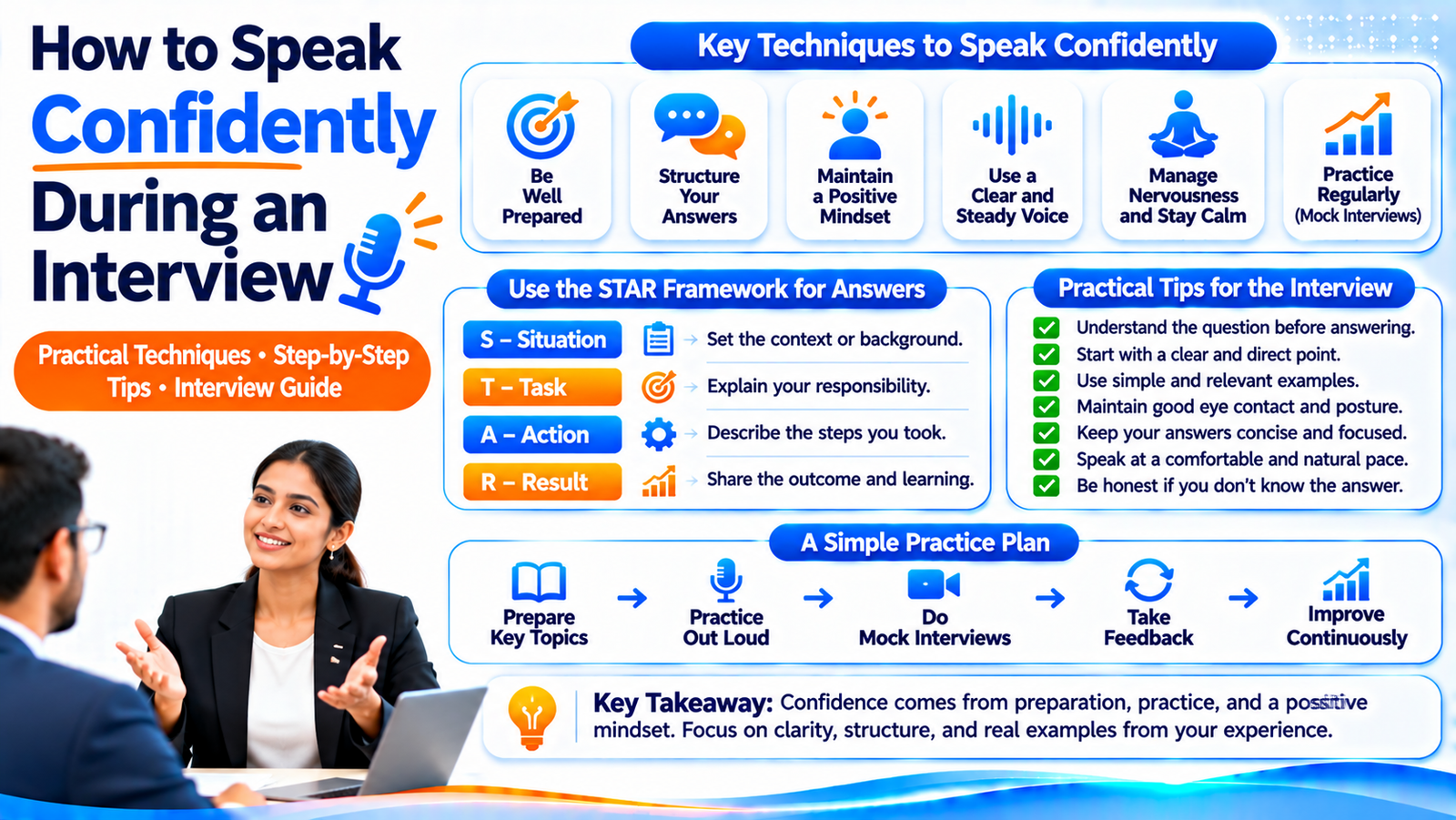
How to Speak Confidently During an Interview: Practical Techniques, Examples & Exercises
Learn how to speak confidently in IT interviews with practical techniques to manage nervousness, answer clearly, handle difficult questions, and practice effectively.
Vyomanant Academy
Build these skills hands-on
Explore structured, practical technology programs from Vyomanant Academy.
Explore CoursesOn this page
How to Speak Confidently During an Interview: A Practical Guide for IT Professionals
Introduction
Imagine sitting in an interview for a software developer, DevOps engineer, cloud engineer, cybersecurity analyst, or IT support role.
The interviewer asks a question you have prepared for.
You know the answer, but suddenly your thoughts become difficult to organize. You speak faster than usual, forget an important point, or worry about making a mistake.
This experience is common, especially when an interview feels important.
Speaking confidently does not mean feeling completely free from nervousness. It means communicating effectively even when you feel nervous.
Interview confidence is not simply a personality trait. You can develop it through preparation, repeated practice, and practical speaking techniques.
In this guide, you will learn:
- What confident speaking actually means.
- Why nervousness affects interview performance.
- How to prepare your mind and voice before an interview.
- How to speak calmly and clearly.
- What to do when you forget an answer.
- How to handle difficult technical and HR questions.
- How to develop confidence through mock interviews.
- How to follow a seven-day interview confidence practice plan.
Whether you are preparing for your first IT interview or your next career opportunity, these techniques can help you present your skills more effectively.
1. What Does Speaking Confidently Mean?
Confident speaking means expressing your ideas in a clear, organized, and professional way.
It does not require:
- Speaking loudly.
- Using complicated English.
- Having a particular accent.
- Answering every question immediately.
- Knowing every technical concept.
- Maintaining constant eye contact.
- Hiding all signs of nervousness.
A confident candidate can listen carefully, take a moment to think, give an appropriate answer, and acknowledge uncertainty.
Confident vs Unconfident Communication
| Situation | Less Effective Response | More Confident Response |
|---|---|---|
| Starting an answer | "Actually, I don't know how to explain..." | "There are two main points to consider." |
| Explaining a concept | Long, unrelated explanation | Direct definition followed by an example |
| Forgetting a detail | Panicking or inventing information | Pausing and explaining what is known |
| Receiving a difficult question | Immediately giving up | Clarifying the problem and reasoning through it |
| Discussing a project | Listing tools without context | Explaining the goal, contribution, and result |
| Making a mistake | Becoming defensive | Correcting the answer calmly |
Important Principle
Confidence is not the absence of mistakes. It is the ability to respond constructively when mistakes happen.
2. Why Do People Feel Nervous During Interviews?
An interview involves uncertainty and evaluation.
You may worry about:
- Forgetting technical concepts.
- Speaking in English.
- Being judged by the interviewer.
- Making grammatical mistakes.
- Not knowing an answer.
- Explaining a project incorrectly.
- Competing with other candidates.
- Missing an important career opportunity.
When people feel anxious, they may experience physical or mental changes such as:
- Faster breathing.
- Increased heart rate.
- Dry mouth.
- Difficulty concentrating.
- Speaking too quickly.
- Forgetting prepared information.
These reactions can make communication harder, but they do not automatically indicate poor preparation or lack of ability.
Change Your Interview Mindset
Instead of thinking:
"I must answer every question perfectly."
Try:
"My goal is to demonstrate what I know, explain how I think, and learn more about the role."
Instead of:
"If I make one mistake, I will fail."
Try:
"If I make a mistake, I can correct it and continue."
Remember
An interview is a professional conversation in which both sides assess whether the opportunity is a good match.
It is not a test of your personal worth.
3. Prepare Your Answers Without Memorizing Scripts
Preparation can reduce uncertainty and make speaking easier.
However, memorizing complete answers word for word can create additional pressure.
If the interviewer changes the wording, you may struggle to adapt.
Prepare Key Points Instead
For a question such as:
"Tell me about yourself."
Prepare four points:
- Your educational or professional background.
- Your relevant technical skills.
- One project or experience.
- Why you are interested in the role.
Example for an IT Fresher
"Hello, I'm a recent computer science graduate interested in cloud computing and DevOps.
I've been learning Linux, Git, Docker, and AWS fundamentals.
As part of my learning, I built a project where I containerized a sample web application and created a basic CI/CD workflow.
That project helped me understand application packaging, automation, and deployment troubleshooting.
I'm looking for an entry-level opportunity where I can contribute to technical projects and continue developing my skills."
Why This Works
The introduction has a clear sequence.
You do not need to remember every word. You only need to remember the main ideas.
Practice Tip
Prepare a 30-second introduction and a 60–90-second version.
Use the shorter version when the interviewer requests a brief introduction.
4. Use the Pause–Think–Speak Technique
Many candidates begin answering before they have organized their thoughts.
This can lead to repeated words, unrelated details, or an incomplete answer.
A simple technique is:
Listen to the Question
          |
          v
       Pause
          |
          v
   Identify Main Point
          |
          v
    Organize Answer
          |
          v
     Speak Clearly
Step 1: Listen
Allow the interviewer to finish.
Step 2: Pause
Take a brief moment to understand the question.
Step 3: Think
Identify the most relevant two or three points.
Step 4: Speak
Begin with the direct answer, then explain it.
Example
Interviewer: "What is the difference between Docker and Kubernetes?"
Instead of immediately listing every feature, organize your response:
"Docker is commonly used to build and run applications in containers, while Kubernetes is a platform for orchestrating containerized workloads.
Docker helps package and run an application. Kubernetes helps manage deployment, scaling, and recovery across a cluster.
For example, a team might build a container image using Docker and deploy that image through Kubernetes."
Useful Phrases
- "There are two main differences."
- "I'll explain that with an example."
- "The first thing I would check is..."
- "Let me organize my answer."
- "I would approach this in three steps."
These phrases help you structure your answer without pretending to know more than you do.
5. Control Your Speaking Speed
Nervousness can cause people to speak faster than usual.
Fast speaking may make explanations difficult to follow.
How to Improve Your Pace
- Finish one thought before starting another.
- Pause briefly between important points.
- Use shorter sentences.
- Avoid trying to include every detail at once.
- Check whether the interviewer wants a deeper explanation.
Example
Rushed Answer:
"CI/CD means continuous integration and continuous delivery and we use Jenkins and Docker and GitHub and testing and deployment and automation..."
Clear Answer:
"CI/CD helps teams automate software integration and delivery.
Continuous integration involves regularly combining code changes and running automated checks.
Continuous delivery keeps the application ready for release through a repeatable process.
For example, Jenkins can build and test code from GitHub and prepare an approved Docker image for deployment."
Practice Exercise
Record yourself answering one question.
Listen to the recording and identify places where you rush or combine too many ideas.
Repeat the answer with natural pauses.
The goal is not to speak artificially slowly. It is to speak at a pace your listener can comfortably follow.
6. Use Simple English and Natural Language
A common misconception is that confident candidates must use advanced English vocabulary.
In technical interviews, understandable explanations are generally more useful than unnecessarily complicated language.
Example
Complicated:
"We utilized sophisticated orchestration mechanisms to facilitate the seamless operationalization of containerized workloads."
Clear:
"We used Kubernetes to deploy and manage application containers."
Useful Professional Phrases
| Situation | Phrase |
|---|---|
| Starting an answer | "The main purpose is..." |
| Explaining a process | "First..., then..., finally..." |
| Giving an example | "For example, in a project..." |
| Comparing technologies | "The key difference is..." |
| Clarifying a question | "Could you clarify whether you mean...?" |
| Correcting yourself | "Let me correct that point." |
| Admitting limited experience | "I haven't used that directly, but I understand..." |
| Concluding | "So the main takeaway is..." |
What About Grammar Mistakes?
Minor grammatical mistakes do not automatically prevent effective communication.
Focus on making your meaning clear.
If you notice a mistake, correct it naturally and continue.
What About Accent?
You do not need to imitate a specific accent.
Aim for understandable pronunciation and comfortable speaking.
7. Build Confidence by Explaining What You Know
Confidence becomes more reliable when it is connected to genuine understanding.
If you only memorize definitions, follow-up questions may become difficult.
Instead, prepare each technical topic using three questions:
- What is it?
- Why is it used?
- Can I give a practical example?
Example: Explain Git
What is it?
"Git is a distributed version control system that tracks changes in files."
Why is it used?
"It helps developers maintain project history, work on separate branches, and collaborate."
Example:
"In a team project, developers can create feature branches, review changes, and merge approved work."
Example: Explain Monitoring
What is it?
"Monitoring involves collecting information about system health and performance."
Why is it used?
"It helps engineers detect problems such as high resource usage, failed requests, or unavailable services."
Example:
"We can use Prometheus to collect metrics and Grafana to display dashboards."
Practical Tip
For every technical topic you study, practice a 30-second explanation and a two-minute explanation.
This prepares you for both brief questions and deeper discussions.
8. How to Speak Confidently When You Don't Know an Answer
You will not know every answer in an interview.
What matters is how you handle uncertainty.
Situation 1: You Know Part of the Answer
Interviewer: "How does the Kubernetes scheduler select a node?"
Response:
"I understand that the scheduler considers factors such as resource requests and scheduling constraints when assigning Pods to nodes. I haven't studied every part of its scoring process yet."
Situation 2: You Have Not Used the Technology
Interviewer: "Have you worked with Azure DevOps?"
Response:
"I haven't used Azure DevOps directly. I have worked with GitHub Actions for basic CI/CD automation, so I'm familiar with concepts such as pipeline stages, automated tests, and deployment workflows."
Situation 3: You Need Clarification
Interviewer: "How would you improve this system?"
Response:
"Could you clarify whether the priority is performance, reliability, security, or cost? That would help me choose an appropriate approach."
Situation 4: You Realize Your Answer Was Incorrect
Response:
"I'd like to correct something I said earlier. The more accurate explanation is..."
Avoid These Responses
- "I know everything about this tool."
- Making up commands or project experience.
- Repeatedly apologizing.
- Pretending to understand an unclear question.
- Giving an unrelated answer to fill silence.
A calm, honest answer is often more credible than an incorrect answer delivered with certainty.
9. How to Handle Difficult Technical Questions
Technical interviews may include scenario-based questions that do not have a single obvious answer.
For example:
"Your application is suddenly responding slowly. What would you do?"
You do not need to guess the root cause immediately.
Instead, explain a systematic investigation.
Example Answer
"First, I would confirm the symptoms and determine whether the slowdown affects all users or only certain requests.
Next, I would check application latency, error rates, and infrastructure metrics.
I would review recent deployments and application logs for relevant errors.
If the issue appeared related to the database, I would investigate query performance and connection availability.
After identifying the likely cause, I would apply a controlled fix and verify that performance returned to the expected range."
Why This Sounds Confident
It demonstrates:
- Logical thinking.
- Clear communication.
- Awareness of multiple possible causes.
- A practical troubleshooting approach.
- Verification rather than guesswork.
Helpful Structure
Understand the Problem
         |
         v
Gather Evidence
         |
         v
Identify Possible Causes
         |
         v
Test Hypotheses
         |
         v
Apply a Fix
         |
         v
Verify the Result
This structure works for cloud, Linux, networking, CI/CD, and application troubleshooting questions.
10. Speak Confidently About Your Projects
Project discussions can be challenging because interviewers may ask detailed follow-up questions.
Prepare a project explanation around five areas:
| Area | What to Explain |
|---|---|
| Objective | What problem did the project address? |
| Architecture | How were the components connected? |
| Responsibility | What did you personally implement? |
| Challenge | What problem did you investigate? |
| Result | What worked, and what did you learn? |
Example: Docker Project
"I created a Docker containerization project for a small web application.
The objective was to package the application and its runtime dependencies into a reusable image.
I wrote a Dockerfile, built the image, and ran the application in a container.
During testing, the application was not accessible because the host port mapping was incorrect.
I reviewed the container configuration, corrected the port mapping, and verified the application through an HTTP request.
This project helped me understand Docker images, containers, networking, and troubleshooting."
How to Handle Follow-Up Questions
Suppose the interviewer asks:
"Why did you choose Docker?"
You can answer:
"Docker helped package the application and its dependencies into a consistent image. This made it easier to run the same application build across compatible environments."
Important Reminder
Describe only the parts of a project you actually implemented or understood.
You can confidently explain a personal learning project without claiming it was a production system.
11. Use Body Language That Supports Communication
Body language can help you appear attentive and engaged.
However, there is no single correct style of confident body language.
During an In-Person Interview
- Sit in a comfortable, attentive position.
- Use natural facial expressions.
- Maintain eye contact when comfortable and culturally appropriate.
- Avoid repeatedly checking unrelated devices.
- Allow the interviewer to finish speaking.
- Use hand gestures naturally if they help you explain.
During an Online Interview
- Check your microphone before joining.
- Position the camera comfortably.
- Use a reasonably quiet environment.
- Keep relevant notes nearby.
- Avoid reading full scripted answers.
- Allow for audio delays before responding.
What If You Feel Nervous?
You do not need to hide every sign of nervousness.
Focus on understanding the question and communicating your answer.
Confidence can be demonstrated through clear thinking even when your voice or body language is not perfectly steady.
12. Manage Nervousness Before the Interview
Preparation can make the interview environment feel more familiar.
Before the Interview
Review key topics.
Focus on the job description, your resume, and your projects.
Prepare examples.
Have examples ready for technical challenges, teamwork, and problem-solving.
Check logistics.
Confirm the interview time, location or meeting link, and required equipment.
Practice your introduction.
Say it aloud several times using your own words.
Use a comfortable breathing rhythm.
If helpful, take a few slow, comfortable breaths before starting. Avoid forcing or holding your breath.
Avoid last-minute information overload.
Review your strongest topics rather than trying to learn an entire new technology immediately before the interview.
A Simple Five-Minute Preparation Routine
| Time | Activity |
|---|---|
| Minute 1 | Check your setup and remove distractions |
| Minute 2 | Review the role and its main requirements |
| Minute 3 | Recall your introduction's key points |
| Minute 4 | Review one project and one troubleshooting example |
| Minute 5 | Sit comfortably and prepare to listen |
This routine is intended to improve readiness, not guarantee that nervousness will disappear.
13. What to Do If Your Mind Goes Blank
Sometimes you may temporarily forget an answer you know.
This does not mean the entire interview has gone badly.
Step 1: Pause
Avoid immediately filling the silence with unrelated words.
Step 2: Identify What You Remember
Start with the basic concept or first step.
Step 3: Ask for Clarification If Needed
A more specific question may help you organize your response.
Step 4: Explain Your Reasoning
If the question is scenario-based, discuss how you would investigate it.
Step 5: Move On When Appropriate
If you cannot answer accurately, acknowledge that and continue.
Example
Interviewer: "What is the exact command for checking a particular Kubernetes resource?"
Response:
"I don't recall the exact syntax at the moment. I know that kubectl get is used to list resources and kubectl describe provides more detailed information. In practice, I'd confirm the exact resource type and command options in the documentation."
Key Point
Confidence includes knowing when to verify information instead of guessing.
14. How to Handle Interruptions and Follow-Up Questions
An interviewer may interrupt to ask for clarification or redirect the discussion.
This is not necessarily a negative sign.
They may be trying to understand a specific part of your answer.
Example
Candidate:
"In my project, we used Jenkins to automate..."
Interviewer:
"Why did you choose Jenkins instead of GitHub Actions?"
Confident Response:
"Jenkins was already available in our learning environment, and it allowed us to practice a customizable pipeline. GitHub Actions could also have supported the workflow, so the choice was mainly based on the tools we had available."
Helpful Techniques
- Stop and listen to the follow-up.
- Answer the new question directly.
- Avoid defending an earlier answer unnecessarily.
- Clarify assumptions when needed.
- Return to the original explanation only if useful.
If You Disagree
You can say:
"That's a useful point. My understanding is slightly different because..."
Then explain your reasoning respectfully.
A professional disagreement should focus on evidence and technical trade-offs.
15. Practice Confidence Through Mock Interviews
Mock interviews help make the interview format more familiar.
You can practice with:
- A friend.
- A mentor.
- A study partner.
- A career coach.
- An AI-based interview practice tool.
- Your own audio or video recordings.
Three-Round Practice Method
Round 1 — Preparation
Choose five common interview questions and prepare key points.
Round 2 — Speaking
Answer the questions aloud without reading full scripts.
Round 3 — Feedback
Review the answers for clarity, accuracy, pace, and structure.
Example Mock Interview Questions
- Tell me about yourself.
- Explain a technical project you completed.
- What is the difference between Docker and Kubernetes?
- Describe a difficult technical problem.
- How would you troubleshoot a failed deployment?
- What would you do if you did not know a tool?
- Why are you interested in this position?
- What are your technical strengths?
- How do you handle feedback?
- Do you have any questions for us?
What Should You Evaluate?
Focus on whether your answers are understandable and relevant.
Do not judge yourself only by how many filler words you use or whether you appear perfectly relaxed.
16. Seven-Day Interview Confidence Practice Plan
Use this short practice schedule to build familiarity with speaking under interview conditions.
| Day | Activity | Suggested Time |
|---|---|---|
| 1 | Record a 60-second self-introduction | 20 minutes |
| 2 | Explain five technical concepts aloud | 25 minutes |
| 3 | Practice two project explanations | 25 minutes |
| 4 | Answer three troubleshooting questions | 25 minutes |
| 5 | Practice unfamiliar and difficult questions | 20 minutes |
| 6 | Complete a mock interview with feedback | 30 minutes |
| 7 | Repeat your weakest areas and compare recordings | 30 minutes |
Day 1: Build a Starting Point
Record your introduction without trying to make it perfect.
Identify two areas to improve.
Day 2: Practice Technical Clarity
Choose familiar technologies and explain each using a definition, purpose, and example.
Day 3: Practice Project Confidence
Explain the architecture, your responsibility, one challenge, and the outcome.
Day 4: Practice Reasoning
Use a structured troubleshooting approach instead of guessing answers.
Day 5: Practice Uncertainty
Learn to acknowledge unfamiliar topics and explain what you do know.
Day 6: Simulate an Interview
Ask someone to conduct a short mock interview without giving you all the questions in advance.
Day 7: Review Progress
Compare your latest answers with Day 1.
Look for clearer structure, more relevant examples, and better recovery from difficult questions.
17. Practical Exercise: The 60-Second Confidence Challenge
Choose one interview question.
For example:
"What is a CI/CD pipeline?"
Step 1: Prepare Three Key Points
- What CI/CD means.
- Why teams use it.
- One practical example.
Step 2: Speak for 60 Seconds
Explain the answer naturally without reading.
Step 3: Record Your Response
Use any basic recording application.
Step 4: Review Your Answer
Ask:
- Did I answer the question directly?
- Was my explanation technically accurate?
- Did I include an example?
- Did I speak at a comfortable pace?
- Did I finish with a clear takeaway?
Step 5: Repeat
Record a second attempt and compare the two.
Bonus Exercise
Ask a friend to interrupt with a follow-up question.
Practice responding calmly and directly.
The purpose is to become comfortable adapting your answer, not merely repeating a memorized script.
18. Common Mistakes That Reduce Interview Confidence
| Mistake | Better Alternative |
|---|---|
| Trying to sound perfect | Focus on being understandable |
| Memorizing complete scripts | Remember key points |
| Speaking too fast | Use natural pauses |
| Giving very long answers | Start with the direct answer |
| Comparing yourself with others | Focus on your own preparation |
| Inventing answers | Acknowledge uncertainty |
| Overusing technical jargon | Explain concepts simply |
| Ignoring the interviewer | Listen and adapt |
| Treating one mistake as failure | Correct and continue |
| Practicing only silently | Speak aloud regularly |
Remember
Confident communication is not a performance of perfection.
It is a practical skill involving preparation, listening, clarity, and adaptability.
19. Frequently Asked Questions
How can I speak confidently if I am naturally shy?
Start with short, low-pressure speaking exercises. Record answers, practice with one trusted person, and gradually increase the difficulty of mock interviews.
How can I stop shaking or feeling nervous?
Preparation, familiarization, and comfortable breathing may help manage ordinary interview nervousness. You do not need to eliminate every physical sign of anxiety to communicate effectively.
Is fluent English necessary for an IT interview?
You need to communicate effectively in the language required for the role. Perfect grammar or a specific accent is not necessarily required.
How can I speak confidently without memorizing answers?
Prepare a structure and a few key points for each common question. Practice explaining them in different words.
What should I do if the interviewer asks a question I don't know?
State what you know accurately, acknowledge the limitation, and explain how you would investigate or learn the missing information.
Is it acceptable to ask the interviewer to repeat a question?
Yes. Asking for clarification is better than answering a misunderstood question.
How long does it take to improve interview confidence?
Progress varies by person, preparation, and practice opportunities. Regular speaking practice and useful feedback can help you improve over time.
Can I be confident even if my technical knowledge is limited?
Yes. You can communicate your current knowledge clearly and honestly while continuing to develop technical skills.
20. Key Takeaways
- Confidence means communicating effectively, not being free from nervousness.
- Preparation reduces uncertainty and helps organize your thoughts.
- Pause–Think–Speak prevents rushed answers.
- Simple language is often more effective than complicated vocabulary.
- Technical understanding supports confident explanations.
- Honesty is essential when answering unfamiliar questions.
- Structured troubleshooting helps with difficult scenarios.
- Project preparation makes follow-up questions easier to handle.
- Mock interviews build familiarity with interview situations.
- Consistent speaking practice helps improve clarity and adaptability.
21. What Should You Learn Next?
Continue with these related resources:
- How to Improve Communication Skills for IT Interviews
- How to Introduce Yourself in an IT Interview
- How to Answer HR Interview Questions Confidently
- How to Explain Technical Projects in Interviews
- How to Handle Difficult Technical Interview Questions
Continue Learning with Vyomanant Academy
Strong technical knowledge and effective communication help you demonstrate your abilities during interviews and professional discussions.
At Vyomanant Academy, learners can build practical skills in software development, DevOps, cloud computing, cybersecurity, and IT fundamentals.
Combine hands-on technical learning with regular speaking practice, project presentations, and mock interviews to prepare for career opportunities.
Learn. Build. Grow.
CONTINUE EXPLORING
Recommended next

What Is Artificial Intelligence? A Simple Beginner's Guide
Learn what Artificial Intelligence (AI) means, how it works, and where we use it in everyday life, with simple examples that anyone can understand.
View resource
What Is Machine Learning? A Simple Beginner's Guide
Discover what Machine Learning is, how computers learn from data, and how predictions work. Explore key ML concepts, learning types, and real-world examples in this beginner-friendly guide.
View resource
What Is Information Technology? A Beginner's Guide
Discover what Information Technology (IT) is, how it works, its main components, everyday applications, and how beginners can start learning IT.
View resource