
RESOURCES
How to Explain an Azure Cloud Deployment Project: Architecture, CI/CD, Steps & Interview Questions
Learn to explain an Azure cloud deployment project using App Service, Azure SQL, networking, GitHub Actions, security, monitoring, and practical interview examples.
Vyomanant Academy
Build these skills hands-on
Explore structured, practical technology programs from Vyomanant Academy.
Explore CoursesOn this page
How to Explain an Azure Cloud Deployment Project: Step-by-Step Guide
Introduction
Imagine attending a cloud engineering or DevOps interview and hearing this question:
"Can you explain an Azure cloud deployment project you have worked on?"
Knowing Azure services is useful, but interviewers want to understand how you combine those services to deploy and operate a working application.
A strong project explanation covers the application's purpose, architecture, deployment process, security, automation, monitoring, and troubleshooting.
In this guide, we'll explore a practical example: deploying an ASP.NET Core web application to Microsoft Azure using Azure App Service, Azure SQL Database, and GitHub Actions.
You'll learn how the project works, which Azure services are involved, how to describe the implementation, and how to answer common interview questions.
Note: This is an educational reference project. Present it as personal experience only if you have genuinely implemented the relevant steps.
1. What Is an Azure Cloud Deployment Project?
An Azure cloud deployment project involves hosting an application using Microsoft Azure services and configuring the resources required to run it.
These resources may include:
- Compute: Runs the application.
- Networking: Controls connectivity between services.
- Database: Stores application data.
- Identity and Security: Protects resources and manages access.
- CI/CD: Automates application releases.
- Monitoring: Tracks application health and performance.
Simple Definition
An Azure cloud deployment project demonstrates how an application moves from source code to a running cloud environment through infrastructure configuration, deployment automation, security, and monitoring.
A project can use Azure Virtual Machines, App Service, Container Apps, Azure Kubernetes Service, or Azure Functions depending on its requirements.
For this example, we'll use Azure App Service because it offers managed hosting for web applications without requiring direct server administration.
2. Project Overview and Requirements
Example Project: Task Management Web Application
Imagine an application that allows users to create, update, and view tasks.
The application uses:
- ASP.NET Core for the backend.
- Azure App Service for hosting.
- Azure SQL Database for persistent storage.
- Azure Virtual Network for private database connectivity.
- Managed Identity for supported Azure authentication.
- GitHub Actions for automated deployment.
- Application Insights for monitoring.
Project Objectives
Our goal is to:
- Create an Azure hosting environment.
- Deploy a working ASP.NET Core application.
- Configure a managed SQL database.
- Secure application-to-database connectivity.
- Automate builds and deployments.
- Monitor application performance.
- Investigate and resolve deployment failures.
Technology Stack
| Component | Azure Service / Technology | Purpose |
|---|---|---|
| Application | ASP.NET Core | Web application and API |
| Hosting | Azure App Service | Managed web hosting |
| Database | Azure SQL Database | Relational storage |
| Networking | Azure Virtual Network | Private connectivity |
| Database Networking | Private Endpoint | Private SQL access |
| Authentication | Managed Identity | Azure service authentication |
| Secrets | Azure Key Vault | Secret management when required |
| CI/CD | GitHub Actions | Build, test, deploy |
| Monitoring | Azure Monitor and Application Insights | Metrics, logs, and application telemetry |
| Source Control | GitHub | Version control |
3. Explain the Azure Architecture
Before describing commands, explain how the components communicate.
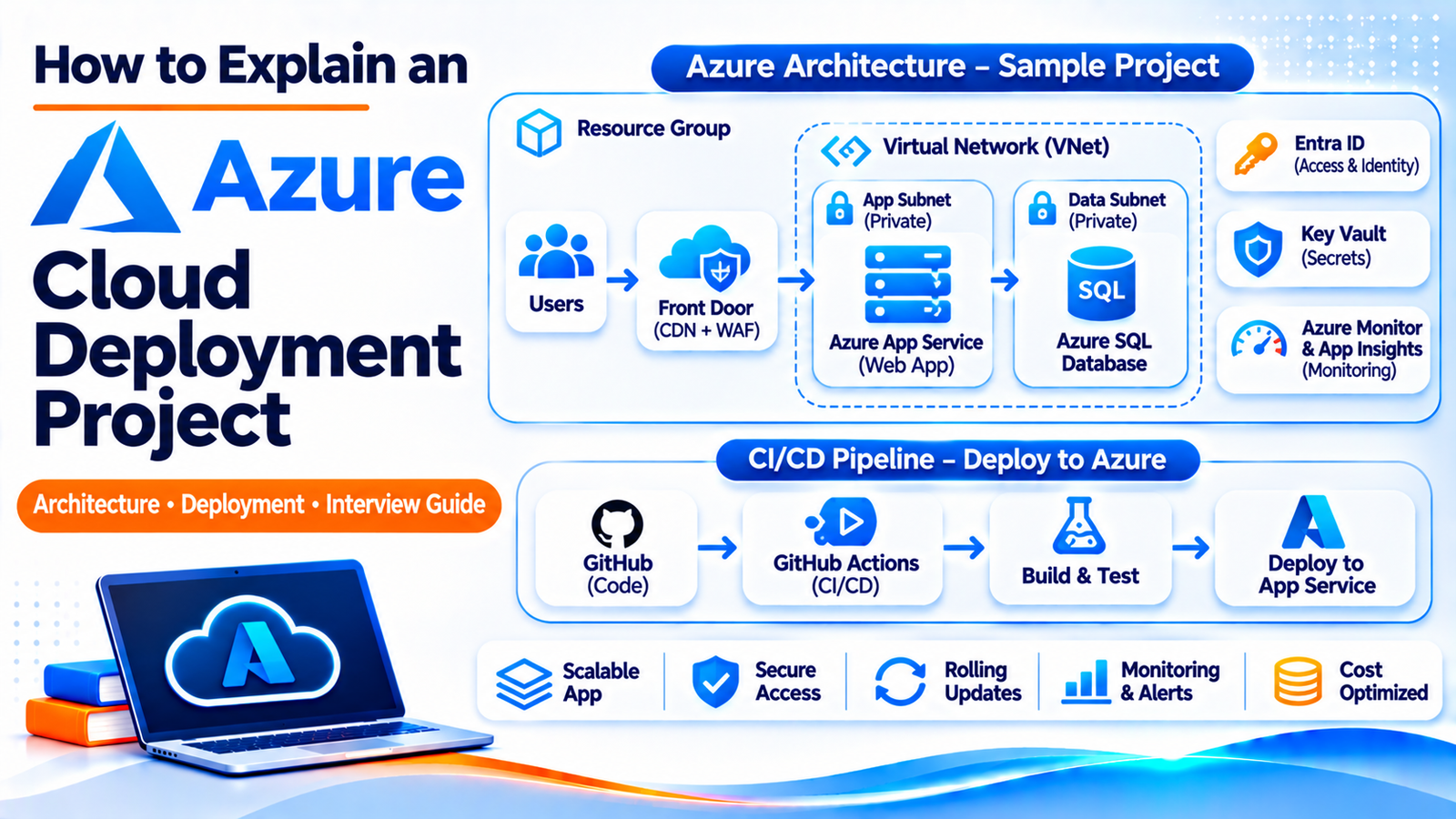
Architecture Diagram
                  Application Users
                         |
                         | HTTPS
                         v
                 Azure App Service
                 ASP.NET Core App
                         |
                         | Outbound VNet Integration
                         v
                 Azure Virtual Network
                         |
                         v
                 SQL Private Endpoint
                         |
                         v
                 Azure SQL Database


               CI/CD Deployment Flow

                 GitHub Repository
                         |
                         v
                    GitHub Actions
                         |
                         v
                  Build and Test
                         |
                         v
                 Authenticate to Azure
                         |
                         v
                  Azure App Service


           Monitoring: Application Insights
           Identity: Managed Identity
           Secrets: Azure Key Vault (if needed)
How the Architecture Works
- A user sends an HTTPS request to the application.
- Azure App Service runs the ASP.NET Core application.
- When database access is required, the application connects to Azure SQL through VNet Integration and a Private Endpoint.
- Managed Identity can authenticate the application to supported Azure services.
- GitHub Actions builds and deploys approved application changes.
- Application Insights collects configured application telemetry.
Why This Architecture?
Azure App Service reduces the need to manage servers directly. Azure SQL provides managed relational storage, while private networking and identity controls help protect access.
Important: App Service VNet Integration supports outbound connectivity. It does not automatically make the application's inbound endpoint private.
4. Step 1: Create Azure Resources
Azure resources are organized within subscriptions and resource groups.
Create a Resource Group
First, sign in:
az login
Select your subscription:
az account set --subscription "<subscription-id>"
Create a resource group:
az group create \
  --name rg-taskapp-dev \
  --location eastus
The region is illustrative. Choose a supported region based on your requirements.
Create an App Service Plan
az appservice plan create \
  --name asp-taskapp-dev \
  --resource-group rg-taskapp-dev \
  --location eastus \
  --sku B1 \
  --is-linux
An App Service plan defines the compute resources and pricing tier for hosted applications.
The example B1 tier incurs charges.
Create the Web Application
az webapp create \
  --name taskapp-web-example \
  --resource-group rg-taskapp-dev \
  --plan asp-taskapp-dev \
  --runtime "DOTNETCORE:8.0"
Replace the example name with an available globally unique name.
You can check currently supported runtime identifiers using:
az webapp list-runtimes --os linux
Interview Explanation
"We created a resource group to organize the application resources, an App Service plan to define hosting capacity, and an Azure App Service application to run the backend."
5. Step 2: Prepare the Application
We'll use a minimal ASP.NET Core application for the initial deployment.
Create the Project
dotnet new web -n TaskApp
cd TaskApp
Example Program.cs
var builder = WebApplication.CreateBuilder(args);

var app = builder.Build();

app.MapGet("/", () => new
{
    Message = "Hello from Azure App Service"
});

app.MapGet("/health", () => new
{
    Status = "Healthy"
});

app.Run();
Test Locally
dotnet run
Open the local URL printed in the terminal.
The application provides:
/— A welcome response./health— A basic health response.
Important: This minimal code verifies application deployment. It does not yet implement task management or database operations. Those features require additional application code and a database schema.
Why Test Locally?
Testing before deployment helps identify application errors independently of cloud infrastructure problems.
6. Step 3: Configure Azure SQL Database
Azure SQL Database is a managed relational database service.
It provides database hosting with capabilities such as automated backups, monitoring, and configurable compute and storage.
Example Database Configuration
| Setting | Example |
|---|---|
| Database | taskdb |
| Engine | Azure SQL Database |
| Network | Private Endpoint |
| Authentication | Microsoft Entra authentication where configured |
| Public Access | Disabled after private connectivity is verified |
| Backup | Service-managed backup capabilities |
Why Use Azure SQL?
The application needs persistent storage for task information.
A managed database reduces some infrastructure administration compared with installing and operating SQL Server on a virtual machine.
Database Connectivity
Azure App Service
       |
       v
VNet Integration
       |
       v
Azure SQL Private Endpoint
       |
       v
Azure SQL Database
Important Networking Requirements
For private connectivity, configure:
- An Azure Virtual Network.
- A delegated subnet for App Service VNet Integration.
- A separate suitable subnet for the SQL Private Endpoint.
- Private DNS resolution for the SQL endpoint.
- Appropriate database authentication and permissions.
The commonly used Azure SQL private DNS zone is:
privatelink.database.windows.net
After testing private connectivity, restrict unnecessary public SQL access.
Interview Explanation
"We used Azure SQL Database for persistent application data and configured private connectivity so the application could reach the database without exposing it broadly to the public internet."
7. Step 4: Configure Managed Identity and Security
Cloud applications should avoid storing long-lived credentials directly in source code.
What Is Managed Identity?
Managed Identity provides an Azure-managed identity that applications can use to authenticate to supported Azure services.
Enable Managed Identity
az webapp identity assign \
  --name taskapp-web-example \
  --resource-group rg-taskapp-dev
Where Can Managed Identity Be Used?
Depending on configuration and permissions, it can support access to:
- Azure Key Vault.
- Azure SQL Database.
- Azure Storage.
- Other supported Azure services.
What Is Azure Key Vault?
Azure Key Vault manages secrets, keys, and certificates.
For example, an application may use Key Vault for a third-party API credential.
Security Practices
- Least Privilege: Grant only required permissions.
- Managed Identity: Prefer identity-based authentication where supported.
- Private Networking: Restrict database connectivity.
- HTTPS: Encrypt web traffic.
- Secret Protection: Avoid storing credentials in source control.
- Monitoring: Investigate suspicious or failed access attempts.
Interview Explanation
"We enabled Managed Identity and configured appropriate permissions for Azure service access. This reduced the need to embed credentials in application code."
8. Step 5: Deploy the Application Manually
Before creating a CI/CD pipeline, understand how a basic deployment works.
Publish the Application
From the project directory:
dotnet publish -c Release -o ./publish
Create the Deployment Package
Package the contents of the publish directory:
cd publish
zip -r ../app.zip .
cd ..
Deploy to App Service
az webapp deploy \
  --resource-group rg-taskapp-dev \
  --name taskapp-web-example \
  --src-path ./app.zip \
  --type zip
Verify Deployment
Visit:
https://<your-app-name>.azurewebsites.net/
Test the health endpoint:
https://<your-app-name>.azurewebsites.net/health
Expected response:
{
  "status": "Healthy"
}
What Does This Prove?
It demonstrates that:
- The application builds successfully.
- The deployment package is valid.
- App Service starts the application.
- The health endpoint responds.
Key Point: A successful deployment command does not automatically mean the application works correctly. Always test the running application.
9. Step 6: Automate Deployment with GitHub Actions
Manual deployment works for learning, but CI/CD makes repeated releases easier to manage.
CI/CD Workflow
Developer Pushes Code
          |
          v
     GitHub Repository
          |
          v
      GitHub Actions
          |
          v
     Restore and Build
          |
          v
       Run Tests
          |
          v
    Publish Application
          |
          v
    Authenticate to Azure
          |
          v
     Deploy to App Service
          |
          v
    Verify Application
Example GitHub Actions Workflow
Create .github/workflows/deploy.yml:
name: Deploy to Azure App Service

on:
  push:
    branches:
      - main

permissions:
  contents: read
  id-token: write

jobs:
  deploy:
    runs-on: ubuntu-latest

    steps:
      - name: Checkout
        uses: actions/checkout@v4

      - name: Setup .NET
        uses: actions/setup-dotnet@v4
        with:
          dotnet-version: '8.0.x'

      - name: Restore
        run: dotnet restore

      - name: Build
        run: dotnet build -c Release --no-restore

      - name: Test
        run: dotnet test -c Release --no-build

      - name: Publish
        run: dotnet publish -c Release -o ./publish

      - name: Azure Login
        uses: azure/login@v2
        with:
          client-id: ${{ secrets.AZURE_CLIENT_ID }}
          tenant-id: ${{ secrets.AZURE_TENANT_ID }}
          subscription-id: ${{ secrets.AZURE_SUBSCRIPTION_ID }}

      - name: Deploy
        uses: azure/webapps-deploy@v3
        with:
          app-name: taskapp-web-example
          package: ./publish
How Does Azure Authentication Work?
This example uses GitHub Actions OpenID Connect federation.
You must configure a trusted federated identity credential in Microsoft Entra ID and grant the deployment identity suitable Azure permissions.
The GitHub values identify the Azure application, tenant, and subscription; they are not client passwords.
Production Improvements
- Add meaningful automated tests.
- Protect production branches.
- Use environment approvals.
- Restrict deployment permissions.
- Pin reviewed GitHub Actions versions.
- Add application verification after deployment.
- Consider deployment slots for safer releases.
Interview Explanation
"We created a GitHub Actions workflow that automatically restored dependencies, built the application, ran tests, authenticated to Azure, and deployed the published application to App Service."
10. Step 7: Configure Monitoring
Deployment is only part of the project. You also need to know whether the application is healthy.
Azure Monitor
Azure Monitor provides monitoring capabilities such as metrics, logs, and alerts.
Application Insights
Application Insights helps collect application telemetry when correctly configured and instrumented.
Useful Measurements
| Measurement | Purpose |
|---|---|
| Request Count | Understand application traffic |
| Response Time | Detect slow requests |
| Failed Requests | Identify errors |
| Dependency Duration | Investigate slow database calls |
| CPU and Memory | Evaluate resource usage |
| Availability | Detect reachability problems |
Example Monitoring Flow
Azure App Service
       |
       v
Application Insights
       |
       v
Azure Monitor
       |
       v
Alerts and Dashboards
       |
       v
Operations Team
Example Alert
Configure an alert when the application experiences an unusual number of HTTP 5xx responses.
The alert threshold should reflect the application's expected traffic and reliability requirements.
Interview Explanation
"We used Application Insights to investigate request failures and performance issues, while Azure Monitor provided operational metrics and alerting."
11. Step 8: Understand Scaling and Deployment Slots
Scaling Up vs Scaling Out
| Scaling Type | Meaning |
|---|---|
| Scale Up | Increase the resources or capabilities of the hosting plan |
| Scale Out | Increase the number of application instances |
Scaling out is useful when the application can serve requests across multiple instances.
Deployment Slots
On supported App Service plans, deployment slots allow teams to test a new application version before moving it into production.
Example Slot Workflow
New Application Version
          |
          v
      Staging Slot
          |
          v
       Smoke Tests
          |
          v
        Approval
          |
          v
       Slot Swap
          |
          v
        Production
Important Limitations
Deployment slots are not available on every pricing tier.
Slot swaps do not automatically roll back database migrations or other external changes.
Applications also need appropriate session handling, database compatibility, and graceful startup behavior.
Key Point: Scaling and release management require application design as well as Azure configuration.
12. Common Azure Deployment Problems and Troubleshooting
Problem 1: Application Returns HTTP 500
Possible Causes: Startup failure, missing settings, unhandled exceptions, or database connectivity problems.
Investigation: Review App Service logs, Application Insights exceptions, and runtime configuration.
Problem 2: GitHub Actions Deployment Fails
Possible Causes: Build errors, incorrect federated identity, missing Azure permissions, or an invalid deployment target.
Investigation: Inspect the failed workflow step and the relevant Azure authentication and deployment logs.
Problem 3: Application Cannot Connect to Azure SQL
Possible Causes: Private DNS problems, missing VNet Integration, incorrect permissions, or database unavailability.
Investigation: Verify SQL hostname resolution, network connectivity, authentication, and database logs.
Problem 4: Deployment Succeeds but Changes Are Missing
Possible Causes: Wrong application, wrong deployment slot, outdated artifact, or caching.
Investigation: Verify the deployed version and target environment.
Problem 5: Application Performance Is Slow
Possible Causes: Insufficient resources, inefficient queries, high traffic, or slow external dependencies.
Investigation: Review request duration, dependency telemetry, resource metrics, and database performance.
Troubleshooting Framework
Identify the Problem
        |
        v
Check App Service Status
        |
        v
Review Application Logs
        |
        v
Inspect Application Insights
        |
        v
Check Configuration and Identity
        |
        v
Verify Network and Database
        |
        v
Identify Root Cause
        |
        v
Apply Fix and Retest
How to Explain Troubleshooting in an Interview
Use this sequence:
Problem → Investigation → Root Cause → Solution → Verification
For example:
"The application could not connect to Azure SQL. We reviewed the application logs and checked private DNS resolution. The SQL hostname was not resolving to the private endpoint address. After correcting the DNS configuration, we tested connectivity and confirmed that database requests worked."
Only use this example as your own experience if you actually performed those steps.
13. How to Explain Your Azure Project in an Interview
A strong answer should follow a logical structure.
Seven-Part Framework
| Part | What to Explain |
|---|---|
| 1. Overview | What application you deployed |
| 2. Objective | Why Azure was selected |
| 3. Architecture | App Service, SQL, networking, identity |
| 4. Implementation | Resource configuration and deployment |
| 5. Automation | GitHub Actions CI/CD |
| 6. Operations | Monitoring, scaling, troubleshooting |
| 7. Contribution | Your actual responsibilities |
Sample Two-Minute Interview Answer
The following is a fictional example for someone who implemented the complete reference project.
"I worked on deploying an ASP.NET Core task management application to Microsoft Azure.
The goal was to host the application using managed cloud services and automate the deployment process.
We used Azure App Service to host the backend and Azure SQL Database for relational storage.
For secure database access, we configured App Service VNet Integration and a Private Endpoint for Azure SQL.
We enabled Managed Identity to support authentication to Azure services without embedding long-lived credentials in the application.
For CI/CD, we created a GitHub Actions workflow that built and tested the application, authenticated to Azure using federated identity, and deployed the application to App Service.
We configured Application Insights to monitor requests, failures, and performance.
One issue we investigated involved database connectivity. We identified a private DNS configuration problem, corrected it, and verified the application could connect successfully.
This project helped me understand Azure application hosting, networking, security, CI/CD, monitoring, and troubleshooting."
Why This Answer Works
It explains the project as a connected system rather than a collection of unrelated services.
It also demonstrates implementation knowledge, architectural reasoning, and troubleshooting ability.
14. Common Azure Interview Questions
Q1. What is Azure App Service?
Azure App Service is a managed platform for hosting web applications and APIs.
Q2. What is an App Service Plan?
An App Service plan defines the compute resources and pricing tier available to hosted applications.
Q3. What is Azure SQL Database?
Azure SQL Database is a managed relational database service based on SQL Server technology.
Q4. What is Azure VNet Integration?
It allows supported App Service applications to make outbound connections through an integrated virtual network.
Q5. What is a Private Endpoint?
A Private Endpoint provides private network connectivity to a supported Azure service through a private IP address.
Q6. What is Managed Identity?
Managed Identity allows applications to authenticate to supported Azure services using an Azure-managed identity.
Q7. What is Azure Key Vault?
Azure Key Vault is used to manage secrets, cryptographic keys, and certificates.
Q8. What is the difference between Azure DevOps and GitHub Actions?
Both support software delivery automation. Azure DevOps provides a broader development and delivery suite, while GitHub Actions integrates automation workflows with GitHub repositories.
Q9. What is Application Insights?
Application Insights provides application performance monitoring and telemetry capabilities.
Q10. How do you troubleshoot a failed Azure deployment?
Check CI/CD logs, application logs, runtime settings, identity permissions, networking, and dependent services.
15. Common Mistakes to Avoid
- Listing Services Only: Explain how the Azure components work together.
- Confusing Hosting Options: Understand when to use App Service, virtual machines, or containers.
- Ignoring Networking: Explain how the application reaches its database.
- Hardcoding Credentials: Use appropriate identity and secret-management methods.
- Skipping Tests: Verify application functionality after deployment.
- Ignoring Monitoring: Explain how failures and performance problems are detected.
- Overlooking Costs: Azure resources can incur charges even when traffic is low.
- Exaggerating Experience: Clearly distinguish learning projects from production deployments.
16. Practical Beginner Exercise
Build your own Azure deployment project using the following checklist.
Phase 1: Application Hosting
- Create a resource group.
- Create an App Service plan.
- Create an App Service application.
- Build a small ASP.NET Core API.
- Deploy it manually.
- Verify the health endpoint.
Phase 2: Database and Security
- Create Azure SQL Database.
- Implement database-backed functionality.
- Configure authentication and permissions.
- Add private networking if required.
- Verify application-to-database connectivity.
Phase 3: Automation
- Push the project to GitHub.
- Configure GitHub Actions.
- Add build and test steps.
- Configure Azure federated authentication.
- Automate deployment.
- Verify the released version.
Phase 4: Monitoring and Documentation
- Configure Application Insights.
- Review application logs.
- Configure a meaningful alert.
- Investigate a controlled failure.
- Document the architecture.
- Record deployment steps and limitations.
- Review costs and delete unused resources.
Suggested Repository Structure
azure-deployment-project/
|
+-- README.md
|
+-- src/
|   +-- TaskApp/
|
+-- tests/
|
+-- .github/
|   +-- workflows/
|       +-- deploy.yml
|
+-- architecture/
|   +-- diagram.png
|
+-- docs/
    +-- deployment.md
    +-- troubleshooting.md
Cost Warning
App Service plans, Azure SQL Database, Private Endpoints, and monitoring services may generate charges.
Use Azure Cost Management budgets, review service pricing, and remove unnecessary learning resources.
17. Frequently Asked Questions
Can beginners build an Azure deployment project?
Yes. Start with a small App Service application before adding database integration and CI/CD automation.
Is Azure DevOps required?
No. You can use GitHub Actions, Azure DevOps, Azure CLI, or other supported deployment tools.
Do I need Kubernetes?
No. Azure App Service is suitable for many web applications without Kubernetes.
Is Terraform required?
No. Terraform is one option for Infrastructure as Code. Azure also supports Bicep, ARM templates, and other provisioning methods.
Can I include a learning project on my resume?
Yes, provided you describe it accurately and can explain what you implemented.
What matters most in an Azure project interview?
Your ability to explain the architecture, technical decisions, deployment process, security, troubleshooting, and personal contribution.
18. Key Takeaways
- Azure App Service hosts web applications without requiring direct server management.
- Azure SQL Database provides managed relational storage.
- Virtual Networks and Private Endpoints support private connectivity.
- Managed Identity reduces the need for stored credentials.
- Azure Key Vault manages secrets when required.
- GitHub Actions can automate application builds and deployments.
- Application Insights provides application telemetry.
- Azure Monitor supports metrics and alerting.
- Deployment slots support controlled releases on eligible plans.
- A strong project explanation connects the application, architecture, implementation, automation, security, and troubleshooting.
19. What Should You Learn Next?
Continue with these related resources:
- What Is Microsoft Azure? A Beginner's Guide
- How to Explain a CI/CD Pipeline Project
- How to Explain an AWS Cloud Infrastructure Project
- What Is Terraform? Infrastructure as Code
- How to Explain a Kubernetes Deployment Project
Continue Learning with Vyomanant Academy
Azure cloud deployment skills help learners connect application development with infrastructure, security, and DevOps automation.
Vyomanant Academy provides learning resources covering Azure fundamentals, cloud networking, managed services, CI/CD pipelines, Infrastructure as Code, and cloud troubleshooting.
Build a small application, deploy it to Azure, automate the release process, and document your work.
Learn. Build. Grow.
CONTINUE EXPLORING
Recommended next

What Is Artificial Intelligence? A Simple Beginner's Guide
Learn what Artificial Intelligence (AI) means, how it works, and where we use it in everyday life, with simple examples that anyone can understand.
View resource
What Is Machine Learning? A Simple Beginner's Guide
Discover what Machine Learning is, how computers learn from data, and how predictions work. Explore key ML concepts, learning types, and real-world examples in this beginner-friendly guide.
View resource
What Is Information Technology? A Beginner's Guide
Discover what Information Technology (IT) is, how it works, its main components, everyday applications, and how beginners can start learning IT.
View resource