
RESOURCES
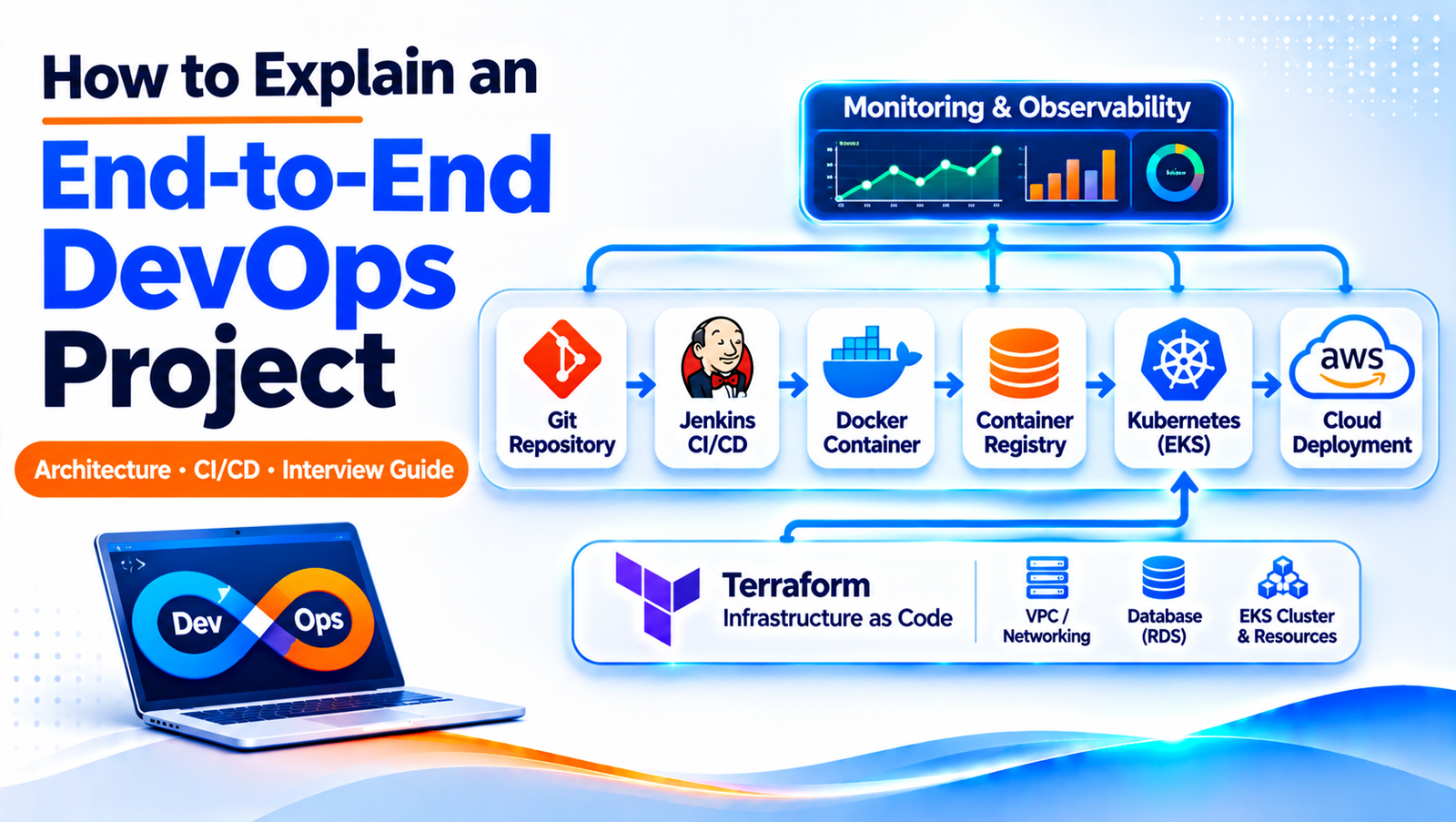
How to Explain an End-to-End DevOps Project: Interview Guide
Learn how to explain an end-to-end DevOps project with architecture, Git, Jenkins, Docker, Kubernetes, Terraform, CI/CD workflows, monitoring, and interview examples.
Vyomanant Academy
Build these skills hands-on
Explore structured, practical technology programs from Vyomanant Academy.
Explore CoursesOn this page
How to Explain an End-to-End DevOps Project
Introduction
Imagine attending a DevOps job interview.
The interviewer asks:
"Can you explain one end-to-end DevOps project you have worked on?"
You know Git, Jenkins, Docker, Kubernetes, Terraform, and cloud computing. You may have practiced each tool individually.
But explaining how these technologies work together in a real project can be challenging.
Should you start with the architecture? Describe the CI/CD pipeline? Explain your responsibilities? Discuss deployment failures?
A strong project explanation is not simply a list of tools.
It is a clear story of what the application does, how it is built and deployed, how the infrastructure is managed, and how the team keeps it reliable and secure.
This guide uses a fictional online shopping application to demonstrate an end-to-end DevOps workflow. It also shows how to explain such a project in an interview, including sample answers and common follow-up questions.
Important: The project below is an illustrative reference architecture, not a claim about a real production implementation. In an interview, describe only the tools, tasks, and results you genuinely worked with.
1. What Is an End-to-End DevOps Project?
An end-to-end DevOps project demonstrates the complete journey of an application from source code to a running, monitored environment.
It connects development, testing, infrastructure, deployment, security, and operations into a repeatable workflow.
Simple Definition
An end-to-end DevOps project shows how code changes move from a developer's repository through automated checks and deployment into an operational application.
A typical project includes:
- Source Control: Managing code using Git.
- Continuous Integration: Building and testing code automatically.
- Security Checks: Scanning code, dependencies, and container images.
- Artifact Management: Storing versioned build outputs.
- Containerization: Packaging applications using Docker.
- Infrastructure as Code: Provisioning infrastructure using Terraform.
- Orchestration: Running containers using Kubernetes.
- Continuous Delivery: Preparing and releasing application updates.
- Monitoring: Observing application and infrastructure health.
- Troubleshooting: Investigating failures and restoring service.
Not every DevOps project uses all these technologies.
The important part is understanding how the chosen tools support the delivery process.
2. Example Project: Deploying an Online Shopping Application
Let's use an example project throughout this guide.
Project Overview
The objective is to deploy an online shopping application using automated infrastructure and application delivery workflows.
The application includes:
- Frontend: A web interface for customers.
- Backend: APIs that handle application logic.
- Database: Storage for products, customers, and orders.
For this example, assume the application uses:
| Component | Example Technology | Purpose |
|---|---|---|
| Source Control | Git and GitHub | Store and manage code |
| CI/CD | Jenkins | Automate builds, tests, and deployment |
| Application Packaging | Docker | Create container images |
| Image Registry | Amazon ECR | Store container images |
| Cloud Provider | AWS | Host infrastructure |
| Infrastructure as Code | Terraform | Provision cloud resources |
| Container Orchestration | Amazon EKS | Run Kubernetes workloads |
| Configuration Management | Kubernetes manifests | Define deployments and services |
| Security Scanning | Trivy | Check images and dependencies |
| Metrics | Prometheus | Collect operational metrics |
| Visualization | Grafana | Display monitoring dashboards |
| Logging | Cloud-native logging tools | Collect and investigate logs |
These are example choices, not mandatory DevOps tools.
A similar project could use GitLab CI/CD, Azure, Google Cloud, managed application platforms, or other technologies.
Business Requirement
The application should:
- Be accessible to customers through a web address.
- Support automated application builds and tests.
- Allow controlled releases of new versions.
- Scale to handle changing traffic.
- Provide visibility into failures and performance.
- Protect application secrets and sensitive information.
Key Point: Start your explanation with the project's purpose and requirements, not with a long list of technologies.
3. Explain the Project Architecture First
Before discussing individual pipeline stages, explain the overall architecture.
This helps the interviewer understand where each tool fits.
Simplified End-to-End Architecture
                 Developer
                     |
                     v
               Git Repository
                     |
                     v
                Jenkins CI
                     |
          +----------+----------+
          |                     |
          v                     v
     Build & Test         Security Checks
          |                     |
          +----------+----------+
                     |
                     v
              Docker Build
                     |
                     v
             Container Registry
                     |
                     v
             Deployment Pipeline
                     |
                     v
               Kubernetes
              (Amazon EKS)
                     |
          +----------+----------+
          |                     |
          v                     v
       Frontend              Backend
                                  |
                                  v
                               Database

Infrastructure: Terraform -> AWS Resources

Operations: Logs + Metrics + Alerts
This diagram separates three important concerns.
Application Delivery
Git, Jenkins, Docker, and Kubernetes move application changes from source code into a running environment.
Infrastructure Provisioning
Terraform creates and manages the required cloud infrastructure.
Operations
Monitoring, logging, and alerting help the team understand the health of the deployed system.
How to Explain This Diagram
You might say:
"Our example architecture uses Git for version control and Jenkins for CI/CD. After code changes pass automated checks, Jenkins builds a Docker image and pushes it to a container registry. The deployment pipeline updates the application running on Kubernetes. Terraform manages the cloud infrastructure, while monitoring and logging tools provide operational visibility."
This gives the interviewer a useful overview before you discuss technical details.
4. Step 1: Explain Source Code Management with Git
Every DevOps delivery workflow begins with application code and configuration.
In our example, developers use Git to track changes.
Example Development Workflow
- A developer creates a feature branch.
- The developer updates application code.
- The changes are committed to Git.
- A pull request is opened.
- Automated checks run.
- Team members review the changes.
- Approved changes are merged into the main branch.
Example Repository Structure
shopping-app/
|
+-- frontend/
|
+-- backend/
|
+-- tests/
|
+-- docker/
|   +-- frontend.Dockerfile
|   +-- backend.Dockerfile
|
+-- kubernetes/
|   +-- frontend-deployment.yaml
|   +-- backend-deployment.yaml
|   +-- services.yaml
|
+-- terraform/
|   +-- main.tf
|   +-- variables.tf
|   +-- outputs.tf
|
+-- Jenkinsfile
|
+-- README.md
This structure is illustrative. Real projects may use multiple repositories or different layouts.
What Should You Explain in an Interview?
Mention:
- How branches were managed.
- Whether pull requests required review.
- What triggered the CI pipeline.
- How application and infrastructure changes were tracked.
Interview Tip: Explain the purpose of the branching strategy rather than claiming that one Git workflow is best for every organization.
5. Step 2: Explain Continuous Integration (CI)
Continuous Integration (CI) is the practice of frequently integrating code changes and validating them through automated checks.
In our example, Jenkins performs CI activities.
Example CI Workflow
         Code Commit
              |
              v
       Jenkins Trigger
              |
              v
       Checkout Source
              |
              v
     Install Dependencies
              |
              v
       Run Unit Tests
              |
              v
    Static Analysis / Scans
              |
              v
       Build Application
              |
              v
      Publish Build Result
What Happens When Code Changes?
Suppose a developer modifies the checkout functionality.
The CI pipeline starts and performs the configured checks.
If a unit test fails, the pipeline reports the failure.
The change should not proceed to the release stage until the failure is investigated according to the team's policy.
Why Is CI Important?
CI helps teams:
- Detect integration problems earlier.
- Run repeatable tests.
- Reduce manual build steps.
- Provide faster feedback.
- Improve confidence in code changes.
Interview Explanation
"Whenever approved code changes are integrated, our CI pipeline checks out the source code, installs dependencies, runs automated tests, and performs configured security and quality checks. The pipeline reports failures before an application image is promoted for deployment."
Key Point: CI is about validating changes consistently, not merely running a Jenkins job.
6. Step 3: Explain Docker Containerization
After the application passes the required checks, it can be packaged into container images.
Docker is commonly used to build and run containerized applications.
Why Use Docker?
Without standardized packaging, applications may behave differently across environments because of variations in installed software and dependencies.
Container images help package application code and its required runtime components in a consistent format.
Example: Backend Dockerfile
FROM python:3.12-slim

WORKDIR /app

COPY requirements.txt .

RUN pip install --no-cache-dir -r requirements.txt

COPY . .

EXPOSE 8000

CMD ["python", "app.py"]
This is a simplified educational example. Production images should use appropriate dependency pinning, non-root execution, and additional hardening.
Example Build Commands
docker build -t shopping-backend:1.0 .
To test the image locally:
docker run --rm -p 8000:8000 shopping-backend:1.0
The application must actually listen on the configured port for this example to work.
Container Image Workflow
      Application Code
             |
             v
         Dockerfile
             |
             v
       Docker Build
             |
             v
       Container Image
             |
             v
       Image Registry
What Is a Container Registry?
A container registry stores and distributes container images.
Examples include Amazon ECR, Docker Hub, and other private or managed registries.
In this example, the pipeline pushes the approved image to Amazon ECR.
Why Are Image Tags Important?
Image tags help identify versions.
However, tags may be mutable.
For stronger release traceability, teams can deploy images using immutable digests and record which artifact was released.
Interview Tip: Explain how you identified, stored, and promoted application images between environments.
7. Step 4: Explain Infrastructure Provisioning with Terraform
The application needs infrastructure before it can run.
This may include:
- Networks and subnets.
- Security groups.
- Kubernetes clusters.
- Worker-node capacity.
- Load balancers.
- Database services.
- Identity and access permissions.
Instead of creating these resources manually, teams can use Terraform.
What Is Terraform?
Terraform is an Infrastructure as Code (IaC) tool used to define and manage infrastructure through configuration files.
Simplified Terraform Workflow
      Terraform Files
             |
             v
       terraform init
             |
             v
       terraform plan
             |
             v
      Review Changes
             |
             v
       terraform apply
             |
             v
      Cloud Infrastructure
Example Terraform Commands
terraform init
Initializes the working directory and downloads required providers and modules.
terraform plan
Shows the proposed infrastructure changes.
terraform apply
Applies the approved changes.
Example: Provisioning AWS Resources
For our project, Terraform might manage:
- A Virtual Private Cloud (VPC).
- Public and private subnets.
- Network routing.
- An Amazon EKS cluster.
- IAM roles and policies.
- Supporting infrastructure.
A production-quality configuration also requires appropriate state management, access controls, and review processes.
Why Is Terraform Useful?
- Repeatability: Infrastructure definitions can be reused.
- Version Control: Changes can be reviewed in Git.
- Consistency: Environments can follow common configuration patterns.
- Automation: Infrastructure changes can be integrated into delivery workflows.
- Visibility: Plans show proposed changes before application.
Interview Explanation
"We used Terraform to define the cloud infrastructure as code. Infrastructure changes were reviewed before application, and Terraform state was stored in an appropriately secured remote backend so the team could manage changes consistently."
Only use that wording if it accurately reflects your implementation.
Key Point: Terraform provisions and manages infrastructure; it does not replace the application deployment workflow.
8. Step 5: Explain Kubernetes Deployment
Once the container images are available, they need a runtime environment.
For our example, the application runs on Amazon Elastic Kubernetes Service (Amazon EKS).
Amazon EKS is a managed Kubernetes service.
What Does Kubernetes Do?
Kubernetes helps manage containerized workloads by supporting:
- Application deployment.
- Replica management.
- Service discovery.
- Rolling updates.
- Health checks.
- Resource scheduling.
- Workload scaling.
Important Kubernetes Components
- Pod: The smallest deployable unit in Kubernetes.
- Deployment: Manages desired replicas and updates for suitable stateless workloads.
- Service: Provides a stable network endpoint for a set of Pods.
- Ingress: Defines HTTP/HTTPS routing rules when supported by an ingress controller.
- ConfigMap: Stores non-sensitive configuration.
- Secret: Stores sensitive values as Kubernetes resources, requiring appropriate protection.
- Namespace: Provides a scope for organizing cluster resources.
Simplified Kubernetes Deployment
          External Traffic
                 |
                 v
           Load Balancer
                 |
                 v
          Kubernetes Service
                 |
        +--------+--------+
        |        |        |
        v        v        v
      Pod 1    Pod 2    Pod 3
Example Deployment Manifest
apiVersion: apps/v1
kind: Deployment
metadata:
  name: shopping-backend
spec:
  replicas: 3
  selector:
    matchLabels:
      app: shopping-backend
  template:
    metadata:
      labels:
        app: shopping-backend
    spec:
      containers:
        - name: backend
          image: example-registry/shopping-backend:1.0
          ports:
            - containerPort: 8000
The image reference is a placeholder and must be replaced with a real image.
A production deployment would generally need resource requests and limits, probes, security settings, and appropriate secret handling.
Useful Kubernetes Commands
kubectl get pods
Lists Pods in the current namespace.
kubectl get deployments
Lists Deployments.
kubectl describe pod <pod-name>
Shows detailed information about a Pod.
kubectl logs <pod-name>
Displays container logs for a Pod.
kubectl rollout status deployment/shopping-backend
Checks rollout progress.
Interview Explanation
"Our application was deployed to Kubernetes using Deployment and Service resources. Kubernetes maintained the desired number of application replicas, while the deployment workflow updated image versions and checked rollout status."
Remember: Kubernetes manages workloads, but reliable deployments also require correct application design, monitoring, and operational controls.
9. Step 6: Explain the Complete CI/CD Pipeline
Now connect the individual tools into one delivery workflow.
End-to-End Pipeline
         Developer Pushes Code
                   |
                   v
              Git Repository
                   |
                   v
             Jenkins Pipeline
                   |
                   v
            Checkout Source
                   |
                   v
              Unit Tests
                   |
                   v
          Code / Dependency Scan
                   |
                   v
             Docker Build
                   |
                   v
           Container Image Scan
                   |
                   v
          Push Image to Registry
                   |
                   v
          Deployment Approval
                   |
                   v
         Update Kubernetes Image
                   |
                   v
          Verify Deployment
                   |
                   v
             Monitor Health
The exact stages and approval requirements depend on the project.
Continuous Delivery vs Continuous Deployment
These terms are often confused.
Continuous Delivery means changes are automatically prepared so they can be released reliably, often with a manual production approval.
Continuous Deployment means qualifying changes are automatically released to production without a manual release decision.
Example Jenkins Pipeline
pipeline {
    agent any

    stages {
        stage('Checkout') {
            steps {
                checkout scm
            }
        }

        stage('Test') {
            steps {
                sh 'python -m pytest'
            }
        }

        stage('Build Image') {
            steps {
                sh 'docker build -t shopping-backend:build .'
            }
        }

        stage('Scan Image') {
            steps {
                sh 'trivy image --exit-code 1 --severity HIGH,CRITICAL shopping-backend:build'
            }
        }
    }
}
This is a partial learning example, not a complete production pipeline.
It assumes the Jenkins agent has Python dependencies, Docker, Trivy, and the necessary permissions installed and configured.
The full delivery workflow would also include secure registry authentication, image publishing, deployment, and release verification.
What Should You Explain About the Pipeline?
Focus on:
- What triggers it.
- Which tests and scans run.
- How failures are handled.
- How images are versioned.
- Where artifacts are stored.
- How deployments are approved.
- How the release is verified.
Interview Tip: Being able to explain a failed pipeline is often more useful than memorizing every Jenkins syntax detail.
10. Step 7: Explain DevSecOps and Security Controls
Security should be integrated throughout the delivery workflow.
For this example, DevSecOps practices may include:
Source Code Security
- Pull request reviews.
- Static code analysis.
- Secret scanning.
- Dependency vulnerability checks.
Container Security
- Trusted base images.
- Image vulnerability scanning.
- Minimal runtime permissions.
- Approved container registries.
Cloud Security
- Least-privilege IAM permissions.
- Restricted network access.
- Encryption where appropriate.
- Protected Terraform state.
Kubernetes Security
- Role-based access control.
- Appropriate service account permissions.
- Workload security contexts.
- Secure secret management.
- Network restrictions where required.
Pipeline Security
- Protected credentials.
- Restricted deployment permissions.
- Controlled production approvals.
- Audit logging.
Example: A Vulnerable Container Image
Suppose Trivy identifies a known high-severity vulnerability in the application image.
The team might:
- Review the vulnerability report.
- Determine whether the affected component is used.
- Evaluate exploitability and exposure.
- Update or replace the vulnerable dependency.
- Rebuild the image.
- Run the scan again.
- Continue deployment according to the security policy.
Key Point: Security checks should support informed risk decisions, not simply produce a large number of alerts.
11. Step 8: Explain Monitoring and Logging
Deployment is not the end of the DevOps workflow.
Once an application is running, the team needs to understand whether it is healthy.
What Should Be Monitored?
Common measurements include:
- CPU and Memory Usage: Resource consumption.
- Request Rate: Number of incoming requests.
- Response Time: How long requests take.
- Error Rate: Percentage of failed requests.
- Pod Restarts: Potential application or infrastructure problems.
- Availability: Whether the service is accessible.
- Database Health: Connections, latency, and capacity.
Example Monitoring Architecture
         Application / Kubernetes
                   |
                   v
             Metrics Exporters
                   |
                   v
               Prometheus
                   |
                   v
                Grafana
                   |
                   v
           Dashboards / Alerts
Prometheus collects metrics from configured targets.
Grafana can visualize metrics and other supported data sources.
Logs may be collected through a separate logging pipeline.
Example Incident
Customers report that checkout requests are slow.
The team investigates:
- Application response-time metrics.
- Error rates.
- Pod resource usage.
- Application logs.
- Database performance.
- Recent deployments.
The findings help identify whether the issue is caused by application code, infrastructure, a dependency, or another factor.
Interview Explanation
"We monitored application and infrastructure metrics and reviewed logs during incidents. Alerts helped identify abnormal conditions, and dashboards supported troubleshooting after deployments."
Only mention actual monitoring tools and alerting practices you used.
Remember: Monitoring is valuable when it helps teams detect, understand, and respond to real problems.
12. Step 9: Explain Rollback and Failure Recovery
Interviewers often ask:
"What happens if a deployment fails?"
A strong answer should describe how failures are detected and how the team responds.
Example: Failed Kubernetes Deployment
Suppose a new application version starts crashing.
A deployment verification check reports that the new Pods are not becoming ready.
The team investigates using commands such as:
kubectl get pods
kubectl describe pod <pod-name>
kubectl logs <pod-name>
Example Rollback Command
kubectl rollout undo deployment/shopping-backend
This requests a rollback to a previous Deployment revision when available.
Important Limitations
A Kubernetes rollback does not automatically reverse:
- Database schema changes.
- External API changes.
- Data migrations.
- Every infrastructure change.
These may require separate recovery plans.
A Good Recovery Explanation
- Detect the failed rollout.
- Inspect application and infrastructure signals.
- Identify the likely cause.
- Stop or reverse the release when appropriate.
- Verify service recovery.
- Document the incident.
- Improve tests or controls to reduce recurrence.
Key Point: Explain both the technical recovery action and how you confirm that the application is healthy afterward.
13. How to Explain Your Responsibilities
A project explanation becomes more credible when you clearly distinguish your contributions from the team's work.
Example Responsibilities
You might have worked on:
- Creating or maintaining Jenkins pipelines.
- Writing Dockerfiles.
- Managing Terraform modules.
- Deploying Kubernetes manifests.
- Configuring monitoring dashboards.
- Investigating deployment failures.
- Implementing security checks.
- Documenting deployment procedures.
Avoid Vague Statements
Instead of saying:
"I handled the entire DevOps process."
Explain the actual work:
"I configured the Jenkins stages for testing and Docker image builds. I also maintained Kubernetes deployment manifests and investigated rollout failures using Pod events and application logs."
If You Worked on a Practice Project
Say so clearly.
For example:
"I built this as a hands-on learning project. I created the pipeline, containerized the application, and deployed it to a test Kubernetes environment."
A clearly explained learning project is more useful than exaggerated production experience.
14. A Simple Framework for Explaining Any DevOps Project
Use the following structure when preparing your project explanation.
The 8-Part Project Explanation Framework
| Part | What to Explain |
|---|---|
| 1. Project Overview | What the application does |
| 2. Business Goal | Why the project was needed |
| 3. Architecture | Main components and infrastructure |
| 4. Technology Stack | Tools and why they were selected |
| 5. CI/CD Workflow | How code reaches the environment |
| 6. Security and Monitoring | How the system is protected and observed |
| 7. Your Contribution | What you personally implemented |
| 8. Challenges and Outcomes | Problems solved and verified results |
Recommended Explanation Order
Project Purpose
      |
      v
Architecture
      |
      v
Source Code and CI
      |
      v
Docker and Registry
      |
      v
Terraform and Kubernetes
      |
      v
Deployment and Monitoring
      |
      v
Your Role and Challenges
      |
      v
Results and Lessons
This creates a clear technical narrative without jumping randomly between tools.
15. Sample DevOps Project Explanation for Interviews
The following is a fictional example of how someone who actually completed the described work might explain their project.
Do not present it as personal experience unless it accurately matches your work.
Sample Answer: Approximately Two Minutes
"One project I worked on involved building an automated deployment workflow for an online shopping application with a frontend, backend, and database.
The main objective was to make application builds and deployments repeatable while improving visibility into release failures.
We used Git for source control and Jenkins for CI/CD automation. When changes were integrated, Jenkins checked out the code, ran automated tests, and performed selected security checks.
After successful validation, the pipeline built Docker images and pushed them to a container registry.
For infrastructure, we used Terraform to provision the required AWS resources, including the networking and Kubernetes environment.
The application ran on Amazon EKS. Kubernetes Deployments managed application replicas, and Services provided networking between components.
The release process updated the container image versions and verified that the new Pods became ready.
We also used monitoring dashboards and application logs to investigate performance issues and deployment failures.
My main responsibilities included maintaining pipeline stages, updating container configurations, and troubleshooting Kubernetes deployments.
One challenge was diagnosing a rollout where new Pods failed to become ready. We inspected Pod events and logs, corrected the configuration issue, and verified that the deployment completed successfully.
This project helped me understand how source control, CI/CD, containers, infrastructure automation, orchestration, and monitoring work together."
Why This Answer Works
It explains:
- The application's purpose.
- The technical architecture.
- The delivery workflow.
- The infrastructure.
- Operational practices.
- Personal responsibilities.
- A specific challenge.
- The learning outcome.
It avoids unnecessary tool definitions and focuses on how the system works.
16. Common DevOps Project Interview Questions
Q1. Why did you use Jenkins?
A suitable answer explains the actual requirements Jenkins met, such as automated builds, pipeline configuration, available integrations, or existing team expertise.
Avoid claiming Jenkins is always better than other CI/CD platforms.
Q2. Why did you use Docker?
Docker helped package the application and its runtime dependencies into container images for consistent execution across suitable environments.
Q3. Why did you use Kubernetes?
Kubernetes provided workload scheduling, replica management, service discovery, and rollout capabilities for containerized applications.
Q4. Why did you use Terraform?
Terraform allowed infrastructure definitions to be version-controlled, reviewed, and applied through repeatable workflows.
Q5. What happens when a Jenkins pipeline fails?
The team reviews the failed stage and logs, investigates the cause, corrects the issue, and reruns the relevant checks.
Q6. How do you manage application secrets?
A strong answer describes an approved secret-management solution, controlled access, and avoiding hardcoded credentials.
Do not claim Kubernetes Secrets alone provide complete secret security.
Q7. How do you handle a failed Kubernetes deployment?
Check rollout status, Pod events, logs, configuration, and dependencies. Roll back or remediate as appropriate, then verify recovery.
Q8. How do you manage different environments?
Common approaches include separate configuration values, controlled credentials, environment-specific infrastructure definitions, and deployment approvals.
Q9. How do you monitor applications?
Explain the actual metrics, logs, dashboards, alerts, and troubleshooting procedures used.
Q10. How do you handle infrastructure changes?
Describe how Terraform changes are proposed, reviewed, planned, approved, applied, and verified.
Q11. How do you reduce deployment downtime?
Possible techniques include rolling updates, readiness probes, appropriate replica counts, and carefully designed release strategies.
Q12. How do you know a deployment was successful?
A deployment should be verified using appropriate signals, such as rollout status, health checks, functional smoke tests, error rates, and application availability.
17. Common Mistakes When Explaining a DevOps Project
Mistake 1: Listing Tools Without Explaining Their Roles
Weak Explanation:
"I used Git, Jenkins, Docker, Kubernetes, Terraform, and AWS."
Better Approach:
Explain how each tool participates in the delivery workflow.
Mistake 2: Starting with Complex Commands
Commands are useful during technical follow-up questions.
Start with the architecture and process so the interviewer understands the system.
Mistake 3: Confusing CI and CD
Be clear about which activities validate code and which activities prepare or release software.
Mistake 4: Ignoring the Application
A DevOps project still exists to deliver and operate software.
Explain what the application does and what requirements it must satisfy.
Mistake 5: Ignoring Security
Mention relevant security checks, permissions, secret management, and release controls.
Mistake 6: Ignoring Monitoring
Explain how the team knows whether the application is healthy after deployment.
Mistake 7: Claiming Unrealistic Results
Do not invent deployment frequency, uptime percentages, cost savings, or performance improvements.
Use actual measurements when available.
Mistake 8: Exaggerating Personal Responsibilities
Clearly identify which parts you implemented, supported, observed, or learned.
Key Point: A believable explanation with clear technical reasoning is stronger than an impressive-sounding but unsupported story.
18. Practical Exercise: Prepare Your Own DevOps Project Explanation
Use this exercise to create an interview-ready explanation of a real or practice project.
Step 1: Write the Project Overview
Complete this sentence:
"The project involved deploying a ______ application for ______ users."
Step 2: Draw the Architecture
Identify:
- Application components.
- Source code repository.
- CI/CD system.
- Container registry.
- Hosting environment.
- Database.
- Monitoring and logging systems.
Step 3: Describe the Pipeline
Write down what happens after a code change is submitted.
For example:
Git Commit
    |
    v
Automated Tests
    |
    v
Container Build
    |
    v
Security Scan
    |
    v
Image Registry
    |
    v
Deployment
    |
    v
Verification
Use the stages your project actually implements.
Step 4: Document Your Responsibilities
List three to five tasks you personally completed.
For each task, explain why it was necessary.
Step 5: Describe One Real Challenge
Use this structure:
- Problem: What went wrong?
- Investigation: How did you identify the cause?
- Action: What did you change?
- Result: How did you verify the outcome?
- Learning: What would you improve next time?
Step 6: Practice Three Explanation Lengths
Prepare:
- 30 seconds: Project purpose and overall workflow.
- 2 minutes: Architecture, pipeline, responsibilities, and challenge.
- 5 minutes: Detailed technical explanation with trade-offs and troubleshooting.
Step 7: Prepare Supporting Evidence
For a practice project, useful evidence may include:
- A Git repository.
- An architecture diagram.
- A Jenkinsfile or equivalent pipeline configuration.
- Dockerfiles.
- Terraform configurations.
- Kubernetes manifests.
- Test results.
- Screenshots of dashboards with sensitive data removed.
- A README explaining setup and limitations.
What Did You Learn?
You transformed a collection of tools into a structured project explanation supported by technical details.
19. Frequently Asked Questions (FAQs)
Q1. What is an end-to-end DevOps project?
An end-to-end DevOps project demonstrates how software moves from source code through automated testing, packaging, deployment, and ongoing operations.
Q2. How do I explain a DevOps project in an interview?
Start with the business goal, explain the architecture, walk through the CI/CD pipeline, describe security and monitoring, and finish with your responsibilities and challenges.
Q3. Which tools are commonly used in DevOps projects?
Common tools include Git, Jenkins or another CI/CD platform, Docker, Terraform, Kubernetes, cloud services, and monitoring systems.
Q4. Is Kubernetes required for an end-to-end DevOps project?
No. Applications can also be deployed using virtual machines, managed application platforms, serverless services, or other infrastructure.
Q5. Can freshers explain a DevOps practice project?
Yes. A well-documented hands-on project can demonstrate understanding. Be clear that it is a learning project rather than production experience.
Q6. How long should a DevOps project explanation take?
A concise overview may take around two minutes. More detailed explanations can follow based on the interviewer's questions.
Q7. Should I explain every command used in the project?
No. Focus first on architecture, workflow, decisions, and outcomes. Discuss commands when they help explain implementation or troubleshooting.
Q8. What is the most important part of a DevOps project explanation?
Understanding how the components connect, why they were selected, what you personally contributed, and how failures are handled.
20. Key Takeaways
- An end-to-end DevOps project connects source control, CI/CD, infrastructure, deployment, security, and operations.
- Start with the business requirement before discussing technologies.
- Explain the architecture so the complete system is easy to understand.
- Git manages source code and configuration changes.
- CI pipelines automate build and validation activities.
- Docker packages applications into container images.
- Terraform manages infrastructure through code.
- Kubernetes runs and manages containerized workloads.
- Security checks help identify selected risks throughout delivery.
- Monitoring and logging support operational visibility and troubleshooting.
- Rollback and recovery should be part of release planning.
- Your contribution matters: Explain what you personally implemented.
- Real challenges and verified outcomes make a project explanation more credible.
- Honesty is essential: Never present fictional or practice-project experience as real production work.
21. What Should You Learn Next?
Continue strengthening your DevOps knowledge with these related resources:
-
What Is CI/CD? Explained with a Real-Life Analogy
- Understand automated build, testing, and release workflows.
-
What Is Docker? Containers Explained Simply
- Learn how applications are packaged into container images.
-
What Is Kubernetes? Architecture & Basics
- Explore container orchestration and application deployment.
-
What Is Terraform? Infrastructure as Code
- Understand automated infrastructure provisioning.
-
What Is DevSecOps? Security in DevOps
- Learn how security fits into the software delivery lifecycle.
Continue Learning with Vyomanant Academy
Understanding individual DevOps tools is useful. Learning how they work together in a complete project is what turns those fundamentals into practical skills.
Vyomanant Academy supports learners exploring:
- Linux and Networking.
- Git and Version Control.
- Jenkins and CI/CD.
- Docker and Kubernetes.
- AWS and Cloud Computing.
- Terraform and Infrastructure as Code.
- Monitoring and Troubleshooting.
- DevSecOps Fundamentals.
Build a small project, document its architecture, practice explaining each stage, and improve it through testing and troubleshooting.
Learn. Build. Grow.
CONTINUE EXPLORING
Recommended next

What Is Artificial Intelligence? A Simple Beginner's Guide
Learn what Artificial Intelligence (AI) means, how it works, and where we use it in everyday life, with simple examples that anyone can understand.
View resource
What Is Machine Learning? A Simple Beginner's Guide
Discover what Machine Learning is, how computers learn from data, and how predictions work. Explore key ML concepts, learning types, and real-world examples in this beginner-friendly guide.
View resource
What Is Information Technology? A Beginner's Guide
Discover what Information Technology (IT) is, how it works, its main components, everyday applications, and how beginners can start learning IT.
View resource