
RESOURCES
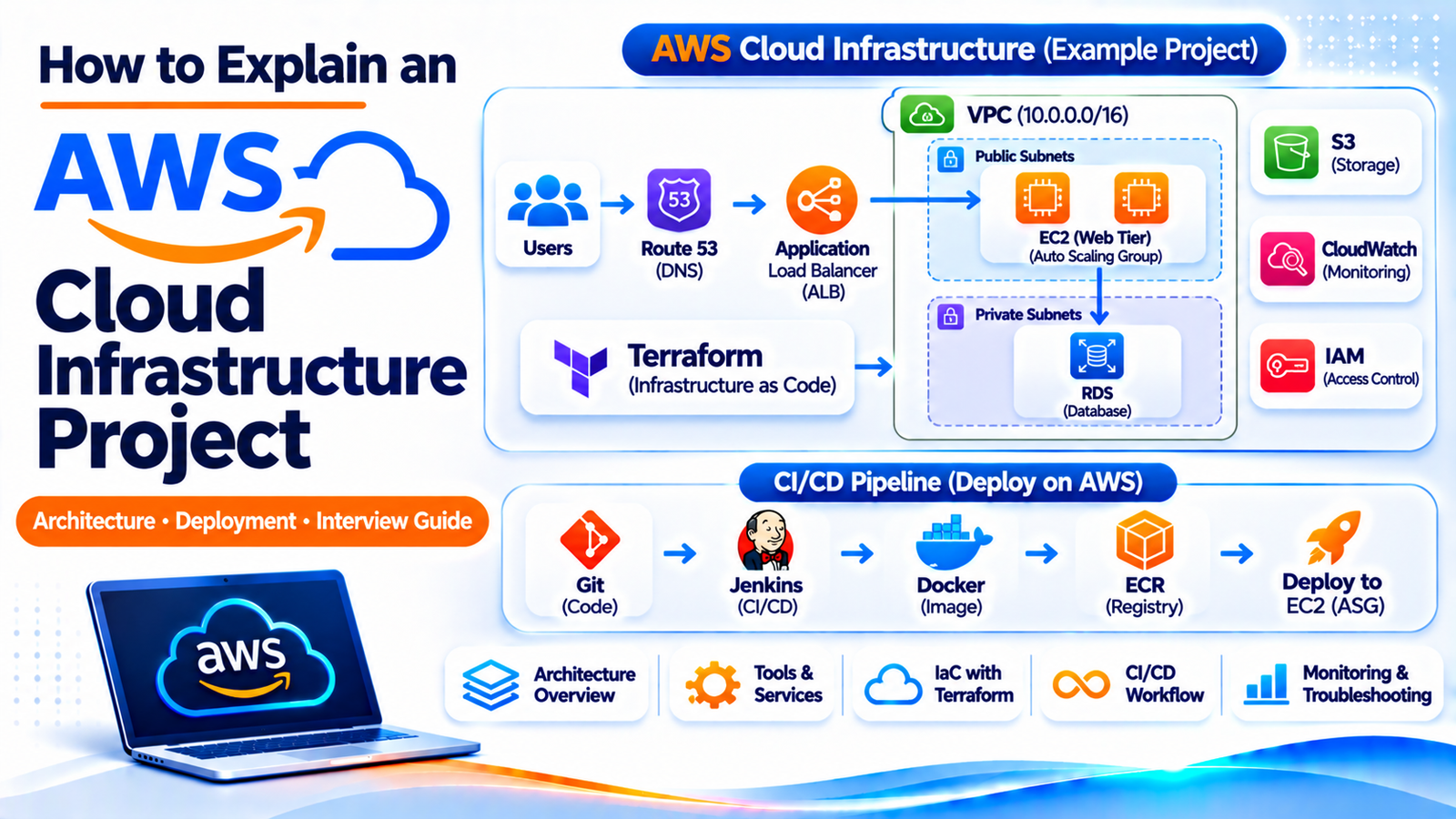
How to Explain an AWS Cloud Infrastructure Project: Step-by-Step Guide with Architecture, Deployment & Interview Questions
Learn how to explain an AWS infrastructure project with VPC, EC2, ALB, RDS, security, monitoring, deployment steps, troubleshooting, and interview answers.
Vyomanant Academy
Build these skills hands-on
Explore structured, practical technology programs from Vyomanant Academy.
Explore CoursesOn this page
How to Explain an AWS Cloud Infrastructure Project: Architecture, Deployment & Interview Guide
Introduction
Imagine you're attending a cloud engineering or DevOps interview.
The interviewer asks:
"Can you explain an AWS cloud infrastructure project you have worked on?"
You know what Amazon EC2, Amazon VPC, Amazon RDS, and Elastic Load Balancing are. You may have created an EC2 instance or configured a security group.
But explaining an infrastructure project requires more than listing AWS services.
You should be able to explain:
- What application or business requirement the infrastructure supported.
- Why you selected specific AWS services.
- How the network was designed.
- How users reached the application.
- How application servers connected to the database.
- How you controlled access and protected data.
- How you handled scaling, monitoring, and failures.
- What you personally implemented and learned.
This guide walks through a practical AWS three-tier-style web application infrastructure project using a public Application Load Balancer, private EC2 application instances, and Amazon RDS.
You'll learn how the components work together, how to explain the architecture, what deployment steps to describe, and how to answer common interview questions.
Important: This is an illustrative learning project. Do not present the sample architecture or interview answers as your own production experience unless you actually implemented them.
1. What Is an AWS Cloud Infrastructure Project?
An AWS cloud infrastructure project involves designing, provisioning, configuring, and operating the cloud resources required to run an application or service.
Instead of purchasing and maintaining physical servers, teams can provision computing, networking, storage, databases, and other resources through AWS.
Simple Definition
An AWS cloud infrastructure project demonstrates how cloud services are combined to host an application securely, reliably, and in a way that can be operated and maintained.
A typical project may include:
- Networking: VPCs, subnets, route tables, and gateways.
- Compute: EC2 instances or other compute services.
- Load Balancing: Distributing application traffic.
- Databases: Storing application data.
- Identity and Access: Managing permissions.
- Security: Restricting network and resource access.
- Monitoring: Collecting metrics, logs, and alerts.
- Scaling: Adjusting capacity based on demand.
- Backup and Recovery: Protecting important data.
- Cost Management: Understanding resource usage and expenses.
Not every project requires all these components. The architecture should match the application's needs.
2. Example Project: Hosting a Web Application on AWS
For this guide, imagine a small task management web application.
Users can sign in, create tasks, and view their saved tasks.
The application requires a backend API and a relational database.
Project Objective
The goal is to create infrastructure that:
- Accepts HTTPS requests from users.
- Runs application servers in private subnets.
- Stores application data in a managed relational database.
- Distributes requests across multiple application instances.
- Supports replacement of unhealthy application instances.
- Monitors infrastructure health.
- Restricts unnecessary network access.
- Supports controlled application updates.
Example Technology Stack
| Component | AWS Service | Purpose |
|---|---|---|
| Networking | Amazon VPC | Isolated virtual network |
| Public Network | Public Subnets | Host the internet-facing load balancer |
| Private Network | Private Subnets | Host application and database resources |
| Internet Connectivity | Internet Gateway | Provide an internet route for public resources |
| Outbound Connectivity | NAT Gateway or VPC endpoints | Support selected private-subnet outbound access |
| Compute | Amazon EC2 | Run application servers |
| Load Balancing | Application Load Balancer | Route HTTP/HTTPS requests |
| Scaling | EC2 Auto Scaling | Maintain and adjust application capacity |
| Database | Amazon RDS for PostgreSQL | Managed relational database |
| Identity | AWS IAM | Manage permissions |
| Certificates | AWS Certificate Manager | Manage supported TLS certificates |
| Monitoring | Amazon CloudWatch | Metrics, logs, and alarms |
| Auditing | AWS CloudTrail | Record supported AWS API activity |
| Secrets | AWS Secrets Manager | Store and retrieve application credentials |
This is one possible architecture, not a universal AWS blueprint.
Key Point: Start with the application requirement, then explain why the selected infrastructure supports it.
3. Explain the AWS Architecture Diagram
A clear architecture diagram is often the most valuable part of an infrastructure project explanation.
AWS Cloud Infrastructure Architecture
                    Internet Users
                          |
                          | HTTPS
                          v
               Application Load Balancer
                  Public Subnets
                          |
                 +--------+--------+
                 |                 |
                 v                 v
            EC2 Instance      EC2 Instance
              AZ A               AZ B
                 |                 |
                 +--------+--------+
                          |
                          | Private DB Connection
                          v
                  Amazon RDS
                PostgreSQL Database
                  Private Subnets

          +--------------------------------+
          |             Amazon VPC         |
          |                                |
          | Public Subnets                 |
          | - Load Balancer                |
          |                                |
          | Private App Subnets            |
          | - EC2 Application Instances    |
          |                                |
          | Private DB Subnets             |
          | - RDS Database                 |
          +--------------------------------+

       CloudWatch | IAM | Secrets Manager
The diagram is conceptual. In the implementation, the load balancer spans public subnets in two Availability Zones, and the application instances are distributed across private subnets.
Request Flow
- A user opens the application domain.
- The user's browser establishes an HTTPS connection to the Application Load Balancer.
- The load balancer selects a healthy application target.
- The selected EC2 instance processes the request.
- The application queries Amazon RDS when data is required.
- The application returns a response through the load balancer.
Why This Architecture?
It separates internet-facing access from application processing and data storage.
The load balancer receives public traffic, while the application servers and database do not require public IP addresses.
Important Clarification
Private subnets do not automatically make workloads secure.
Security also depends on security groups, IAM, application configuration, patching, encryption, and operational controls.
Interview Explanation:
"We designed a VPC with public and private subnets across two Availability Zones. An internet-facing Application Load Balancer received HTTPS traffic and forwarded requests to EC2 application instances in private subnets. The application connected to a private RDS PostgreSQL database. We used security groups to restrict communication between the layers."
4. Step 1: Design the VPC and Subnets
A Virtual Private Cloud (VPC) is a logically isolated virtual network in AWS.
It provides control over network addressing, routing, and connectivity.
Example VPC Configuration
For the sample project:
| Network Component | Example CIDR |
|---|---|
| VPC | 10.20.0.0/16 |
| Public Subnet A | 10.20.1.0/24 |
| Public Subnet B | 10.20.2.0/24 |
| Private App Subnet A | 10.20.11.0/24 |
| Private App Subnet B | 10.20.12.0/24 |
| Private DB Subnet A | 10.20.21.0/24 |
| Private DB Subnet B | 10.20.22.0/24 |
These are example private IP ranges.
Why Use Two Availability Zones?
Availability Zones are separate locations within an AWS Region.
Distributing application instances across two Availability Zones can reduce dependence on a single zone.
However, multi-AZ application placement alone does not guarantee high availability.
The application, load balancer, database, dependencies, and recovery procedures must all support the intended availability requirements.
Public vs Private Subnets
Public Subnet
A subnet whose route table includes a route to an internet gateway.
Resources still need appropriate addressing and security configuration to communicate with the internet.
Private Subnet
A subnet without a direct route to an internet gateway.
Private resources may use NAT or supported VPC endpoints for selected outbound communication.
Interview Tip
Be prepared to explain why the load balancer is internet-facing while the application instances and database remain private.
5. Step 2: Configure Internet and Outbound Connectivity
Internet Gateway
An Internet Gateway enables internet connectivity for appropriately configured resources in a VPC.
In this project, the public subnets use a route table with a default route pointing to the internet gateway.
Example route:
Destination       Target
0.0.0.0/0         Internet Gateway
NAT Gateway
A NAT Gateway can allow instances in private subnets to initiate outbound IPv4 connections without accepting unsolicited inbound connections from the internet.
For example, private EC2 instances may need outbound connectivity to download software updates or access external services.
Example Private Route
Destination       Target
10.20.0.0/16      Local
0.0.0.0/0         NAT Gateway
Do All Private Subnets Need NAT?
No.
Depending on the application, you can use VPC endpoints, private networking, prebuilt application images, or other approaches.
NAT Gateways incur charges, including hourly and data-processing costs.
For higher availability, a design may use NAT Gateways in multiple Availability Zones, with suitable route tables.
Interview Explanation
"We configured public routes for the load balancer subnets. The application instances remained in private subnets and used controlled outbound connectivity where required. We also considered VPC endpoints to reduce unnecessary public-network dependencies."
6. Step 3: Configure Security Groups
A security group acts as a stateful virtual firewall for supported AWS resources.
It controls permitted inbound and outbound traffic.
Example Security Group Design
| Security Group | Inbound Rule | Source |
|---|---|---|
| ALB Security Group | TCP 443 | Internet, where public access is intended |
| App Security Group | TCP 5000 | ALB Security Group |
| Database Security Group | TCP 5432 | App Security Group |
The outbound rules must also permit required traffic.
How the Rules Work
Internet
   |
   | HTTPS 443
   v
ALB Security Group
   |
   | Application Port 5000
   v
EC2 Security Group
   |
   | PostgreSQL 5432
   v
RDS Security Group
Why Reference Security Groups?
Using a security group as the source of another rule can be more maintainable than allowing traffic from broad IP address ranges.
Common Security Mistakes
- Exposing the database port to the public internet.
- Allowing unrestricted SSH access.
- Opening unnecessary application ports.
- Giving application instances overly broad permissions.
- Failing to review outbound access.
What About SSH?
For administrative access, AWS Systems Manager Session Manager may provide a suitable alternative to opening inbound SSH access, when the required agent, permissions, and connectivity are configured.
Key Point: Each infrastructure layer should accept only the traffic it requires.
7. Step 4: Launch and Configure EC2 Instances
Amazon EC2 provides configurable virtual servers in AWS.
In this project, EC2 instances run the application backend.
Example EC2 Configuration
| Setting | Example |
|---|---|
| Operating System | Amazon Linux |
| Instance Family | Suitable general-purpose instance |
| Network | Private application subnets |
| Public IP | Disabled |
| Security Group | Application Security Group |
| IAM Role | Restricted application instance role |
| Application Port | 5000 |
| Application Runtime | Python with Gunicorn |
How Is the Application Installed?
Common approaches include:
- User data scripts for initial configuration.
- Prebuilt machine images.
- Containerized application deployment.
- Configuration management.
- Automated CI/CD deployment.
For our example, assume a versioned application package is installed through a repeatable instance bootstrap process.
Why Use a Launch Template?
An EC2 Launch Template can define settings used to launch application instances, such as:
- AMI.
- Instance type.
- Security groups.
- IAM instance profile.
- User data.
- Storage configuration.
An Auto Scaling group can then launch replacement instances using the template.
Important Consideration
The bootstrap process should be repeatable and should not depend on manually configuring each instance.
Interview Explanation:
"We created a launch template to standardize the EC2 application configuration. The application instances ran in private subnets and used an IAM role for approved AWS service access."
8. Step 5: Configure the Application Load Balancer
An Application Load Balancer (ALB) operates at the application layer and supports HTTP and HTTPS traffic routing.
Why Use an ALB?
It can:
- Distribute requests across healthy targets.
- Terminate HTTPS connections.
- Perform target health checks.
- Support host-based and path-based routing.
- Integrate with EC2 Auto Scaling.
Example ALB Configuration
| Component | Example |
|---|---|
| Scheme | Internet-facing |
| Subnets | Public Subnet A and B |
| Listener | HTTPS 443 |
| Certificate | ACM-managed certificate |
| Target Group | EC2 application instances |
| Target Protocol | HTTP |
| Target Port | 5000 |
| Health Check | /health |
Traffic Flow
User Browser
     |
     | HTTPS 443
     v
Application Load Balancer
     |
     | HTTP 5000
     v
Healthy EC2 Target
This example terminates TLS at the load balancer.
For environments requiring encryption between the load balancer and application instances, configure an appropriate HTTPS target connection.
What Happens If an EC2 Target Becomes Unhealthy?
The ALB uses target health status when routing requests.
It generally stops sending normal traffic to unhealthy targets when healthy targets are available.
However, health-check behavior and fail-open conditions matter. An ALB should not be described as a guarantee that no request can ever reach an unhealthy target.
Interview Tip
Explain the difference between distributing traffic and replacing failed instances. The ALB handles traffic routing; EC2 Auto Scaling manages instance capacity and replacement.
9. Step 6: Configure EC2 Auto Scaling
An EC2 Auto Scaling group helps maintain a desired number of EC2 instances and can adjust capacity.
Example Configuration
| Setting | Example |
|---|---|
| Minimum Capacity | 2 instances |
| Desired Capacity | 2 instances |
| Maximum Capacity | 4 instances |
| Subnets | Private App Subnet A and B |
| Launch Template | Application Launch Template |
| Load Balancer | Application Target Group |
| Health Checks | EC2 and configured ELB checks |
| Scaling Policy | Target tracking |
How Does Auto Scaling Work?
Normal Demand

EC2 A        EC2 B


Higher Demand

EC2 A   EC2 B   EC2 C   EC2 D


Lower Demand

EC2 A        EC2 B
Example Scaling Policy
A target tracking policy could aim to maintain an average CPU utilization target, such as 60%.
This is an illustrative threshold, not a universally recommended setting.
What Happens When an Instance Fails?
The Auto Scaling group can launch a replacement instance to restore the desired capacity.
Important Limitation
Auto Scaling doesn't automatically make an application stateless.
If user sessions or important files exist only on one EC2 instance, replacing that instance may disrupt application behavior.
Applications should use an appropriate shared or external persistence strategy when required.
Key Point: Auto Scaling manages capacity, while the application architecture determines how well additional or replacement instances can serve requests.
10. Step 7: Configure Amazon RDS
Amazon RDS is a managed relational database service.
For this project, assume we use RDS for PostgreSQL.
Why Use RDS Instead of Installing PostgreSQL on EC2?
RDS handles many database infrastructure operations, such as supported backup, maintenance, and availability features.
The customer still remains responsible for database design, access control, query performance, application compatibility, and other workload responsibilities.
Example RDS Configuration
| Setting | Example |
|---|---|
| Database Engine | PostgreSQL |
| Deployment | Multi-AZ DB instance |
| Public Access | Disabled |
| DB Subnet Group | Private DB subnets |
| Security Group | Database Security Group |
| Port | 5432 |
| Storage Encryption | Enabled |
| Automated Backups | Enabled with suitable retention |
| Credentials | Managed securely |
What Is Multi-AZ?
For a traditional Multi-AZ DB instance deployment, RDS maintains a synchronous standby in another Availability Zone.
If a supported failure occurs, RDS can initiate failover.
The standby isn't a general-purpose read replica.
How Does the Application Connect?
The EC2 application connects to the RDS endpoint using the configured database port and credentials.
EC2 Application
      |
      | PostgreSQL 5432
      v
Amazon RDS Endpoint
      |
      v
PostgreSQL Database
Important Security Practices
- Keep the database private.
- Restrict database access to application resources.
- Enable encryption where appropriate.
- Manage credentials securely.
- Configure backups and test recovery.
- Monitor connections, storage, and performance.
Interview Explanation
"We used Amazon RDS for PostgreSQL to avoid managing the database host directly. The database was placed in private subnets, and its security group allowed connections only from the application security group."
11. Step 8: Manage IAM Roles and Secrets
What Is IAM?
AWS Identity and Access Management controls authentication and authorization for AWS resources.
Example IAM Role
An EC2 instance may need permission to:
- Retrieve a specific application secret.
- Write logs to CloudWatch.
- Access selected S3 objects.
- Use Systems Manager features.
These permissions should be limited to what the workload needs.
Why Use an IAM Role Instead of Access Keys?
An instance profile can provide temporary role credentials to an EC2 instance.
This avoids placing long-lived AWS access keys in application configuration.
Secrets Manager
AWS Secrets Manager can store database credentials and other application secrets.
The application can retrieve authorized secrets at runtime.
Example Access Flow
EC2 Application
      |
      | IAM Role Credentials
      v
AWS Secrets Manager
      |
      v
Database Credential
      |
      v
Amazon RDS
Important Clarification
Secrets Manager doesn't remove the need for secure application behavior.
Secrets must not be exposed through logs, error messages, or unauthorized processes.
Key Point: AWS permissions and application credentials should be managed separately and with restricted access.
12. Step 9: Configure Monitoring and Logging
Infrastructure should be observable after deployment.
Amazon CloudWatch
CloudWatch supports metrics, logs, alarms, and related monitoring capabilities.
Example Metrics
| Component | Useful Measurements |
|---|---|
| ALB | Request count, target response time, HTTP error counts |
| EC2 | CPU utilization, instance status checks |
| Auto Scaling | Desired and actual instance capacity |
| RDS | CPU utilization, connections, storage, latency |
| Application | Error rates, request latency, application-specific metrics |
Some operating-system and application metrics require additional agents or instrumentation.
Example Alarm
A CloudWatch alarm might notify the team when application error rates exceed an established threshold.
The threshold should be chosen based on real workload requirements.
What Is CloudTrail?
AWS CloudTrail records supported account and API activity.
It helps with auditing and investigation.
CloudTrail is not a substitute for application request logs.
Example Monitoring Workflow
Application / AWS Resources
             |
             v
       CloudWatch Metrics
             |
             v
        CloudWatch Alarm
             |
             v
        Notification
             |
             v
       Team Investigation
Interview Tip
Explain what you monitored and what action an alert was intended to trigger.
Avoid saying "CloudWatch monitored everything" without specifying the signals.
13. Step 10: Explain Application Deployment
Infrastructure provisioning and application deployment are related but different tasks.
Infrastructure Provisioning
Creates the resources required to run the application.
Examples:
- VPC.
- Subnets.
- Security groups.
- Load balancer.
- Auto Scaling group.
- RDS database.
Application Deployment
Installs or releases a particular version of the application onto the infrastructure.
Example Deployment Workflow
Developer Pushes Code
          |
          v
      Git Repository
          |
          v
    CI/CD Pipeline
          |
          v
      Build and Test
          |
          v
   Versioned Artifact
          |
          v
  Deployment Automation
          |
          v
   EC2 Application Fleet
          |
          v
   ALB Health Verification
A project may use AWS CodeDeploy, Systems Manager, an approved CI/CD platform, or another controlled deployment mechanism.
What About Terraform?
Terraform can provision the infrastructure as code.
For example, it can manage VPC resources, security groups, EC2 launch templates, load balancers, and RDS configuration.
However, Terraform infrastructure provisioning and application release automation should not be treated as identical operations.
Interview Explanation
"We separated infrastructure provisioning from application releases. The infrastructure provided the network, compute, load balancing, and database resources, while the deployment workflow installed and verified approved application versions."
14. Step 11: Explain Infrastructure as Code
Infrastructure as Code (IaC) allows teams to define infrastructure through version-controlled configuration.
Common options include:
- Terraform.
- AWS CloudFormation.
- AWS CDK.
Why Use IaC?
IaC can help with:
- Repeatable resource creation.
- Code review.
- Environment consistency.
- Change tracking.
- Automated provisioning.
- Infrastructure recovery.
Example Terraform Resource
resource "aws_security_group" "app" {
  name        = "example-app-sg"
  description = "Application access from ALB"
  vpc_id      = aws_vpc.main.id

  ingress {
    from_port       = 5000
    to_port         = 5000
    protocol        = "tcp"
    security_groups = [
      aws_security_group.alb.id
    ]
  }

  egress {
    from_port   = 0
    to_port     = 0
    protocol    = "-1"
    cidr_blocks = ["0.0.0.0/0"]
  }
}
This is an illustrative Terraform fragment, not a complete deployable infrastructure configuration.
The referenced VPC and ALB security group must be defined elsewhere.
The outbound rule is broad for simplicity; a production design should evaluate whether narrower outbound access is appropriate.
Terraform Workflow
Write Configuration
        |
        v
terraform init
        |
        v
terraform plan
        |
        v
Review Changes
        |
        v
terraform apply
        |
        v
Verify Resources
Important Considerations
A real IaC implementation should also address:
- Remote state management.
- State access control.
- State locking where supported.
- Secret exposure in state.
- Provider version constraints.
- Change approval processes.
- Resource tagging.
Key Point: Don't claim an infrastructure project was automated with Terraform if you actually created every resource manually.
15. AWS Infrastructure Security Best Practices
Security should be considered throughout the architecture.
Identity Security
- Apply least-privilege IAM permissions.
- Use roles and temporary credentials where possible.
- Enable appropriate multi-factor authentication.
- Review privileged access.
Network Security
- Keep application instances and databases private when practical.
- Restrict security group rules.
- Limit administrative access.
- Use appropriate subnet routing.
- Evaluate network segmentation.
Data Security
- Enable suitable encryption at rest and in transit.
- Protect database credentials.
- Configure backup retention.
- Test restoration procedures.
Application Security
- Patch dependencies and operating systems.
- Validate application inputs.
- Review application authentication and authorization.
- Scan software artifacts for known vulnerabilities.
- Consider AWS WAF when relevant to the threat model.
Monitoring and Auditing
- Configure meaningful alarms.
- Review supported audit activity.
- Centralize relevant logs.
- Establish incident-response procedures.
Important Reminder
Using AWS managed services does not eliminate customer security responsibilities.
Security follows the AWS shared responsibility model, with the exact division depending on the service.
16. Cost Optimization in an AWS Project
Cost is an important consideration when designing cloud infrastructure.
Common Cost Drivers
| Resource | Typical Cost Considerations |
|---|---|
| EC2 | Instance size and running duration |
| ALB | Running time and load balancer capacity usage |
| RDS | Database instance, storage, backups, deployment options |
| NAT Gateway | Running time and processed data |
| Data Transfer | Traffic direction and destination |
| CloudWatch | Logs, metrics, alarms, and retention |
| Secrets Manager | Secrets and API usage |
Practical Cost Practices
- Select instance sizes based on measured requirements.
- Stop or remove unnecessary learning resources.
- Review database and load balancer capacity needs.
- Set log retention policies.
- Use budgets and cost alerts.
- Review data-transfer patterns.
- Tag resources for cost attribution.
Important Learning Project Warning
A multi-AZ architecture with EC2 instances, NAT Gateways, an ALB, and RDS can generate substantial charges even with little traffic.
For a beginner lab, start with a smaller architecture, configure AWS Budgets alerts, and destroy resources when finished.
Budget alerts notify you about spending; they do not automatically prevent all charges.
Interview Tip: Explain the trade-off between availability, performance, operational simplicity, and cost.
17. Common AWS Infrastructure Problems and Troubleshooting
Interviewers frequently ask about real-world failure scenarios.
Scenario 1: Website Is Not Accessible
Possible Causes:
- DNS is incorrect.
- ALB listener is misconfigured.
- Security group rules block traffic.
- The target group has no healthy targets.
- Application instances are unavailable.
Investigation:
- Verify DNS resolution.
- Check the ALB listener.
- Review target group health.
- Inspect security group rules.
- Check application logs.
Scenario 2: ALB Targets Are Unhealthy
Possible Causes:
- Incorrect health-check path.
- Application isn't listening on the expected port.
- Security group rules are incorrect.
- Application startup failure.
- Health-check response doesn't meet the configured criteria.
Investigation:
Review target health reason codes, application logs, and connectivity.
Scenario 3: EC2 Cannot Connect to RDS
Possible Causes:
- Incorrect database endpoint.
- Database security group rules.
- Incorrect credentials.
- Database unavailable.
- Routing or DNS problems.
Investigation:
Check the endpoint, port, security groups, application configuration, and RDS status.
Scenario 4: Auto Scaling Does Not Add Instances
Possible Causes:
- Scaling policy isn't triggered.
- Maximum capacity is reached.
- Instance launch failures.
- Insufficient capacity or quotas.
- Launch template errors.
Investigation:
Review Auto Scaling activity history, CloudWatch metrics, and instance launch errors.
Scenario 5: EC2 Instances Cannot Download Dependencies
Possible Causes:
- Missing NAT or endpoint connectivity.
- Incorrect route table.
- Restrictive outbound security rules.
- DNS problems.
Investigation:
Review the required destinations and verify the intended private-subnet connectivity path.
Scenario 6: RDS Performance Is Slow
Possible Causes:
- Inefficient SQL queries.
- High CPU usage.
- Storage performance constraints.
- Excessive database connections.
- Application-side connection handling problems.
Investigation:
Review RDS metrics, query performance, and application behavior.
Troubleshooting Framework
          AWS Application Failure
                    |
                    v
           Identify User Impact
                    |
                    v
          Check DNS and Load Balancer
                    |
                    v
          Check Target Group Health
                    |
                    v
             Check EC2 Instances
                    |
                    v
           Check Network and IAM
                    |
                    v
             Check Database
                    |
                    v
             Review Logs
                    |
                    v
             Identify Root Cause
                    |
                    v
          Apply and Verify Fix
Key Point: Troubleshoot from the observed symptom toward the responsible component, using evidence rather than guessing.
18. How to Explain High Availability and Disaster Recovery
High availability and disaster recovery are related but different concepts.
High Availability
High availability aims to keep an application operational when certain components fail.
Our example supports this through:
- EC2 instances in two Availability Zones.
- An ALB distributing traffic.
- Auto Scaling replacing unhealthy instances.
- An RDS Multi-AZ deployment.
Disaster Recovery
Disaster recovery focuses on restoring systems and data after a serious disruption.
It may involve:
- Backups.
- Recovery procedures.
- Infrastructure recreation.
- Cross-Region recovery designs.
- Defined recovery objectives.
RTO and RPO
Recovery Time Objective (RTO)
The target maximum time to restore a service after a disruption.
Recovery Point Objective (RPO)
The target maximum acceptable amount of data loss, expressed as time.
Important Clarification
Multi-AZ infrastructure doesn't automatically provide a complete disaster recovery strategy.
Backups, recovery testing, and application-specific recovery planning remain necessary.
19. How to Explain Your AWS Project in an Interview
Use a structured explanation instead of listing every service independently.
Seven-Part Framework
| Part | What to Explain |
|---|---|
| 1. Project Overview | Application and business requirement |
| 2. Architecture | VPC, subnets, ALB, EC2, RDS |
| 3. Networking | Routing, connectivity, security groups |
| 4. Deployment | How infrastructure and application were provisioned |
| 5. Reliability | Health checks, Auto Scaling, backups |
| 6. Operations | Monitoring, troubleshooting, cost |
| 7. Your Contribution | What you personally implemented |
Sample Interview Answer: Approximately Two Minutes
The following is a fictional answer for someone who completed a project like the one described.
"I worked on an AWS infrastructure project for a web application with a backend API and a PostgreSQL database.
The objective was to create a secure and scalable hosting environment.
We designed a VPC with public and private subnets across two Availability Zones.
An internet-facing Application Load Balancer was placed in the public subnets to accept HTTPS requests.
The application ran on EC2 instances in private subnets. We used an Auto Scaling group with a launch template to maintain the desired number of instances and support scaling.
For the database, we used Amazon RDS for PostgreSQL in private database subnets.
Security groups restricted application access to the load balancer and database access to the application instances.
We used IAM roles for approved AWS service access and Secrets Manager for database credentials.
For monitoring, we configured CloudWatch metrics and alarms and reviewed application logs.
One issue we investigated involved unhealthy ALB targets. We checked the target group health information, discovered that the health-check port didn't match the application configuration, corrected it, and verified that the targets became healthy.
This project helped me understand AWS networking, compute, load balancing, database connectivity, security, scaling, monitoring, and infrastructure troubleshooting."
Why This Answer Works
It explains:
- The application.
- The infrastructure objective.
- The architecture.
- Network security.
- Scaling and reliability.
- Monitoring.
- A realistic troubleshooting example.
- Personal learning and responsibilities.
It avoids presenting AWS services as unrelated tools.
20. Common AWS Cloud Infrastructure Interview Questions
Q1. What is an AWS VPC?
A VPC is a logically isolated virtual network in AWS.
Q2. What is the difference between a public and private subnet?
A public subnet has a route to an internet gateway. A private subnet doesn't have a direct route to an internet gateway.
Q3. Why use an Application Load Balancer?
An ALB routes HTTP/HTTPS traffic to suitable application targets and supports health checks and advanced routing features.
Q4. Why place EC2 instances in private subnets?
Private placement reduces direct internet exposure and allows access through controlled network paths.
Q5. What is an Auto Scaling group?
An Auto Scaling group maintains and adjusts a collection of EC2 instances according to configured capacity and scaling rules.
Q6. What is Amazon RDS?
Amazon RDS is a managed relational database service.
Q7. What is the difference between an Internet Gateway and NAT Gateway?
An Internet Gateway supports internet connectivity for appropriately configured VPC resources. A NAT Gateway enables selected outbound connections from private resources without directly exposing them to unsolicited inbound internet connections.
Q8. What is a security group?
A security group is a stateful virtual firewall controlling permitted traffic for supported AWS resources.
Q9. What is IAM?
IAM manages identities and permissions for accessing AWS resources.
Q10. Why use IAM roles for EC2?
IAM roles provide temporary credentials for authorized AWS API access without embedding long-lived access keys.
Q11. What is Multi-AZ RDS?
It is a database deployment configuration designed to improve availability through infrastructure in multiple Availability Zones.
Q12. What is CloudWatch?
CloudWatch provides monitoring capabilities such as metrics, logs, alarms, and related operational features.
Q13. What is the difference between CloudWatch and CloudTrail?
CloudWatch focuses on monitoring and operational telemetry. CloudTrail records supported AWS account and API activity.
Q14. How do you troubleshoot an unhealthy ALB target?
Check target health reason codes, application availability, health-check settings, ports, security groups, and logs.
Q15. How do you reduce AWS infrastructure costs?
Right-size resources, remove unused infrastructure, manage log retention, review network costs, and use cost monitoring tools.
21. Common Mistakes When Explaining an AWS Project
Mistake 1: Listing Services Without Explaining Their Purpose
An interview answer should show how AWS components support the application.
Mistake 2: Confusing Public and Private Networking
Be able to explain subnet routes, gateways, and security groups.
Mistake 3: Assuming an ALB Automatically Scales EC2
The ALB distributes traffic. EC2 Auto Scaling manages instance capacity.
Mistake 4: Claiming Private Subnets Guarantee Security
Network placement is only one part of security.
Mistake 5: Ignoring Database Availability
Discuss backups, failover, and database access controls.
Mistake 6: Ignoring Monitoring
A deployment needs operational visibility.
Mistake 7: Forgetting Cost Considerations
Cloud infrastructure can incur charges even when application traffic is low.
Mistake 8: Exaggerating Project Experience
A personal AWS lab is valuable, but it should be described accurately.
Key Point: Strong cloud engineers explain architectural decisions and trade-offs, not just AWS service names.
22. Practical Beginner Exercise: Build an AWS Infrastructure Portfolio Project
You can practice the concepts incrementally.
Phase 1: Basic Infrastructure
- Create an AWS account with appropriate security controls.
- Configure AWS Budgets alerts.
- Create a VPC.
- Create public and private subnets.
- Configure route tables.
- Create appropriate security groups.
- Launch a small EC2 application instance.
- Verify access through an approved method.
Phase 2: Application Hosting
- Deploy a small web application.
- Configure an application health endpoint.
- Create an ALB and target group.
- Verify target health.
- Test application access.
Phase 3: Database Integration
- Create a private RDS database if your budget allows.
- Configure restricted database access.
- Connect the application.
- Verify database operations.
- Review backup settings.
Phase 4: Reliability and Operations
- Create a launch template.
- Configure an Auto Scaling group.
- Review instance replacement behavior.
- Configure CloudWatch monitoring.
- Investigate one controlled failure scenario.
Phase 5: Documentation
- Create an architecture diagram.
- Record the resource configuration.
- Explain security decisions.
- Document deployment steps.
- Record troubleshooting observations.
- Explain cost and availability trade-offs.
- Remove unused learning resources.
Suggested GitHub Repository Structure
aws-cloud-infrastructure-project/
|
+-- README.md
|
+-- architecture/
|   +-- architecture-diagram.png
|
+-- application/
|   +-- app.py
|   +-- requirements.txt
|
+-- infrastructure/
|   +-- README.md
|   +-- terraform/
|
+-- deployment/
|   +-- deployment-guide.md
|
+-- monitoring/
|   +-- cloudwatch-guide.md
|
+-- troubleshooting/
    +-- common-issues.md
What Should Your Portfolio Demonstrate?
A useful AWS project should show that you understand:
- Cloud network design.
- Public and private resource placement.
- Application hosting.
- Load balancing.
- Database connectivity.
- IAM and network security.
- Monitoring and scaling.
- Cost awareness.
- Troubleshooting.
Beginner Tip: You don't need to build the entire reference architecture at once. Start small, verify each component, and add complexity only when you understand the reason for it.
23. Frequently Asked Questions (FAQs)
Q1. What is an AWS cloud infrastructure project?
An AWS cloud infrastructure project demonstrates how AWS services are designed, provisioned, configured, and operated to support an application.
Q2. How do I explain an AWS project in an interview?
Explain the application, objective, architecture, network design, deployment process, security, monitoring, challenges, and your responsibilities.
Q3. Can beginners build an AWS project?
Yes. A small VPC and EC2-based application is a practical starting point, provided costs and security are managed carefully.
Q4. Is Terraform required for an AWS infrastructure project?
No. Infrastructure can be created through the AWS Console, AWS CLI, CloudFormation, Terraform, or other supported tools.
Q5. Is Kubernetes necessary for AWS application hosting?
No. Many applications run on EC2, ECS, Lambda, managed application platforms, or other services without Kubernetes.
Q6. Why use private subnets for application servers?
Private subnets help avoid direct internet exposure and support controlled access paths.
Q7. What is the difference between scalability and high availability?
Scalability is the ability to adjust capacity for changing demand. High availability focuses on keeping services operational during certain failures.
Q8. How do I demonstrate troubleshooting experience?
Describe a specific problem, the evidence you collected, the root cause, the correction, and how you verified recovery.
24. Key Takeaways
- AWS infrastructure projects combine cloud services to support real application requirements.
- Amazon VPC provides the virtual network.
- Public subnets can host internet-facing load balancers.
- Private subnets can host application and database resources.
- Internet Gateways and NAT Gateways support different connectivity needs.
- Security groups restrict network traffic.
- Amazon EC2 runs application workloads.
- Application Load Balancers distribute HTTP/HTTPS requests.
- EC2 Auto Scaling manages application instance capacity.
- Amazon RDS provides managed relational databases.
- IAM roles support controlled AWS service access.
- Secrets Manager helps manage application credentials.
- CloudWatch provides monitoring and alerting capabilities.
- CloudTrail supports auditing of AWS activity.
- Infrastructure as Code improves repeatability and change tracking.
- Cost management should be part of infrastructure design.
- A strong interview explanation connects the business requirement, architecture, security, deployment, reliability, troubleshooting, and personal contribution.
25. What Should You Learn Next?
Continue your cloud engineering and DevOps learning journey with these related resources:
-
What Is AWS? Core Cloud Services Explained
- Understand the foundational AWS services and their responsibilities.
-
What Is Terraform? Infrastructure as Code
- Learn how to define and provision infrastructure through code.
-
How to Explain a CI/CD Pipeline Project
- Understand how application releases are automated.
-
How to Explain a Kubernetes Deployment Project
- Explore container orchestration and cloud-native deployments.
-
How to Explain an End-to-End DevOps Project
- Connect infrastructure, automation, containers, monitoring, and deployment into one workflow.
Continue Learning with Vyomanant Academy
Understanding AWS infrastructure is an important step toward developing practical cloud engineering and DevOps skills.
Vyomanant Academy helps learners build knowledge in:
- AWS Cloud Fundamentals.
- Virtual Private Clouds and Networking.
- Amazon EC2 and Load Balancing.
- Amazon RDS and Cloud Databases.
- IAM and Cloud Security.
- Terraform and Infrastructure as Code.
- CI/CD Automation.
- Monitoring and Troubleshooting.
- Cloud Architecture and Deployment.
Start with a small application, design the infrastructure it needs, and document the decisions you make.
Learn. Build. Grow.
CONTINUE EXPLORING
Recommended next

What Is Artificial Intelligence? A Simple Beginner's Guide
Learn what Artificial Intelligence (AI) means, how it works, and where we use it in everyday life, with simple examples that anyone can understand.
View resource
What Is Machine Learning? A Simple Beginner's Guide
Discover what Machine Learning is, how computers learn from data, and how predictions work. Explore key ML concepts, learning types, and real-world examples in this beginner-friendly guide.
View resource
What Is Information Technology? A Beginner's Guide
Discover what Information Technology (IT) is, how it works, its main components, everyday applications, and how beginners can start learning IT.
View resource