
RESOURCES
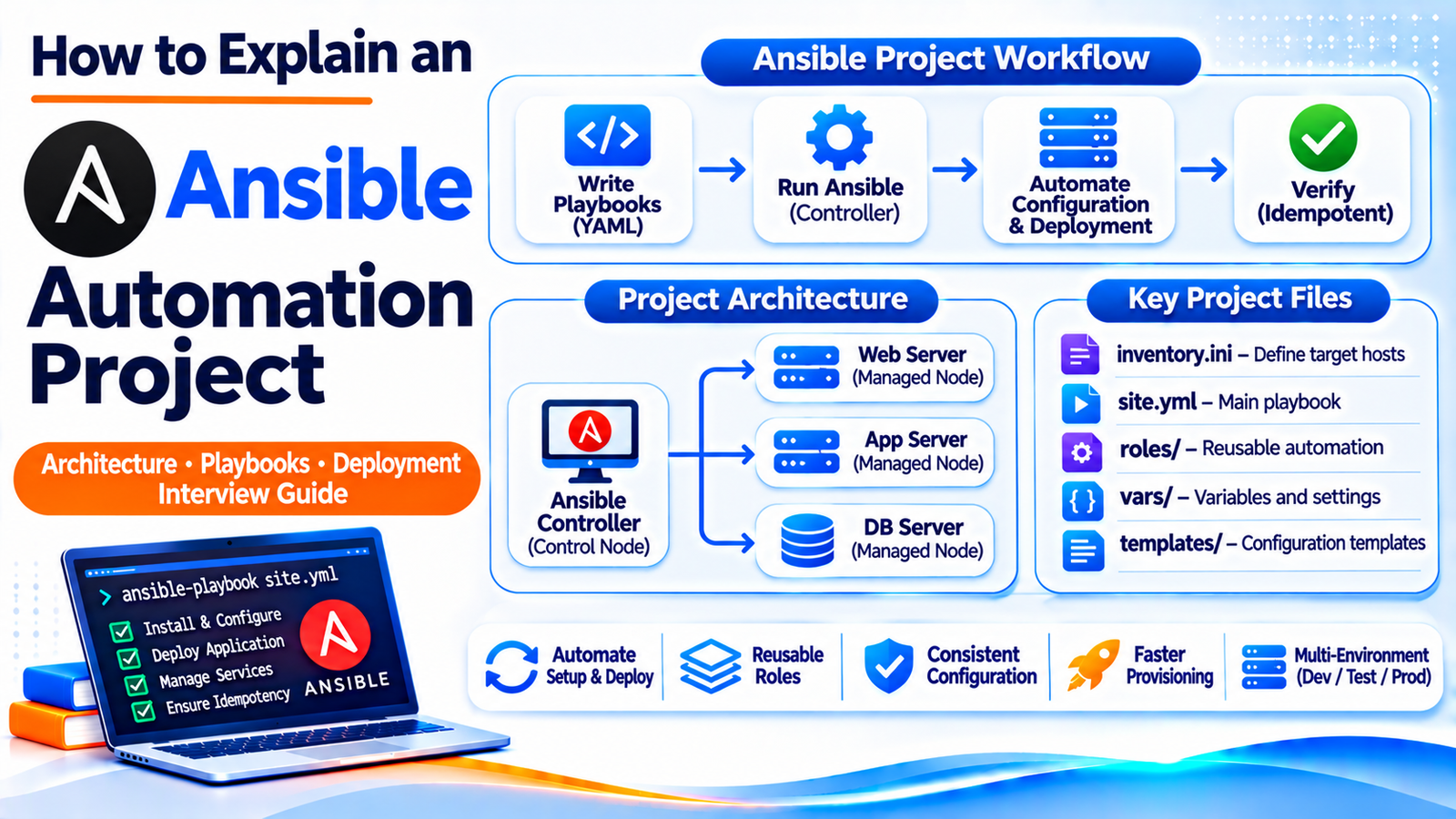
How to Explain an Ansible Automation Project: Architecture, Playbooks, CI/CD & Interview Guide
Learn how to explain an Ansible automation project using playbooks, inventories, roles, server configuration, CI/CD, security, troubleshooting, and interview examples.
Vyomanant Academy
Build these skills hands-on
Explore structured, practical technology programs from Vyomanant Academy.
Explore CoursesOn this page
How to Explain an Ansible Automation Project: Step-by-Step Guide
Introduction
Imagine attending a DevOps or system administration interview and hearing this question:
"Can you explain an Ansible automation project you have worked on?"
You may know Ansible commands, YAML syntax, inventories, and playbooks. But a strong project explanation should demonstrate how you used these concepts to solve an actual infrastructure management problem.
Interviewers want to understand:
- What manual work needed automation.
- Why Ansible was selected.
- How the automation architecture worked.
- How inventories, playbooks, and roles were organized.
- How servers were configured consistently.
- How sensitive information was protected.
- How automation was tested and executed.
- What problems occurred and how they were resolved.
In this guide, we'll explore a practical example: automating the configuration and deployment of Nginx web servers using Ansible on AWS EC2 instances.
We'll also cover CI/CD integration, troubleshooting, interview questions, and how to present the project as part of a DevOps portfolio.
Important: This is an educational reference project. Describe it as your own experience only if you have actually implemented the relevant steps.
1. What Is an Ansible Automation Project?
An Ansible automation project uses Ansible to automate tasks such as software installation, system configuration, application deployment, and routine infrastructure operations.
Ansible is an open-source automation tool commonly used for configuration management and orchestration.
Instead of manually connecting to every server and executing commands, engineers describe the desired configuration in YAML playbooks.
Ansible then connects to managed hosts and performs the required tasks.
Simple Definition
An Ansible automation project demonstrates how repeatable infrastructure and application configuration tasks can be managed through reusable, version-controlled automation.
Why Use Ansible?
Ansible provides several practical benefits:
- Automation: Reduces repetitive manual commands.
- Consistency: Applies defined configurations across servers.
- Agentless Operation: Typically manages Linux hosts through SSH without requiring a dedicated Ansible agent.
- Readability: Uses YAML-based playbooks.
- Reusability: Supports roles and reusable task collections.
- Scalability: Can target multiple hosts and groups.
- Integration: Works with CI/CD systems and cloud environments.
Ansible can also manage Windows systems and network devices through appropriate connection plugins and modules.
2. Example Project: Automating Web Server Configuration
Project Scenario
Imagine a team that manages several Linux web servers.
Previously, administrators configured each server manually.
They had to:
- Connect through SSH.
- Update package information.
- Install Nginx.
- Configure the web server.
- Deploy website files.
- Start the service.
- Verify that the website was accessible.
This approach becomes time-consuming and error-prone as the number of servers grows.
Project Objective
Use Ansible to automate the configuration of three Ubuntu-based EC2 instances.
The automation should:
- Install Nginx.
- Deploy a standard web page.
- Apply a consistent server configuration.
- Enable and start the Nginx service.
- Restart or reload Nginx when configuration changes.
- Verify service availability.
- Support separate development and production inventories.
- Integrate validation into a CI/CD workflow.
Technology Stack
| Component | Technology | Purpose |
|---|---|---|
| Automation | Ansible | Configuration management |
| Configuration Language | YAML | Playbook definitions |
| Managed Servers | AWS EC2 | Linux hosting environment |
| Operating System | Ubuntu | Managed host OS |
| Web Server | Nginx | Serve HTTP content |
| Connectivity | SSH | Remote host management |
| Inventory | Ansible Inventory | Define managed hosts |
| Reusability | Ansible Roles | Organize automation |
| Secret Protection | Ansible Vault | Encrypt sensitive project variables |
| Version Control | GitHub | Track automation code |
| CI/CD | GitHub Actions | Validate automation changes |
The same general approach can be adapted to on-premises servers, Azure virtual machines, or other supported environments.
3. Explain the Ansible Architecture
Ansible commonly uses a control node and managed nodes.
Architecture Diagram
                   DevOps Engineer
                          |
                          v
                   Git Repository
                          |
                          v
                   Ansible Project
                          |
             +------------+------------+
             |            |            |
             v            v            v
          Inventory    Playbooks       Roles
             |            |            |
             +------------+------------+
                          |
                          v
                  Ansible Control Node
                          |
                   SSH Connections
                          |
             +------------+------------+
             |            |            |
             v            v            v
         EC2 Server 1  EC2 Server 2  EC2 Server 3
             |            |            |
             v            v            v
           Nginx        Nginx        Nginx
How the Architecture Works
- The engineer maintains Ansible configuration in Git.
- The inventory identifies the target servers.
- Playbooks define the automation tasks.
- Roles organize related configuration.
- Ansible connects to the Linux servers using SSH.
- Ansible modules install packages, manage files, and control services.
- Verification tasks check whether the expected configuration is present.
What Is a Control Node?
The control node is the machine where Ansible runs.
It can be a developer workstation, a dedicated automation server, or an appropriately configured CI/CD runner.
What Are Managed Nodes?
Managed nodes are the systems Ansible configures.
For this project, they are Ubuntu EC2 instances.
Does Ansible Require an Agent?
For typical Linux automation over SSH, Ansible does not require a continuously running Ansible agent on each host.
However, managed hosts must satisfy the requirements of the modules and connection methods used. Many standard Linux modules require Python.
Interview Explanation
"We used an Ansible control node to manage multiple Ubuntu EC2 instances over SSH. The inventory defined the servers, playbooks described the required configuration, and reusable roles installed and configured Nginx consistently."
4. Step 1: Prepare the Ansible Environment
Prerequisites
Before starting, you need:
- A Linux or macOS control node, or another supported Ansible execution environment.
- Ansible installed on the control node.
- Three accessible Ubuntu servers.
- SSH authentication configured.
- A user with appropriate privilege escalation permissions.
- Network rules allowing SSH from an approved management source.
Verify Ansible Installation
ansible --version
Verify SSH Connectivity
ssh -i ~/.ssh/ansible-lab.pem ubuntu@<server-ip>
Replace the example IP and key path with your actual values.
For EC2, the SSH username depends on the selected AMI.
Important Security Note
Do not expose SSH port 22 to the entire internet unnecessarily.
Prefer restricted management access, a suitable private network, or an approved secure access method.
Interview Explanation
"We prepared the control node, configured SSH authentication, and verified that the automation account had the permissions required to manage packages and services."
5. Step 2: Create the Ansible Inventory
An inventory tells Ansible which hosts to manage.
Example Inventory
Create inventory/dev.ini:
[webservers]
web1 ansible_host=10.0.1.10
web2 ansible_host=10.0.1.11
web3 ansible_host=10.0.1.12

[webservers:vars]
ansible_user=ubuntu
ansible_ssh_private_key_file=~/.ssh/ansible-lab.pem
These are illustrative private IP addresses.
The control node must have network connectivity to the managed hosts.
What Does the Inventory Define?
- Host Alias: A readable name such as
web1. - Host Address: The actual connection address.
- Host Group: A collection of related servers.
- Connection Variables: Settings such as SSH username.
Test Connectivity
ansible webservers \
  -i inventory/dev.ini \
  -m ansible.builtin.ping
A successful response resembles:
web1 | SUCCESS => {
    "changed": false,
    "ping": "pong"
}
Important Clarification
The Ansible ping module does not send a traditional ICMP ping.
It verifies that Ansible can connect and execute a small module on the target host.
Interview Explanation
"We grouped our application servers under the webservers inventory group. This allowed us to execute the same automation against multiple hosts without maintaining separate scripts for each server."
6. Step 3: Organize the Ansible Project
A well-structured project is easier to maintain and explain.
Recommended Repository Structure
ansible-webserver-automation/
|
+-- README.md
+-- ansible.cfg
+-- site.yml
|
+-- inventory/
|   +-- dev.ini
|   +-- prod.ini
|
+-- group_vars/
|   +-- webservers.yml
|
+-- roles/
|   +-- nginx/
|       +-- tasks/
|       |   +-- main.yml
|       |
|       +-- handlers/
|       |   +-- main.yml
|       |
|       +-- templates/
|       |   +-- index.html.j2
|       |
|       +-- defaults/
|           +-- main.yml
|
+-- .github/
    +-- workflows/
        +-- ansible-validation.yml
Important Components
| Component | Purpose |
|---|---|
ansible.cfg |
Project-level Ansible configuration |
site.yml |
Main playbook |
inventory/ |
Managed host definitions |
group_vars/ |
Variables for host groups |
roles/ |
Reusable automation components |
tasks/ |
Steps executed by a role |
handlers/ |
Actions triggered by changes |
templates/ |
Files rendered with variables |
defaults/ |
Default role variable values |
Why Use Roles?
Roles make automation reusable and easier to organize.
For example, the Nginx role can be reused across multiple environments without copying all installation and configuration tasks.
7. Step 4: Create the Main Ansible Playbook
A playbook defines which hosts to configure and which tasks or roles to execute.
Example site.yml
---
- name: Configure Nginx web servers
  hosts: webservers
  become: true

  roles:
    - nginx
Explain the YAML
name
Provides a readable description of the play.
hosts
Specifies the inventory group to target.
become
Enables privilege escalation for tasks that require administrative permissions.
roles
Lists reusable roles to execute.
What Is Privilege Escalation?
Some operations, such as installing system packages or editing /etc/nginx, require elevated permissions.
Ansible can use supported privilege escalation mechanisms, commonly sudo on Linux.
The automation account should receive only the permissions it requires.
8. Step 5: Automate Nginx Installation
Create roles/nginx/tasks/main.yml:
---
- name: Install Nginx
  ansible.builtin.apt:
    name: nginx
    state: present
    update_cache: true

- name: Deploy website home page
  ansible.builtin.template:
    src: index.html.j2
    dest: /var/www/html/index.html
    owner: root
    group: root
    mode: "0644"

- name: Ensure Nginx is enabled and running
  ansible.builtin.service:
    name: nginx
    state: started
    enabled: true
What Does This Playbook Do?
The apt module ensures that Nginx is installed.
The template module renders and copies a website file to the managed server.
The service module ensures that Nginx is started and enabled at boot.
Why Use Modules Instead of Shell Commands?
Ansible modules express the desired state of a resource.
For example:
state: present
means the package should be installed.
The module can check the current state and avoid unnecessary changes.
This is one reason Ansible automation is generally more maintainable than repeating shell installation commands.
What Is Idempotency?
Idempotency means that running an operation repeatedly should not keep changing the system once the desired state has been reached.
For example, if Nginx is already installed, a correctly configured package task should not reinstall it unnecessarily.
Not every Ansible task or module is automatically idempotent. Shell commands and external side effects require particular care.
9. Step 6: Use Templates and Variables
Hardcoding every configuration value makes automation difficult to reuse.
Ansible supports variables and Jinja2 templates.
Example Role Defaults
Create roles/nginx/defaults/main.yml:
---
website_title: "Ansible Automation Demo"
environment_name: "development"
Example Template
Create roles/nginx/templates/index.html.j2:
<!DOCTYPE html>
<html lang="en">
<head>
    <meta charset="UTF-8">
    <title>{{ website_title }}</title>
</head>
<body>
    <h1>{{ website_title }}</h1>
    <p>Environment: {{ environment_name }}</p>
    <p>Configured using Ansible.</p>
</body>
</html>
Environment-Specific Variables
Create group_vars/webservers.yml:
---
website_title: "Vyomanant Automation Lab"
You can also define environment-specific variables using inventory-specific variable directories or other supported Ansible variable mechanisms.
Why Are Templates Useful?
Templates allow the same role to generate different files based on input variables.
For example, development and production environments may use different application names, hostnames, or configuration values.
Interview Explanation
"We used Jinja2 templates and Ansible variables to avoid hardcoding environment-specific values. This made the role reusable across different server groups."
10. Step 7: Use Ansible Handlers
A handler is a task triggered by another task when a change occurs.
For example, changing an Nginx configuration file may require reloading the service.
Example Configuration Task
- name: Deploy Nginx configuration
  ansible.builtin.template:
    src: nginx.conf.j2
    dest: /etc/nginx/nginx.conf
    owner: root
    group: root
    mode: "0644"
  notify: Reload Nginx
This example assumes you have created and validated a suitable nginx.conf.j2 template.
Example Handler
Create roles/nginx/handlers/main.yml:
---
- name: Reload Nginx
  ansible.builtin.service:
    name: nginx
    state: reloaded
How Does It Work?
When the template task changes the configuration file, it notifies the handler.
The handler runs at the appropriate point in the play.
If the template task reports no change, the handler is not triggered by that task.
Production Improvement
Validate a generated Nginx configuration before reloading the service.
A malformed configuration can cause service disruption.
Interview Explanation
"We used handlers so that Nginx was reloaded only when its configuration changed. This reduced unnecessary service operations during repeated playbook runs."
11. Step 8: Execute and Verify the Playbook
Check Playbook Syntax
ansible-playbook \
  -i inventory/dev.ini \
  site.yml \
  --syntax-check
Preview Changes
ansible-playbook \
  -i inventory/dev.ini \
  site.yml \
  --check --diff
Run the Playbook
ansible-playbook \
  -i inventory/dev.ini \
  site.yml
Example Execution Summary
PLAY RECAP

web1 : ok=4 changed=2 unreachable=0 failed=0
web2 : ok=4 changed=2 unreachable=0 failed=0
web3 : ok=4 changed=2 unreachable=0 failed=0
These values are illustrative; actual task counts depend on the playbook.
Verify the Web Servers
From a machine with network access to the hosts:
curl http://10.0.1.10
You should receive the generated HTML page.
Check Idempotency
Run the same playbook again:
ansible-playbook \
  -i inventory/dev.ini \
  site.yml
For a stable configuration using idempotent tasks, the second execution should normally report no additional changes.
Important Limitation
Check mode is not a complete simulation. Some modules do not fully support it, and some tasks require actual execution to determine their effects.
Key Point: Always verify the resulting service, not only the Ansible execution summary.
12. Step 9: Protect Sensitive Information with Ansible Vault
Automation projects may require sensitive configuration such as passwords, tokens, or API credentials.
These should not be stored as plaintext in a public Git repository.
What Is Ansible Vault?
Ansible Vault encrypts selected files or variables used by Ansible.
Create an Encrypted File
ansible-vault create secrets.yml
Edit an Encrypted File
ansible-vault edit secrets.yml
Run a Playbook with Vault Authentication
ansible-playbook \
  -i inventory/dev.ini \
  site.yml \
  --ask-vault-pass
The encrypted file must also be loaded by the playbook or its variable configuration when its values are needed.
Security Considerations
- Do not commit Vault passwords.
- Restrict access to encrypted secret files.
- Avoid exposing sensitive values in logs.
- Use
no_log: truefor tasks that may expose secrets. - Protect CI/CD secret access.
- Consider an approved external secret manager when appropriate.
Important Clarification
Ansible Vault encrypts stored content. It does not automatically prevent secrets from being exposed during execution, logging, or use on managed systems.
13. Step 10: Integrate Ansible with CI/CD
Ansible can be integrated with GitHub Actions, Jenkins, GitLab CI/CD, or other automation platforms.
Example CI/CD Workflow
Developer Updates Playbook
           |
           v
       Git Repository
           |
           v
      CI/CD Pipeline
           |
           v
       YAML Linting
           |
           v
     Ansible Syntax Check
           |
           v
        Code Review
           |
           v
       Approval
           |
           v
     Execute Playbook
           |
           v
     Verify Web Servers
Example GitHub Actions Validation Workflow
Create .github/workflows/ansible-validation.yml:
name: Validate Ansible Project

on:
  pull_request:

permissions:
  contents: read

jobs:
  validate:
    runs-on: ubuntu-latest

    steps:
      - name: Checkout repository
        uses: actions/checkout@v4

      - name: Install Ansible and lint
        run: |
          python -m pip install ansible ansible-lint

      - name: Run Ansible Lint
        run: ansible-lint site.yml

      - name: Check Playbook Syntax
        run: |
          ansible-playbook \
            -i inventory/dev.ini \
            site.yml \
            --syntax-check
This workflow validates automation code. It does not connect to production servers or execute the deployment.
How Would Deployment Automation Work?
A controlled deployment workflow would:
- Validate the playbook.
- Require code review.
- Authenticate to an approved automation environment.
- Select the correct inventory.
- Execute the playbook.
- Verify service health.
- Record the execution result.
Important Security Considerations
Avoid placing private SSH keys directly in workflow files.
For production, use an approved secrets-management mechanism and a runner with suitable network connectivity.
GitHub-hosted runners may not be able to reach private EC2 addresses directly.
Interview Explanation
"We integrated Ansible validation into GitHub Actions. The pipeline checked playbook syntax and linting before changes were approved for execution in the target environment."
14. Common Ansible Automation Problems and Troubleshooting
Problem 1: SSH Connection Failed
Possible Causes:
- Incorrect IP address.
- Wrong SSH username.
- Incorrect private key.
- Network restrictions.
- Unreachable server.
Investigation:
Verify the inventory, SSH configuration, security groups, and network connectivity.
Problem 2: Permission Denied
Possible Causes:
- Missing privilege escalation.
- Insufficient sudo permissions.
- Incorrect file ownership.
Investigation:
Check the automation account, become settings, and permissions required by the task.
Problem 3: YAML Syntax Error
Possible Causes:
- Incorrect indentation.
- Invalid YAML structure.
- Incorrect module parameters.
Investigation:
Run:
ansible-playbook site.yml --syntax-check
Include the appropriate inventory if the playbook requires it.
Problem 4: Package Installation Failed
Possible Causes:
- Package repository unavailable.
- Unsupported package name.
- Network or DNS problems.
- Package manager lock.
Investigation:
Review the package task error, operating system version, repository configuration, and connectivity.
Problem 5: Playbook Reports Changes Every Time
Possible Causes:
- Non-idempotent shell commands.
- Dynamic template content.
- Tasks that always report changed.
- Incorrect file or service configuration.
Investigation:
Review which tasks repeatedly report changes and whether the desired state is stable.
Problem 6: Nginx Fails After Configuration Change
Possible Causes:
- Invalid configuration.
- Port conflicts.
- Missing referenced files.
- Incorrect permissions.
Investigation:
Validate the configuration with:
sudo nginx -t
Review the service logs and correct the configuration before reloading.
Troubleshooting Framework
Ansible Execution Failure
           |
           v
    Identify Failed Host
           |
           v
    Review Failed Task
           |
           v
    Check Connectivity
           |
           v
    Check Permissions
           |
           v
    Validate Configuration
           |
           v
    Correct Root Cause
           |
           v
    Rerun and Verify
Key Point: Explain troubleshooting using the problem, evidence, root cause, solution, and verification.
15. How to Explain Your Ansible Project in an Interview
A good project explanation follows a clear structure.
Seven-Part Interview Framework
| Part | What to Explain |
|---|---|
| 1. Project Overview | What you automated |
| 2. Problem | Why manual configuration was inefficient |
| 3. Architecture | Control node and managed servers |
| 4. Implementation | Inventory, playbooks, roles, variables |
| 5. Security | SSH access, privilege escalation, Vault |
| 6. Automation | Validation and deployment workflow |
| 7. Results | Verification, troubleshooting, lessons learned |
Sample Two-Minute Interview Answer
The following is a fictional example for someone who implemented the described project.
"I worked on an Ansible automation project to standardize the configuration of Ubuntu web servers running on AWS EC2.
Previously, the server setup involved manually connecting to each instance, installing Nginx, deploying website files, and starting the service.
We used Ansible to automate these tasks.
I configured an inventory containing the EC2 instances and organized the automation into a reusable Nginx role.
The role installed the required package, deployed website files using Jinja2 templates, and ensured the Nginx service was running.
We used handlers to reload Nginx only when its configuration changed.
We also used variables to support environment-specific configuration and protected sensitive values using appropriate secret-management practices.
The playbooks were maintained in GitHub, and we added automated linting and syntax validation through GitHub Actions.
During testing, we encountered an SSH connectivity issue caused by incorrect network access rules. We reviewed the connection settings, corrected the allowed management access, and successfully reran the playbook.
We verified the website using HTTP requests and repeated the playbook to check for unnecessary configuration changes.
This project helped me understand Ansible inventories, playbooks, roles, templates, handlers, idempotency, security, and automation troubleshooting."
Why This Answer Works
It demonstrates:
- A real automation objective.
- Understanding of Ansible architecture.
- Configuration management skills.
- Reusable playbook organization.
- Security awareness.
- CI/CD validation.
- Troubleshooting.
- Verification of results.
Interview Tip
If you completed only a personal learning project, explain it accurately.
A well-documented lab project is more credible than unsupported claims about managing production infrastructure.
16. Common Ansible Interview Questions
Q1. What is Ansible?
Ansible is an automation tool used for configuration management, application deployment, and infrastructure operations.
Q2. What is an Ansible playbook?
A playbook is a YAML file that defines automation tasks and the hosts on which they should run.
Q3. What is an inventory?
An inventory defines the hosts and groups Ansible manages.
Q4. What is an Ansible role?
A role organizes related tasks, variables, handlers, templates, and files into a reusable structure.
Q5. What is idempotency?
Idempotency means repeated execution produces the same desired state without unnecessary changes.
Q6. What is an Ansible handler?
A handler is a task triggered by a notification, typically when another task reports a change.
Q7. What is Ansible Vault?
Ansible Vault encrypts files or variables containing sensitive information.
Q8. What is the difference between command and shell?
The command module executes commands without shell processing, while shell executes commands through a shell and supports shell features.
Q9. What is become?
become enables privilege escalation for tasks requiring elevated permissions.
Q10. What is Ansible check mode?
Check mode attempts to predict changes without applying them, subject to module support and limitations.
Q11. What is the difference between Ansible and Terraform?
Terraform primarily manages infrastructure resources through providers. Ansible is commonly used for configuration management, deployment, and operational automation.
Q12. Can Ansible manage cloud resources?
Yes. Supported collections and modules allow Ansible to manage cloud resources as well as operating system configuration.
Q13. How does Ansible connect to Linux servers?
Ansible commonly uses SSH, although other connection methods are supported.
Q14. How do you troubleshoot an unreachable host?
Check inventory addresses, authentication, network connectivity, SSH configuration, and firewall or security group rules.
Q15. How do you make Ansible automation reusable?
Use roles, variables, templates, well-defined inventories, and consistent naming conventions.
17. Common Mistakes When Explaining an Ansible Project
- Only Listing Modules: Explain what operational problem the automation solved.
- Ignoring Inventories: Show how servers were organized and targeted.
- Writing Everything in One Playbook: Use roles when they improve maintainability.
- Hardcoding Credentials: Protect sensitive information.
- Ignoring Idempotency: Repeated runs should not cause unnecessary changes.
- Using Shell for Every Task: Prefer appropriate Ansible modules.
- Skipping Verification: Confirm services and applications work after automation.
- Ignoring Security: Restrict SSH access and privilege escalation.
- Exaggerating Experience: Describe your actual implementation accurately.
18. Practical Beginner Exercise
Build your own Ansible automation project using the following checklist.
Phase 1: Environment Setup
- Install Ansible.
- Prepare two or three Linux servers.
- Configure secure SSH access.
- Create an inventory.
- Test connectivity with the Ansible ping module.
Phase 2: Basic Automation
- Create a playbook.
- Install Nginx.
- Deploy a basic web page.
- Start and enable the Nginx service.
- Verify the website.
Phase 3: Reusable Configuration
- Create an Nginx role.
- Add role defaults.
- Create a Jinja2 template.
- Configure a handler.
- Add environment-specific variables.
- Test idempotency.
Phase 4: Security and CI/CD
- Review SSH permissions.
- Protect secrets appropriately.
- Store automation code in GitHub.
- Add linting and syntax checks.
- Review changes before execution.
- Document the deployment process.
Phase 5: Troubleshooting and Documentation
- Simulate a controlled configuration error.
- Investigate the failed task.
- Correct the issue.
- Rerun the playbook.
- Verify the final service state.
- Document the architecture and lessons learned.
- Stop or remove unused cloud resources.
What Should Your GitHub README Include?
- Project objective.
- Ansible architecture diagram.
- Prerequisites.
- Inventory structure.
- Role and playbook explanation.
- Execution commands.
- Security considerations.
- Verification steps.
- Troubleshooting examples.
- Cleanup instructions.
19. Frequently Asked Questions
Can beginners build an Ansible automation project?
Yes. Start by automating package installation and service management on one Linux server.
Is Ansible only for AWS?
No. Ansible can manage supported systems across cloud platforms, on-premises infrastructure, and other environments.
Does Ansible require an agent?
For typical Linux management over SSH, no dedicated Ansible agent is required.
Is Python required on managed servers?
Many Ansible Linux modules require Python, although some tasks and connection methods have different requirements.
Can Ansible replace Terraform?
They overlap in some capabilities but commonly serve complementary roles. Terraform often provisions infrastructure, while Ansible configures operating systems and applications.
Can Ansible run through GitHub Actions?
Yes. A workflow can validate and execute Ansible automation when authentication, network connectivity, and permissions are configured appropriately.
Is Ansible useful for DevOps roles?
Yes. Ansible is widely applicable to configuration management, deployment automation, and repeatable infrastructure operations.
20. Key Takeaways
- Ansible automates infrastructure configuration and operational tasks.
- Inventories identify managed hosts.
- Playbooks define automation workflows.
- Roles organize reusable configuration.
- Variables support environment-specific settings.
- Jinja2 Templates generate configurable files.
- Handlers respond to changes.
- Idempotency helps maintain consistent system state.
- Ansible Vault protects stored sensitive variables.
- CI/CD Integration supports automated validation and controlled execution.
- Troubleshooting requires understanding connectivity, permissions, configuration, and module behavior.
- A strong interview explanation connects the operational problem, architecture, automation, security, verification, and results.
21. What Should You Learn Next?
Continue with these related resources:
- What Is Ansible? Configuration Management Explained
- How to Explain a Terraform Infrastructure Project
- How to Explain a CI/CD Pipeline Project
- How to Explain an End-to-End DevOps Project
- How to Explain a DevSecOps Security Automation Project
Continue Learning with Vyomanant Academy
Ansible automation projects help learners develop practical skills in server management, configuration automation, reusable infrastructure workflows, and DevOps operations.
Vyomanant Academy supports learning in:
- Ansible Fundamentals.
- Linux Administration.
- Configuration Management.
- Ansible Playbooks and Roles.
- Cloud Server Automation.
- CI/CD Integration.
- Infrastructure Security.
- DevOps Troubleshooting.
Start with one Linux server, automate a repeatable task, expand to multiple hosts, and document the results.
Learn. Build. Grow.
CONTINUE EXPLORING
Recommended next

What Is Artificial Intelligence? A Simple Beginner's Guide
Learn what Artificial Intelligence (AI) means, how it works, and where we use it in everyday life, with simple examples that anyone can understand.
View resource
What Is Machine Learning? A Simple Beginner's Guide
Discover what Machine Learning is, how computers learn from data, and how predictions work. Explore key ML concepts, learning types, and real-world examples in this beginner-friendly guide.
View resource
What Is Information Technology? A Beginner's Guide
Discover what Information Technology (IT) is, how it works, its main components, everyday applications, and how beginners can start learning IT.
View resource