
RESOURCES
How to Explain a Terraform Infrastructure Project: AWS Architecture, IaC Workflow, CI/CD & Interview Guide
Learn how to explain a Terraform infrastructure project using AWS, Infrastructure as Code, modules, remote state, CI/CD, security, and interview examples.
Vyomanant Academy
Build these skills hands-on
Explore structured, practical technology programs from Vyomanant Academy.
Explore CoursesOn this page
How to Explain a Terraform Infrastructure Project: Step-by-Step Guide
Introduction
Imagine you're attending a DevOps, cloud engineering, or Infrastructure as Code interview.
The interviewer asks:
"Can you explain a Terraform infrastructure project you have worked on?"
You may know commands such as terraform init, terraform plan, and terraform apply. You may have created EC2 instances or configured cloud resources.
But explaining a Terraform project requires more than remembering commands.
You should understand:
- What infrastructure the project needed.
- Why Terraform was selected.
- How the infrastructure architecture was designed.
- How Terraform configuration files were organized.
- How providers, resources, variables, and modules worked.
- How Terraform state was managed.
- How infrastructure changes were reviewed and deployed.
- How security, troubleshooting, and cost were handled.
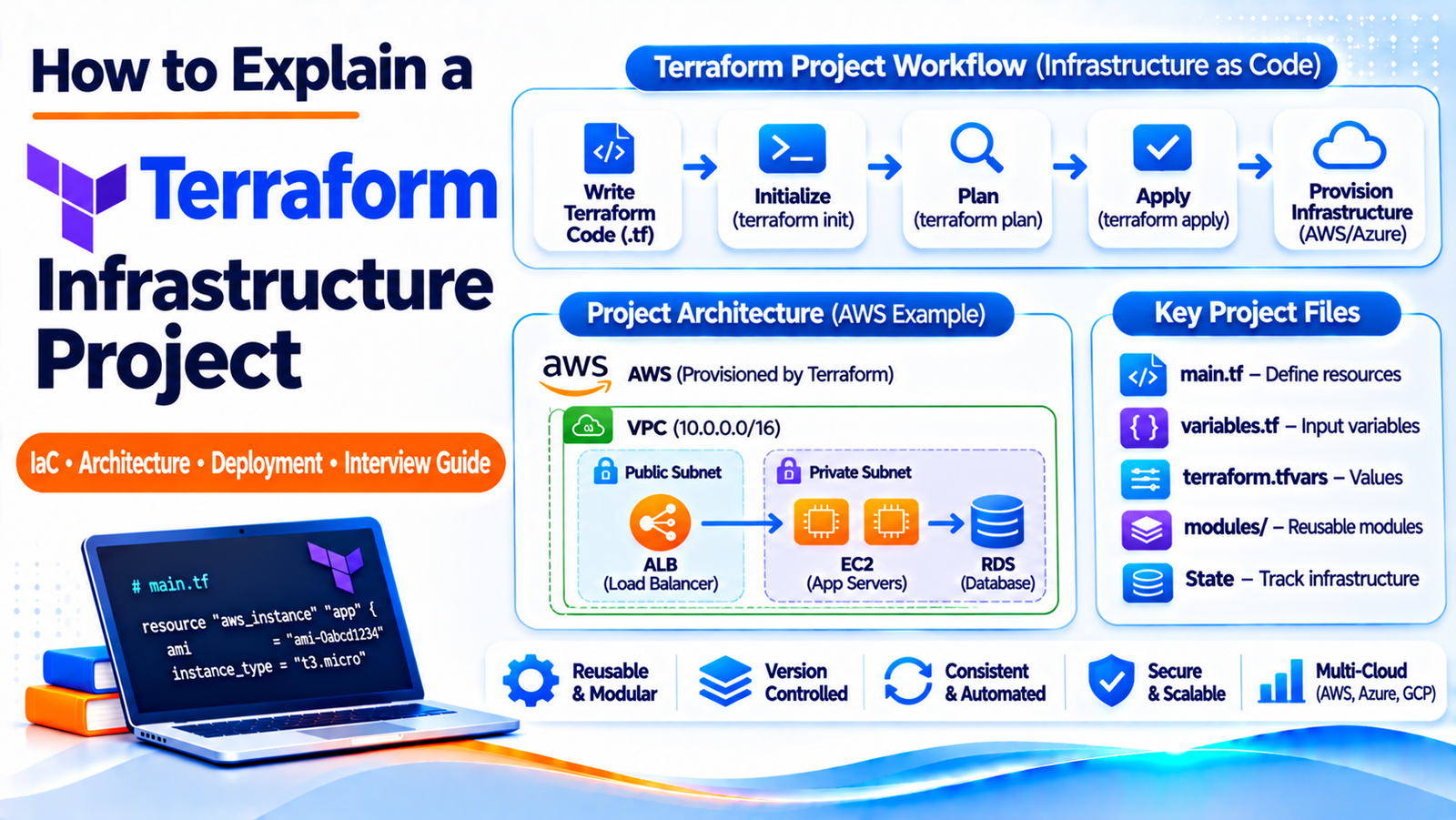
In this guide, we'll explore a practical Terraform project that provisions AWS infrastructure for a web application, including networking, compute, load balancing, and remote state management.
You'll also learn how to explain the project in an interview and document it as a portfolio project.
Important: This is an educational reference project. Describe it as personal experience only if you actually implemented the relevant steps.
1. What Is a Terraform Infrastructure Project?
A Terraform infrastructure project uses configuration files to define and manage infrastructure resources.
Terraform is an Infrastructure as Code (IaC) tool developed by HashiCorp.
Instead of manually creating every cloud resource through a console, engineers describe the desired infrastructure using Terraform configuration.
Terraform then uses providers to communicate with platforms such as AWS, Microsoft Azure, and Google Cloud.
Simple Definition
A Terraform infrastructure project demonstrates how cloud resources can be provisioned, updated, and managed using version-controlled configuration files.
Why Use Terraform?
Terraform helps teams achieve:
- Repeatability: Recreate infrastructure using configuration.
- Consistency: Reduce differences between environments.
- Version Control: Track infrastructure changes through Git.
- Automation: Integrate provisioning into delivery pipelines.
- Reusability: Share common configurations through modules.
- Change Visibility: Review proposed actions before applying them.
Terraform is not a replacement for application deployment, monitoring, or security tools. It manages infrastructure resources through supported providers.
2. Example Project: Provisioning AWS Infrastructure with Terraform
Let's imagine a small web application that needs a scalable AWS hosting environment.
Project Objective
The goal is to use Terraform to provision:
- An AWS Virtual Private Cloud (VPC).
- Public and private subnets.
- Internet and outbound connectivity.
- Security groups.
- An Application Load Balancer.
- EC2 application instances.
- An EC2 Auto Scaling group.
- Remote Terraform state storage.
- Environment-specific configuration.
- A controlled CI/CD workflow for infrastructure changes.
Technology Stack
| Component | Technology | Purpose |
|---|---|---|
| Infrastructure as Code | Terraform | Provision and manage resources |
| Cloud Provider | AWS | Host the infrastructure |
| Networking | Amazon VPC | Isolated virtual network |
| Compute | Amazon EC2 | Run application servers |
| Load Balancing | Application Load Balancer | Route application traffic |
| Scaling | EC2 Auto Scaling | Manage instance capacity |
| Remote State | Amazon S3 | Store Terraform state |
| Version Control | GitHub | Track infrastructure code |
| CI/CD | GitHub Actions | Validate, plan, and apply changes |
| Identity | AWS IAM | Control cloud permissions |
| Monitoring | Amazon CloudWatch | Observe deployed infrastructure |
For clarity, the core project focuses on infrastructure provisioning. A production application might also need a managed database, DNS, TLS certificates, secret management, and additional operational controls.
3. Explain the Terraform Architecture
A Terraform project has two important architectural views:
- The infrastructure Terraform creates.
- The workflow used to manage that infrastructure.
AWS Infrastructure Architecture
                    Internet Users
                          |
                          | HTTPS
                          v
                 Application Load Balancer
                      Public Subnets
                          |
               +----------+----------+
               |                     |
               v                     v
          EC2 Instance          EC2 Instance
          Private AZ A          Private AZ B
               |                     |
               +----------+----------+
                          |
                    Auto Scaling

             AWS Virtual Private Cloud
             -------------------------
             Public Subnets:
               - Application Load Balancer
               - NAT Gateways (if needed)

             Private Subnets:
               - EC2 Application Instances

             Supporting Services:
               - IAM
               - CloudWatch
This diagram represents a target architecture. HTTPS requires a suitable certificate and listener configuration. Private instances also need a defined bootstrap and outbound connectivity strategy.
Terraform Management Workflow
              Developer
                  |
                  v
           Terraform Files
                  |
                  v
            Git Repository
                  |
                  v
           GitHub Actions
                  |
           +------+------+
           |             |
           v             v
       Validate        Plan
                         |
                         v
                 Review / Approval
                         |
                         v
                   Apply Changes
                         |
                         v
                    AWS APIs
                         |
                         v
                 AWS Infrastructure

          Terraform State <--> Amazon S3
How the Project Works
Terraform reads the configuration and determines the desired resources.
The AWS provider communicates with AWS APIs.
Terraform compares the configuration with the recorded state and information retrieved from the provider.
It produces a plan describing proposed changes.
After review and approval, Terraform applies the changes.
The resulting state is stored in a configured backend.
Interview Explanation
"We used Terraform to provision AWS networking and application infrastructure. The configuration was stored in Git, reusable modules defined common components, and remote state was maintained in Amazon S3. Infrastructure changes were reviewed through Terraform plans before being applied."
4. Step 1: Understand the Terraform Workflow
Terraform uses a declarative configuration language called HashiCorp Configuration Language (HCL).
Instead of writing every infrastructure creation step, you describe the desired resources.
Basic Terraform Commands
| Command | Purpose |
|---|---|
terraform init |
Initialize the working directory and providers |
terraform fmt |
Format Terraform configuration |
terraform validate |
Check configuration validity |
terraform plan |
Preview proposed infrastructure changes |
terraform apply |
Apply planned changes |
terraform output |
Display configured outputs |
terraform state list |
List tracked resources |
terraform destroy |
Plan and remove managed resources |
Typical Workflow
terraform init

terraform fmt -check

terraform validate

terraform plan -out=tfplan

terraform apply tfplan
Why Review the Plan?
A plan can reveal unexpected actions, such as:
- Creating additional resources.
- Modifying network rules.
- Replacing an EC2 instance.
- Removing a resource.
- Changing resource attributes that may cause downtime.
A successful plan is not a guarantee that the subsequent apply will succeed.
Key Point: Always understand the proposed infrastructure changes before approving them.
5. Step 2: Organize the Terraform Project
A maintainable Terraform project should separate reusable components from environment-specific configuration.
Example Repository Structure
terraform-aws-infrastructure/
|
+-- README.md
|
+-- modules/
|   +-- networking/
|   |   +-- main.tf
|   |   +-- variables.tf
|   |   +-- outputs.tf
|   |
|   +-- security/
|   |   +-- main.tf
|   |
|   +-- compute/
|   |   +-- main.tf
|   |
|   +-- load-balancer/
|       +-- main.tf
|
+-- environments/
|   +-- dev/
|   |   +-- main.tf
|   |   +-- variables.tf
|   |   +-- terraform.tfvars
|   |   +-- backend.tf
|   |
|   +-- prod/
|       +-- main.tf
|       +-- variables.tf
|       +-- backend.tf
|
+-- .github/
    +-- workflows/
        +-- terraform.yml
Important Terraform Files
main.tf
Defines resources and module calls.
variables.tf
Declares configurable inputs.
outputs.tf
Defines values to display or expose to other configurations.
providers.tf
Defines provider requirements and configuration.
backend.tf
Configures where Terraform stores state.
terraform.tfvars
Provides input values for an environment.
Why Use Modules?
Modules allow infrastructure patterns to be reused.
For example, the same networking module can support development and production environments with different address ranges.
However, a module should represent a useful, understandable abstraction rather than merely wrapping every resource.
6. Step 3: Configure the AWS Provider
Terraform providers are plugins that allow Terraform to manage resources through external APIs.
Example Provider Configuration
Create providers.tf:
terraform {
  required_version = ">= 1.10.0"

  required_providers {
    aws = {
      source  = "hashicorp/aws"
      version = "~> 5.0"
    }
  }
}

provider "aws" {
  region = var.aws_region
}
This example intentionally targets AWS provider major version 5. Other versions may require configuration adjustments.
Define a Variable
Create variables.tf:
variable "aws_region" {
  description = "AWS region for deployment"
  type        = string
  default     = "us-east-1"
}
How Does Terraform Authenticate?
The AWS provider supports established AWS credential mechanisms.
For local development, engineers may use an appropriately configured AWS profile.
For CI/CD, temporary credentials obtained through an IAM role are generally preferable to long-lived access keys.
Security Reminder
Never hardcode AWS access keys in Terraform files or commit credentials to Git.
7. Step 4: Create the VPC and Networking
Networking provides the foundation for the application infrastructure.
Example Network Design
| Resource | Example CIDR |
|---|---|
| VPC | 10.40.0.0/16 |
| Public Subnet A | 10.40.1.0/24 |
| Public Subnet B | 10.40.2.0/24 |
| Private Subnet A | 10.40.11.0/24 |
| Private Subnet B | 10.40.12.0/24 |
Example VPC Resource
resource "aws_vpc" "main" {
  cidr_block           = "10.40.0.0/16"
  enable_dns_support   = true
  enable_dns_hostnames = true

  tags = {
    Name = "terraform-project-vpc"
  }
}
Example Public Subnet
resource "aws_subnet" "public_a" {
  vpc_id                  = aws_vpc.main.id
  cidr_block              = "10.40.1.0/24"
  availability_zone       = "us-east-1a"
  map_public_ip_on_launch = true

  tags = {
    Name = "public-subnet-a"
  }
}
These snippets illustrate resource definitions, not a complete deployable network.
A functioning design also requires additional subnets, route tables, an internet gateway, and appropriate connectivity.
Availability Zone identifiers can map differently across AWS accounts. Production modules should avoid assuming a particular zone is always suitable.
Why Use Public and Private Subnets?
Public subnets host resources that need direct internet-facing routing, such as the public load balancer.
Private subnets host application instances that should not accept direct inbound connections from the public internet.
Interview Explanation
"We created a VPC with public and private subnets across two Availability Zones. The public subnets supported the internet-facing load balancer, while EC2 application instances ran in private subnets."
8. Step 5: Configure Security Groups
Security groups control permitted network traffic for supported AWS resources.
Example Access Rules
| Resource | Allowed Inbound Traffic |
|---|---|
| Application Load Balancer | HTTPS 443 from intended clients |
| EC2 Application Instances | Application port from ALB security group |
| Database, if added | Database port from application security group |
Example Application Security Group
resource "aws_security_group" "app" {
  name   = "terraform-app-sg"
  vpc_id = aws_vpc.main.id

  ingress {
    description     = "Application traffic from ALB"
    from_port       = 8080
    to_port         = 8080
    protocol        = "tcp"
    security_groups = [aws_security_group.alb.id]
  }

  egress {
    from_port   = 0
    to_port     = 0
    protocol    = "-1"
    cidr_blocks = ["0.0.0.0/0"]
  }
}
The referenced ALB security group must be defined separately.
The broad outbound rule is illustrative and should be reviewed against actual workload requirements.
Security Practices
- Avoid exposing administrative ports unnecessarily.
- Restrict application access to the load balancer.
- Use IAM roles for AWS service permissions.
- Avoid embedding secrets in Terraform configuration.
- Review planned security group changes carefully.
Key Point: Terraform automates security configuration, but the configuration still needs to be secure.
9. Step 6: Provision EC2 and Auto Scaling
Amazon EC2 provides virtual servers.
For this project, EC2 instances host a web application.
Example Compute Design
Application Load Balancer
          |
     Target Group
          |
   EC2 Auto Scaling Group
          |
     +----+----+
     |         |
     v         v
   EC2 A     EC2 B
  Private   Private
  Subnet A  Subnet B
What Is a Launch Template?
A launch template defines how EC2 instances are created.
It may include:
- Amazon Machine Image.
- Instance type.
- Security groups.
- IAM instance profile.
- Storage configuration.
- User data for bootstrapping.
What Does Auto Scaling Do?
An Auto Scaling group maintains a desired number of instances and can adjust capacity according to configured policies.
For example:
Minimum Capacity: 2
Desired Capacity: 2
Maximum Capacity: 4
Why Use an Application Load Balancer?
The ALB routes requests to healthy application targets.
The load balancer and Auto Scaling group perform different responsibilities:
- ALB: Routes application traffic.
- Auto Scaling: Manages instance capacity and replacement.
Important Implementation Detail
The application must be installed and configured on instances launched by the Auto Scaling group.
This can be handled through user data, prebuilt images, or an approved deployment mechanism.
Terraform creating an EC2 instance does not automatically mean the application is deployed.
Interview Explanation
"We used a launch template and Auto Scaling group to standardize application instances. An Application Load Balancer distributed requests to healthy instances running in private subnets."
10. Step 7: Use Terraform Variables and Outputs
Variables allow the same configuration to support different environments.
Example Variables
variable "environment" {
  type    = string
  default = "dev"
}

variable "instance_type" {
  type    = string
  default = "t3.micro"
}
Example Resource Tags
tags = {
  Environment = var.environment
  ManagedBy   = "Terraform"
}
Example Output
output "vpc_id" {
  description = "Created VPC ID"
  value       = aws_vpc.main.id
}
After deployment:
terraform output
Why Are Variables Useful?
Development and production may need different:
- Instance sizes.
- Scaling capacities.
- Network ranges.
- Resource names.
- Monitoring settings.
Important Limitation
Marking a variable as sensitive reduces accidental display in some Terraform output, but it does not guarantee that the value is absent from state.
Do not assume Terraform state contains no secrets.
11. Step 8: Configure Remote Terraform State
Terraform state records information about managed resources.
What Is Terraform State?
Terraform uses state to associate configuration resources with real infrastructure objects.
By default, state may be stored locally.
For team projects, a shared remote backend is usually more appropriate.
Why Use Remote State?
Remote state helps with:
- Shared access to the latest state.
- Controlled state storage.
- Consistent automation.
- State locking when supported and configured.
- Reduced reliance on a developer's local machine.
Example: Amazon S3 Backend
terraform {
  backend "s3" {
    bucket       = "example-terraform-state-bucket"
    key          = "dev/infrastructure.tfstate"
    region       = "us-east-1"
    encrypt      = true
    use_lockfile = true
  }
}
This example assumes an existing S3 bucket and a Terraform version supporting S3 native lockfiles.
The bucket must be created before initializing this backend.
State Management Best Practices
- Enable S3 bucket versioning.
- Restrict state bucket access through IAM.
- Encrypt state storage.
- Enable and correctly configure state locking.
- Separate state for different environments.
- Protect state files as sensitive infrastructure data.
- Avoid manual state editing unless a controlled recovery procedure requires it.
What Is State Locking?
State locking helps prevent concurrent operations from modifying the same state simultaneously.
Without suitable locking, overlapping Terraform operations can create consistency problems.
Interview Explanation
"We configured an S3 remote backend with restricted access, encryption, versioning, and supported state locking. Development and production used separate state locations."
12. Step 9: Use Terraform Modules
A Terraform module is a collection of Terraform configuration files that can be called from another configuration.
Example Module Call
module "networking" {
  source = "../../modules/networking"

  environment = "dev"
  vpc_cidr    = "10.40.0.0/16"
}
This assumes the networking module declares the corresponding input variables.
Why Use Modules?
Modules help with:
- Reusing common infrastructure patterns.
- Reducing duplicated configuration.
- Establishing consistent defaults.
- Organizing complex projects.
- Supporting multiple environments.
Example Environment Design
Reusable Modules
       |
       +-- Networking
       +-- Security
       +-- Compute
       +-- Load Balancer
       |
       v
Environment Configurations
       |
       +-- Development
       +-- Testing
       +-- Production
Important Consideration
Modules should have clearly documented inputs, outputs, assumptions, and versioning practices.
Changing a shared module can affect multiple environments.
13. Step 10: Integrate Terraform with CI/CD
Terraform workflows can be automated through GitHub Actions, Azure DevOps, Jenkins, or another CI/CD platform.
Example Pipeline
Developer Opens Pull Request
             |
             v
       Terraform Format
             |
             v
       Terraform Validate
             |
             v
        Terraform Plan
             |
             v
         Code Review
             |
             v
        Merge / Approval
             |
             v
        Terraform Apply
             |
             v
      Verify Infrastructure
Example GitHub Actions Validation Workflow
name: Terraform Validation

on:
  pull_request:

permissions:
  contents: read

jobs:
  validate:
    runs-on: ubuntu-latest

    defaults:
      run:
        working-directory: environments/dev

    steps:
      - name: Checkout
        uses: actions/checkout@v4

      - name: Setup Terraform
        uses: hashicorp/setup-terraform@v3

      - name: Initialize
        run: terraform init -backend=false

      - name: Check Formatting
        run: terraform fmt -check -recursive

      - name: Validate
        run: terraform validate
This workflow performs configuration validation only. It does not generate a cloud-aware plan or apply infrastructure changes.
How Should Plan and Apply Work?
A more complete workflow would:
- Authenticate to AWS using a trusted, short-lived identity mechanism.
- Initialize the approved remote backend.
- Run
terraform plan. - Review the proposed changes.
- Require approval for sensitive environments.
- Apply the approved plan.
- Verify the infrastructure.
For GitHub Actions on AWS, OpenID Connect federation with an appropriately restricted IAM role is a common authentication pattern.
Production Considerations
- Protect production environments.
- Limit IAM permissions.
- Review dependency and provider versions.
- Secure plan artifacts because they may contain sensitive information.
- Avoid concurrent applies to the same state.
- Use appropriate approval controls.
- Maintain audit records.
Interview Explanation
"We automated Terraform formatting and validation for pull requests. Infrastructure plans were reviewed before applying approved changes through a controlled deployment process."
14. How to Troubleshoot Terraform Problems
Interviewers often ask about infrastructure failures.
Problem 1: Terraform Initialization Fails
Possible Causes:
- Provider download failure.
- Backend configuration error.
- Missing credentials.
- Network connectivity problems.
Investigation:
Check initialization output, provider requirements, backend access, and authentication.
Problem 2: Terraform Plan Shows Unexpected Changes
Possible Causes:
- Manual infrastructure changes.
- Updated provider behavior.
- Changed variable values.
- Resource replacement requirements.
- Configuration drift.
Investigation:
Review the plan carefully and compare it with the actual resource configuration.
Problem 3: Terraform Apply Fails
Possible Causes:
- Missing permissions.
- AWS service quotas.
- Invalid resource configuration.
- Resource dependencies.
- Cloud API errors.
Investigation:
Read the exact provider error and inspect the affected resource.
Problem 4: State Lock Error
Possible Causes:
- Another Terraform operation is running.
- A previous operation was interrupted.
- Backend access or locking problems.
Investigation:
Confirm whether an active operation holds the lock.
Never force-unlock state unless you have verified that doing so is safe.
Problem 5: Resource Was Changed Manually
Possible Causes:
An administrator modified an AWS resource outside Terraform.
Investigation:
Run a plan, inspect the differences, and decide whether to restore the declared configuration or update Terraform to reflect the approved change.
Problem 6: Terraform Wants to Replace a Resource
Possible Causes:
A changed argument requires resource replacement according to the provider's behavior.
Investigation:
Inspect the plan and provider documentation before applying. Replacement may cause downtime or data loss.
Troubleshooting Framework
Terraform Error
      |
      v
Read Error Message
      |
      v
Identify Resource / Backend
      |
      v
Check Configuration
      |
      v
Check Credentials and Permissions
      |
      v
Review State and Dependencies
      |
      v
Apply Controlled Fix
      |
      v
Run Plan and Verify
Key Point: Terraform errors should be investigated through configuration, state, provider behavior, and cloud API responses.
15. Terraform Security and Cost Best Practices
Security Best Practices
- Use least-privilege cloud identities.
- Prefer temporary credentials.
- Protect remote state.
- Restrict backend access.
- Avoid committing secrets.
- Review Terraform plans.
- Scan IaC for misconfigurations.
- Use approved provider and module versions.
- Require review for sensitive infrastructure changes.
Cost Management
Terraform can create resources that incur charges.
Common AWS cost drivers include:
- EC2 instances.
- Application Load Balancers.
- NAT Gateways.
- Data transfer.
- CloudWatch logs.
- Storage resources.
Practical Cost Controls
- Start with a small lab environment.
- Review estimated costs before applying.
- Configure AWS Budgets alerts.
- Remove unused resources.
- Tag resources for cost allocation.
- Avoid unnecessarily expensive network designs.
Cleanup
For a disposable learning environment:
terraform plan -destroy
Review the proposed removals, then run:
terraform destroy
Warning: Destroying infrastructure may permanently remove resources and data. Confirm the environment and review the plan before proceeding.
16. How to Explain Your Terraform Project in an Interview
Use a structured explanation that connects infrastructure requirements with implementation decisions.
Seven-Part Framework
| Part | What to Explain |
|---|---|
| 1. Overview | What infrastructure the project required |
| 2. Objective | Why Terraform was selected |
| 3. Architecture | AWS networking, compute, and load balancing |
| 4. Implementation | Providers, resources, variables, modules |
| 5. State Management | S3 backend, locking, access control |
| 6. Automation | Validation, plan review, approved apply |
| 7. Troubleshooting | Problems solved and lessons learned |
Sample Two-Minute Interview Answer
The following is a fictional answer for someone who completed the described project.
"I worked on a Terraform Infrastructure as Code project to provision AWS infrastructure for a web application.
The objective was to replace repetitive manual provisioning with version-controlled and reusable infrastructure configuration.
We used Terraform to create a VPC, public and private subnets, security groups, an Application Load Balancer, and an EC2 Auto Scaling group.
The application instances ran in private subnets, while the load balancer handled incoming HTTPS traffic.
We organized the Terraform configuration into reusable networking, security, compute, and load-balancer modules.
We used variables to manage environment-specific values and outputs to expose useful resource information.
For state management, we configured an S3 remote backend with encryption, versioning, restricted IAM access, and state locking.
We stored the Terraform code in GitHub and added automated formatting and validation checks. Proposed infrastructure changes were reviewed before being applied.
One challenge involved an unexpected Terraform plan after a security group was modified manually. We compared the declared configuration with the actual AWS resource, identified the drift, and restored the approved configuration.
This project helped me understand Terraform modules, AWS infrastructure provisioning, remote state, CI/CD integration, security, and troubleshooting."
Why This Answer Works
It demonstrates:
- Understanding of Infrastructure as Code.
- A clear infrastructure objective.
- AWS architecture knowledge.
- Terraform configuration organization.
- State management.
- Automation.
- Troubleshooting.
- Practical decision-making.
Important Interview Tip
Be specific about what you personally implemented.
If you created a learning project, explain it as a learning project rather than claiming production experience.
17. Common Terraform Interview Questions
Q1. What is Terraform?
Terraform is an Infrastructure as Code tool used to define and manage infrastructure through declarative configuration.
Q2. What is a Terraform provider?
A provider is a plugin that enables Terraform to interact with external services and APIs.
Q3. What is a Terraform resource?
A resource represents an infrastructure object managed through Terraform configuration.
Q4. What is Terraform state?
Terraform state records information about managed infrastructure resources and their relationships to configuration.
Q5. What is the difference between terraform plan and terraform apply?
terraform plan previews proposed changes. terraform apply executes approved changes.
Q6. What is a Terraform module?
A module is a reusable collection of Terraform configuration.
Q7. Why use remote state?
Remote state supports shared infrastructure management, centralized storage, and appropriate access controls.
Q8. What is state locking?
State locking helps prevent concurrent Terraform operations from modifying the same state.
Q9. What is Terraform drift?
Drift occurs when actual infrastructure differs from the configuration or recorded state, often because of changes made outside Terraform.
Q10. What is the difference between Terraform and Ansible?
Terraform primarily manages infrastructure resources, while Ansible is commonly used for configuration management and operational automation. Their capabilities can overlap.
Q11. Can Terraform manage Azure and Google Cloud?
Yes. Terraform supports multiple platforms through providers.
Q12. How do you manage multiple environments?
Common approaches include separate root configurations, reusable modules, environment-specific variables, and isolated state.
Q13. What happens if Terraform apply fails halfway?
Some resources may already have been changed. Terraform is not a universal transactional rollback system. Inspect the state and actual infrastructure before retrying.
Q14. What is terraform import?
Terraform import associates an existing infrastructure object with a Terraform resource address in state. The configuration must also represent the intended resource settings.
Q15. How do you protect Terraform state?
Use restricted access, encryption, versioning, secure backend configuration, and supported state locking.
18. Common Mistakes When Explaining a Terraform Project
- Only Mentioning Commands: Explain the infrastructure and why it was needed.
- Ignoring State: State management is central to collaborative Terraform use.
- Overcomplicating Modules: Reuse meaningful infrastructure patterns.
- Hardcoding Credentials: Use secure authentication methods.
- Skipping Plan Review: Unexpected changes can cause outages.
- Confusing IaC with Application Deployment: Terraform provisioning does not automatically deploy application code.
- Ignoring Drift: Manual changes can conflict with declared infrastructure.
- Forgetting Costs: Cloud resources may incur charges even without traffic.
- Exaggerating Experience: Describe actual responsibilities accurately.
19. Practical Beginner Exercise
Build your Terraform project in stages.
Phase 1: Terraform Basics
- Install Terraform.
- Configure an AWS learning environment.
- Create a small Terraform project.
- Configure the AWS provider.
- Run
terraform init. - Run
terraform fmtandterraform validate. - Create a VPC using Terraform.
Phase 2: AWS Infrastructure
- Create public and private subnets.
- Configure routing and gateways.
- Create security groups.
- Configure a launch template.
- Create an EC2 Auto Scaling group.
- Configure an Application Load Balancer.
- Verify application connectivity.
Phase 3: State and Modules
- Create a secured S3 state bucket.
- Enable bucket versioning.
- Configure remote state and locking.
- Separate networking and compute modules.
- Add input variables and outputs.
- Create a development environment configuration.
Phase 4: Automation
- Push Terraform configuration to GitHub.
- Add a validation workflow.
- Configure secure AWS authentication.
- Generate and review Terraform plans.
- Implement approval controls before applying changes.
Phase 5: Documentation
- Draw an architecture diagram.
- Explain the infrastructure components.
- Document module inputs and outputs.
- Describe state management.
- Record one troubleshooting scenario.
- Review AWS costs.
- Destroy disposable lab resources safely.
What Should Your GitHub README Include?
Your project README should describe:
- Project objective.
- Architecture diagram.
- Terraform version and provider requirements.
- Repository structure.
- Setup prerequisites.
- Provisioning instructions.
- State management approach.
- Security considerations.
- Troubleshooting notes.
- Cleanup instructions.
Beginner Tip: Start with a VPC and one small EC2 instance before adding load balancing, Auto Scaling, modules, and CI/CD automation.
20. Frequently Asked Questions
Can beginners build a Terraform project?
Yes. Begin with a small cloud resource, understand the plan and state, then expand the project.
Is Terraform only for AWS?
No. Terraform can manage resources across multiple platforms through providers.
Is Terraform required for DevOps?
Not universally, but Infrastructure as Code is an important skill in many cloud and DevOps roles.
Should I use Terraform modules?
Modules are useful when they improve organization and reuse. Small projects may not need many modules.
Can Terraform replace a CI/CD tool?
No. Terraform can be executed within CI/CD workflows, but it is not a complete CI/CD platform.
Is Terraform state safe to commit to GitHub?
Generally, no. State may contain sensitive infrastructure information. Use an appropriately secured backend.
Can I put a Terraform learning project on my resume?
Yes. Describe it accurately and be prepared to explain the implementation and limitations.
21. Key Takeaways
- Terraform manages infrastructure through declarative configuration.
- Infrastructure as Code improves repeatability and change tracking.
- Providers connect Terraform to platforms such as AWS.
- Resources represent managed infrastructure objects.
- Variables support configurable environments.
- Modules organize reusable infrastructure patterns.
- Terraform plans show proposed changes before application.
- Remote state supports controlled team workflows.
- State locking helps prevent concurrent modification.
- GitHub Actions can automate Terraform validation and deployment workflows.
- Security and cost management remain essential.
- A strong interview explanation connects architecture, implementation, state, automation, and troubleshooting.
22. What Should You Learn Next?
Continue with these related resources:
- What Is Terraform? Infrastructure as Code
- How to Explain an AWS Cloud Infrastructure Project
- How to Explain a CI/CD Pipeline Project
- How to Explain an End-to-End DevOps Project
- How to Explain a Kubernetes Deployment Project
Continue Learning with Vyomanant Academy
Terraform projects help learners develop practical skills in Infrastructure as Code, cloud provisioning, automation, and infrastructure management.
Vyomanant Academy supports learning in:
- Terraform Fundamentals.
- AWS Cloud Infrastructure.
- Infrastructure as Code.
- Terraform Modules and State.
- GitHub Actions and CI/CD.
- Cloud Security.
- DevOps Automation.
- Infrastructure Troubleshooting.
Start with a small infrastructure project, document your Terraform workflow, and gradually introduce reusable modules and automation.
Learn. Build. Grow.
CONTINUE EXPLORING
Recommended next

What Is Artificial Intelligence? A Simple Beginner's Guide
Learn what Artificial Intelligence (AI) means, how it works, and where we use it in everyday life, with simple examples that anyone can understand.
View resource
What Is Machine Learning? A Simple Beginner's Guide
Discover what Machine Learning is, how computers learn from data, and how predictions work. Explore key ML concepts, learning types, and real-world examples in this beginner-friendly guide.
View resource
What Is Information Technology? A Beginner's Guide
Discover what Information Technology (IT) is, how it works, its main components, everyday applications, and how beginners can start learning IT.
View resource