
RESOURCES
How to Explain a DevSecOps Security Pipeline Project: Architecture, Tools, CI/CD & Interview Guide
Learn to explain a DevSecOps security pipeline project using Jenkins, SonarQube, Trivy, OWASP ZAP, Docker, Kubernetes, security gates, and interview examples.
Vyomanant Academy
Build these skills hands-on
Explore structured, practical technology programs from Vyomanant Academy.
Explore CoursesOn this page
How to Explain a DevSecOps Security Pipeline Project: Step-by-Step Guide
Introduction
Imagine attending a DevOps, DevSecOps, cloud security, or platform engineering interview.
The interviewer asks:
"Can you explain a DevSecOps security pipeline project you have worked on?"
You might know Jenkins, SonarQube, Trivy, Docker, and Kubernetes. However, explaining a security pipeline requires more than listing tools.
Interviewers want to understand how security checks fit into software delivery, what risks they detect, how findings are handled, and what happens when a security check fails.
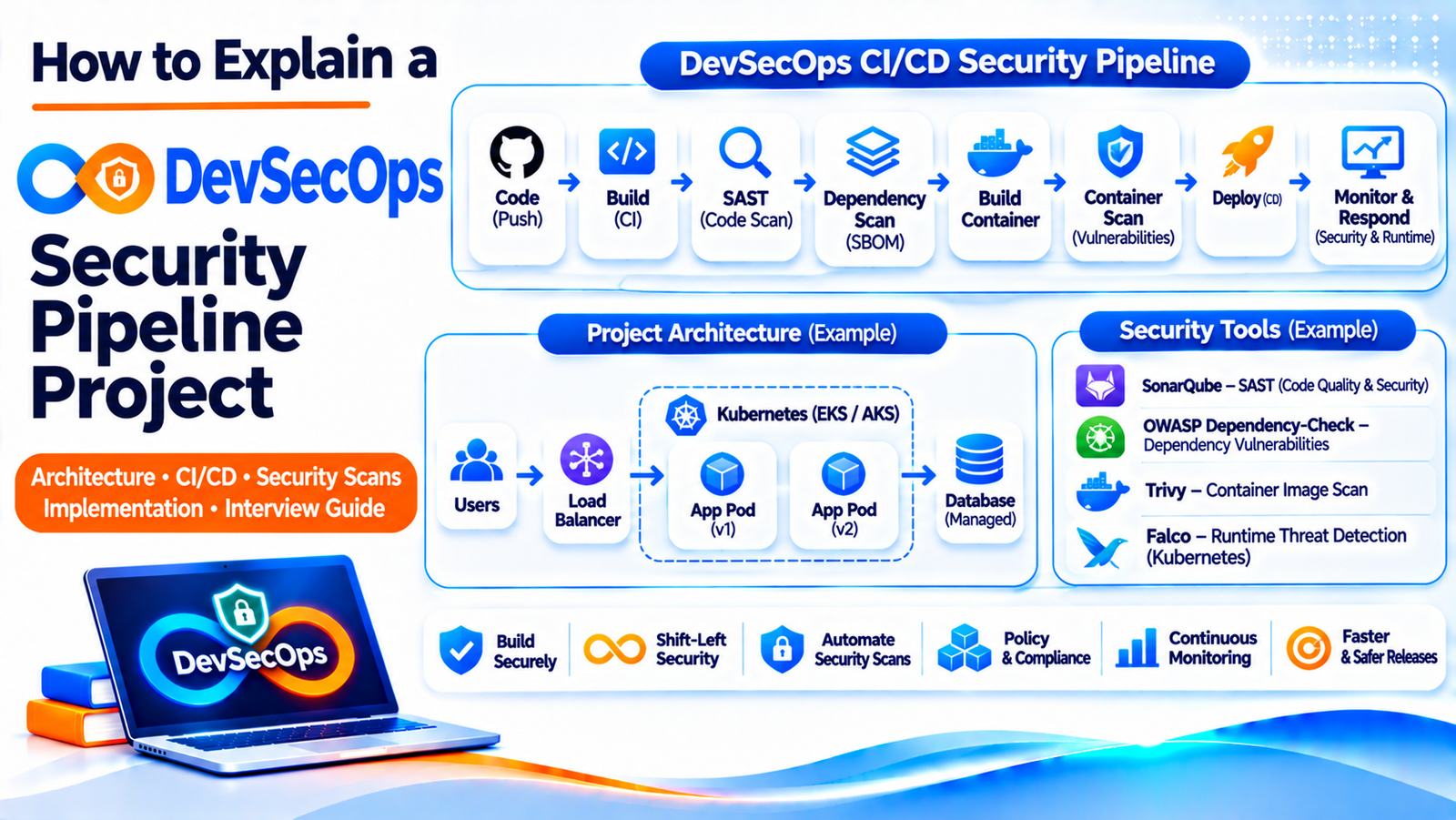
In this guide, we'll explore a practical project that uses Jenkins, SonarQube, Gitleaks, OWASP Dependency-Check, Trivy, Docker, OWASP ZAP, and Kubernetes to build a security-focused CI/CD pipeline.
You'll learn how the architecture works, how to implement the pipeline, how to explain common security decisions, and how to answer interview questions.
Important: This is an educational reference project. Describe it as your own experience only if you have actually implemented the relevant components.
1. What Is a DevSecOps Security Pipeline?
A DevSecOps security pipeline integrates automated security checks into the software development and delivery process.
Traditional delivery pipelines primarily focus on building, testing, packaging, and deploying applications.
A DevSecOps pipeline adds security checks throughout that workflow.
Simple Definition
A DevSecOps security pipeline automatically checks application code, dependencies, secrets, container images, and deployed applications for selected security risks before or during software delivery.
Why Is DevSecOps Important?
Security issues can originate from different parts of an application:
- Vulnerable source code.
- Exposed credentials.
- Outdated third-party libraries.
- Insecure container images.
- Misconfigured infrastructure.
- Excessive cloud permissions.
- Vulnerable running applications.
No single scanning tool detects every type of security problem.
A DevSecOps pipeline combines complementary checks and requires engineers to review and resolve findings.
DevOps vs DevSecOps
| DevOps | DevSecOps |
|---|---|
| Focuses on development and operations collaboration | Integrates security into development and operations |
| Automates build, test, and deployment | Adds security validation and remediation workflows |
| Measures delivery speed and reliability | Also considers security risk and policy compliance |
| Uses CI/CD pipelines | Uses CI/CD pipelines with security controls |
DevSecOps does not replace DevOps. It extends existing delivery practices by making security a shared responsibility.
2. Example Project: Securing a Containerized Web Application
Project Scenario
Imagine a team developing a Java Spring Boot application.
The application is packaged as a Docker container and deployed to Kubernetes.
The team wants to detect security issues before releasing changes to production.
Project Objectives
Build a CI/CD workflow that:
- Retrieves application code from GitHub.
- Runs automated tests.
- Scans for exposed secrets.
- Analyzes source code.
- Checks third-party dependencies.
- Builds a container image.
- Scans the image for vulnerabilities.
- Publishes an approved image.
- Deploys to a staging environment.
- Runs dynamic application security testing.
- Requires approval before production deployment.
- Records security results and deployment evidence.
Technology Stack
| Component | Technology | Purpose |
|---|---|---|
| Source Control | GitHub | Manage application code |
| CI/CD | Jenkins | Orchestrate pipeline stages |
| Application | Java Spring Boot | Example backend service |
| Build Tool | Maven | Build and test |
| Secret Scanning | Gitleaks | Detect potential exposed secrets |
| Code Analysis | SonarQube | Analyze code quality and supported security findings |
| Dependency Scanning | OWASP Dependency-Check | Identify known vulnerable dependencies |
| Containerization | Docker | Package application |
| Image Scanning | Trivy | Detect supported image vulnerabilities and misconfigurations |
| Image Registry | Container Registry | Store approved images |
| Deployment | Kubernetes | Run application containers |
| Dynamic Testing | OWASP ZAP | Test a running web application |
| Security Reporting | Jenkins and Scanner Reports | Record findings and build status |
The tools are illustrative. Organizations may use other products providing equivalent capabilities.
3. DevSecOps Pipeline Architecture
A good project explanation starts with the complete workflow.
Architecture Diagram
                  Developer
                      |
                      v
                GitHub Repository
                      |
                      v
                 Jenkins Pipeline
                      |
                      v
               Build and Unit Tests
                      |
                      v
                 Gitleaks Scan
                 Secret Detection
                      |
                      v
                SonarQube Analysis
                Code Quality / SAST
                      |
                      v
             Dependency Vulnerability Scan
                      |
                      v
                 Docker Image Build
                      |
                      v
                 Trivy Image Scan
                      |
                      v
              Push Approved Image
                      |
                      v
              Kubernetes Staging
                      |
                      v
                OWASP ZAP Scan
                      |
                      v
              Review / Approval
                      |
                      v
             Kubernetes Production
                      |
                      v
             Monitoring and Response
How the Architecture Works
The developer pushes code to GitHub.
Jenkins starts the pipeline and runs automated tests.
Security scanners check the code, secrets, dependencies, and container image.
If required checks pass, the image is published and deployed to staging.
OWASP ZAP tests the running application.
The team reviews findings and approves the production release according to policy.
After deployment, monitoring and vulnerability management continue.
Important Principle
A successful security scan does not prove that an application is secure.
Scanners have limited coverage and can produce false positives or false negatives.
Security testing must be combined with secure design, code review, access controls, patching, and incident response.
4. Step 1: Prepare the Project Environment
Prerequisites
For this reference project, prepare:
- A GitHub repository.
- A small Java Spring Boot application.
- Jenkins with suitable plugins.
- A compatible JDK and Maven installation.
- SonarQube and a configured project.
- Gitleaks.
- OWASP Dependency-Check.
- Docker or an approved image builder.
- Trivy.
- A container registry.
- A Kubernetes staging environment.
- OWASP ZAP.
- Secure credentials and appropriate permissions.
Not all tools need to run on the same server.
For production environments, separate responsibilities and use controlled build agents or isolated runners.
Example Repository Structure
devsecops-security-pipeline/
|
+-- README.md
+-- Jenkinsfile
+-- pom.xml
+-- Dockerfile
|
+-- src/
|   +-- main/
|   +-- test/
|
+-- kubernetes/
|   +-- staging/
|   |   +-- deployment.yaml
|   |   +-- service.yaml
|   |
|   +-- production/
|       +-- deployment.yaml
|       +-- service.yaml
|
+-- security/
|   +-- zap-rules.tsv
|   +-- scan-policy.md
|
+-- docs/
    +-- architecture.md
    +-- threat-model.md
    +-- remediation-guide.md
Why Document Security Policies?
A pipeline should define what happens when findings appear.
For example:
- Which severity levels block deployment?
- Who reviews a potential false positive?
- How are exceptions approved?
- When must vulnerabilities be remediated?
- How long are scan reports retained?
Without clear policies, automated security results may not lead to consistent decisions.
5. Step 2: Build and Test the Application
Before security scanning, verify that the application builds successfully.
Maven Build
mvn clean verify
This runs Maven's lifecycle through the verify phase, including configured tests and checks.
Why Run Unit Tests First?
Unit tests help identify functional regressions before investing resources in later pipeline stages.
Security and functionality are complementary requirements.
Example Pipeline Flow
Source Checkout
       |
       v
Maven Build
       |
       v
Unit Tests
       |
       v
Security Scanning
Interview Explanation
"We configured Jenkins to build the Spring Boot application and run automated tests before performing security analysis."
6. Step 3: Detect Exposed Secrets with Gitleaks
What Is Secret Scanning?
Secret scanning looks for potential credentials accidentally committed to source code or repository history.
Examples include:
- API keys.
- Access tokens.
- Private keys.
- Database passwords.
- Cloud credentials.
What Is Gitleaks?
Gitleaks is a secret detection tool that can scan repositories and other supported inputs for patterns associated with sensitive credentials.
Example Command
gitleaks git \
  --report-format json \
  --report-path gitleaks-report.json
Run this from the repository root using a compatible Gitleaks version.
What Happens When a Secret Is Detected?
A safe response includes:
- Investigate whether the finding is genuine.
- Revoke or rotate exposed credentials.
- Remove the secret from application configuration.
- Move secret storage to an approved secret manager.
- Assess whether repository history or logs require further remediation.
- Rerun the scanner.
Simply deleting a secret from the latest commit does not necessarily eliminate exposure.
Security Gate
For this example, verified active credential exposure should block promotion until appropriately addressed.
Interview Explanation
"We added Gitleaks early in the pipeline to detect potential exposed credentials. Findings were reviewed, and confirmed secrets required rotation and remediation."
7. Step 4: Perform Static Code Analysis with SonarQube
What Is SAST?
Static Application Security Testing (SAST) analyzes application code or related artifacts without executing the application as a live target.
It can help identify certain insecure coding patterns.
What Is SonarQube?
SonarQube analyzes supported source code for maintainability, reliability, and security-related findings.
Exact analysis capabilities depend on the language, version, edition, and configuration.
Example Maven Analysis
mvn sonar:sonar \
  -Dsonar.projectKey=devsecops-demo \
  -Dsonar.host.url=https://sonarqube.example.com
Authentication should be supplied through an approved secure mechanism, not hardcoded into source control.
What Is a Quality Gate?
A quality gate evaluates analysis results against configured conditions.
For example, a project may require:
- No unresolved blocking security findings on new code.
- Acceptable test coverage.
- No significant new maintainability issues.
The actual gate conditions must be configured in SonarQube.
Jenkins Integration
Jenkins can wait for a SonarQube quality gate result when the required integration and webhook configuration are available.
Interview Explanation
"We integrated SonarQube into Jenkins to analyze source code and enforce configured quality gate conditions before later pipeline stages."
8. Step 5: Scan Third-Party Dependencies
Applications frequently use open-source libraries.
A vulnerability in a dependency can affect the application even when its own code is well written.
What Is Software Composition Analysis?
Software Composition Analysis (SCA) identifies software components and evaluates known security or licensing risks.
What Is OWASP Dependency-Check?
OWASP Dependency-Check is a tool that identifies dependencies and checks for publicly known vulnerabilities using available vulnerability information.
Example Maven Command
mvn org.owasp:dependency-check-maven:check
The plugin must be compatible with the project's Java and Maven environment.
Example Finding
Component: example-library
Version: 1.2.3
Finding: Known vulnerability
Severity: High
This is fictional example data, not a claim about a real library.
How Should Findings Be Handled?
- Confirm whether the dependency is present.
- Review the vulnerability advisory.
- Determine whether the vulnerable functionality is reachable.
- Upgrade or replace the dependency where possible.
- Apply compensating controls if a fix is unavailable.
- Record any approved exception and its expiration.
Security Gate
A pipeline might block releases containing unresolved critical vulnerabilities, subject to the organization's documented risk policy.
Important Limitation
Severity alone does not determine exploitability or business impact.
Security decisions should consider application context and available evidence.
9. Step 6: Build the Docker Image
After the application passes the required checks, package it into a container image.
Example Dockerfile
FROM eclipse-temurin:21-jre

WORKDIR /app

COPY target/app.jar app.jar

USER 10001

EXPOSE 8080

ENTRYPOINT ["java", "-jar", "app.jar"]
This example assumes Maven has already created target/app.jar and that the application supports running as the specified non-root user.
For a real project, align the image, Java version, artifact name, and filesystem permissions with the application.
Build the Image
docker build -t task-api:1.0 .
Why Use Containers?
Containers package the application and required runtime dependencies into a deployable image.
They help make application packaging consistent across environments.
Container Security Practices
- Use a trusted base image.
- Prefer minimal images where appropriate.
- Run as a non-root user.
- Avoid embedding secrets.
- Keep runtime dependencies updated.
- Use reviewed and pinned image references.
- Minimize unnecessary packages.
10. Step 7: Scan the Container Image with Trivy
What Is Trivy?
Trivy is a security scanner that supports container images, filesystems, repositories, and other targets.
Depending on scan mode and configuration, it can identify vulnerabilities, misconfigurations, secrets, and related risks.
Example Image Scan
trivy image \
  --scanners vuln \
  --severity HIGH,CRITICAL \
  --exit-code 1 \
  task-api:1.0
What Does This Command Do?
It scans the image for known vulnerabilities and returns a nonzero exit code when matching findings meet the configured conditions.
Why Use --exit-code 1?
A nonzero exit code allows the CI/CD pipeline to mark the stage as failed.
Example Policy
Critical Vulnerability: Block
High Vulnerability: Review / Block by Policy
Medium Vulnerability: Track and Prioritize
Low Vulnerability: Record and Monitor
This is an illustrative policy, not a universal security standard.
Important Limitations
A clean Trivy result does not prove that the image has no vulnerabilities.
Results depend on scanner capabilities, vulnerability databases, supported packages, and available metadata.
Interview Explanation
"We used Trivy to scan container images before publishing them. The pipeline enforced our configured vulnerability policy and prevented unapproved images from being promoted."
11. Step 8: Publish the Approved Container Image
Once the image passes the required checks, publish it to an approved registry.
Example Workflow
Docker Image Build
        |
        v
    Trivy Scan
        |
        v
  Security Gate Passed?
       / \
      No  Yes
      |    |
      v    v
    Stop  Push Image
             |
             v
        Container Registry
Example Commands
docker tag task-api:1.0 \
  registry.example.com/task-api:1.0

docker push registry.example.com/task-api:1.0
These commands require an authenticated registry and an appropriate repository.
Production Best Practices
- Use immutable image references.
- Prefer deployment by image digest.
- Restrict registry permissions.
- Retain build provenance where supported.
- Generate a Software Bill of Materials when required.
- Consider image signing and signature verification.
- Avoid deploying unreviewed image versions.
What Is an SBOM?
A Software Bill of Materials is an inventory of software components and dependencies.
It supports vulnerability management and software supply chain visibility.
12. Step 9: Deploy to Kubernetes Staging
Why Use a Staging Environment?
Staging allows teams to test a running application before promoting it to production.
Example Kubernetes Deployment
apiVersion: apps/v1
kind: Deployment
metadata:
  name: task-api
spec:
  replicas: 2
  selector:
    matchLabels:
      app: task-api
  template:
    metadata:
      labels:
        app: task-api
    spec:
      containers:
        - name: task-api
          image: registry.example.com/task-api:1.0
          ports:
            - containerPort: 8080
          securityContext:
            allowPrivilegeEscalation: false
            runAsNonRoot: true
            runAsUser: 10001
            capabilities:
              drop:
                - ALL
The example assumes a compatible container image and that the cluster can pull it.
Deploy to Staging
kubectl apply \
  -n staging \
  -f kubernetes/staging/
The namespace must already exist, and the manifests must be valid.
Verify the Deployment
kubectl get pods -n staging

kubectl rollout status \
  deployment/task-api \
  -n staging
Kubernetes Security Considerations
- Use dedicated service accounts.
- Restrict RBAC permissions.
- Apply appropriate NetworkPolicies.
- Configure resource requests and limits.
- Avoid privileged containers.
- Use approved secret-management methods.
- Apply admission policies where appropriate.
- Restrict access to the Kubernetes API.
Important Clarification
Container scanning and Kubernetes configuration checks address different risks.
A container image can have no reported high-severity vulnerabilities while the deployment remains insecure because of excessive permissions or network exposure.
13. Step 10: Perform Dynamic Security Testing with OWASP ZAP
What Is DAST?
Dynamic Application Security Testing (DAST) evaluates a running application from an external testing perspective.
It may help identify certain application security problems such as insecure HTTP configuration or selected web vulnerabilities.
What Is OWASP ZAP?
OWASP ZAP is an open-source web application security testing tool.
Example Baseline Scan
docker run --rm \
  -v "$PWD/security:/zap/wrk/:rw" \
  ghcr.io/zaproxy/zaproxy:stable \
  zap-baseline.py \
  -t https://staging.example.com \
  -r zap-report.html
This assumes the staging URL is reachable and the mounted directory has suitable permissions.
Why Start with a Baseline Scan?
A baseline scan is designed for passive assessment and is generally less intrusive than an active attack-oriented scan.
Important Safety Requirement
Only scan applications you own or are explicitly authorized to test.
Active security testing can affect application availability or data and should be carefully scoped.
How Are Findings Used?
The team reviews reported issues and decides whether to:
- Fix the vulnerability.
- Investigate a potential false positive.
- Accept a documented exception.
- Block production promotion.
Interview Explanation
"We deployed the application to an authorized staging environment and used OWASP ZAP to perform dynamic security checks before production approval."
14. Step 11: Add Security Gates to Jenkins
A security gate determines whether the pipeline can proceed.
Example Pipeline Stages
Checkout
   |
   v
Build and Unit Tests
   |
   v
Secret Scan
   |
   v
Static Analysis
   |
   v
Dependency Scan
   |
   v
Build Container
   |
   v
Container Scan
   |
   v
Publish Image
   |
   v
Deploy Staging
   |
   v
DAST
   |
   v
Approval
   |
   v
Deploy Production
Example Jenkinsfile
The following is a simplified pipeline skeleton. It assumes Jenkins agents already have the required tools, secure authentication, and network access.
pipeline {
    agent any

    stages {
        stage('Checkout') {
            steps {
                checkout scm
            }
        }

        stage('Build and Test') {
            steps {
                sh 'mvn clean verify'
            }
        }

        stage('Secret Scan') {
            steps {
                sh 'gitleaks git'
            }
        }

        stage('Dependency Scan') {
            steps {
                sh '''
                  mvn org.owasp:dependency-check-maven:check
                '''
            }
        }

        stage('Build Image') {
            steps {
                sh 'docker build -t task-api:1.0 .'
            }
        }

        stage('Container Scan') {
            steps {
                sh '''
                  trivy image \
                    --scanners vuln \
                    --severity HIGH,CRITICAL \
                    --exit-code 1 \
                    task-api:1.0
                '''
            }
        }

        stage('Production Approval') {
            steps {
                input message: 'Approve production release?'
            }
        }
    }
}
What Is Missing from This Skeleton?
A complete project also needs:
- SonarQube analysis and quality gate integration.
- Secure registry authentication.
- Image publishing.
- Kubernetes staging deployment.
- OWASP ZAP execution.
- Security report archiving.
- Approved production deployment.
- Deployment verification and rollback procedures.
These stages must be implemented and tested rather than assumed.
Why Separate Pipeline Stages?
Separate stages make it easier to identify which security check failed and provide clear evidence for investigation.
15. Understand Security Gates and Risk-Based Decisions
Not every scanner finding should be handled identically.
Example Security Gate Matrix
| Finding | Example Action |
|---|---|
| Verified exposed production credential | Block and rotate credential |
| Critical exploitable dependency vulnerability | Block until remediated or formally excepted |
| High-severity container vulnerability | Review against release policy |
| Failed SonarQube quality gate | Block if configured as mandatory |
| Confirmed serious DAST finding | Block promotion |
| Low-risk informational finding | Record and prioritize |
What Is a False Positive?
A false positive occurs when a scanner reports an issue that does not represent a genuine vulnerability in the assessed context.
What Is a False Negative?
A false negative occurs when a real vulnerability is not detected.
How Should Exceptions Work?
An exception should include:
- The affected finding.
- Risk assessment.
- Business justification.
- Compensating controls.
- Approver.
- Expiration or review date.
Key Principle
Security gates should be consistent, documented, and based on risk—not arbitrary scanner scores alone.
16. DevSecOps Security Best Practices
Protect the CI/CD System
Jenkins and its build agents are sensitive infrastructure because they may access source code, credentials, registries, and deployment environments.
Recommended practices include:
- Restrict Jenkins administrative access.
- Keep Jenkins and plugins updated.
- Use isolated build agents where possible.
- Apply least-privilege credentials.
- Protect secrets from logs.
- Restrict production deployment permissions.
- Review pipeline changes.
- Avoid executing untrusted pull request code with privileged credentials.
Secure the Software Supply Chain
- Pin and review dependencies.
- Verify trusted build inputs.
- Generate SBOMs where useful.
- Protect container registries.
- Use immutable artifacts.
- Consider signing and provenance verification.
- Scan infrastructure configuration.
- Track vulnerabilities after deployment.
Continue Security After Deployment
DevSecOps does not stop at production release.
Continue monitoring for:
- Newly disclosed vulnerabilities.
- Suspicious application behavior.
- Unauthorized configuration changes.
- Exposed services.
- Outdated images.
- Excessive permissions.
17. Common DevSecOps Pipeline Problems
Problem 1: SonarQube Quality Gate Fails
Possible Causes: Security findings, coverage conditions, or other configured quality gate requirements.
Investigation: Review the SonarQube project analysis and the specific failed conditions.
Problem 2: Gitleaks Detects a Secret
Possible Causes: A real credential, a test fixture, or a false positive.
Investigation: Validate the finding safely without exposing the secret. Rotate genuine exposed credentials.
Problem 3: Dependency Scan Reports Vulnerabilities
Possible Causes: Known vulnerable library versions or inaccurate component identification.
Investigation: Review dependency versions, advisories, and applicability.
Problem 4: Trivy Blocks the Image
Possible Causes: Known vulnerabilities in application packages or the base image.
Investigation: Review affected components, upgrade packages or base images, and rescan.
Problem 5: Kubernetes Deployment Fails
Possible Causes: Image pull failures, invalid manifests, missing permissions, or application startup errors.
Investigation: Review deployment events, pod status, container logs, and registry access.
Problem 6: ZAP Reports Security Warnings
Possible Causes: Missing security headers, insecure configuration, or application vulnerabilities.
Investigation: Review the finding, affected endpoint, evidence, and recommended remediation.
Troubleshooting Framework
Pipeline Failed
      |
      v
Identify Failed Stage
      |
      v
Review Scanner Report
      |
      v
Confirm Finding
      |
      v
Assess Security Risk
      |
      v
Remediate or Review Exception
      |
      v
Rerun Security Checks
      |
      v
Approve or Block Release
18. Realistic Troubleshooting Example
Scenario: Container Scan Blocks Deployment
Imagine a new application release fails the Trivy container scan.
Step 1: Identify the Failure
The Jenkins pipeline stops at the container scanning stage.
Step 2: Review the Report
Trivy reports a high-severity vulnerability associated with a package included in the base image.
Step 3: Investigate
The team checks:
- The affected package version.
- Available patched versions.
- The base image source.
- The relevant security advisory.
- Whether the vulnerability applies to the deployed workload.
Step 4: Apply the Fix
The team updates to an appropriate patched base image and rebuilds the application.
Step 5: Rerun the Pipeline
The updated image passes the configured vulnerability gate.
Step 6: Verify the Release
The application is deployed to staging, tested, and reviewed before production promotion.
Interview Explanation
"During a security pipeline exercise, Trivy identified a high-severity vulnerability in the container image. We reviewed the affected package and advisory, updated the base image, rebuilt the container, and reran the scan before allowing the release to continue."
Only describe this as personal experience if you performed the investigation.
19. How to Explain Your DevSecOps Project in an Interview
Use this seven-part structure.
| Part | What to Explain |
|---|---|
| 1. Overview | What application and pipeline you secured |
| 2. Objective | Why automated security checks were needed |
| 3. Architecture | Jenkins, scanners, Docker, Kubernetes |
| 4. Implementation | Security stages and tool integration |
| 5. Security Gates | How findings affected deployment |
| 6. Troubleshooting | An issue investigated and remediated |
| 7. Results | What the pipeline demonstrated |
Sample Two-Minute Interview Answer
The following is a fictional example for someone who implemented the full project.
"I worked on a DevSecOps security pipeline project for a Java Spring Boot application deployed as a Docker container to Kubernetes.
The objective was to integrate automated security checks into the CI/CD workflow so that important security issues could be identified before production release.
We used Jenkins to orchestrate the pipeline.
After retrieving the source code, Jenkins built the application with Maven and ran automated tests.
We integrated Gitleaks for secret detection, SonarQube for static analysis, and OWASP Dependency-Check for third-party dependency vulnerability scanning.
Next, we built a Docker image and used Trivy to scan it for known vulnerabilities.
Only images that satisfied the configured security policy were approved for publishing.
We deployed the application to a Kubernetes staging environment and used OWASP ZAP to perform dynamic security checks.
Production promotion required the mandatory checks to pass and an authorized approval.
One issue we investigated involved a vulnerable package in a container base image. We updated the image, rebuilt it, and verified the scan results before continuing.
This project helped me understand secure CI/CD pipelines, vulnerability management, container security, security gates, and Kubernetes deployment controls."
Why This Answer Works
It demonstrates:
- Understanding of DevSecOps principles.
- A clear security objective.
- Knowledge of complementary scanning tools.
- CI/CD integration.
- Risk-based release controls.
- Practical remediation.
- Awareness of production security.
20. Common DevSecOps Interview Questions
Q1. What is DevSecOps?
DevSecOps integrates security practices into software development, delivery, and operations.
Q2. What is a security pipeline?
A security pipeline automates selected security checks and policy decisions during software delivery.
Q3. What is SAST?
SAST analyzes source code or related artifacts to identify supported security issues without testing a live running application.
Q4. What is DAST?
DAST tests a running application to identify certain security weaknesses.
Q5. What is SCA?
SCA identifies software dependencies and helps evaluate known component vulnerabilities and related risks.
Q6. What is SonarQube?
SonarQube is a code analysis platform that evaluates supported quality and security-related issues.
Q7. What is Trivy?
Trivy is a scanner that can identify supported vulnerabilities, misconfigurations, secrets, and related risks across different targets.
Q8. What is Gitleaks?
Gitleaks detects potential secrets in repositories and other supported inputs.
Q9. What is OWASP ZAP?
OWASP ZAP is a web application security testing tool.
Q10. What is a security gate?
A security gate determines whether a pipeline may proceed based on configured security requirements.
Q11. What is a false positive?
A reported issue that does not represent a genuine vulnerability in the assessed context.
Q12. What is an SBOM?
An SBOM is an inventory of software components and dependencies.
Q13. Why scan container images?
Image scanning helps identify known vulnerabilities and other supported risks before deployment.
Q14. Can security scanning guarantee an application is secure?
No. Scanners have limited coverage and must be combined with other security practices.
Q15. What happens when a security scan fails?
The team investigates the finding, assesses risk, remediates or documents an approved exception, and reruns the relevant checks.
21. Common Mistakes When Explaining a DevSecOps Project
- Only Listing Tools: Explain how each tool addresses a different risk.
- Confusing SAST and DAST: Understand what each approach tests.
- Treating Every Finding Equally: Apply risk-based decisions.
- Ignoring False Positives: Validate findings before making decisions.
- Hardcoding Credentials: Protect pipeline and cloud secrets.
- Scanning Only Source Code: Include dependencies, images, and runtime configuration.
- Skipping Staging: Test the running application before production promotion.
- Ignoring Supply Chain Security: Protect build inputs and published artifacts.
- No Remediation Process: Scanning without action provides limited value.
- Exaggerating Experience: Describe actual project responsibilities accurately.
22. Practical Beginner Exercise
Build a DevSecOps project incrementally.
Phase 1: Basic CI/CD
- Create a Spring Boot application.
- Push the source code to GitHub.
- Configure Jenkins.
- Add Maven build and test stages.
- Verify pipeline execution.
Phase 2: Source and Dependency Security
- Add Gitleaks.
- Configure SonarQube.
- Run dependency scanning.
- Review security reports.
- Define security gate requirements.
Phase 3: Container Security
- Create a Dockerfile.
- Build the application image.
- Scan the image using Trivy.
- Fix an identified issue in a controlled lab.
- Publish an approved image.
Phase 4: Kubernetes and DAST
- Deploy to a staging namespace.
- Configure basic Kubernetes security controls.
- Verify application health.
- Run an authorized OWASP ZAP baseline scan.
- Review and document findings.
Phase 5: Security Governance
- Add approval requirements.
- Protect pipeline credentials.
- Archive security reports securely.
- Document vulnerability remediation.
- Record approved exceptions.
- Review production deployment permissions.
Phase 6: Documentation
- Draw the pipeline architecture.
- Explain each scanning stage.
- Document security gates.
- Include sanitized report examples.
- Describe one troubleshooting scenario.
- Explain deployment verification.
- Document cleanup and cost considerations.
Suggested GitHub README Sections
- Project objective.
- Architecture diagram.
- Tools and prerequisites.
- Jenkins pipeline stages.
- Security scanning configuration.
- Security gate policy.
- Docker and Kubernetes deployment.
- Security findings and remediation.
- Troubleshooting.
- Lessons learned.
23. Frequently Asked Questions
Can beginners build a DevSecOps security pipeline?
Yes. Start with a basic CI/CD pipeline and add one security scanner at a time.
Is Jenkins required?
No. DevSecOps pipelines can also be built using GitHub Actions, GitLab CI/CD, Azure DevOps, and other automation platforms.
Is Kubernetes required?
No. Security automation applies to applications deployed on virtual machines, containers, managed platforms, and serverless environments.
Is SonarQube enough for application security?
No. It provides selected code analysis capabilities and should be combined with other security practices.
Should every vulnerability block deployment?
Not necessarily. Blocking rules should reflect a documented, risk-based security policy.
Can DevSecOps eliminate vulnerabilities?
No. DevSecOps helps detect, prevent, manage, and respond to security risks, but it cannot eliminate every vulnerability.
Can I include a DevSecOps lab project on my resume?
Yes. Clearly describe it as a personal or learning project and explain what you actually implemented.
24. Key Takeaways
- DevSecOps integrates security throughout software delivery.
- Jenkins can orchestrate automated security checks.
- Gitleaks helps detect exposed secrets.
- SonarQube analyzes supported code quality and security findings.
- OWASP Dependency-Check identifies known vulnerable dependencies.
- Docker packages the application into container images.
- Trivy scans supported container security risks.
- Kubernetes runs the deployed application.
- OWASP ZAP supports dynamic application security testing.
- Security gates control release promotion based on defined policies.
- SBOMs and provenance improve software supply chain visibility.
- Risk-based remediation is more useful than blindly trusting scanner scores.
- A strong project explanation connects architecture, automation, security decisions, troubleshooting, and results.
25. What Should You Learn Next?
Continue with these related resources:
- What Is DevSecOps? Security in DevOps
- How to Explain a CI/CD Pipeline Project
- How to Explain a Docker Containerization Project
- How to Explain a Kubernetes Deployment Project
- How to Explain a Monitoring and Logging Project
Continue Learning with Vyomanant Academy
DevSecOps security pipeline projects help learners understand how software delivery automation and security controls work together.
Vyomanant Academy supports learning in:
- DevSecOps Fundamentals.
- Secure CI/CD Pipelines.
- Application Security Testing.
- Dependency and Container Scanning.
- Docker and Kubernetes Security.
- Software Supply Chain Security.
- Vulnerability Management.
- Cloud Security Automation.
Start with a small application, add security checks incrementally, and document how findings affect the release process.
Learn. Build. Grow.
CONTINUE EXPLORING
Recommended next

What Is Artificial Intelligence? A Simple Beginner's Guide
Learn what Artificial Intelligence (AI) means, how it works, and where we use it in everyday life, with simple examples that anyone can understand.
View resource
What Is Machine Learning? A Simple Beginner's Guide
Discover what Machine Learning is, how computers learn from data, and how predictions work. Explore key ML concepts, learning types, and real-world examples in this beginner-friendly guide.
View resource
What Is Information Technology? A Beginner's Guide
Discover what Information Technology (IT) is, how it works, its main components, everyday applications, and how beginners can start learning IT.
View resource