
RESOURCES
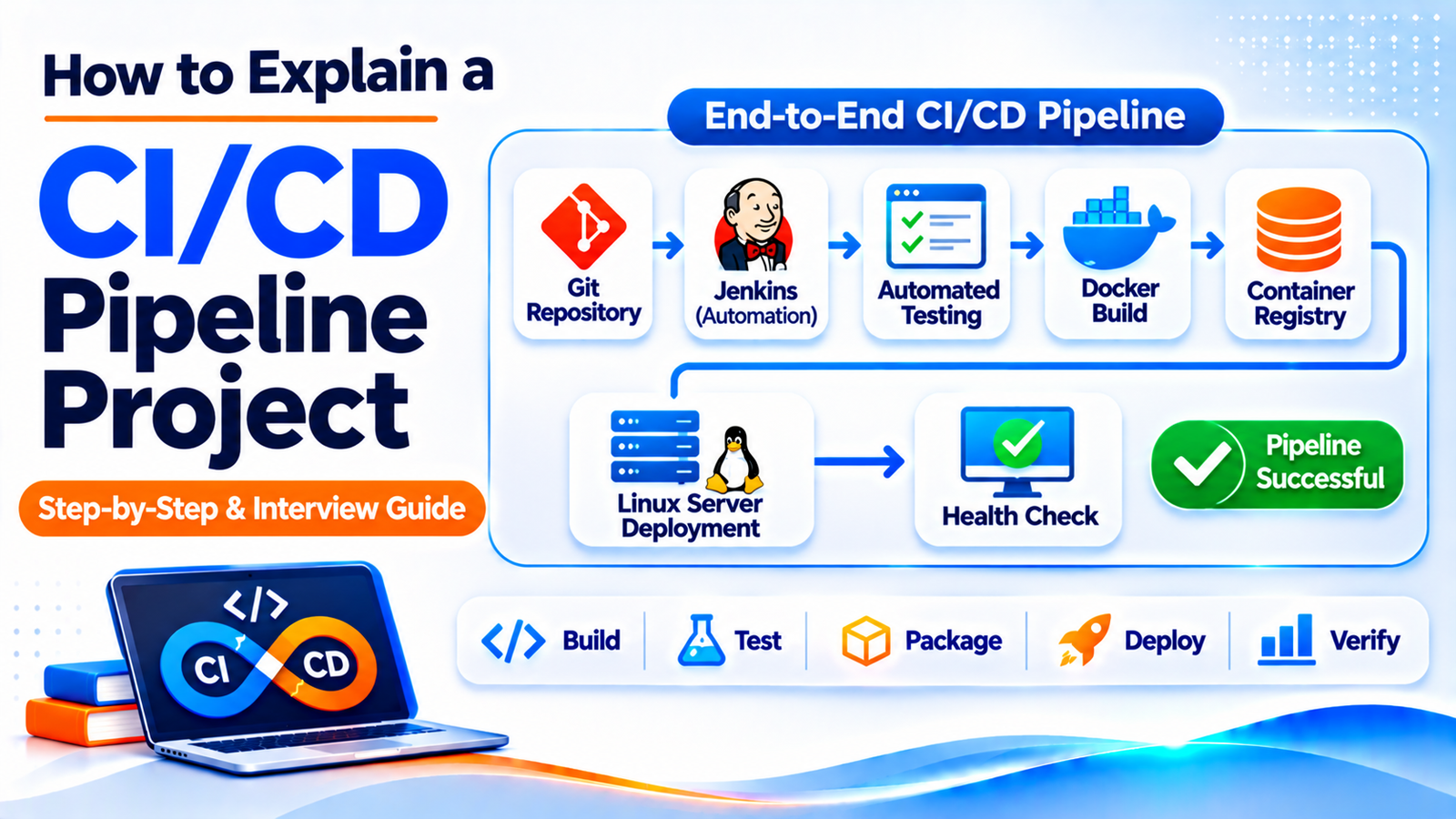
How to Explain a CI/CD Pipeline Project: Step-by-Step Guide
Learn how to explain a CI/CD pipeline project with a practical example, Jenkins workflow, Git, Docker, deployment stages, troubleshooting, and interview answers.
Vyomanant Academy
Build these skills hands-on
Explore structured, practical technology programs from Vyomanant Academy.
Explore CoursesOn this page
How to Explain a CI/CD Pipeline Project: Step-by-Step Guide
Introduction
Imagine you are attending a DevOps interview.
The interviewer asks:
"Can you explain the CI/CD pipeline you implemented in your project?"
You know that Jenkins automates builds, Git manages source code, and Docker packages applications.
But knowing these tools individually is different from explaining how they work together.
What happens when a developer pushes code? How does Jenkins know that something changed? What happens when a test fails? How does the new application version reach the server?
A strong CI/CD project explanation answers these questions in a clear sequence.
It also explains the decisions behind the pipeline, how failures are handled, and what you personally implemented.
In this guide, we will use a sample Python web application to understand a complete CI/CD workflow, explore a Jenkins pipeline example, and prepare an interview-ready project explanation.
Note: This is an illustrative learning project. Use the sample interview answers as a structure, but describe only work you have actually performed.
1. What Is a CI/CD Pipeline Project?
A CI/CD pipeline project demonstrates how software changes move through automated build, testing, packaging, and delivery stages.
CI/CD stands for Continuous Integration and Continuous Delivery or Continuous Deployment.
Continuous Integration (CI)
Continuous Integration is the practice of frequently integrating code changes into a shared codebase and validating those changes through automated checks.
Typical CI activities include:
- Code Checkout: Retrieving the latest source code.
- Dependency Installation: Preparing required libraries and tools.
- Automated Testing: Checking application behavior.
- Code Quality Checks: Identifying selected coding issues.
- Security Scanning: Detecting selected vulnerabilities.
- Artifact Creation: Building a versioned application package.
Continuous Delivery (CD)
Continuous Delivery keeps software in a releasable state through automated processes.
A production release may still require manual approval.
Continuous Deployment
Continuous Deployment automatically releases changes that pass the required checks, without a separate manual release decision.
CI/CD in Simple Words
A CI/CD pipeline automates the journey from a code change to a tested, deployable, and potentially released application.
For this guide, we will use a pipeline with automated validation and deployment to a test environment.
2. Understand the Project Before Explaining the Tools
A common mistake is starting an interview answer with:
"I used Jenkins, GitHub, Docker, and Linux."
This tells the interviewer which technologies you know, but not what the project accomplishes.
Start with the application and the problem being solved.
Example Project Overview
Our sample project is a small Python web application that displays a welcome message and provides a health-check endpoint.
The project aims to:
- Store application code in Git.
- Automatically test code changes.
- Build a Docker image after successful validation.
- Scan the image for selected security vulnerabilities.
- Publish the approved image to a container registry.
- Deploy the image to a test Linux server.
- Verify that the deployed application responds correctly.
Example Technology Stack
| Component | Technology | Purpose |
|---|---|---|
| Application | Python and Flask | Sample web application |
| Version Control | Git | Track source-code changes |
| Repository Hosting | GitHub | Host the project repository |
| Automation | Jenkins | Execute the CI/CD pipeline |
| Testing | pytest | Run automated tests |
| Containerization | Docker | Package the application |
| Image Registry | Docker Hub or private registry | Store container images |
| Deployment Target | Linux server | Run the application |
| Security Scanning | Trivy | Scan container images |
| Health Verification | curl | Check the deployed endpoint |
These are example choices.
A CI/CD project can also use GitHub Actions, GitLab CI/CD, Azure Pipelines, or other platforms.
Key Point: The project objective explains why the pipeline exists. The tools explain how it works.
3. Explain the CI/CD Architecture
Before discussing commands or Jenkins configuration, draw the workflow.
CI/CD Pipeline Architecture
                 Developer
                     |
                     v
                Git Commit
                     |
                     v
              GitHub Repository
                     |
                     v
                Jenkins
                     |
                     v
               Checkout Code
                     |
                     v
             Install Dependencies
                     |
                     v
              Automated Tests
                     |
                     v
              Build Docker Image
                     |
                     v
            Container Image Scan
                     |
                     v
             Push to Registry
                     |
                     v
             Deploy to Test Server
                     |
                     v
              Health Verification
                     |
                     v
               Test Environment
How to Explain This Diagram
You can say:
"The pipeline starts when a code change is pushed to the repository. Jenkins retrieves the source code, installs dependencies, runs tests, builds a Docker image, and performs an image security scan. If the required checks pass, the pipeline publishes the image and deploys it to a test server. Finally, it checks whether the application is responding correctly."
This is the core story of the project.
The remaining sections explain each stage in more detail.
4. Step 1: Prepare the Application Repository
Every pipeline needs source code.
For this project, imagine a repository with the following structure:
cicd-demo/
|
+-- app.py
+-- requirements.txt
+-- requirements-dev.txt
+-- tests/
|   +-- test_app.py
+-- Dockerfile
+-- Jenkinsfile
+-- .dockerignore
+-- README.md
Example Python Application
Create app.py:
from flask import Flask

app = Flask(__name__)


@app.get("/")
def home():
    return {"message": "Welcome to the CI/CD Demo"}


@app.get("/health")
def health():
    return {"status": "ok"}


if __name__ == "__main__":
    app.run(host="0.0.0.0", port=5000)
The application provides two endpoints:
/: Displays a welcome message./health: Returns a simple health response.
The built-in Flask development server is used here to keep the example understandable. A production deployment should use an appropriate application server and configuration.
Application Dependencies
Create requirements.txt:
Flask>=3.0,<4.0
Create requirements-dev.txt:
-r requirements.txt
pytest>=8.0,<10.0
For a reproducible real project, resolve and lock dependency versions using a suitable dependency-management workflow.
Why Use Git?
Git allows the team to:
- Track application changes.
- Review modifications.
- Maintain branches.
- Investigate earlier versions.
- Connect repository events to automation.
Example Git Commands
git add .
git commit -m "Add sample application and tests"
git push origin main
These commands assume the repository and remote branch are already configured.
Interview Tip: Explain how code changes enter the pipeline, including whether pull requests are reviewed before merging.
5. Step 2: Configure the Pipeline Trigger
A CI/CD pipeline needs a way to know when work should begin.
Common triggers include:
- Push Events: Code is pushed to a repository.
- Pull Requests: A developer proposes changes.
- Scheduled Runs: The pipeline executes at defined intervals.
- Manual Execution: An authorized user starts a pipeline.
- Upstream Pipelines: Another workflow triggers the build.
Example: GitHub Webhook
A GitHub webhook can notify Jenkins when a configured repository event occurs.
Developer Pushes Code
         |
         v
    GitHub Repository
         |
         v
     Webhook Event
         |
         v
    Jenkins Pipeline
Jenkins must be configured with an appropriate GitHub integration, reachable webhook endpoint, and suitable credentials.
What Happens Next?
Jenkins starts the configured job and retrieves the relevant repository revision.
The exact behavior depends on the job type and trigger configuration.
Interview Explanation
"We configured repository events to trigger the Jenkins pipeline. This allowed code changes to be validated automatically instead of requiring someone to start every build manually."
Key Point: A webhook is a notification mechanism. It does not perform the build or deployment itself.
6. Step 3: Explain the Build and Testing Stages
After Jenkins checks out the code, it prepares the application environment.
For our Python project, that means installing the dependencies and running tests.
Example Unit Tests
Create tests/test_app.py:
from app import app


def test_home():
    client = app.test_client()
    response = client.get("/")

    assert response.status_code == 200
    assert response.json["message"] == "Welcome to the CI/CD Demo"


def test_health():
    client = app.test_client()
    response = client.get("/health")

    assert response.status_code == 200
    assert response.json["status"] == "ok"
Run Tests Locally
Install the development dependencies:
python -m pip install -r requirements-dev.txt
Run the tests:
python -m pytest
What Happens If a Test Fails?
Suppose a developer changes the health endpoint to return a different response.
The corresponding test may fail.
The pipeline should stop progressing to image publishing and deployment.
Why Is This Important?
Automated testing helps:
- Detect broken functionality.
- Provide consistent feedback.
- Reduce manual verification work.
- Prevent selected defects from reaching deployment environments.
Tests cannot prove that an application is free of defects.
Their usefulness depends on the scenarios and behavior they cover.
Interview Tip: Be prepared to explain at least one test your pipeline runs and what happens when it fails.
7. Step 4: Build the Application with Docker
Once the tests pass, Jenkins can build a container image.
A Docker image packages application code, runtime components, and dependencies into a reusable artifact.
Example Dockerfile
Create a Dockerfile:
FROM python:3.12-slim

WORKDIR /app

COPY requirements.txt .

RUN pip install --no-cache-dir -r requirements.txt

COPY app.py .

RUN useradd --create-home appuser

USER appuser

EXPOSE 5000

CMD ["python", "app.py"]
This example runs the application as a non-root user.
It is still an educational image and would require further hardening for production use.
Build the Image
docker build -t cicd-demo:1.0 .
Run It Locally
docker run --rm -p 5000:5000 cicd-demo:1.0
Visit:
http://localhost:5000/health
Expected response:
{
  "status": "ok"
}
Why Build an Image in the Pipeline?
The image becomes a versioned deployment artifact.
Instead of manually installing application dependencies on every server, the deployment process runs the packaged image.
Why Is Image Versioning Important?
A pipeline should make it possible to identify exactly which application version was deployed.
Common identifiers include:
- Git commit SHA.
- Build number.
- Release version.
- Container image digest.
For stronger traceability, immutable image digests are preferable to relying only on mutable tags.
Key Point: The Docker image is the artifact that moves from the build process to the deployment environment.
8. Step 5: Add a Container Security Scan
Before publishing the image, the pipeline can check it for known vulnerabilities.
For example, Trivy can scan container images and report security findings.
Example Command
trivy image --exit-code 1 --severity HIGH,CRITICAL cicd-demo:1.0
This example configures the scan to return a failing exit status when findings matching the selected criteria are reported.
What Does the Scanner Check?
Depending on configuration and supported components, image scanning can identify known vulnerabilities in:
- Operating system packages.
- Application dependencies.
- Other supported software components.
What If the Scan Fails?
The team should investigate the findings.
Possible actions include:
- Reviewing the affected package.
- Checking whether an update is available.
- Evaluating exploitability and exposure.
- Updating the dependency or base image.
- Rebuilding and rescanning the image.
Important Limitation
A passing image scan does not guarantee that an application is secure.
It does not replace secure coding, access control, application security testing, or operational monitoring.
Interview Tip: Explain how your team prioritizes security findings rather than saying every reported vulnerability automatically requires the same response.
9. Step 6: Publish the Image to a Container Registry
After the required checks pass, the pipeline can publish the image.
A container registry stores images so that deployment environments can retrieve them.
Examples include:
- Docker Hub.
- Amazon Elastic Container Registry.
- Azure Container Registry.
- Google Artifact Registry.
- Private enterprise registries.
Example Image Tag
exampleuser/cicd-demo:build-42
Here:
exampleuser: Example registry namespace.cicd-demo: Image repository.build-42: Example version identifier.
Example Commands
docker tag cicd-demo:1.0 exampleuser/cicd-demo:build-42
docker push exampleuser/cicd-demo:build-42
These commands require valid registry authentication and an image repository that the user can publish to.
Registry Workflow
       Jenkins Build
             |
             v
       Docker Image
             |
             v
       Security Checks
             |
             v
      Container Registry
             |
             v
       Deployment Server
How Should Credentials Be Managed?
Use the CI/CD platform's approved credential-management mechanisms.
Avoid storing registry passwords or access tokens directly in source code or pipeline scripts.
Key Point: A registry separates image creation from deployment and allows environments to retrieve approved application versions.
10. Step 7: Deploy the Application to a Linux Server
For this example, assume the deployment target is a Linux server with Docker installed.
Jenkins needs an authorized and secure method to instruct the server to deploy the image.
A team might use an SSH-based deployment step, a dedicated deployment agent, or another approved mechanism.
Example Deployment Flow
      Jenkins Pipeline
              |
              v
       Deployment Command
              |
              v
         Linux Server
              |
              v
       Pull New Image
              |
              v
       Replace Container
              |
              v
       Verify Application
Example Docker Commands
On the deployment server:
docker pull exampleuser/cicd-demo:build-42
Stop and remove the previous container if it exists:
docker rm -f cicd-demo
Start the new container:
docker run -d \
  --name cicd-demo \
  --restart unless-stopped \
  -p 5000:5000 \
  exampleuser/cicd-demo:build-42
Important Deployment Considerations
This is a simple replacement strategy for learning.
It can cause downtime between removing the old container and starting the new one.
Production systems may use:
- Rolling deployments.
- Blue-green deployments.
- Reverse proxies.
- Health-based traffic switching.
- Managed deployment platforms.
How Does Jenkins Reach the Server?
An authorized deployment mechanism must be configured.
For SSH-based deployments, this typically involves:
- An appropriately restricted deployment account.
- SSH authentication.
- Secure credential storage.
- Network access controls.
- Limited deployment permissions.
Do not expose unrestricted Docker or administrative access unnecessarily.
Interview Tip: Be ready to explain how your deployment environment authenticates the pipeline and how permissions are restricted.
11. Step 8: Verify the Deployment
A successful container start does not automatically mean the application is functioning correctly.
The pipeline should verify the deployment.
Example Health Check
Run:
curl --fail --silent --show-error http://localhost:5000/health
If the application responds correctly, the endpoint returns:
{
  "status": "ok"
}
What Is a Smoke Test?
A smoke test is a small set of checks used to confirm that essential application functionality works after deployment.
For our project, smoke tests could verify:
- The application is reachable.
- The health endpoint responds successfully.
- The home endpoint returns the expected content.
Health Check vs Full Testing
A health endpoint may confirm that the application process responds, but it may not verify every dependency or business function.
For example, a health check could pass even if an external database is unavailable.
The verification strategy should reflect the application's real dependencies and requirements.
Key Point: Deployment verification confirms that the released application is operating as expected, not merely that the deployment command completed.
12. Example Jenkinsfile: Connecting the CI Stages
A Jenkinsfile defines a Jenkins Pipeline as code.
Below is a simplified example covering checkout, testing, image building, scanning, and publishing.
It intentionally leaves remote deployment as a separately configured stage because secure server access depends on the target environment.
Example Jenkinsfile
pipeline {
    agent any

    environment {
        IMAGE_NAME = 'exampleuser/cicd-demo'
        IMAGE_TAG = "build-${BUILD_NUMBER}"
    }

    stages {
        stage('Checkout') {
            steps {
                checkout scm
            }
        }

        stage('Install and Test') {
            steps {
                sh '''
                    python3 -m venv .venv
                    .venv/bin/python -m pip install -r requirements-dev.txt
                    .venv/bin/python -m pytest
                '''
            }
        }

        stage('Build Docker Image') {
            steps {
                sh 'docker build -t $IMAGE_NAME:$IMAGE_TAG .'
            }
        }

        stage('Security Scan') {
            steps {
                sh '''
                    trivy image \
                      --exit-code 1 \
                      --severity HIGH,CRITICAL \
                      $IMAGE_NAME:$IMAGE_TAG
                '''
            }
        }

        stage('Publish Image') {
            steps {
                withCredentials([
                    usernamePassword(
                        credentialsId: 'registry-credentials',
                        usernameVariable: 'REGISTRY_USER',
                        passwordVariable: 'REGISTRY_PASSWORD'
                    )
                ]) {
                    sh '''
                        echo "$REGISTRY_PASSWORD" |
                          docker login \
                            --username "$REGISTRY_USER" \
                            --password-stdin

                        docker push "$IMAGE_NAME:$IMAGE_TAG"

                        docker logout
                    '''
                }
            }
        }
    }

    post {
        success {
            echo 'CI pipeline completed successfully.'
        }

        failure {
            echo 'Pipeline failed. Review the stage logs.'
        }
    }
}
Requirements for This Example
The Jenkins agent must have:
- Python and the ability to create virtual environments.
- Docker CLI and authorized access to a Docker daemon.
- Trivy installed.
- Network access to the container registry.
- A configured Jenkins credential named
registry-credentials.
The image namespace must also be replaced with a registry repository that the project can access.
What Is Missing from This Jenkinsfile?
This sample covers the CI and image publishing stages.
A complete deployment workflow would additionally need:
- Secure access to the target environment.
- A deployment stage using the newly published image.
- Health verification.
- Appropriate failure handling.
- A rollback or recovery strategy.
For production use, the pipeline would also benefit from controlled dependency versions, immutable artifacts, restricted credentials, and environment-specific release policies.
How to Explain the Jenkinsfile
Rather than reading every line aloud, explain the stages:
"Jenkins checks out the repository, creates a Python environment, runs tests, builds the Docker image, scans it with Trivy, and publishes it to the registry. A separate deployment workflow retrieves the approved image, starts the application in the test environment, and performs health checks."
Remember: A Jenkinsfile is valuable because it makes automation visible, repeatable, and version-controlled.
13. What Happens When a Pipeline Fails?
CI/CD interviews frequently include troubleshooting questions.
Let's examine common failures.
Scenario 1: Unit Tests Fail
Possible Cause: A code change breaks expected behavior.
Investigation:
- Read the failed test output.
- Identify the affected function.
- Reproduce the failure locally.
- Correct the code or an outdated test expectation.
Scenario 2: Docker Build Fails
Possible Cause: Missing files, invalid Dockerfile instructions, or dependency installation problems.
Investigation:
- Review the build logs.
- Check file paths and build context.
- Verify dependency configuration.
- Reproduce the build locally.
Scenario 3: Image Scan Reports Vulnerabilities
Possible Cause: The image contains packages with known vulnerabilities.
Investigation:
- Review affected packages.
- Evaluate severity and exposure.
- Update components when appropriate.
- Rebuild and scan again.
Scenario 4: Image Push Fails
Possible Cause: Incorrect registry credentials, permissions, image name, or network connectivity.
Investigation:
- Check the registry destination.
- Verify the credential configuration.
- Confirm repository permissions.
- Review connectivity and registry responses.
Scenario 5: Application Fails After Deployment
Possible Cause: Incorrect runtime configuration, port mapping, missing environment variables, or application errors.
Investigation:
docker ps -a
docker logs cicd-demo
docker inspect cicd-demo
Then review the health-check response and relevant application logs.
A Useful Troubleshooting Framework
      Pipeline or Deployment Failure
                    |
                    v
             Identify Failed Stage
                    |
                    v
              Review Logs
                    |
                    v
             Reproduce the Issue
                    |
                    v
              Find Root Cause
                    |
                    v
             Apply Correction
                    |
                    v
              Re-run Checks
                    |
                    v
               Verify Result
Interview Tip: Describe what evidence you used to diagnose a problem, not just the command that eventually fixed it.
14. How Do You Handle Rollback in a CI/CD Project?
Rollback means restoring a previously working application version when a new release causes problems.
Example
Suppose version build-42 fails after deployment.
The previous approved version is build-41.
A recovery process may redeploy the earlier image.
Version build-41: Working
          |
          v
Version build-42: Fails
          |
          v
Investigate Failure
          |
          v
Redeploy build-41
          |
          v
Verify Recovery
Important Considerations
A safe rollback strategy depends on:
- Keeping previous artifacts available.
- Recording deployed versions.
- Managing application configuration.
- Handling database migrations carefully.
- Verifying recovery after rollback.
Redeploying an earlier container image does not automatically undo database or infrastructure changes.
Interview Explanation
"We retained versioned container images so that a previously approved image could be redeployed if a release failed. After recovery, we verified the application health and investigated the original failure."
Only use this statement if your project actually implemented version retention and recovery.
15. How to Explain Your CI/CD Project in an Interview
A useful answer should have a clear beginning, middle, and end.
The Six-Part Explanation Framework
| Part | What to Explain |
|---|---|
| 1. Project Objective | Why the pipeline was needed |
| 2. Architecture | Repository, CI/CD system, registry, and deployment target |
| 3. Pipeline Stages | Trigger, test, build, scan, publish, deploy, verify |
| 4. Security and Reliability | Credentials, security checks, and recovery |
| 5. Your Responsibilities | What you personally implemented |
| 6. Challenges and Results | What went wrong and what you learned or improved |
Sample Interview Answer: Approximately Two Minutes
The following is a fictional sample answer for someone who completed the described practice project.
"I worked on a CI/CD automation project for a small Python web application.
The goal was to automate application testing, Docker image creation, and deployment to a Linux test server.
We stored the source code in GitHub and used Jenkins as the automation platform.
Whenever code changes were integrated into the main branch, Jenkins retrieved the latest source and ran automated tests using pytest.
If the tests passed, Jenkins built a Docker image and performed a vulnerability scan using Trivy.
The approved image was then tagged with a build identifier and pushed to a container registry.
Our deployment workflow retrieved the new image on the Linux server, replaced the existing application container, and ran a health check to verify that the application responded correctly.
We also maintained previous image versions so that we could redeploy an earlier working version if necessary.
My responsibilities included creating the Jenkinsfile, configuring build and test stages, writing the Dockerfile, and troubleshooting pipeline failures.
One challenge was a failed Docker build caused by an incorrect file path. I reproduced the issue locally, corrected the build configuration, and verified that the pipeline completed successfully.
This project helped me understand how automated validation, container packaging, artifact publishing, deployment, and troubleshooting work together."
Why This Answer Is Effective
It clearly explains:
- The application.
- The purpose of automation.
- The trigger.
- The pipeline stages.
- The deployment process.
- Personal contributions.
- A specific technical problem.
- The outcome.
It does not rely on memorized definitions alone.
16. CI/CD Pipeline Interview Questions and Answers
Q1. What triggers your Jenkins pipeline?
The trigger depends on the project configuration. Common examples include repository webhooks, pull requests, scheduled jobs, and manual execution.
Q2. What is the difference between CI and CD?
CI focuses on integrating and validating code changes. Continuous Delivery prepares software for reliable release, while Continuous Deployment automatically releases qualifying changes.
Q3. Why did you use Jenkins?
Jenkins can automate build, test, and deployment workflows using pipelines and integrations. The choice should reflect actual project requirements.
Q4. Why did you use Docker?
Docker packages the application and its runtime dependencies into an image that can be used across suitable environments.
Q5. What happens if a test fails?
The pipeline should report the failure and prevent the change from progressing to release stages under the defined policy.
Q6. How do you store pipeline credentials?
Use the CI/CD platform's credential-management features and restrict access according to the principle of least privilege.
Q7. How do you identify which application version was deployed?
Use build identifiers, commit SHAs, release records, or immutable container image digests.
Q8. What happens if the Docker image push fails?
Investigate registry authentication, permissions, repository naming, connectivity, and the specific error response.
Q9. What is a webhook?
A webhook sends an event notification from one system to another, often using an HTTP request.
Q10. What is a smoke test?
A smoke test checks whether essential application functionality works after a build or deployment.
Q11. How do you deploy without downtime?
Possible approaches include rolling deployments, blue-green deployments, and health-based traffic switching. The correct choice depends on the application and infrastructure.
Q12. What is the difference between a build artifact and a deployment?
A build artifact is an output produced by the build process. Deployment is the process of making that artifact run in an intended environment.
Q13. Can CI/CD work without Kubernetes?
Yes. CI/CD can deploy applications to virtual machines, physical servers, managed platforms, containers, or serverless environments.
Q14. How do you secure a CI/CD pipeline?
Use protected credentials, restricted permissions, code reviews, dependency and image scanning, controlled release processes, and secure build environments.
Q15. How do you measure CI/CD improvements?
Possible measurements include deployment frequency, change lead time, failed deployment recovery time, and change failure rate.
Only report improvements supported by actual project measurements.
17. Common Mistakes When Explaining a CI/CD Project
Mistake 1: Explaining Only Jenkins
A CI/CD project includes more than a pipeline tool.
Discuss the application, repository, tests, artifacts, deployment, and verification.
Mistake 2: Confusing Build and Deployment
Building creates an artifact.
Deployment makes the artifact available in an environment.
Mistake 3: Ignoring Failed Builds
Interviewers want to know how you respond when automation does not work.
Prepare a genuine troubleshooting example.
Mistake 4: Claiming Everything Is Fully Automated
Be precise about manual approvals, environment preparation, and operational tasks.
Mistake 5: Hardcoding Credentials
Never present storing passwords or tokens in pipeline scripts as a recommended practice.
Mistake 6: Skipping Deployment Verification
A successful pipeline command is not sufficient evidence that the application works.
Mistake 7: Inventing Performance Improvements
Do not claim that deployment time decreased by a specific percentage unless you measured it.
Mistake 8: Memorizing an Answer Without Understanding It
Interviewers may ask why a stage exists, what happens when it fails, or what alternative you considered.
Understanding the workflow matters more than memorizing the wording.
18. Practical Exercise: Build and Explain Your Own CI/CD Project
You can turn the example in this article into a small portfolio project.
Step 1: Create a Repository
Add the sample application, dependencies, tests, and Dockerfile.
Step 2: Run the Application Locally
Verify that the home and health endpoints respond.
Step 3: Run Automated Tests
Use pytest to check the application behavior.
Step 4: Build a Docker Image
Create and run the image locally.
Step 5: Configure Jenkins
Set up an authorized Jenkins environment with the required tools and repository access.
Step 6: Create the Pipeline
Start with:
Checkout -> Install -> Test -> Build
Then add image scanning and publishing.
Step 7: Configure a Test Deployment
Use a dedicated Linux test server or another suitable learning environment.
Avoid exposing administrative services or credentials unnecessarily.
Step 8: Add Health Verification
Check that the deployed application responds correctly.
Step 9: Test a Failure Scenario
For example, intentionally change a test expectation in a temporary practice branch.
Confirm that the pipeline reports the failed test and does not publish the change.
Step 10: Document Your Work
Your README should explain:
- Project purpose.
- Architecture.
- Prerequisites.
- Pipeline stages.
- Deployment process.
- Security considerations.
- Troubleshooting steps.
- Known limitations.
Step 11: Practice Your Explanation
Prepare three versions:
- 30 Seconds: Explain the application and overall pipeline.
- 2 Minutes: Include stages, deployment, and responsibilities.
- 5 Minutes: Discuss implementation decisions, failures, security, and recovery.
Beginner Tip: A small CI/CD pipeline you can demonstrate and troubleshoot is more valuable than a complicated architecture you cannot explain.
19. Frequently Asked Questions (FAQs)
Q1. What is a CI/CD pipeline project?
A CI/CD pipeline project demonstrates how software changes are automatically validated, packaged, and prepared or deployed to an environment.
Q2. How do I explain a CI/CD pipeline project in an interview?
Explain the project objective, architecture, trigger, testing, build process, artifact publishing, deployment, verification, your responsibilities, and challenges.
Q3. Is Jenkins mandatory for CI/CD?
No. Other CI/CD platforms can perform similar automation tasks.
Q4. Can beginners build a CI/CD project?
Yes. A small application with automated tests, Docker packaging, and deployment to a test environment is a practical starting point.
Q5. Is Docker necessary for CI/CD?
No. CI/CD can work with many application packaging and deployment methods.
Q6. What should I do if my pipeline fails?
Identify the failed stage, review logs, reproduce the issue where possible, correct the cause, and rerun the relevant checks.
Q7. What is the most important stage in a CI/CD pipeline?
There is no universally most important stage. Each stage should support a defined quality, security, or delivery requirement.
Q8. Can I explain a personal CI/CD project in an interview?
Yes. Clearly identify it as a personal or learning project and explain what you actually implemented.
20. Key Takeaways
- A CI/CD pipeline project automates software validation, packaging, and delivery.
- Continuous Integration helps validate frequently integrated code changes.
- Continuous Delivery keeps software ready for release.
- Continuous Deployment automatically releases qualifying changes.
- Git manages application source code.
- Repository events can trigger Jenkins pipelines.
- Automated tests help detect defects before deployment.
- Docker creates reusable container images.
- Security scans help identify selected vulnerabilities.
- Container registries store versioned deployment artifacts.
- Deployment stages release approved artifacts to target environments.
- Health checks provide basic deployment verification.
- Rollback planning supports recovery from unsuccessful releases.
- Troubleshooting experience is an important part of a project explanation.
- Clear personal contributions make an interview answer more credible.
21. What Should You Learn Next?
Continue developing your CI/CD knowledge with these related resources:
-
What Is CI/CD? Explained with a Real-Life Analogy
- Review the fundamentals of automated software delivery.
-
What Is Git? Understanding Version Control
- Learn how source-code changes are managed.
-
What Is Docker? Containers Explained Simply
- Understand application packaging and container images.
-
What Is DevSecOps? Security in DevOps
- Explore security checks and secure delivery practices.
-
How to Explain an End-to-End DevOps Project
- Learn how CI/CD connects with Terraform, Kubernetes, cloud infrastructure, and monitoring.
Continue Learning with Vyomanant Academy
Understanding CI/CD is an important step toward building practical DevOps and cloud engineering skills.
Vyomanant Academy helps learners develop foundations in:
- Linux and Git.
- Jenkins and CI/CD.
- Docker and Containerization.
- Cloud Deployment.
- Kubernetes.
- Infrastructure as Code.
- DevSecOps.
- Monitoring and Troubleshooting.
Start with a small application, automate its testing and packaging, and gradually build a complete delivery workflow you can confidently explain.
Learn. Build. Grow.
CONTINUE EXPLORING
Recommended next

What Is Artificial Intelligence? A Simple Beginner's Guide
Learn what Artificial Intelligence (AI) means, how it works, and where we use it in everyday life, with simple examples that anyone can understand.
View resource
What Is Machine Learning? A Simple Beginner's Guide
Discover what Machine Learning is, how computers learn from data, and how predictions work. Explore key ML concepts, learning types, and real-world examples in this beginner-friendly guide.
View resource
What Is Information Technology? A Beginner's Guide
Discover what Information Technology (IT) is, how it works, its main components, everyday applications, and how beginners can start learning IT.
View resource